


 4.8


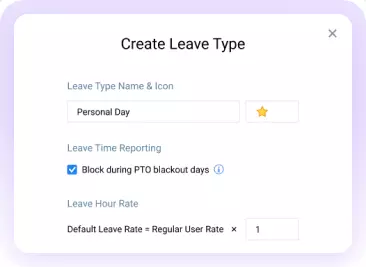
Customization
Create leave types and accrual rules that meet your company's needs and local regulations.
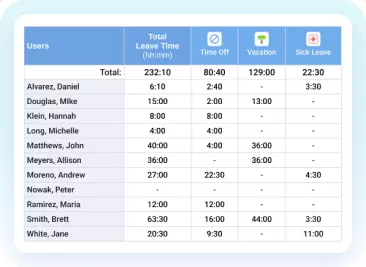
Reporting
See a detailed breakdown of reported time by leave types or specific users.
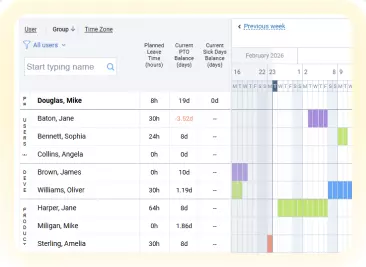
actiPLANS integration
Simplify leave requests and approvals, and streamline your employee scheduling process.


Log leave time and check PTO balances
No more PTO math. Every request checked against policy.
- No credit card required
- Unlimited users
- Human support & onboarding
Start your free trial
Create custom leave policies
and assign them to employees in minutes

Leave types
Tailor leave types to your business needs, from vacation to study leave.
Learn more
Paid time off management
Create custom PTO rules, automate accrual, or adjust leave balances manually.
Learn more
Sick days balances
Keep an eye on the sick days your employees use.

Balance limits
Leave won't go through if there aren't enough days left on the balance.

Blackout days
Keep everyone at work on your busiest dates, with exceptions where needed.
Make time off
transparent for everyone

Plan around absences
See who is off and when, so projects and deadlines take it into account.

Records you can rely on
Keep accurate leave records that support labor law and internal policy requirements.

Know what time off costs
Pay rates for each leave type make the cost of time off clear.

Employee satisfaction
Let employees check PTO balances, request leave, and get it approved with ease.
Frequently asked questions
-
It keeps your time off policies running without spreadsheets: leave types, how PTO and sick days accrue, how balances reset or are capped, and when time off can't be taken. In actiTIME, these rules sit inside time tracking, so leave is logged in the same timesheet as work hours, and balances update with every entry.
-
Yes. Default accrual rules apply to everyone, and you can override them for individual people, for example to grant more days to senior staff or start accruals on a hire date. Balances can also be adjusted by hand when someone joins with days already earned.
-
Not for most teams. actiTIME covers leave types, accruals, balances, limits, and blackout days alongside time tracking, so there's no separate PTO software to keep in sync. If you'd like a shared leave calendar for planning ahead, connect actiPLANS.
-
Employees log leave in their timesheet or the mobile app, and it goes for approval along with the rest of their week. Balance limits and blackout days are checked automatically, so the leave management tool applies your policy without a manager reviewing every request. If you use actiPLANS, future leave is requested there instead.
-
Yes. Teams of up to 3 users can set up leave types, accrual rules, and PTO and sick day balances at no cost. Approving timesheets, and the leave in them, is available in every version except the free one, and you can try it in the full 30-day trial.
