




Save a template or copy its contents into your own Google Sheets or Excel document (for PDF templates - they are meant only for printing)
NEW

Free Download
Track Time Easily with
Free Timesheet
Templates
Try out the ultimate weekly, biweekly, and monthly timesheet templates for all occasions.
Get All Timesheet Templates in One Pack
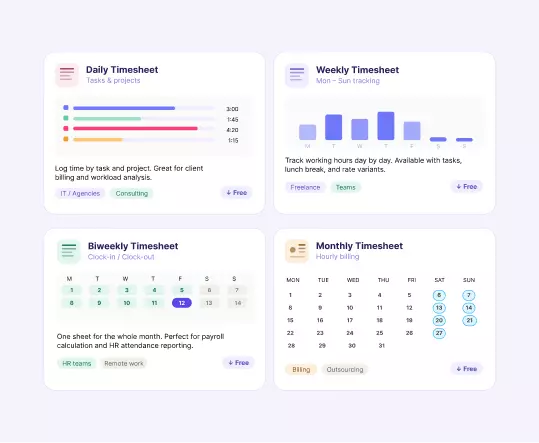
Timesheet template categories

Daily Timesheet
Use this straightforward timesheet to track your daily activities and ensure accurate billing or logging of work hours. The template includes columns for the date, start and end times, break duration and total hours worked. Fully editable and print-ready - the printable daily timesheet is ideal for freelancers, contractors and shift workers who need a precise record.

Weekly Timesheets
Working a standard Monday-to-Friday schedule? Capture the total hours worked over a week. Choose from four variants: basic hours, tasks, hourly rates or lunchbreaks. The printable weekly timesheet works for individuals and teams - each employee fills in their own sheet, making it easy to collect and review records across the whole team.

Biweekly Timesheets
Prefer calculating bills and employee wages every other week? We've got you covered. Pick from four biweekly timesheet templates depending on your needs - basic, with tasks, with rates or with lunchbreaks. The printable biweekly timesheet aligns with the most common payroll cycle and keeps two weeks of data clean in a single sheet.

Monthly Timesheets
Dealing with long-term projects or monthly payroll? Use these templates for reviewing and processing time logs by month. Choose between a basic hours log or a clock-in clock-out format to track exact arrival and departure times across the full calendar month.
Download Timesheet
Templates Free

Use actiTIME Timesheet Templates to Automatically Calculate Work Hours Totals
Step 1
Step 2
Step 3
Step 4
Fill out your and your manager's name, department and date
Depending on the template, you can fill out time, tasks, lunch time, hourly rate, clock-in and out time
See how your Google Sheets or Excel timesheet templates automatically calculates your total working hours and payroll amount
Step 1
Save a template or copy its contents into your own Google Sheets or Excel document (for PDF templates - they are meant only for printing)
Step 2
Fill out your and your manager's name, department and date
Step 3
Depending on the template, you can fill out time, tasks, lunch time, hourly rate, clock-in and out time
Step 4
See how your Google Sheets or Excel timesheet templates automatically calculates your total working hours and payroll amount
Pro tip: As a manager, you can manage timesheet data in Google Sheets and Excel by applying data filtering and setting up additional rows and columns.
More Timesheet Templates to Enjoy


Frequently Asked Questions
-
There are four types: Daily, Weekly, Biweekly and Monthly. Each comes in several variants to match different workflows - basic hours, task breakdowns, hourly rates and lunchbreak tracking.
-
Yes. All timesheet templates are completely free to download and use.
-
Yes. All templates are fully editable. You can add or remove rows, rename headers, adjust date ranges and customize the layout to match your workflow.
-
Yes. The Daily Timesheet Template is fully printable. Open it in Google Sheets, fill in your details and print it in a few clicks - no formatting adjustments needed.
-
Yes. All weekly timesheet variants are print-ready. Open the template, complete your entries and print directly from Google Sheets for a clean, professional record.
-
Yes. The biweekly timesheet templates are designed to print cleanly across two weeks. Open in Google Sheets and print when your pay period is complete.
-
The weekly timesheet templates are designed per employee - each team member fills in their own sheet. For team-wide tracking and approvals in one place, actiTIME lets you manage timesheets for multiple employees simultaneously.
-
A daily timesheet captures hours task by task within a single day, making it ideal for detailed billing or shift-based work. A weekly timesheet rolls up daily hours across five working days, which suits teams that review or process payroll on a weekly basis.
-
A weekly timesheet covers one work week and is best for teams with weekly payroll or frequent check-ins. A biweekly timesheet spans two consecutive weeks in a single document, aligning with the most common payroll cycle and reducing the admin of managing separate weekly sheets.
-
It depends on your pay cycle and level of detail needed. Use the Daily template for hour-by-hour task logging. Use Weekly if you process payroll or review hours every week. Use Biweekly if your pay period runs every two weeks. Use Monthly if you consolidate hours once a month for payroll or reporting.
