A micromanager is a manager who controls how people do their work instead of agreeing on what the work should achieve and letting them get there. Micromanagers ask for frequent status updates, approve small decisions themselves, redo delegated work and correct details that do not change the result. The habit usually starts with a reasonable worry, such as a missed deadline or a client complaint, and grows because the manager cannot see progress any other way.
That last part is the one most guides skip. A lot of micromanaging is a visibility problem: the manager does not know where the work stands, so they ask, check and hover. This guide gives you a plain definition, a 30 point checklist you can score yourself on, the causes and costs of micromanagement, a step by step way to stop, and the mistakes managers make when they try to let go.
- What is a micromanager?
- Micromanaging vs. healthy oversight
- Signs of a micromanager: a 30 point checklist
- Examples of micromanagement at work
- Why managers micromanage
- What micromanagement costs a team
- How to stop micromanaging
- Where fixing micromanagement goes wrong
- Why monitoring software is not the fix
- How to see progress without asking: hours on tasks in actiTIME
- How to deal with a micromanaging boss
- FAQ
What is a micromanager?
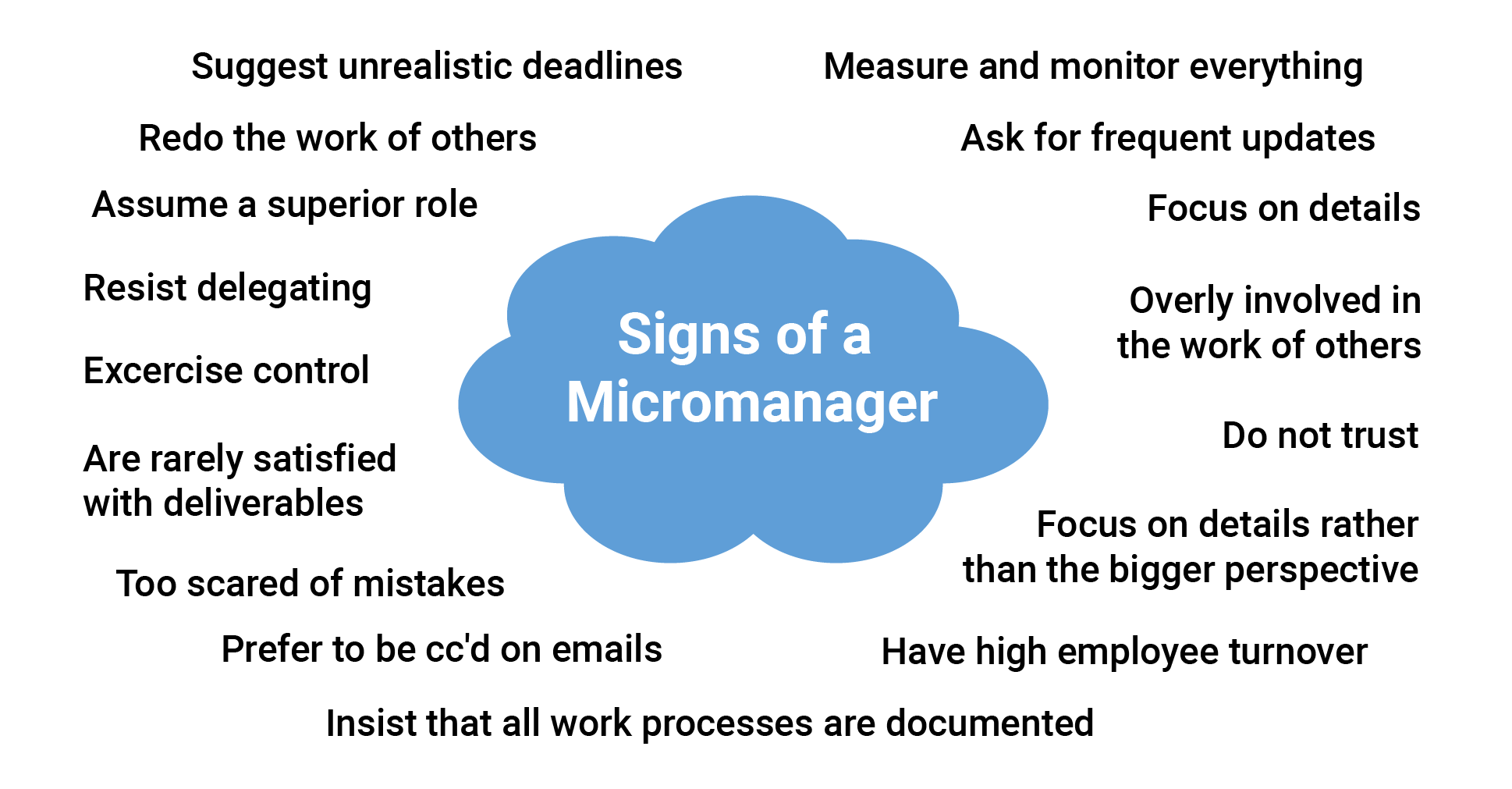
A micromanager is a person in authority who keeps control over the details and steps of other people’s work, well past the point where that control improves the result. So what is micromanaging? Micromanagement, or micromanaging, is the behavior itself: excessive supervision of how a task is done, constant requests for updates, and decisions pulled up to the manager that the person doing the work could make.
Here is what it looks like in practice. A manager hands a new logo to a designer and then specifies which software to use, which colors to try and how many hours it should take. Twice a day they ask how it is going, they want to approve every style change, and when the draft arrives they rework it themselves. The designer learns that their judgment does not count, stops offering ideas and waits for instructions. Next time the manager has even more to check.
Gallup describes a less obvious type that is common today: the manager who gives little context or support, disappears, then flies in at the last moment to list everything that is wrong with the work. In its guide to micromanagers, Gallup reports that only 7% of employees receive feedback from their manager daily, while 47% get it a few times a year or less (Gallup workplace data published in 2020; the guide does not state the country or sample). So the trouble is usually control without context rather than too much contact.
Micromanaging vs. healthy oversight
Managers are supposed to follow up, set quality standards and step in when a project is at risk. What separates oversight from micromanaging is what the manager controls (the outcome or the method) and how often the check is needed to make a decision. A check in that changes nothing is control for its own sake.
| Situation | Micromanager | Healthy oversight |
|---|---|---|
| Handing over a task | Explains the steps and the tools to use | Agrees the result, the deadline and the estimate, then leaves the method to the person |
| Knowing where work stands | Asks for status updates by message or meeting, often daily | Reads progress from a shared source (task statuses, hours logged against tasks) and asks only about exceptions |
| Decisions | Every choice waits for the manager’s approval | Clear boundaries: what the person decides, what they consult on, what the manager owns |
| Mistakes | Fixes them personally and checks more next time | Talks through what happened and treats the error as part of learning |
| Feedback | Corrections on style and small details, often after the fact | Regular two way conversations about outcomes and what is blocking them |
| Remote work | Watches online status, screens or activity levels | Looks at delivered work against deadlines and estimates |
When closer control is the right call
Close supervision is not always wrong. A 2002 paper in Radiology Management by Collins and Collins notes that it can help in short term situations: training new employees, lifting an underperformer, controlling high risk issues, or when there must be no question about who is in charge. Gallup’s guide adds onboarding to a new role, newly assigned responsibilities, unusually complex tasks and people who ask for more feedback. The difference is that healthy close control has an end date. Say out loud that this is a temporary period, agree what will change when it ends, and then step back.
Signs of a micromanager: a 30 point checklist
Read each statement and count how many describe you most weeks, not on your worst day. Ask yourself honestly, or better, ask two people on your team to score you and compare.
Delegation
- You would rather do a task yourself than explain it to someone else.
- When you delegate, you describe how to do the task in more detail than what the result should be.
- You often take back work you delegated and finish it yourself.
- You estimate your team’s tasks for them instead of asking the people doing the work.
- You rarely take a vacation because you believe the team will not cope without you.
- You are reluctant to give anyone ownership of a whole area.
Check ins and updates
- You ask for status updates more often than you use them to decide anything.
- You want to be copied on most emails and added to most chats.
- You feel uneasy when a team member’s chat status shows they are away during work hours.
- You check calendars, inboxes or activity tools to see what people are doing.
- You contact people about routine work outside their working hours.
- You expect an immediate reply to your messages.
Control over the how
- You correct details such as wording, formatting or tools when they do not change the outcome.
- You are rarely satisfied with a deliverable on the first pass.
- You take pride in how often you improve other people’s work.
- You require detailed documentation of how every task was done.
- You ask people to comment every time entry with a description of their work, even when no one reads it.
- You get frustrated when a task takes slightly longer than you expected.
Decisions and information
- Most decisions on your team need your approval.
- You rarely change a decision once you have made it.
- You share information on a need to know basis and keep the wider context to yourself.
- You see brainstorming as a waste of time.
- You seldom take up proposals for doing things differently.
- The thought of your team making a mistake makes you anxious.
Signals from the team
- People on your team rarely take initiative or suggest ideas.
- Team members ask permission for small things or avoid asking you questions at all.
- Your strongest people have left, or turnover on your team is higher than elsewhere in the company.
- You rarely praise anyone in public.
- You find it hard to switch off from work.
- You feel more like a babysitter than a manager.
How to read your score
| Statements that fit | What it means | Where to start |
|---|---|---|
| 0 to 7 | You give people room. Occasional close control is probably situational. | Check that close periods have an end date |
| 8 to 15 | You are drifting into micromanaging, likely under pressure or in specific areas. | Pick the group with the most ticks and fix that first |
| 16 to 30 | Your team very likely experiences you as a micromanager. | Ask for anonymous feedback, then work through the steps below |
Pay extra attention to the last group. Statements 25 to 30 describe what the team does, so they are the hardest to argue with. If you score high there and low everywhere else, your own view of yourself is probably more generous than your team’s.


Examples of micromanagement at work
The signs are easier to spot in concrete situations. These are typical examples of micromanagement:
- A team lead asks each developer for a written end of day summary, although the same information is already in the task tracker.
- An account manager rewrites every client email a junior colleague drafts before it can be sent.
- A manager asks to approve purchases of a few dollars and every change to a document template.
- A project manager who used to be an engineer joins technical debates and decides questions the engineers are better placed to answer.
- A daily stand up turns into each person reporting to the manager, who then assigns the day’s work.
- A remote team is asked to keep cameras on all day or to explain every gap in their online status.
In each case the manager gets reassurance and the team pays for it in time, initiative or trust.
Why managers micromanage
Few people decide to become micromanagers. The habit tends to come from one of these causes:
- No trust relationship yet. Gallup’s guide says micromanaging happens when there is no relationship of trust and support between a manager and an employee, often because they do not know each other well.
- Promotion from expert to manager. People promoted for being good at the work keep doing the work. The UK HR software company Breathe, citing Harvard Business Review, lists feeling more comfortable doing the old job than overseeing the people who now do it as one of two main reasons managers micromanage.
- Fear for their reputation. If the manager believes any mistake by the team will be judged as theirs, every task looks like a risk to control.
- Pressure from above. Gallup notes that leaders who push hard on narrow targets without extra support leave managers anxious, and that anxiety cascades down to the team.
- No view of progress. When work is not visible anywhere, asking is the only way to know. This is the cause that tools and routines can fix fastest, and it is covered in the actiTIME section below.
- Unclear quality standards. If what “good” looks like was never written down, the manager ends up arguing about it again on every deliverable.
What micromanagement costs a team
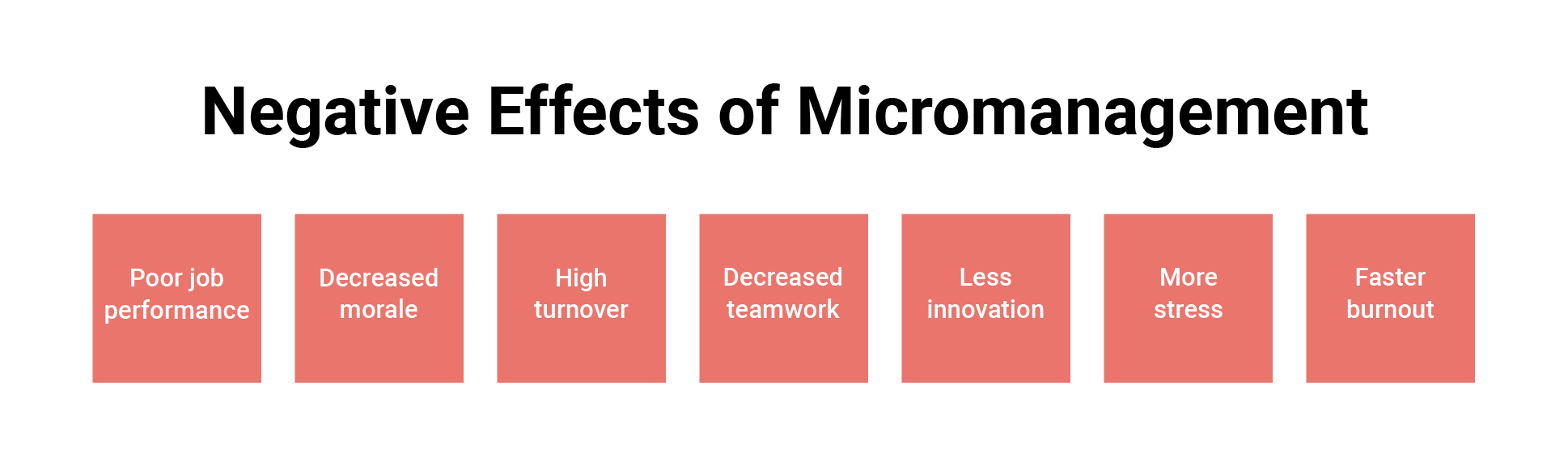
The research on micromanagement is older and thinner than the number of articles about it suggests, so it is worth knowing what the figures actually measure:
- In a survey by Accountemps of more than 450 office workers in the United States (published 2014), 59% said they had worked for a micromanager. Of those, 68% said it decreased their morale and 55% said it hurt their productivity.
- The 2002 Collins and Collins paper describes micromanagement as one of the top three reasons employees resign and links it to low morale, high turnover and lower productivity. It is an opinion article in a management journal rather than a survey, so treat it as an expert view.
- Breathe reports that in its Culture Economy Report 2020, 21% of respondents named micromanagement as a reason for distrust. Breathe works with UK businesses, but its blog does not give the sample size or country breakdown, so read this as a single, low confidence data point.
- The flip side is delegation. In a Gallup study of 143 CEOs on the US Inc. 500 list (2014), those with high Delegator talent generated 33% more revenue in 2013 than those with low or limited delegator talent ($8 million versus $6 million).
Morale and turnover are hard to put a number on before they happen. Status updates are not. Here is an illustrative calculation for a team of six where the manager asks everyone for a short written update every day.
Every extra five minutes per update adds 2.5 hours a week across the team. If the same information already exists because people log hours against tasks with estimates and deadlines, the manager can replace the daily round with a 30 minute weekly review, and the writing time drops to zero. The figures are illustrative; plug in your own team size, update length and hourly cost.
There is also a cost to the manager. Collins and Collins point out that managers buried in daily operational details miss the bigger picture and put themselves at risk of burnout. The same pattern hits the team, as covered in our guide on how to prevent burnout.
How to stop micromanaging
Changing a management habit takes weeks. These steps work in order, because each one makes the next safer.
-
Write down why you intervene.
For one week, note every time you step into someone’s work and the reason. Was the risk real (a client deadline, a compliance issue, a new hire), or did you simply prefer a different way? Most managers find that a handful of worries drive most of their checking.
-
Ask the team how they want to be managed.
Run a short anonymous survey or ask in one to one meetings: what do you need more of from me, and what less? Some people want more feedback, most want more autonomy. Expect to hear things that sting and do not argue with them in the moment.
-
Agree the what, the when and the boundaries.
For each task or area, agree the expected result, the deadline and a realistic estimate with the person who will do it. Then set decision boundaries: what they decide alone, what they check with you, what stays with you. Leave the method to them.
-
Make progress visible without asking.
Move status out of conversations and into a shared place: task statuses, hours logged against each task, estimates next to actual time. Once you can see that a task has used 30 of its 40 estimated hours with three days left, you only need to talk about the tasks that are off track.
-
Replace daily check ins with a fixed rhythm.
Hold one regular review, weekly for most teams, where you look at exceptions together. Between reviews, people come to you when they are blocked. If you have a stand up, leave it to the team for coordinating with each other.
-
Coach with questions instead of instructions.
When you disagree with an approach, ask what the person is optimizing for and what risks they see before you prescribe a fix. Let some small mistakes happen and discuss them afterwards. You are building their judgment, and that matters more than winning the argument.
-
Recognize good work in public.
Micromanaged teams hear mostly about errors. Name the decisions that went well, especially the ones made without you.
-
Review after six to eight weeks.
Score the checklist again and repeat the team survey. Look at deadlines met, rework and turnover. If results held up while you checked less, keep going and hand over the next area.
The feedback part of this deserves its own practice. Our article on the importance of feedback covers how to run those conversations.
Where fixing micromanagement goes wrong
Managers who decide to stop micromanaging often swap one problem for another. These are the most common ways it goes wrong:
- Swinging to absent. The manager stops checking in at all, then reappears at the deadline with a list of corrections. Gallup’s “fly in, fly out” micromanager is exactly this. Fewer check ins only work if there is a regular review and a way to see progress in between.
- Asking leading questions instead of giving orders. Coaching with questions helps, but when every question has one acceptable answer, the team still feels micromanaged and the indirection annoys them more.
- Delegating, then taking it back. Handing over a task and reclaiming it at the first delay teaches the team that ownership is temporary. Decide in advance what would justify stepping in.
- Turning the stand up into a status meeting. A daily meeting where everyone faces the manager and reports is micromanagement with a calendar invite.
- Replacing questions with surveillance. Managers who stop asking for updates sometimes install activity monitoring instead. That is the same distrust, automated, and the team notices.
- Letting go without standards. If quality expectations were never written down, the manager steps back, gets work they do not like and concludes that letting go does not work. Agree the standard first.
Why monitoring software is not the fix
Activity monitoring tells you that a laptop was busy. That was never the question a manager needs answered. What you need to know is whether the work is moving: which tasks are done, which are late, and where the hours went compared to the estimate. Screenshots, keystroke counts and online status answer none of that, and they tell the team exactly how much you trust them.
Managers who run remote and office teams well do something simpler. They log hours against tasks instead of against people, put a deadline on every task and an estimate beside it. The work becomes visible, so suspicion has nothing to feed on. If you are weighing the ethics of tracking, read why employees accept time tracking but not spying, and for the wider picture see our employee monitoring guide.
How to see progress without asking: hours on tasks in actiTIME
actiTIME is project time tracking software, and it fits step 4 above: it makes progress visible from data the team records anyway, so the manager does not need to chase updates.
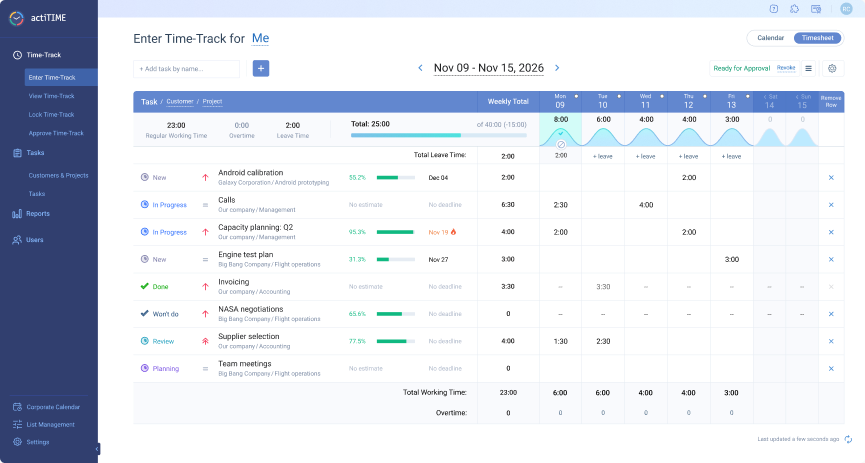
Work is organized as customers, projects and tasks. Each task can carry an estimate, a deadline, a priority and a workflow status, so the agreement on what and when lives on the task itself. People log their hours against those tasks in a weekly timesheet, in the calendar view or in the mobile app. The timesheet shows each task’s status, how much of its estimate is used and its deadline next to the hours, so the person doing the work sees the same picture the manager does.
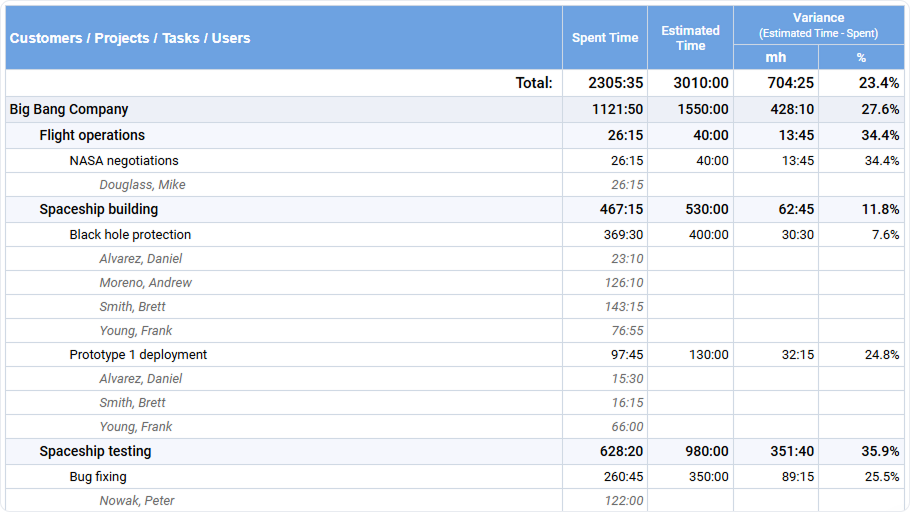
For the weekly review, the Estimated vs. Actual Time Report compares spent time with estimated time for every customer, project and task, with the variance in hours and percent. You open it, look at the few tasks that are far over their estimate, and ask about those. The rest of the team is left alone.
A Kanban board in the Tasks section shows the same tasks as cards grouped by workflow status, and each task has a comment thread, so questions about a piece of work stay with that work instead of turning into another check in message.

Now we can better predict future project requirements
Our company needed a simple way of tracking time used on multiple projects – and actiTIME fit the need. Its interface is simple and easy to maintain. We use the application for time management, task estimation and also to communicate deadline information to our team members. Now having actiTIME we can better predict future project requirements!
actiTIME is free for teams of up to 3 users, with a limited feature set (task estimates and budgets are not part of the free version). Paid options start from $5 per user per month. Start a free trial to use all features for 30 days; after the trial, teams of up to 3 users can keep using the free version.
How to deal with a micromanaging boss
If you work for a micromanaging boss, a few moves help more than pushing back directly:
- Update before you are asked. Send a short progress note at a time you agree on, such as every Friday. A predictable update often stops the surprise requests.
- Agree the result and the deadline in writing. When you start a task, confirm what done looks like and when it is due. It gives both of you something to check against other than the method.
- Make your work visible. Keep task statuses and logged hours current in whatever tool your team uses, so your manager can see progress without asking.
- Talk about specific behavior. Opening with “you micromanage me” tends to make people defensive. Describe one situation and its effect, then suggest an alternative, such as a weekly review.
- Escalate if it affects your health. If the behavior continues and you feel worn down, speak to HR or your manager’s manager.
FAQ
Is micromanagement bullying?
Not by default, but it can cross the line. In the UK, Acas notes there is no legal definition of bullying and lists “constantly criticising someone’s work” among its examples of bullying at work. In the US, the EEOC treats harassment as unlawful when it is based on a protected characteristic such as race, sex, age or disability and is severe or pervasive; ordinary micromanaging on its own usually does not meet that bar. Persistent, humiliating control is worth raising with HR either way.
Are daily stand ups micromanagement?
They should not be. The Scrum Guide defines the Daily Scrum as a 15 minute event for the Developers to inspect progress toward the Sprint Goal and agree the next day’s work. It becomes micromanagement when people report to a manager instead of coordinating with each other, or when the manager uses it to assign tasks.
What is the opposite of a micromanager?
The usual answer is a macromanager, who sets goals and leaves the details to the team. Taken too far, that becomes the absent manager who gives no direction or feedback, which is just as damaging. The healthy middle is a coach: clear outcomes and deadlines, frequent two way conversations, and help when people ask for it.