How to manage remote teams comes down to one change: you replace what you used to see in the office with things you can read. Write down how the team works, set the hours when people overlap, put every piece of work on a task with an owner, a deadline and an estimate, and then hold a short weekly rhythm around it. Once the work is visible, you no longer need to wonder who is online.
Most advice on managing remote teams stops at “communicate more” and “build trust.” This guide is for team leads and managers who want the working parts, which are a communication table you can copy, the arithmetic of time zones, a way to read task data and a meeting cadence with lengths. It also covers the failure signs that tend to appear after the first few months. If you are the person working from home and want advice for yourself, read our guide on how to work from home instead.
- What the research says about managing remote teams
- Step 1: write a team working agreement
- Step 2: how to manage remote teams across time zones
- Step 3: make the work visible, not the people
- Step 4: replace status meetings with a weekly rhythm
- Step 5: schedule the feedback the office gave for free
- Step 6: watch for overwork and isolation
- How to manage a remote team you just inherited: the first 30 days
- How to manage remote teams that are hybrid
- The challenges of managing remote employees, and how they show up
- Which remote team management tools you need
- How to run this setup in actiTIME
- FAQ
What the research says about managing remote teams
The short version is that location matters less than how the work is organized, and remote work is now a normal condition. In the US, about 27% of paid full days were worked from home in late 2026, according to the Survey of Working Arrangements and Attitudes, and Gallup’s 2026 tracking puts 54% of US employees with remote capable jobs in hybrid arrangements and 25% in exclusively remote ones.
The studies below are the ones worth knowing before you adopt any best practices for managing remote teams. They do not all point the same way, and that helps, because each one shows where remote work needs deliberate management.
| Finding | Who and when | What it means for a manager |
|---|---|---|
| Two days at home a week cut quit rates by a third, with no effect on performance grades or promotions over the next two years | 1,612 employees at Trip.com, China, randomized trial, 2021 to 2022 | Hybrid work does not have to cost you performance, and it can keep people longer |
| Hours rose, including 18% more outside normal business hours, while output per hour fell 8% to 19% | Over 10,000 professionals at a large Asian IT services company, pandemic period | Unmanaged remote work can mean longer days and more coordination, not more output |
| Collaboration networks became more static and siloed, with fewer bridges between groups | 61,182 Microsoft employees in the US, first six months of 2020 | Links between groups can fade, so create them on purpose |
| Sitting near teammates raised coding feedback by 18.3%, mostly for junior staff, while experienced engineers wrote less code | Software engineers at a US Fortune 500 firm, 2019 to 2024, working paper | Remote work may protect senior focus time, but juniors can lose feedback |
| When daylight saving time widened the gap between colleagues, total communication fell 9.4%, all of it from live conversation | 12,038 employees at a Fortune 100 multinational, 48 countries, working paper | Even small time gaps can reduce live conversation, so design overlap rather than assume it |
| Electronic monitoring showed no evidence of better performance and was linked to higher stress | Meta analysis of 94 samples and 23,461 workers, published 2023 | Watching activity may reassure you, but the evidence does not show it improves results |
One caveat applies to all of this: several studies come from technology companies and two from the pandemic years, so they point to a direction without forecasting how your team will do. For broader figures, we keep a separate page of remote work statistics.
Step 1: write a team working agreement
The first thing to settle when you work out how to manage remote teams is how the team itself operates. A working agreement is a one page document the team writes together that says how you work when nobody can look over a partition. In an office, people absorb these rules by watching each other. A remote team has to write them down, and having the rules on paper can head off arguments before they start.
The Center for Creative Leadership lists purpose, roles and procedures as the first things to settle for a dispersed team, and points out that people spread across time zones often end up working long hours to accommodate each other. Your agreement should answer these questions:
- Hours: which hours is everyone reachable, and what can wait until tomorrow?
- Channels: where does each kind of message go, and how fast should people answer?
- Decisions: where is a decision recorded so that people who missed the call can find it?
- Done: what does finished mean for a typical task on this team?
- Absence: how do people tell the team they are away, and who covers for them?
- Escalation: if something is stuck for more than a day, who hears about it?
Write the first version in a 45 minute meeting and let the team change it. People tend to follow an agreement they helped write, while one sent down by email often goes unread. Keep the company level rules on eligibility, equipment and expenses in a separate document, and use our remote work policy guide for that. You can also download the template here:
Remote team communication: a table to copy
Many remote team communication problems come down to routing. A question lands in the wrong place and nobody knows how fast to respond, so people stay glued to chat in case something matters. Harvard’s Division of Continuing Education calls this an often overlooked step: documenting how each tool should be used. Here is a starting point. The reply times are our suggested defaults, so adjust them to your work.
| Situation | Channel | Expected reply |
|---|---|---|
| Something is broken or a client is waiting now | Phone or direct call | 15 minutes during working hours |
| A question is blocking today’s work | Team chat, with a name mentioned | 2 working hours |
| Anything about a specific piece of work | Comment on the task | Next working day |
| A decision that affects several people | Shared document, linked in chat | 2 working days, then the owner decides |
| Feedback, conflict or anything personal | Video or voice call, never chat | At the next one to one, or sooner if needed |
The rule that does the most work is the third row. When discussion about a task stays on the task, a colleague in another time zone can pick up the thread without asking anyone. GitLab, which runs fully remote, keeps this kind of practice in a public handbook, and that is a good model for how plain and specific your own rules can be. For more on the link between messaging habits and output, see our piece on communication and team productivity.
Step 2: how to manage remote teams across time zones
Learning how to manage remote teams across time zones starts with accepting that overlap is a design decision, and teams often skip it. Microsoft’s telemetry from early 2025 shows 30% of meetings spanning multiple time zones and meetings starting after 8 pm up 16% year over year. Those are global figures for Microsoft 365 users, and they describe what happens when nobody sets a limit: the meeting drifts into someone’s evening.
Start by working out how much of the day people actually share. Here is an illustrative team with a person each in New York, London and Bengaluru, all working 9 to 5 local time, using standard time in winter:
| Pair | Shared hours | When, in the first city’s time |
|---|---|---|
| New York and London | 3 hours | 9:00 to 12:00 |
| London and Bengaluru | 2.5 hours | 9:00 to 11:30 |
| New York and Bengaluru | 0 hours | Bengaluru’s day ends 2.5 hours before New York’s begins |
So this team has no hour when all three people are at work. You have two options: move the work so it does not need live conversation, or spread the discomfort of one weekly call fairly. Compare a fixed slot with a rotating one for a 45 minute weekly meeting over four weeks, counting how far the call reaches outside each person’s 9 to 5:
The total cost is the same 13 hours, but alternating splits it 6 to 7 rather than 4 to 9. If you add a fourth person in Sydney, the math stops working, so split into regional groups with a written handoff. Check the numbers again when clocks change, because the US and the UK move on different dates and India does not move at all.
For the hours people do share, protect them. Agree on two or three core hours for live collaboration and keep meetings inside that window, which leaves the rest of the day for focused work. Where there is no overlap, a handoff note at the end of each person’s day replaces the conversation: what is finished, what is blocked, and what the next person should pick up.
Step 3: make the work visible, not the people
This step answers the question behind searches on how to monitor remote employees: how do I know they are actually working? It is also where managing remote employees differs most from managing people you can see. Microsoft’s 2022 survey of 20,006 knowledge workers in 11 countries gave this anxiety a number: 87% of employees said they were productive, while 12% of leaders had full confidence that their teams were.
Surveillance software is unlikely to close that gap, because it answers a different question. It can tell you a laptop was busy but not whether the proposal is on track, and the meta analysis in the table above found no evidence that it improves performance. A simpler approach is to log hours against tasks instead of against people, put a deadline on every task and add an estimate beside it. Then the work is on the table and the suspicion has little to feed on.
A task is usable when it has these five things:
- One owner. Give each task a single person who answers for it.
- A deadline. Use a calendar date, because “this week” can mean different things to different people.
- An estimate in hours. The owner should help set it, because the conversation about the estimate surfaces most of the misunderstandings.
- A definition of done. One sentence on what you will be able to see when it is finished.
- A status. Everyone can see whether it is open, in progress, blocked or finished.
Tasks should be small enough to finish within a week. A task that sits at “in progress” for three weeks tells you very little, while four small ones show progress or a stall within days. Coursera’s guide makes the same point about dividing projects into smaller chunks so that frequent deliverables replace close supervision.
How to read estimates against actual time
Task data is only useful if you know what to do with it. The aim is to find where a helpful question is due. Here is an illustrative Thursday view of one person’s week:
| Task | Estimate | Logged | Deadline | What to do |
|---|---|---|---|---|
| Client proposal draft | 12 h | 11.5 h | Finished on time | Nothing. Say thanks |
| Data migration script | 20 h | 34 h | 3 days late | 70% over. Ask what the estimate missed and fix the next one |
| Landing page copy | 8 h | 2 h | Due Friday | 6 hours left and 1 day to do them. Ask whether it is blocked |
| QA checklist | 6 h | 0 h | Due tomorrow | Probably a priority clash. Help choose what moves |
This table raises three good management conversations, and none of them starts with “why were you away from your desk at 2 pm?” The second row points to a scoping problem, and the last row may be your own doing if two managers asked for two things. In our estimate, a weekly review takes about ten minutes per person.
For the wider set of measures, such as throughput and quality, see how to measure team performance. If your company does need a broader monitoring approach, our guide on how to monitor employee productivity covers how to do it with respect.
Step 4: replace status meetings with a weekly rhythm
The instinct, when people first ask how to manage remote teams, is to add meetings. Once your task board carries the status, meetings can do what a board cannot: make decisions and keep people connected. Here is a cadence that works as a starting point. It is our recommendation rather than a research finding, so adjust it after a month.
| Ritual | How often | Length | Format | What it is for |
|---|---|---|---|---|
| Written update | Daily | 5 minutes to write | Asynchronous | Done, next, blocked |
| Team meeting | Weekly | 45 minutes | Live | Priorities, decisions, five minutes of small talk |
| One to one | Weekly | 15 to 30 minutes | Live | Recognition, goals, obstacles, career |
| Retrospective | Monthly | 45 minutes | Live or written | What to change in the working agreement |
| In person meetup | Once or twice a year, if budget allows | 1 to 3 days | In person | Relationships and hard strategy conversations |
A few rules keep the live meetings useful. Send the agenda ahead of time with the result you need from each item, name who is in the room, and send action items afterward, as CCL recommends. Our guide to effective meetings goes deeper on running them.
Think twice before you require cameras. In a field experiment with 103 employees of a US health care services company, published in 2021, keeping the camera on caused more fatigue, and the effect was stronger for women and for people new to the organization. The researchers argue for autonomy rather than for cameras off all the time. A sensible default is cameras on for one to ones and small discussions, and optional for large meetings.
What a daily status call costs
Here is an illustrative calculation for a team of eight, at an assumed internal cost of $40 an hour, comparing a daily 30 minute status call with written updates that take five minutes to write and five minutes to read:
The result depends heavily on the length of the call. If your stand up already takes 15 minutes, it costs 10 hours a week and the saving falls to 3.3 hours, or $132. At that size the money matters less, and the better reason to go asynchronous is that nobody in Bengaluru has to stay late to say “no blockers.” If the team misses talking, keep one live call a week and write the other four days. That costs 9.3 hours and still saves 10.7.
Step 5: schedule the feedback the office gave for free
The office hands out a lot of informal coaching: the comment on the way out of a meeting, the senior colleague who overhears a call. Remote work removes it quietly. The proximity study in the table above found the gains from being close were concentrated among less tenured and younger employees.
So if you want to know how to effectively manage remote employees, start by putting feedback on the calendar. Gallup reports that 80% of employees who received meaningful feedback in the past week are fully engaged, regardless of how many days they spent in the office, and that 15 to 30 minutes is enough if it happens often. That is a correlation in US workplace data and says nothing certain about cause, but it does show how big the habit needs to be. Gallup ranks recognition for recent work as the top feature of those conversations, followed by collaboration and current goals.
A useful one to one has three parts, and status is left out:
- Their agenda first. What is getting in your way, and what do you need from me?
- Specific recognition or correction. Point to a piece of work from this week instead of a general impression.
- One forward looking item. A goal, a skill or a next project.
New hires and junior staff need more than this default. For the first 90 days, assign a buddy other than their manager, hold two short one to ones a week, and ask senior colleagues to review work in small pieces. Add this review time to the estimates of senior people’s tasks, because the same study shows mentoring can reduce their own output. Without that time in the estimate, the mentoring tends to get dropped.
Step 6: watch for overwork and isolation
Leading remote teams often starts with a worry that people do too little, but the data suggests the opposite problem deserves at least as much attention. Microsoft’s early 2025 telemetry shows an average of 58 chat messages per user outside the 9 to 5 in a rolling 28 day count, with after hours chats up 15% year over year. In Gallup’s 2026 US data, 32% of exclusively remote employees are engaged, compared with 28% of people with remote capable jobs working on site. Yet Gallup’s global reporting from 2025 also finds 45% of fully remote employees felt a lot of stress the previous day, against 39% of remote capable employees on site, along with more loneliness.
So an engaged remote employee can also be a tired and lonely one, and video calls rarely show it. Three habits help:
- Read hours as a welfare signal. If someone logs 50 hours a week for a month, the conversation is about workload and estimates instead of praise for commitment.
- Model the boundary. Schedule messages for the morning instead of sending them at 10 pm. People tend to copy what the manager does, so your own habits set the norm.
- Create contact on purpose. Start meetings with a few minutes of conversation and pair people from different groups on real work. That also rebuilds the bridges the Microsoft study saw disappear. Our lists of online team building activities and ways to engage remote employees have ideas, and remote work culture covers the longer game.
Extra hours also carry legal weight, and the rules differ by country. In the US, the Department of Labor’s 2023 bulletin confirms that nonexempt teleworkers must be paid for all hours worked, including hours you did not request, and that short breaks of 20 minutes or less generally count as paid time. In Australia, employees have a right to disconnect, which means they can refuse out of hours contact unless that refusal is unreasonable. It has applied since 2024 at larger employers and since 2025 at employers with fewer than 15 staff. Check the rules wherever your people live, because a team across three countries can sit under three sets of them.
How to manage a remote team you just inherited: the first 30 days
Many guides on how to manage remote teams assume you are building from nothing, but you may well take over a team that already has habits, some of them bad. Hold off on changing the tools and use this sequence:
-
Week 1: listen.
Hold a 30 minute one to one with each person and ask the same three questions: what is working, what wastes your time, and what do you wish your manager knew? Do not change anything yet.
-
Week 2: map the work.
List everything in progress, who owns it and when it is due. The gaps in that list are your first findings. Calculate the overlap hours for the team while you are at it.
-
Week 3: write the agreement.
Bring what you heard to the team and write the working agreement together. Fix the single biggest complaint first, because an early visible change makes the rest easier to accept.
-
Week 4: start the rhythm.
Begin weekly one to ones, written updates and the team meeting. Tell people what you will look at and why, then review the setup at the first monthly retrospective.
How to manage remote teams that are hybrid
Everything above applies, with one added risk: the people in the room can become the real team while everyone else watches. Since most remote capable US employees are hybrid, according to the Gallup figures earlier, this is the setup many managers actually have.
- One remote, all remote. If anyone joins a meeting by video, everyone joins from their own screen, or you assign someone to watch the chat and bring remote voices in.
- Decisions happen in writing. A conclusion reached in the kitchen does not count until it is on the task or in the document.
- Give office days a purpose. Coordinate them around work that benefits from being together, such as mentoring and hard design problems. The Trip.com trial used two home days a week.
- Check for proximity bias. Compare who gets the high profile work. If it always goes to those who come in most, you have proximity bias, and an attendance rule will not fix it.
We compare both models in detail in fully remote team vs hybrid team.
The challenges of managing remote employees, and how they show up
Remote problems can stay hidden for a while. They tend to appear as small patterns after the first few months, once the novelty has gone and habits have set. These are the ones to look for, based on the research above and on other published guides.
| What you notice | Likely cause | What to do |
|---|---|---|
| Everything turns into a call | Tasks are too vague to act on in writing | Add a definition of done and move discussion to the task |
| Messages arrive late in the evening | Meetings fill the day, so real work moves to the night | Cut one recurring meeting and protect a block of focus time |
| Junior staff go quiet and rework grows | They have stopped asking because every question feels like a disturbance | Add a buddy and review work in smaller pieces |
| Two locations stop talking to each other | Links between groups have faded | Pair people across locations on real tasks |
| Timesheets get filled in on Friday from memory | People see tracking as control instead of something useful to them | Show the team what you use the data for, and use it to defend their time |
| You are sending more “any update?” messages | You cannot see status, so you are compensating | Fix the task data rather than asking more often |
| The same person always takes the 7 am call | Nobody has done the time zone math | Rotate the slot and share the cost |
Which remote team management tools you need
Remote team management needs one tool per job and a written rule on what each one is for. Coursera warns that too many channels fill the day with inefficient communication. Five jobs are enough for a typical team:
- Chat: Slack or Microsoft Teams, for quick questions.
- Video: Zoom, Google Meet or Teams, for conversations that need a face.
- Documents: a shared drive or wiki that holds the working agreement and decisions.
- Tasks: a place where each piece of work has an owner, a deadline and an estimate.
- Time: a tracker that records hours against those tasks, ideally in the same tool.
If you want a full comparison, we keep a separate roundup of tools for remote teams and a list of team management apps.
How to run this setup in actiTIME
actiTIME is project time tracking software, so it covers the task and time jobs from the list above and gives you the reports for steps 3 and 6. Work is organized in three levels, and time is always logged at the task level:
- Customer
- Project
- Task
Here is how that maps onto this guide:
- Visible work. Each task carries a deadline, an estimate, a priority and a workflow status, and you can follow them in a list or on a Kanban board. Comments stay on the task, along with a change history, which is the third row of the communication table in practice.
- Logging hours. People record time against tasks in a weekly timesheet, a calendar view or the mobile app. Locations let them mark whether they worked from home or the office, and the Locations Report shows the split.
- Reading the data. The Estimated vs. Actual Time Report gives you the table from step 3, and the Staff Performance Report breaks down each person’s time logs.
- Protecting people. The Time Balance and Overtime Report compares work time with scheduled hours, so a person who has been over schedule for a month is easy to spot. Leave logged in the timesheet shows who is away.
- Money. Tracked hours also feed cost and billing reports if your remote team works on client projects, so the same entries show whether a project is on budget.
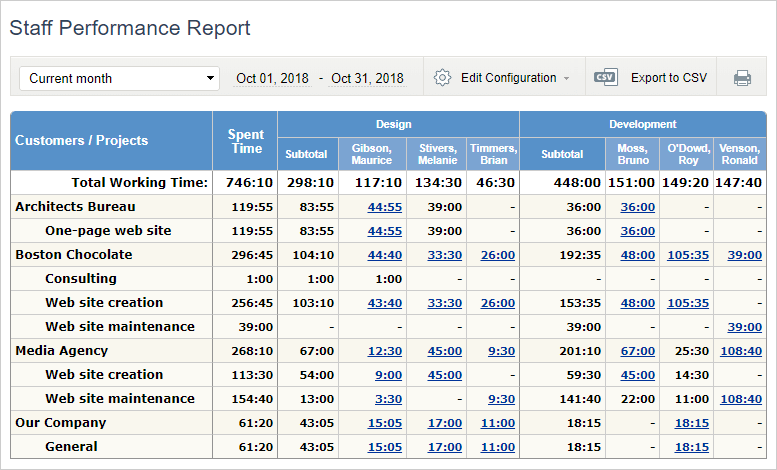
One limit to know: task estimates and overtime registration are not in the permanent free version, so you need the full version or the trial for those parts of this setup. For a feature level walkthrough, read how to manage a remote team with actiTIME or see time tracking for remote teams.

Now we can better predict future project requirements
Our company needed a simple way of tracking time used on multiple projects – and actiTIME fit the need. Its interface is simple and easy to maintain. We use the application for time management, task estimation and also to communicate deadline information to our team members. Now having actiTIME we can better predict future project requirements!
FAQ
Should we use employee monitoring software on a remote team?
We recommend starting with task data, because research finds no performance gain from monitoring and higher stress. If your company still needs it, for security reasons for example, tell people what is collected and why. In the UK, the ICO says employers must inform workers about monitoring, except in very exceptional circumstances. Our employee monitoring guide covers policy in more detail.
What should you do when a remote employee underperforms?
First rule out the system: check that tasks were clear, estimates were realistic and priorities did not collide. If the pattern remains across several weeks, raise it on a live call rather than in chat, using specific tasks as examples. Agree on one or two measurable changes with a review date, and write them down afterward so that both of you have the same record.
What is the difference between a remote, virtual and distributed team?
The terms overlap and are often used interchangeably. A remote team usually means people working away from an office, a virtual team is one whose collaboration happens through technology, and a distributed team is spread across locations, often with no main office. For how you manage them, what matters is how much of the working day they share.
Start with one change this week
You do not need all six steps at once. If you only do one thing, take your team’s current work and give every item an owner, a deadline and an estimate. Knowing how to manage your team remotely grows from there, because the questions you ask afterward are about the work and no longer about who was online.
To try this with real data, start a free trial of actiTIME. It runs for 30 days with every feature on and costs nothing, and you can move to the permanent free version for up to 3 users afterward.