Tracking employee time sounds simple until you try to do it well. Get it right and you have accurate payroll, defensible client invoices, and a clear picture of where the work actually goes. Get it wrong and you have padded timesheets, billing disputes, and a team that resents being watched.
This guide covers the practical side of how to track employee time: why it matters, the main methods to choose from, the best practices that keep the data honest, and a step-by-step setup using actiTIME once you are ready to put it into action.
Why track employee time
Time data is the foundation for several things a business cannot run well without.
- Accurate payroll. Hours worked, overtime, and leave feed straight into pay, so clean records mean fewer corrections and disputes.
- Reliable client billing. If you bill for time, every unrecorded hour is revenue given away and every vague entry is a dispute waiting to happen.
- Real project costs. Comparing tracked hours against estimates shows which projects make money and which quietly lose it.
- Better planning. Once you can see where time actually goes, you can spot overload, rebalance work, and estimate the next project from data instead of guesswork.
- Compliance. Labor laws in many regions require employers to keep records of hours worked, so accurate tracking is often a legal need, not just a nice-to-have.
Ways to track employee time
There is no single right method. The best one depends on your team size, whether you bill clients, and how much accuracy you need.
Paper and spreadsheets
Writing hours on paper or in a spreadsheet costs nothing and works for a very small team. The trouble is that entries are made from memory at the end of the week, which makes them inaccurate, and there is no easy way to turn them into reports, payroll, or invoices without more manual work.
Timesheet software
A dedicated time tracking tool lets employees log hours against tasks and projects, then turns that data into reports, payroll exports, and invoices automatically. This is the right fit for most teams that bill clients or need to control project costs, because the data stays structured and reusable. actiTIME sits in this category.
Automatic activity tracking
Automatic trackers run in the background and record which apps and sites are used, so hours are captured without anyone starting a timer. This suits people who forget to log time or want a hands-off record. It works well paired with timesheets rather than as a replacement, since raw activity still needs to be tied to tasks.
Clock-in and biometric systems
Punch clocks, kiosks, and biometric check-ins record when people start and finish, which is common for shift work and on-site teams. They are strong on attendance but weaker on the detail of what the time was spent on, so they fit hourly and field work better than project-based work.
Time tracking best practices
The method matters less than how you use it. These practices keep the data accurate and the team on board.
-
Track time daily, not weekly.
Hours logged the same day are far more accurate than a week reconstructed from memory on Friday afternoon.
-
Track at the task level.
Recording time against specific tasks, not just projects, is what makes the data useful for estimates, billing, and finding where hours really go.
-
Keep it simple.
Turn off features and fields you do not need. The easier tracking is, the more consistently people actually do it.
-
Be transparent about why.
Explain that tracking is about accurate billing, fair workloads, and better planning, not surveillance. Buy-in is what makes the data honest.
-
Use estimates and review reports.
Compare tracked time against estimates regularly so the numbers drive real decisions rather than sitting unused.
-
Respect privacy.
Track work time, not personal life. Clear boundaries keep trust intact and keep you on the right side of local regulations.
How to start tracking time with actiTIME in 5 steps
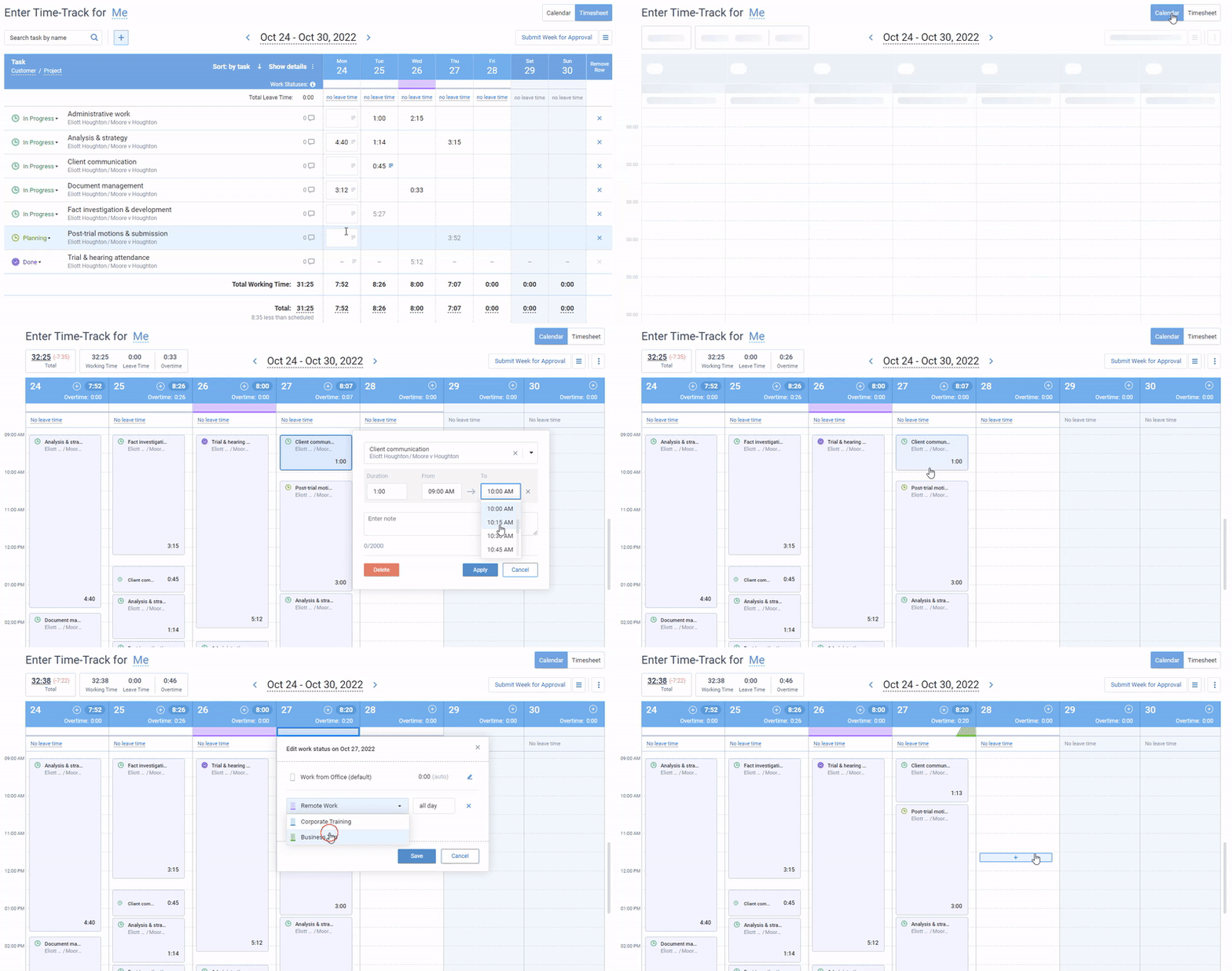
Once you have chosen a tool, setup is what stands between you and usable data. Adopting new software can feel daunting, but a straightforward time tracker like actiTIME keeps that effort small. Its weekly timesheets are the core, and you need only a little configuration before logging hours. Here is how to get set up.
1. Edit your time-track hierarchy
The time-track hierarchy organizes your tasks across three levels, named Customer, Project, and Task by default. You track hours at the task level, projects group tasks, and customers group projects.
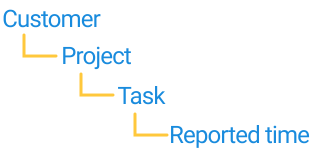
You can rename every level in General Settings so it fits your work. The top tier can become Client, Product, Product Line, or Project; the middle tier can become Job, Product, Release, or Task; and the entry level can be Task or subtask. If none of the presets fit, set your own custom names.
2. Create tasks to track time for
With the hierarchy set, add your projects and tasks. You can create customers, projects, and tasks one at a time from the Tasks tab using + Add New, filling in names, estimates, and deadlines as you go.
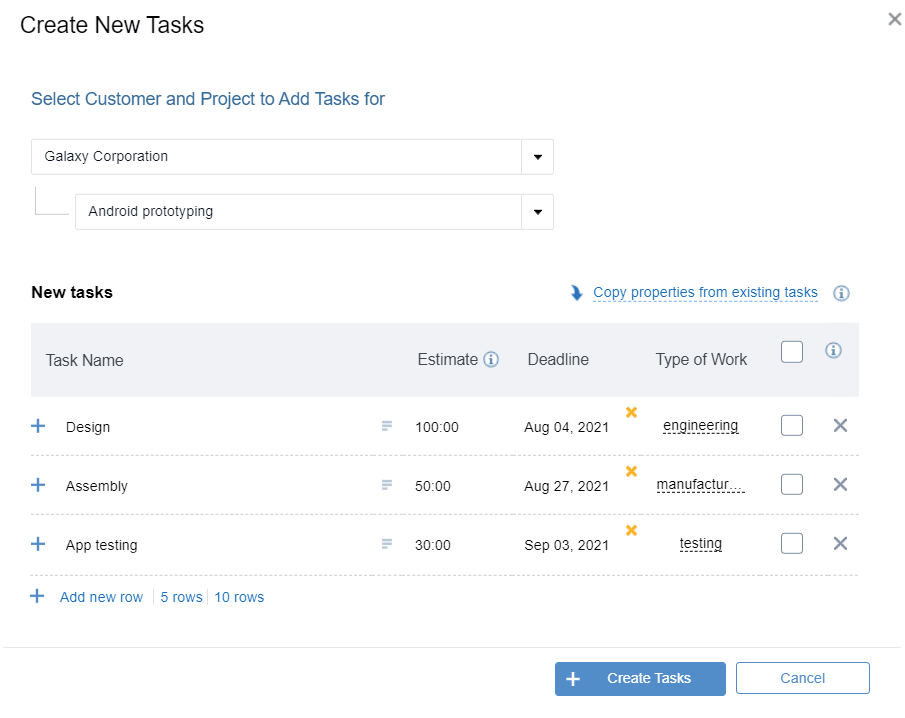
For a larger setup, import in bulk instead. Build a spreadsheet with your project and task data, save it as a CSV, and upload it through Tasks, then + Create New, then Import tasks from CSV. The imported tasks are ready to add to timesheets right away.
3. Invite your team
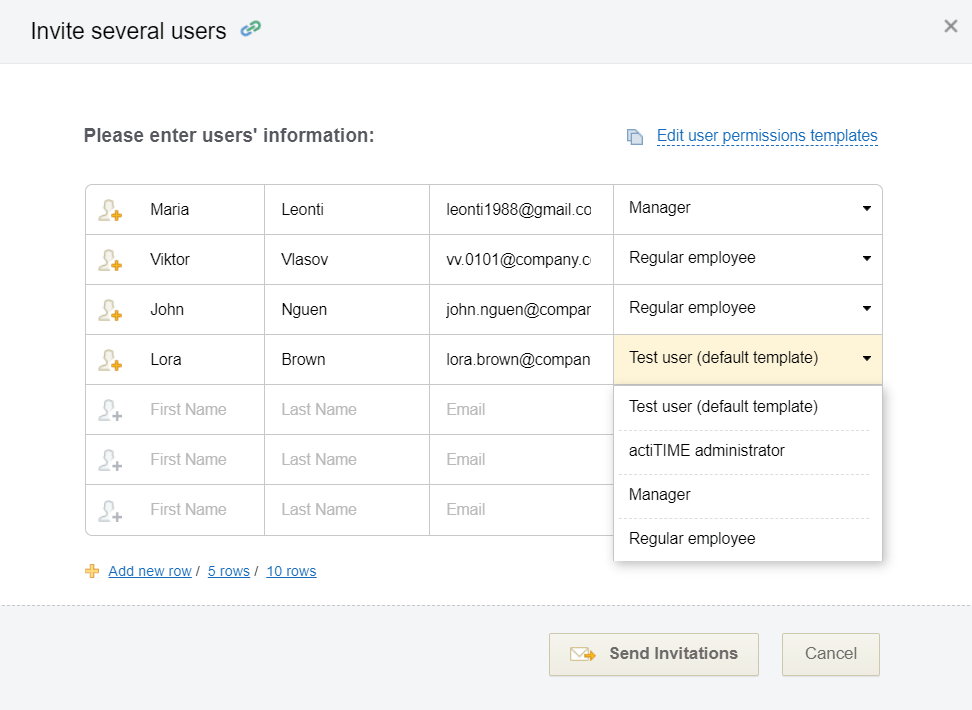
Next, bring in your colleagues and assign tasks to them. Add users one by one from the Users tab with + New User, entering their name, email, hire date, department, work schedule, and pay rate.
Then set permissions to control what each person can access. The Enter Time-Track permission suits regular employees who just log their hours, while Manage Scope of Work suits team leads who add tasks and monitor progress. To onboard everyone at once, use Bulk Invitations instead of adding users individually.

We reduced payroll processing to 45 minutes per week
actiTIME is very robust, integrated well into your business process, and most important, helps you focus on your business instead of monkeying around with technology. actiTIME has reduced our payroll processing from 4-6 hours per week to 45 minutes per week.
4. Switch off features you do not need
actiTIME is flexible enough to match most workflows, and part of that is turning off what you will not use. Open product settings and click Turn Features On / Off to hide functionality you do not need, which keeps the interface clean and tracking simple for your team.
5. Add the browser extension and mobile app
If you would rather automate tracking than enter everything by hand, actiTIME’s browser extension, the Time Management Assistant, records which sites you use and includes a one-click timer. It works as a free standalone tool and syncs to your actiTIME account when you connect it.
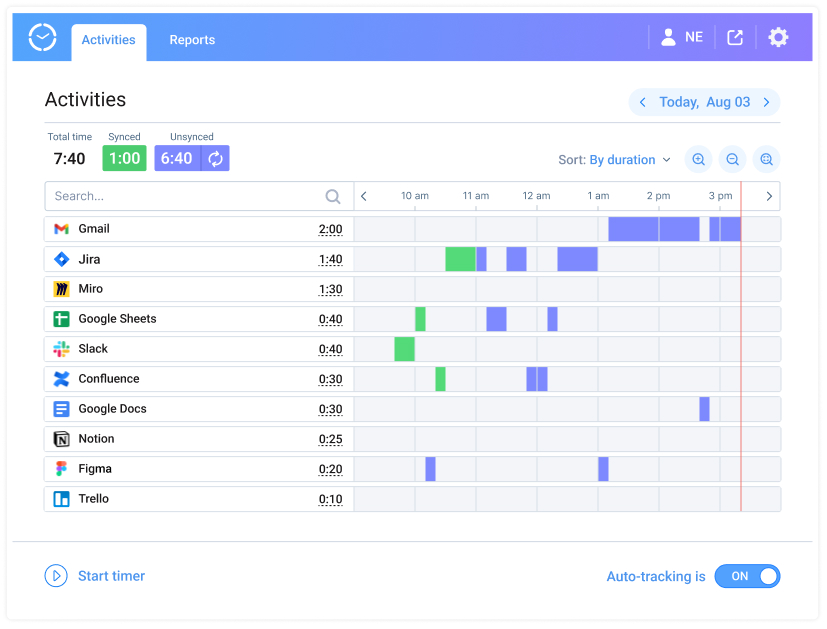
The mobile app adds one-click timers on the go and works offline, so your team can log hours even without a stable connection. Entries sync to the main account as soon as they are back online.
How to track employee time FAQ
What is the best way to track employee time?
For most teams, dedicated timesheet software is the best option, because it captures hours against tasks and turns them straight into payroll, reports, and invoices without manual rework. Spreadsheets can work for a very small team, and clock-in systems suit shift and on-site work, but they fall short once you need to bill clients or control project costs. Match the method to whether you bill for time and how much detail you need.
Is it legal to track employee working hours?
Yes. Employers are generally allowed to track working hours, and in many regions labor law actually requires records of hours worked for payroll and overtime. The key is transparency: tell employees what you track and why, track work time rather than personal activity, and follow local privacy rules. Tracking done openly and fairly is both legal and good practice.
Is there a free way to track employee time?
Yes. A spreadsheet is free but limited, and several tools offer free plans. actiTIME is free for up to 3 users and includes timesheets, the calendar view, and the mobile app, which is enough for a small team to replace spreadsheets. Once you need approvals, billing, or reporting across a larger team, a paid plan or a full-featured trial is the next step.
Start tracking time today
Knowing how to track employee time is really about picking a method your team will actually use, then setting it up so the data turns into something useful. actiTIME gives you the timesheets, reports, and automation to do that without a heavy learning curve.


Sign up for a free 30-day trial, no credit card required, or book a demo with our product experts to see how it fits your team.