
Manual timesheets may seem harmless at first, but over the course of a project they can become chaotic. Some employees “pencil‑whip” their time cards, others simply forget to track their hours, and the entire process feels error‑prone. Accurate time data is essential for understanding whether projects are on schedule and for making informed business decisions, yet many organizations still rely on outdated methods. That’s where automated time tracking software comes in. The right tool simplifies the process, improves accuracy and frees your team to focus on the work that matters
Why Automated Time Tracking Software Matters
Automated timekeeping isn’t just about punching a digital clock. Modern timekeeping tools boost productivity by helping managers identify inefficiencies and reallocate resources. They also provide accurate attendance records and reduce administrative tasks, which allows HR teams to spend their time on higher‑value activities. Because the hours worked are logged automatically, leaders can control labour costs, prevent unnecessary overtime and maintain a fair workload distribution.
Compliance and employee satisfaction are equally important. Automated tracking systems ensure that employees receive proper compensation for their regular and overtime hours, and the data can serve as evidence in audits or legal disputes. Digitizing timesheets also makes it easier to comply with labour laws and company policies. Finally, accurate time data lets supervisors gain deeper insights into how team members spend their working hours. This improved oversight helps managers provide better feedback and supports a healthier work‑life balance.
Key Benefits of Automated Time Tracking
To fully appreciate the value of an automated solution, consider the advantages it brings compared with manual spreadsheets:
-
-
Improved payroll and billing accuracy: Digital time tracking enables employers to calculate pay and invoices correctly and reduces errors in overtime or accrual calculations. This accuracy helps maintain trust between employees and management.
-
Higher productivity: When employees know their hours are recorded accurately, they tend to stay focused and complete tasks more efficiently. Managers can use the collected data to identify bottlenecks and provide additional resources where needed.
-
Lower administrative burden: Automation frees HR staff from the repetitive work of compiling attendance reports and processing timesheets, allowing them to devote more time to strategic initiatives and employee development.
-
Better budget and cost control: Real‑time tracking gives leaders insight into project costs and labour expenditures, enabling them to make adjustments before overruns occur.
-
Greater compliance and transparency: Automated systems provide precise records and auditable trails, making it easier to meet labour‑law requirements and demonstrate fairness during audits.
-
Data‑driven decision‑making: Collecting detailed time records creates a valuable repository of data about employee productivity, project timelines, and resource utilization. Analysing this “data trove” helps companies refine workflows and better allocate resources.
-
Features to Look for in the Best Automated Time Tracking Software
Not all time tracking tools are created equal. When evaluating solutions, look for features that will genuinely streamline your processes and deliver actionable insights:
-
Real‑time tracking with automatic timesheet submissions and approvals: Systems should capture time as work happens and submit records automatically, reducing the risk of forgotten entries. Automated reminders and approvals further minimize administrative effort.
-
Reminders and notifications: People occasionally forget to log hours. Look for software that sends reminders or warns employees when they have exceeded normal hours to help prevent burnout.
-
Labour and cost calculations: Advanced tools automatically calculate labour costs and offer flexible billing options (project‑based, task‑based, employee‑based rates) so you can invoice clients accurately.
-
Mobile apps and browser extensions: These ensure you can record hours wherever you are—whether on a business trip, in the field or working remotely.
-
Multiple views and customizable reports: Switching between timesheet and calendar views helps users log start and end times more visually and identify inefficiencies. Customizable reports, graphs and charts turn raw time data into actionable business intelligence.
-
Integrations and APIs: The software should connect seamlessly with other tools such as project management platforms, accounting systems or calendar apps to eliminate manual data entry and maintain data consistency.
-
Security and compliance features: Audit trails, user permissions and data locking maintain integrity and ensure only authorized individuals can modify time records.
actiTIME: A Comprehensive Automated Time Tracking Solution
Many organizations start by improving their time tracking workflow. actiTIME is one of the most versatile automated time tracking software options because it addresses each of the requirements above. In the original article, the authors note that without a well‑designed system, time tracking quickly becomes messy and error‑prone. actiTIME was created to cut through that chaos and deliver clean, reliable data
1. Set up your time tracking process in a few simple steps
Hour tracking with actiTIME is super easy, and it takes merely five basic steps to begin:
- Configure your Time-Track Hierarchy
- Create projects and tasks to track time for
- Invite your team members to actiTIME
- Switch off any features you don’t plan to use
- Download our mobile app and the browser extension to simplify the process even further
Click here to find out more 👈


2. Enjoy the benefits of automated time tracking
As an automated time tracker, actiTIME measures hours spent on tasks in real time, ensuring that every second is accounted for and recorded accurately. Then, you can easily access insightful data that reflects the work done, providing you with a comprehensive overview of your business operations and helping you to take them under better control.
Explore all the benefits of automated time tracking with actiTIME here 👈
3. Keep track of every second spent online
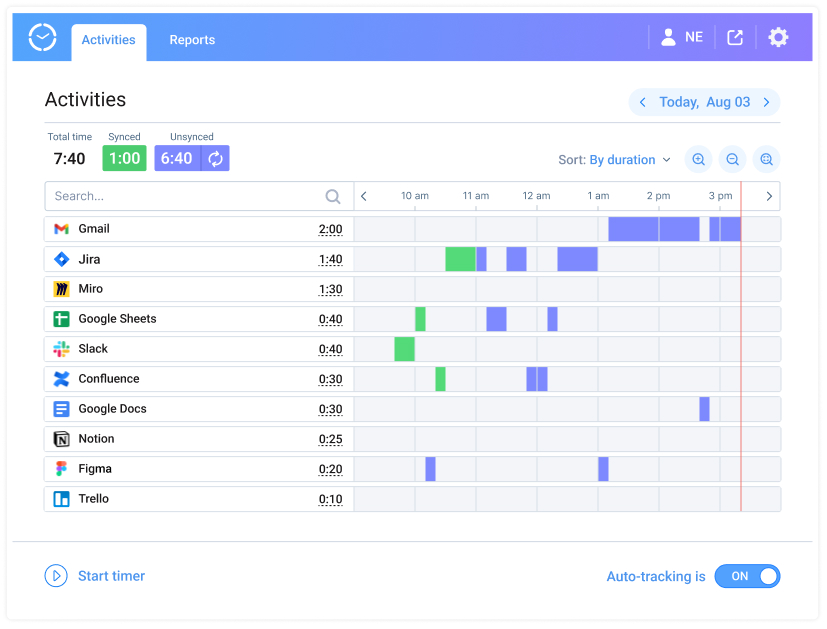
Whether you’re working remotely, studying virtually, or simply using social media to stay connected with loved ones, it’s important to be mindful of how much time you’re spending online each day. And with our fully automated browser extension, Time Management Assistant, you can track every second spent online, no matter the task at hand.
You can pick which websites and activities you want to track and choose whether to integrate your Time Management Assistant with actiTIME or use it as a personal productivity-boosting tool. You can also view detailed reports and analytics to identify patterns and make positive changes to your online habits.
Check out this post to explore Time Management Assistant in greater depth 👈
4. Switch between the Timesheet View and the Calendar View
Along with traditional weekly timesheets where you can track the overall time spent on work, actiTIME features the Calendar View where employees can log the exact time they started and finished working on tasks. It offers a more visual way of tracking daily work activities and helps to identify major distractions, inefficient time management behaviors, or unauthorized overtime hours the easier way.
Find out more about Calendar View in this post 👈
5. Track hours wherever you are
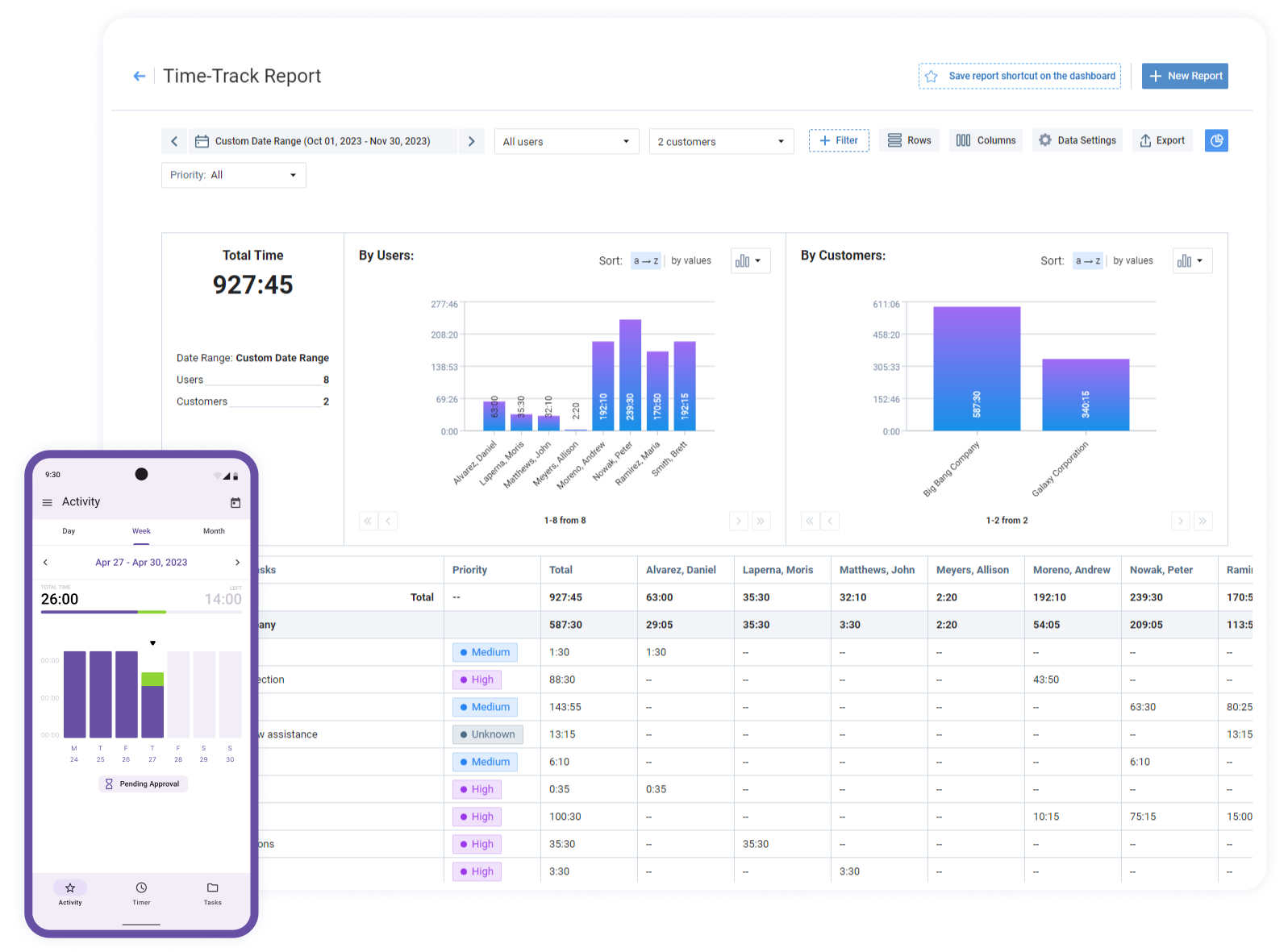
With actiTIME Mobile, you can easily log your hours no matter where you are, whether you’re in the office, on a business trip, working in the field, or remotely. Its built-in one-click timers provide maximum data accuracy, while the offline time tracking feature ensures that you won’t miss a beat even when you don’t have internet access.
Click here to explore other features actiTIME Mobile has to offer 👈
6. Manage Projects and Resources
actiTIME’s capabilities go far beyond simply logging hours. It functions as a project management hub, helping you plan the scope of work, set deadlines, allocate resources and monitor progress through visual estimate trackers and data widgets. Built‑in reports compare planned hours and costs with actual performance, and automatic notifications alert you if you risk overrunning the budget or missing deadlines.
In terms of resource management, actiTIME helps you build a historical database of task completion times. This makes it easier to estimate future tasks more accurately and control overtime hours so they don’t go unnoticed. The system also centralizes absence and time off requests, simplifying PTO management and ensuring fairness. You can assign hourly pay rates, track time spent on each project and run reports that show how much money has been spent on specific tasks
Using actiTIME to Improve Business Management
Business management involves setting goals, allocating resources, monitoring performance and making informed decisions. actiTIME supports these efforts by providing timely reports and analytics. Timesheet reports give a complete picture of your project timeline, capturing every hour worked and highlighting where improvements can be made. Money reports reveal your expenses and income sources, helping you identify where to cut costs or increase investments. Visual dashboards turn complex data into easy‑to‑read graphs and charts, simplifying performance analysis.
actiTIME’s billing features categorize time by project, client or task and allow you to set and assign billing rates. Automated invoicing ensures that clients are billed accurately and that communication remains transparent. Customizable account settings let you define the work structure, configure permissions, and add custom fields, tailoring the software to your processes. Integrations with other tools support a seamless digital ecosystem, while APIs enable you to build custom workflows.
Conclusion
In today’s fast‑paced and competitive business environment, adopting automated time tracking software is no longer optional. Automated systems increase productivity, improve payroll accuracy and provide the transparency required for informed decision‑making. actiTIME combines these core benefits with project management, budgeting and integration features, making it one of the most comprehensive solutions available. By simplifying time tracking and integrating seamlessly into your workflows, actiTIME frees your team to focus on what really matters. So, sign up for a free actiTIME trial now and watch your business soar!
FAQs about automated time tracking software
What is automated time tracking software?
Automated time tracking software records employees’ working hours digitally, either in real time or with minimal manual input. It reduces human error, improves accuracy, and provides reliable data for payroll, billing, and performance analysis.
How is automated time tracking different from manual timesheets?
Manual timesheets rely on employees to remember and enter their hours, which often leads to missing or inaccurate data. Automated time tracking software captures work hours automatically or with one click, provides real-time visibility, and significantly reduces administrative effort.
Is automated time tracking software legal and compliant?
Yes. When implemented transparently and in accordance with local labour laws, automated time tracking software helps organizations maintain accurate records, track overtime, and support compliance through auditable time data.