Anyone who has tried to find the right project management software for their architecture or construction company (no matter big or small) will agree, it can be a real pain.
On the one hand, there are tons of options out there, each claiming to make your life easier, boost collaboration, and skyrocket productivity.
You’ve got basic tools like Trello and Asana that work for just about anyone, and the specialized platforms like Autodesk BIM 360 and Archicad that cater specifically to the architecture crowd.
On the other hand, finding a tool that actually fits your firm’s unique needs and closely matches your workflow takes hours of scrolling through endless reviews and features lists, not to mention the integration headaches.
The good news is that we did some of the work for you. So, if you’re an architectural firm on the hunt for project management software, buckle up! We’ve analyzed the specific challenges you might face and made a selection of tools to address these.
Short on time? This video walks through the leading project management apps for architects in 2026, so you can see which one suits your team.
Why project management software matters for architects
The numbers explain why project management for architects has become less optional and more table stakes. According to PMI’s Pulse of the Profession research, 43% of projects finish over budget, and organizations waste nearly a dime of every dollar invested because of poor project performance. Architecture projects (long timelines, multiple stakeholders, constant scope changes from client feedback) are exposed to exactly the kind of drift behind most cost overruns once a project is already underway.
The upside is measurable too. A 2024 Dodge Construction Network study of more than 1,500 construction professionals found that firms using project management software at an “optimized” level reported project performance benefits at more than double the rate of light adopters (82% vs. 31%), and 77% reported increased profit margins as a direct result. How deeply a firm actually uses the software matters more than which tool it picked.
For architecture firms specifically, this tends to show up in three places: fewer budget surprises, because time and costs get tracked against estimates as the project runs instead of discovered at the end; less time lost chasing project status across email threads; and faster invoicing, because billable hours are already tied to specific phases instead of reconstructed from memory at month-end.
Understanding the unique needs of architectural projects
Architecture project management software helps you keep your projects on track, from budgeting and scheduling to staffing and invoicing. When evaluating tools, look for:
- Time tracking – schedule tasks, set milestones, and track progress against deadlines.
- Ease of use – most architecture firms don’t have an in-house IT expert, so the tool needs to be simple to manage.
- Visual planning – Gantt charts and Kanban boards make complex, multi-phase schedules easier to manage.
- Real-time collaboration – shared workspaces, comment threads, and file sharing keep clients, contractors, engineers, and regulators on the same page.
- Resource management – monitor staff availability and keep your budget in check to avoid overruns.
- Budgeting – create estimates, track expenses, and manage invoices in one place.
- Mobile access – architects are mostly on-site or on the move, so a solid mobile app matters.
- Integrations – look for APIs or pre-built connections to CAD software, accounting systems, and other tools you already use.
With that in mind, here are the 13 project management software options we found perfect for architects, a mix of general-purpose tools and platforms built specifically for architecture and design firms.
Architect project management software tools
Here’s the full lineup. Jump to whichever fits your firm, or skip to the side-by-side comparison table at the end of the list.
1. actiTIME
Key features:
- Automatic and manual time tracking
- Client billing
- Mobile app
actiTIME offers a combination of task management and time tracking to help your architectural team stay organized and get things done on time.
Whether you’re switching between projects or moving around, you can assign tasks, log your time effortlessly and use the past data to invoice clients and make informed estimations for upcoming projects.
- Use the online timesheet, a one-click timer on the mobile app, or even an fully automated browser extension – whatever works best for you!
Create tasks with deadlines, estimates, priorities, and comments to keep everyone on the team in the loop about any project updates. - Set hourly rates for each team member and keep tabs on project costs and profitability, ensuring your budget stays in check and everyone gets paid fairly.
- Easily assess your team’s productivity results and resource usage at a glance. Detailed data makes it simple to identify bottlenecks or inefficiencies, allowing you to adapt swiftly and make informed decisions for future projects.
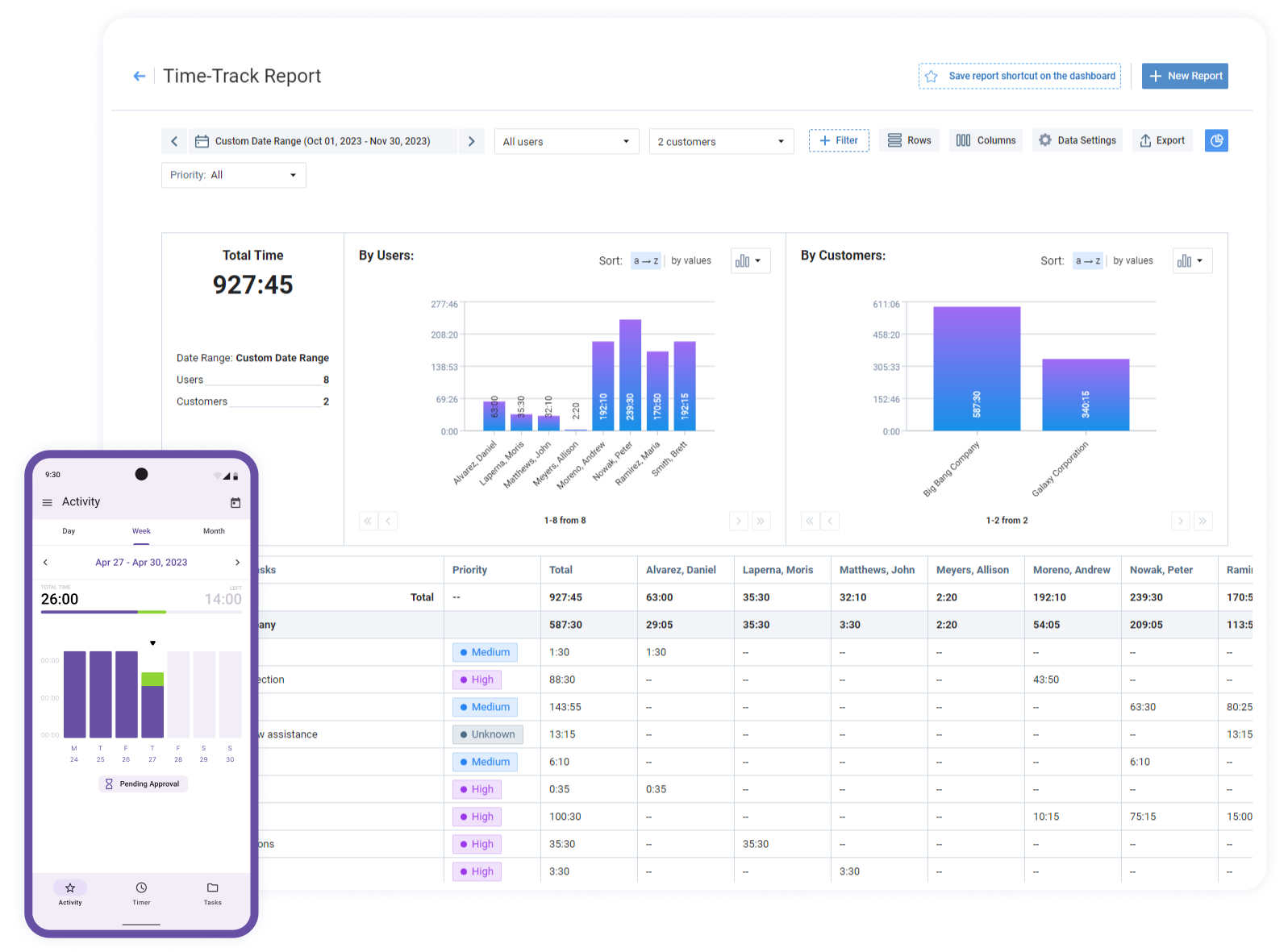

I’ll recommend actiTIME for an architectural business like ours
I’ll recommend the software, especially for architectural business like ours – the solution seems to be intuitive and streamlined, the learning curve is modest and the product works as you expected. A web-based interface is a big plus as well – it is very easy and very simple!
Pros:
- Self-hosted option available for teams that want full data control
- Strong built-in reporting – profitability, budgets, staff performance
- Multiple ways to log time – timesheet, calendar view, Chrome extension, offline-capable mobile app
Cons:
- No built-in billable-expense tracking
- Limited accounting-software integrations
- Some users wish entries logged punch-in/punch-out times instead of just totals
Best for: architecture firms that want simple, accurate time tracking tied directly to project budgets and profitability reporting.
Team size: 2–500+ (scales well, cloud or self-hosted)
Ideal use case: studios that need to see billable vs. non-billable hours per project or client without adopting a full heavyweight PM suite.
Pricing: Free for up to 3 users; $6/user/month for 1–40 users, $5/user/month for 41–200 users.
Reviews: G2 4.5/5; Capterra 4.5/5
2. Outplanr
Key features:
- Task planning
- Workload management
- Email notifications
Outplanr is a project and resource managing tool that turns to-do lists into daily work plans so that all personal responsibilities and project-specific tasks are put in order.
You can divide big projects into small, bite-sized subtasks and use Floating Start Dates to make them roll over automatically if not completed, making teams flexible without losing track of what is to be done.
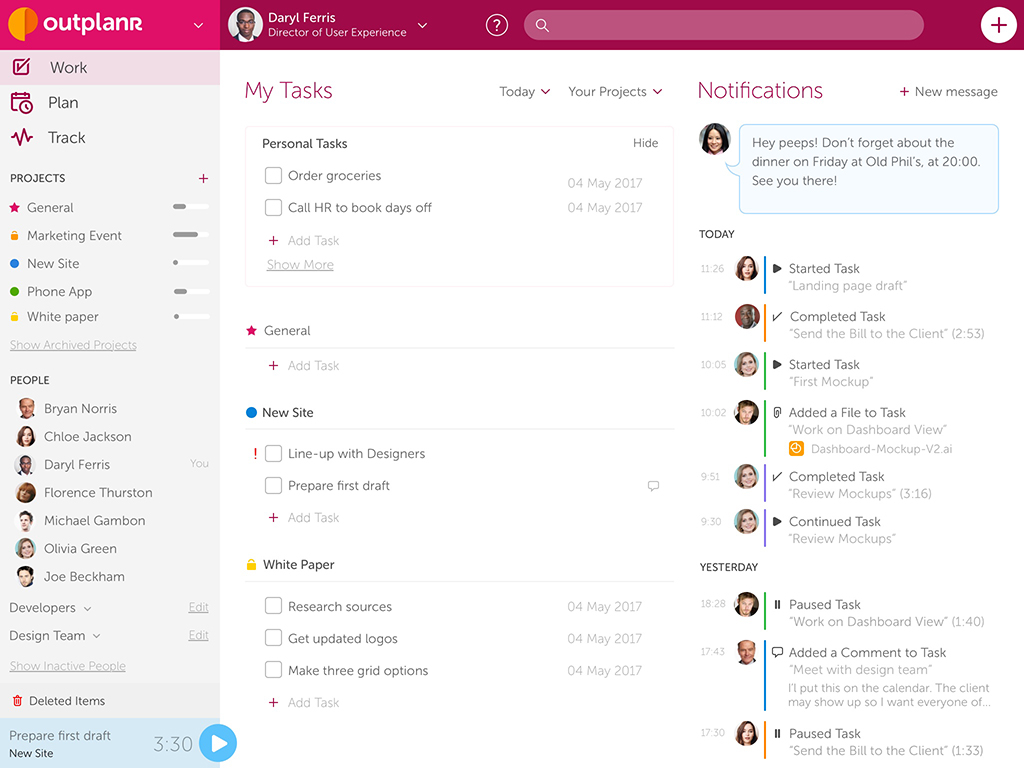
The Task Broadcasting feature ensures that the very moment an architect starts a task, the entire team is notified in real time, so everyone stays on the same page, and by putting task status to urgent, you notify team members immediately and push them to put critical work in the front line.
In case priorities change you can quickly import new tasks by copying a list straight from Excel and pasting it into the project, keeping all the project-related data in one accessible place.
Pros:
- Turns to-do lists into structured daily/weekly work plans
- Intuitive interface, easy setup
- Real-time Task Broadcasting keeps the whole team notified
Cons:
- Support satisfaction below comparable products
- Very thin review base (20 reviews on G2, none on Capterra)
- No dedicated budget-management features
Best for: small studios that want lightweight weekly capacity planning synced to a calendar, not a full PM system.
Team size: 3–20
Ideal use case: small architecture practices turning to-do lists into structured daily and weekly work plans across a small team.
Pricing: $19/month (StartUp tier, 3 users).
Reviews: G2 4.3/5 (20 reviews)
3. BQE Core
Key features:
- Project management
- Accounting
- Payment processing
BQE Core is a cloud-based project management and accounting software designed specifically for creative industry firms, including architecture.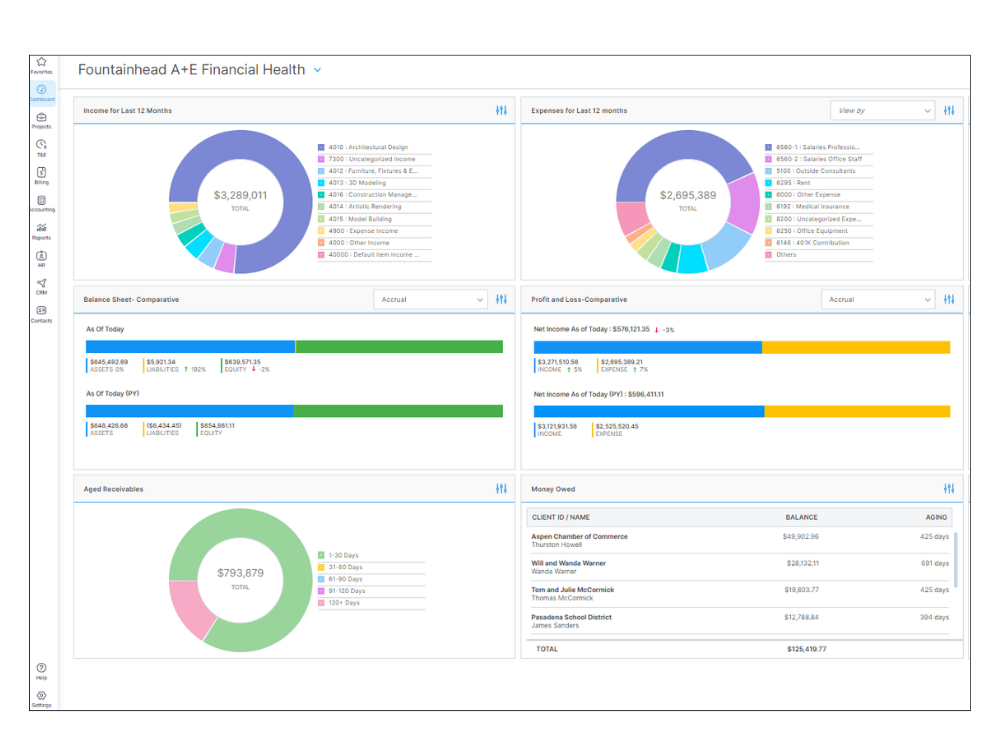
Apart from basic options like time logging and invoicing it offers tools for:
- Tracking various metrics as resource utilization and profitability.
- Creating and managing budgets, predicting costs and monitoring expenses in real time.
- Mapping out project timelines, assigning tasks, and visualizing work progress at various phases via interactive Gantt charts.
Pros:
- Intuitive interface with customizable dashboards
- Wide range of reporting and invoice templates
- Integrates with QuickBooks, Xero, Microsoft 365
Cons:
- Occasional performance lags; steep learning curve
- Web version costs roughly 3x more than the desktop version
- Report templates need more field flexibility
Best for: firms that want time tracking tightly integrated with invoicing and firm-wide financial management.
Team size: small to mid-size firms with dedicated accounting/billing needs.
Ideal use case: firms wanting architecture project tracking software that also handles billing, expenses, and reporting instead of stitching tools together.
Pricing: Core Architect plan from $34.95/user/month (billed annually).
Reviews: G2 4.3/5; Capterra 4.5/5
4. Projectworks
Key features:
- Resourcing & capacity planning
- Budgeting & forecasting
- Time tracking & invoicing
Projectworks is a professional services automation (PSA) platform built for services firms (including architecture, engineering, and consulting practices) that need time tracking, resourcing, and financial forecasting in one system instead of stitching together separate tools.
It gives project leads a live view of budgets against actual hours logged, so overruns show up while there’s still time to act instead of after the invoice goes out. Resourcing tools help staff projects based on real capacity rather than guesswork, and built-in reporting turns timesheets into profitability data without a separate export step.
Projectworks integrates with Xero, Jira, Azure DevOps, BambooHR, and Salesforce, so it can sit alongside tools architecture firms already use for accounting and issue tracking rather than replacing them outright.
Pros:
- Time tracking, budgeting, resourcing, and project visibility in one system
- Clean, intuitive interface
- Strong personalized support during onboarding
Cons:
- Can feel clunky at times; learning curve
- Limited customization in reporting and workflows
- Custom report builder is complicated to use
Best for: services firms (architecture, engineering, consulting) that need time tracking, budgeting, and resourcing in one PSA platform.
Team size: small to mid-size firms (85% of Capterra reviewers are small businesses).
Ideal use case: architecture and AEC firms that want visibility into a project’s financial side (budgets, invoicing, forecasting) alongside day-to-day task tracking.
Pricing: Build $19/user/month, Scale $27/user/month, Unleash $45/user/month (10% discount billed annually), plus a one-time onboarding fee from $1,000.
Reviews: G2 4.5/5 (197 reviews)
5. GoodDay
Key features:
- Work calendar
- Gantt chart
- Reminders
GoodDay is a tool designed to improve collaboration across different teams, be it architectural firms or any other.
With its help, you can plan project workflows from scratch, create custom workflows that fit your specific architectural needs, and structure projects in a way that enhances clarity and boosts team collaboration just the way you want it to.
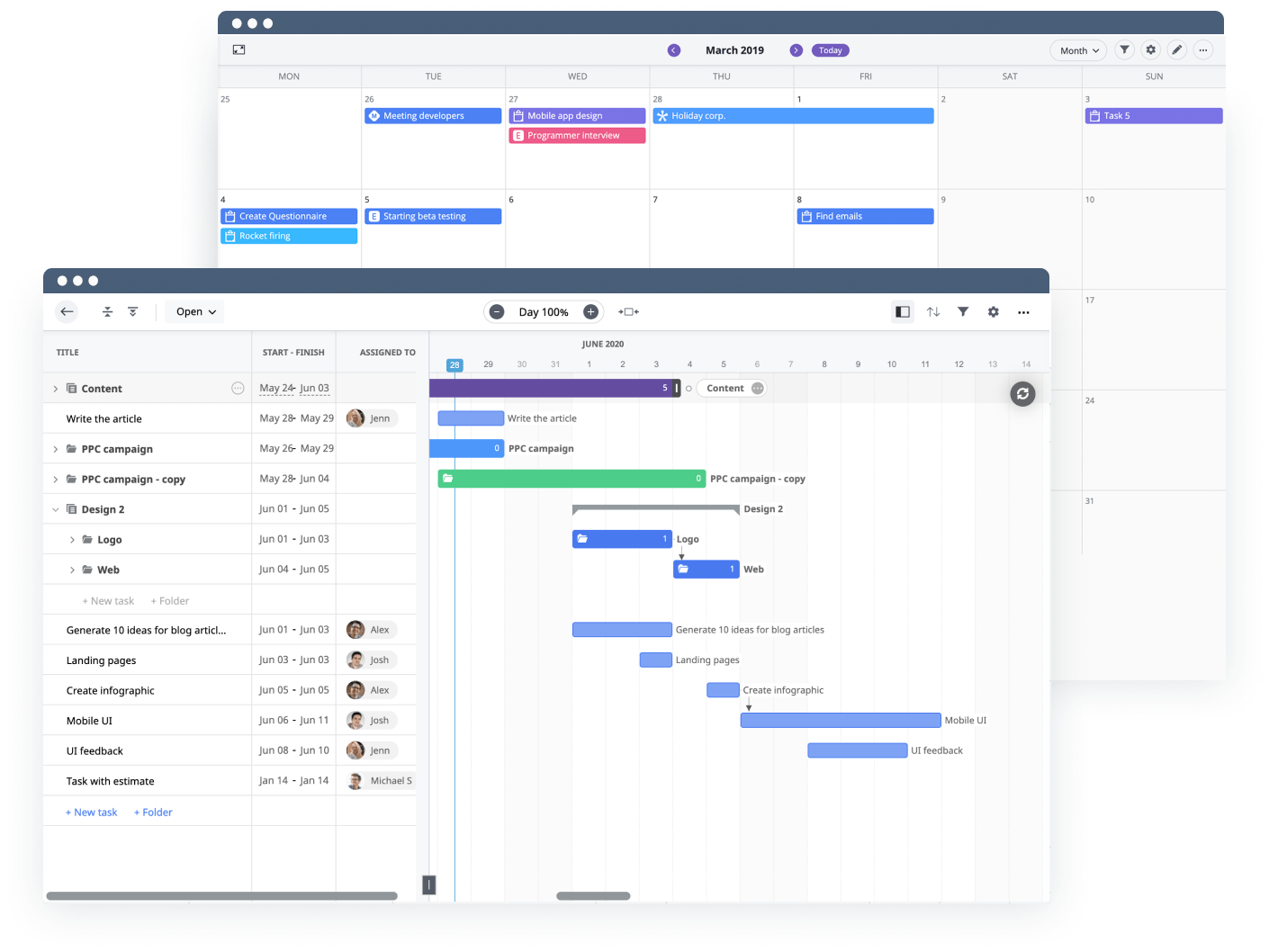
- Use data to set realistic deadlines for tasks, allocate your team’s time more effectively, and foster smoother project execution.
- Enjoy real-time updates on task completion and project milestones. Immediately address any delays and keep your projects on track.
- Get deep insights into the matters of team productivity, performance expenses, and revenues.
Pros:
- Flexible project/task management with multiple views (Kanban, Gantt, list)
- Customizable dashboards and a wide range of features
- Intuitive interface, easy implementation
Cons:
- Mobile apps are lackluster
- Limited integrations and inconsistent customer support
- Some features feel half-baked; security policies on lower tiers raise questions
Best for: teams wanting a flexible, low-cost PM tool with multiple views and time tracking.
Team size: free for 1–15 users, up to 250 on the Professional plan.
Ideal use case: budget-conscious small studios that want an all-in-one PM tool without committing to paid seats right away.
Pricing: Free for 1–15 users; Professional $4/user/month (up to 250 users).
Reviews: G2 4.3/5 (61 reviews)
6. Archicad
Key features:
- Building information modeling (BIM)
- Team collaboration
- App integrations
Our list of the best architect project management software wouldn’t be complete without one of the most powerful tools available to architects today is Archicad, a BIM software developed by Graphisoft.
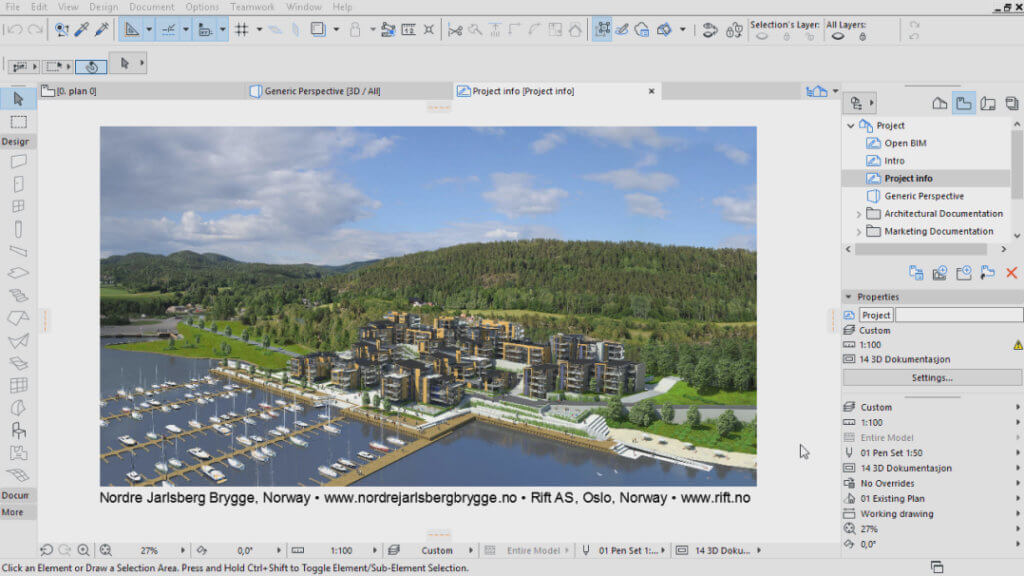
Apart from its modeling features Archicad includes tools for managing project timelines, budgets, and resources that enable teams to clearly set goals and deadlines for each phase of the project and monitor progress against these.
It also automates the generation of project documentation. Document changes made throughout the project lifecycle so that everyone is on the same page. A clear record of modifications helps to minimize the risk of miscommunication and lets clients easily see how their feedback has been incorporated.
Pros:
- One of the most powerful 2D/3D BIM tools available
- Real-time modeling for comprehensive construction documentation
- Automates project documentation and change tracking
Cons:
- Subscription pricing is steep; licensing terms change often with no real upgrade path
- 3D object library is smaller than Revit’s or SketchUp’s
Best for: architecture firms that want a BIM tool with built-in timeline, budget, and documentation management rather than a separate PM system.
Team size: small to mid-size studios (per-seat licensing gets expensive to scale).
Ideal use case: firms already standardized on Archicad as their BIM tool that want built-in timelines, budgets, and auto-generated project documentation without switching systems.
Pricing: from $2,810/seat/year (Archicad Collaborate, includes BIMx and BIMcloud).
Reviews: G2 4.6/5 (288 reviews)
7. Jira
Key features:
- Scrum
- Roadmaps
- Reports
Jira is an agile project management software that has gained global recognition across various industries including architectural firms and independent designers.
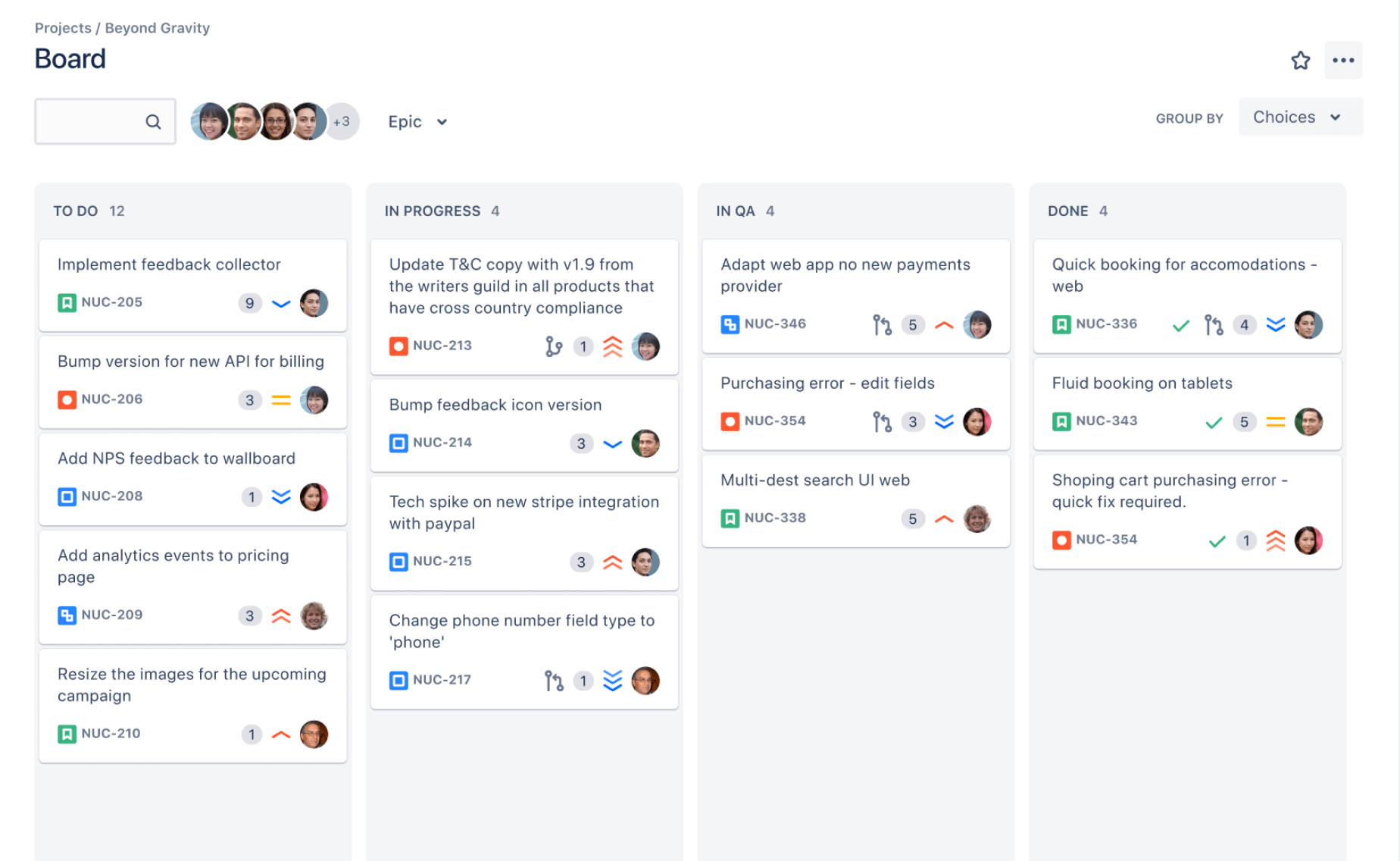
With the roadmap builder, Kanban and Scrum boards, task prioritization capabilities, performance reporting, and integrations, Jira equips architectural teams with all they need to manage projects more effectively.
And the integration with a huge list of other tools which the architects generally use, provides a centralized information hub where all data is stored relating to a certain project to avoid miscommunication and create a streamlined flow of tasks.
Moreover, Jira supports integration with many incredibly useful tools, and you can check some of them in this post.
Pros:
- Flexible, powerful issue tracking with customizable workflows and dashboards
- Built for agile/scrum, strong for sprints and backlogs
- Huge integration ecosystem
Cons:
- Gets complex and hard to maintain as projects grow
- Steep learning curve and overwhelming UI for new users
- Pricing climbs quickly past the free tier
Best for: technical, agile teams that need sprints, backlogs, and issue tracking. Not architecture-specific by design, but common at firms with hybrid design and dev/IT teams.
Team size: free for up to 10 users, scales to large enterprise.
Ideal use case: firms already running Agile/Scrum on adjacent IT or BIM workflows that need roadmaps, Kanban boards, and reporting.
Pricing: Free (up to 10 users); Standard $7.91/user/month; Premium $14.54/user/month.
Reviews: G2 4.3/5; Capterra 4.4/5
8. Newforma
Key features:
- Centralized project management
- Communication
- Document management
This project information management software is created with architects’ needs in mind.
It lets you keep all project documents in one place and share files, drawings and specifications with vital stakeholders safely and quickly. The software also allows real-time updates of information on the project so that all parties involved are up to speed with any changes that may be taking place in the project.
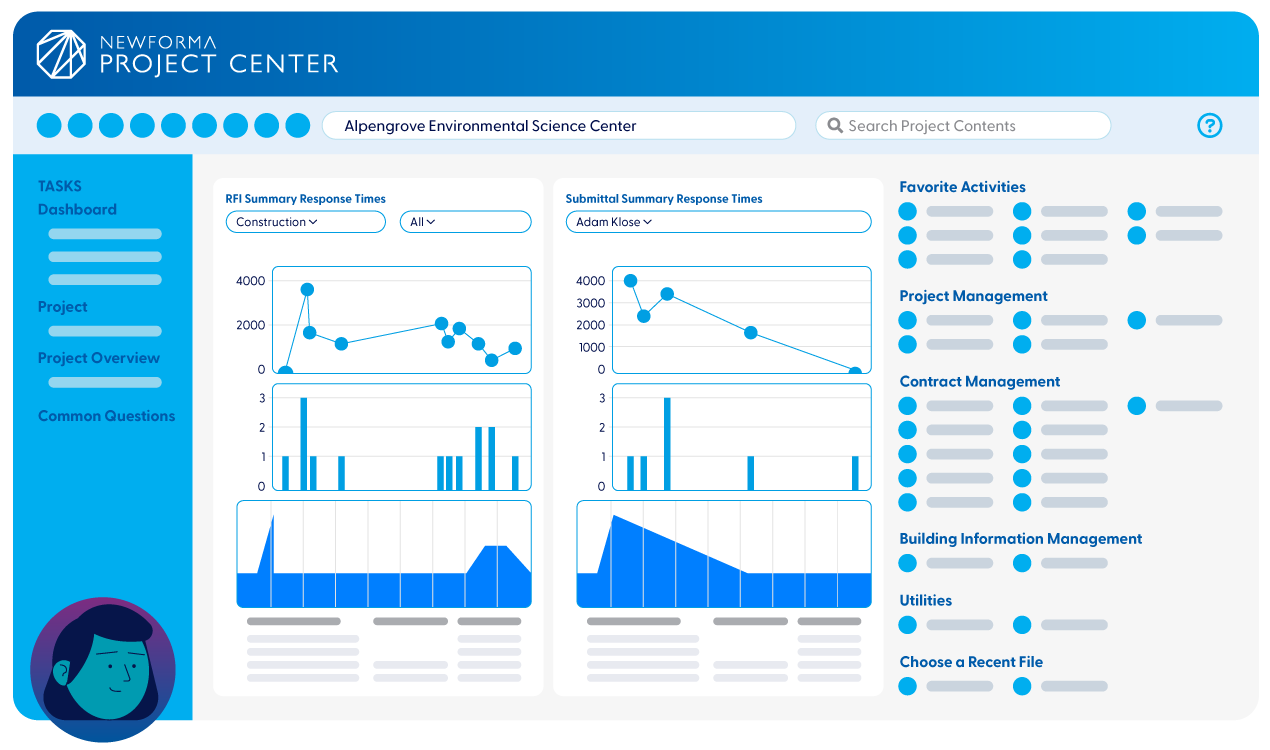
Newforma centralizes project email in one place, so discussions about issues, questions, and decisions stay attached to the project instead of scattered across individual inboxes.
On top of that Newforma provides tools to monitor timelines, budgets, and resource allocation and automates the repetitions of tasks and processes involved in a project, freeing the architect to attend to more critical aspects of the projects.
Pros:
- Makes legal and documentation record-keeping far less painful
- Indexed search across files and correspondence
- Easier to set up and maintain than SharePoint
Cons:
- Can be buggy and slow to fix, especially the Outlook integration
- Server setup is involved; performance depends on network speed
- Lacks strong modules for meeting minutes and pay-apps
Best for: architecture and AEC firms where project documentation matters for legal or compliance reasons: correspondence, file versions, RFIs, submittals.
Team size: mid-size to large firms (per-user licensing gets pricier at scale).
Ideal use case: firms drowning in project email and files that need centralized, indexed search across all project documentation without locking data into a proprietary system.
Pricing: roughly $25–40/user/month for mid-size firms, plus implementation costs from $5,000–50,000.
9. Monograph
Key features:
- Task planning
- Resource management
- Time tracking
Architects must juggle a lot of tasks in order to make their projects successful. Drowning in paperwork is an often-used metaphor to describe the amount of work that goes into project management. But Monograph is here to help make drowning a thing of the past.
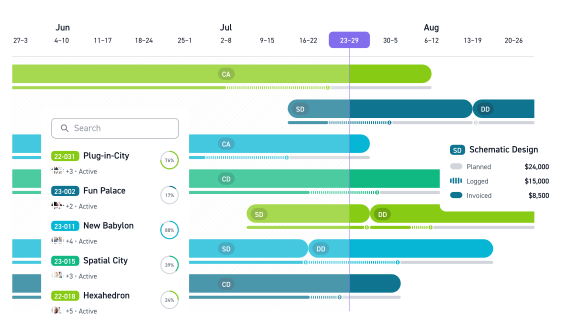
Everything from task allocation to working through budgets can be simplified with Monograph:
- Project reports. Track progress, identify potential issues, and keep stakeholders informed. Get real-time insights that let you boast about how on top of things you really are, while also making it easy to pinpoint areas that need attention.
- Budgeting. With visually engaging budget tracking tools, you can analyze spending patterns, make informed financial decisions, and avoid those pesky overruns.
- Staff allocation. Assign tasks based on your team members’ strengths and availability and rest assured that everyone is engaged and productive.
Pros:
- Real-time budget visibility
- Ease of use that drives actual adoption by project managers
- Clean UI and strong customer support
Cons:
- Priced on the high side compared to other PM tools
- No independent accounting module
- Staffing tool is useful but not easy to deploy
Best for: small architecture firms that want visual clarity on budget and time tracking without a separate accounting system.
Team size: small firms, mostly design and administrative roles (92% of reviewers work in architecture and planning).
Ideal use case: studios that want a live budget-vs-actual-hours view tied directly to time tracking, without adopting a full accounting suite.
Pricing: Track (Basic) $30/user/month ($25 billed annually); Grow (Advanced) $55/user/month ($45 billed annually).
Reviews: G2 4.3/5; Capterra 4.5/5
10. Notion
Key features:
- Roadmaps
- Timelines
- Wikis
Notion helps to manage your projects effortlessly by putting together the full circle of plans and implementations in one space for visibility.
With its streamlined and flexible interface, it’s the perfect place for collaborating on tasks, planning timelines, and syncing shared data among team members.
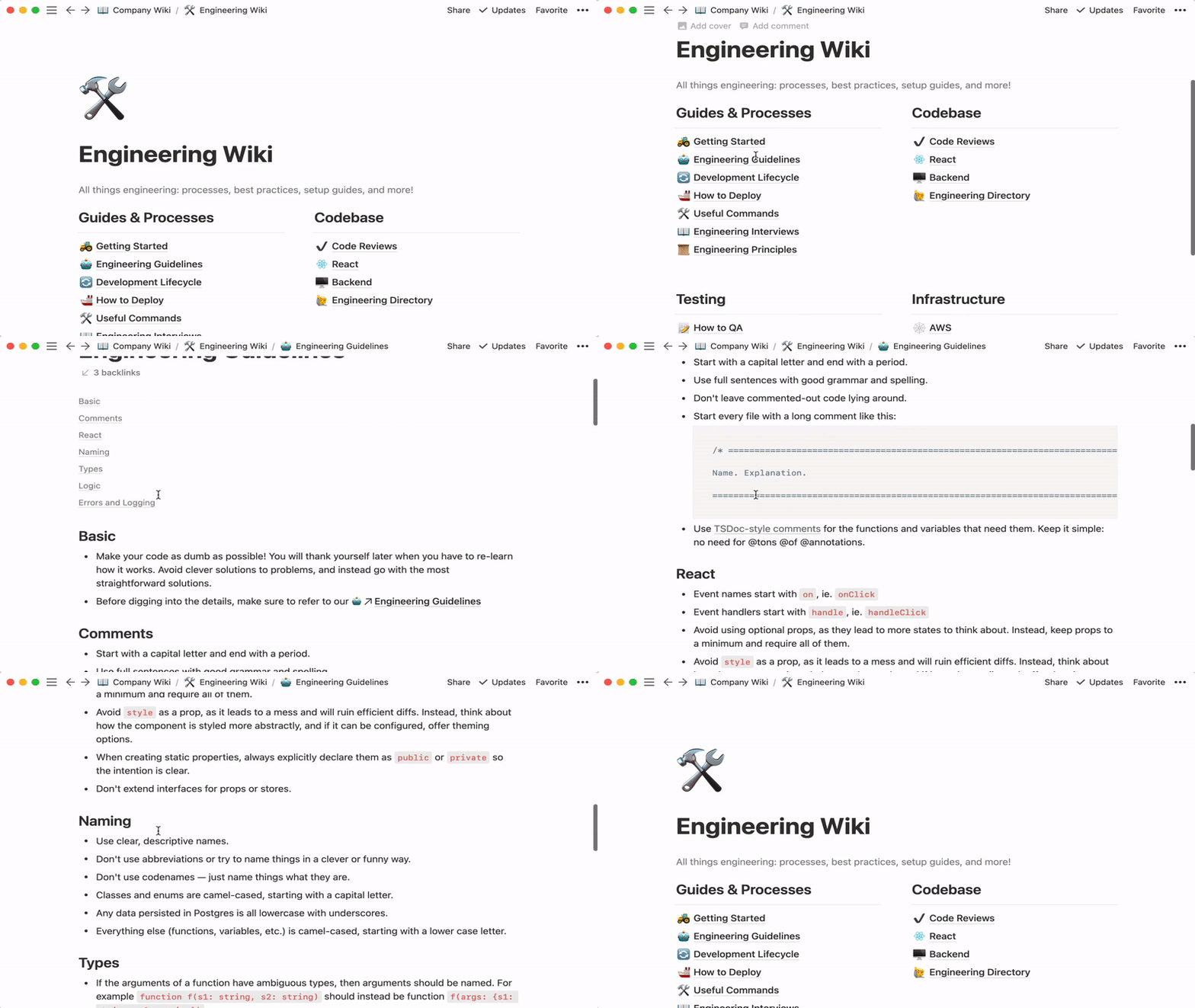
Notion gives you full visibility into progress and allows you to easily customize project workspaces to match your workflow.
Its calendar view presents visualization of project timelines, and team members can easily drag and drop tasks, set due dates, and get an immediate overview of the workload for their colleagues and themselves.
The Kanban-style project boards allow teams to segment tasks into different stages, such as “To Do,” “In Progress,” and “Completed” and watch status updates on project tasks.
Besides that, project workspaces can be tuned up as one’s workflow needs. Whether one prefers structured or free-form styles, Notion can follow the preferences of your team.
Pros:
- Extremely flexible: notes, tasks, documents, and databases in one workspace
- Can double as a wiki, CRM, or editorial calendar
- Strong general usability across very different teams
Cons:
- Performance drops on large databases or heavy pages
- Mobile experience is weaker than desktop
Best for: teams that want a flexible, all-in-one workspace rather than a dedicated PM tool.
Team size: mostly small business, scales to enterprise.
Ideal use case: architecture studios that want documentation, briefs, task tracking, and an internal knowledge base in one customizable space.
Pricing: Free; Plus $10/user/month (billed annually); Business $18–20/user/month.
Reviews: G2/Capterra average ~4.7/5
11. Heeros (aka Taimer)
Key features:
- Scheduling
- Collaboration
- Invoicing
Heeros, also known as Taimer, is a project management tool that takes care of tedious tasks.
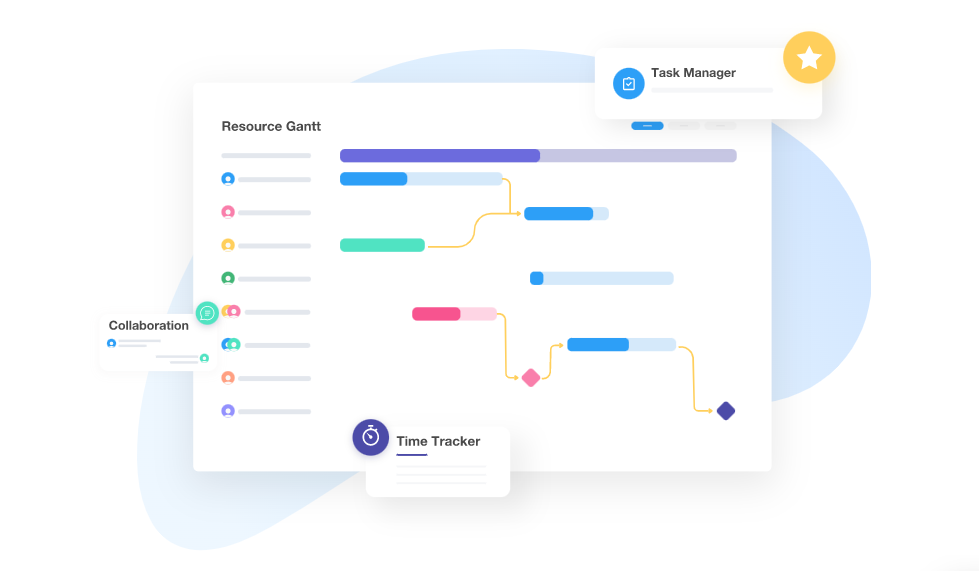
It provides a 360-degree view of client interactions with its integrated CRM system and responds immediately to their queries. Architects can track leads, follow up, and keep the history of projects with detailed information.
This all-around approach to client management secures that nothing is missed in client interactions, communications, and relationships.
It also allows the manager to track workloads to avoid overstaffing or underutilization of resources, log the expenses as they occur and categorize them by projects to derive valuable insights of budget performance.
Pros:
- Clear dashboard overview, easy to use even for small teams
- Mobile app for iOS and Android
- Strong presence among architecture & engineering firms specifically (18% of reviewers)
Cons:
- Limited customization; can’t hide unused features
- Missing some integrations (e.g., banking)
- UI language isn’t always clear
Best for: small services firms (architecture, engineering, consulting) that want a PSA tool combining projects, time, and finances in one system.
Team size: mostly small business (91%), some midsize (9%).
Ideal use case: architecture and engineering firms that want Gantt/Kanban planning together with billing, budgeting, and project-profitability reporting.
Pricing: roughly €20–41/seat/month.
12. ArchiSnapper
Key features:
- Field reports
- Photo annotation
- Punch lists
ArchiSnapper (now Deltek ArchiSnapper) is a field-reporting and punch-list app built for site visits. It turns photos, drawing annotations, and on-site notes into branded PDF reports without the usual after-the-fact formatting work back at the office.
Architects, engineers, and contractors capture observations directly on a tablet or phone during a walkthrough, mark them up on the drawings, and generate a one-click report before leaving the site. The Android app works offline, which matters on job sites with spotty connectivity.
It’s a narrow tool by design, without budget or timeline management, but for firms that run frequent site visits, it removes hours of manual report formatting every week.
Pros:
- Multi-platform access; Android app works offline
- Easy photo integration and consistent report templates
- Saves time in the office (auto-formatting) and in the field (quick notes)
Cons:
- Pricing feels high for a single-purpose tool
- Limited customization (fonts, landscape mode)
- Can be sluggish at times (cloud-based)
Best for: architects, engineers, and contractors who need fast field reports and punch lists straight from the job site.
Team size: small to mid-size firms, from solo architects to teams with regular site visits.
Ideal use case: firms that need to turn site visits (photos, drawing annotations, observations) into branded PDF reports in minutes without manually assembling documents back at the office.
Pricing: from $29/user/month (billed annually) / $34/user/month (monthly).
Reviews: Capterra 4.5/5 (46 reviews)
13. Deltek (Vantagepoint)
Key features:
- Project accounting
- Resource planning
- Financial reporting
Deltek Vantagepoint is project management software for architecture firms and other professional services practices that need centralized financial management alongside project tracking, delivered as a project-based ERP system.
It ties time entry, billing, and resource planning directly to project accounting, giving firm leadership a single source of truth for profitability across every active project instead of reconciling numbers between separate systems.
Deltek’s approach is opinionated: it expects firms to follow fairly standardized delivery and billing structures. That works well for firms whose workflows already match Deltek’s model; firms with more custom or hybrid delivery tend to fight the system instead.
Pros:
- Powerful centralized financial reporting
- Flexible customization for company-specific data across multiple hubs
- Built specifically for project-based professional services firms
Cons:
- “Built for accountants and engineers,” not the average employee or manager, with a cumbersome, rigid interface
- Reports can take a long time to run
- Adapts poorly to non-standard or hybrid delivery models
Best for: mid-size to large AEC firms that need a full ERP system: finances, resourcing, and project accounting in one place.
Team size: mid-size to large firms (implementation is heavy and costly for small studios).
Ideal use case: firms with mature, standardized processes that need centralized financial and project accounting at an ERP level, not a lightweight task tracker.
Pricing: list pricing from ~$30/user/month, but total first-year cost (license, implementation, configuration) commonly runs $50,000–500,000+ for mid-size firms.
Reviews: G2 4.1/5 (493 reviews)
Side-by-side comparison
Here’s the feature set and pricing for all 13 tools, side by side, if you want the full comparison before picking one.
| Tool | Time Tracking | Visual Planning | Resource Management | Budget Management | Mobile App | Starting Price | G2/Capterra Rating | Free Version |
|---|---|---|---|---|---|---|---|---|
| actiTIME | + | + | – | + | + | $6/mo (1–40), $5/mo (41–200) | 4.5 | All features for 1–3 users |
| Outplanr | + | + | + | – | + | $19/month | 4.3 | Trial only |
| BQE Core | + | + | + | + | + | $34.95/user/month | 4.4 | – |
| Projectworks | + | + | + | + | – | $19/user/month | 4.5 | Trial only |
| GoodDay | + | + | + | – | + | $4/user/month | 4.3 | All features for 1–15 users |
| Archicad | + | + | + | + | + | $2,810/seat/year | 4.6 | For students only |
| Jira | + | + | – | + | + | $7.91/user/month | 4.4 | All features for 1–10 users |
| Newforma | – | + | + | + | + | ~$25/user/month | N/A | Trial only |
| Monograph | + | + | + | + | + | $30/user/month | 4.4 | – |
| Notion | + | + | + | + | + | $10/user/month | 4.7 | Limited |
| Heeros | + | + | + | + | + | €20/seat/month | N/A | Trial only |
| ArchiSnapper | – | – | – | – | + | $29/user/month | 4.5 | Trial only |
| Deltek | + | + | + | + | + | $30/user/month | 4.1 | – |
Free options worth trying
If budget is the deciding factor, a handful of tools on this list double as free project management software for architects, at least for very small teams. Here’s what’s actually free to use, not just free to trial:
- actiTIME – free for up to 3 users, full feature set (time tracking, reporting, budgets), nothing gated behind the free tier.
- GoodDay – free for up to 15 users, includes custom workflows, dashboards, and multiple views rather than a stripped-down demo.
- Notion – free plan with unlimited blocks, workable for documentation and light task tracking, though file uploads and version history are capped.
- Jira – free for up to 10 users, full agile feature set, but nothing architecture-specific.
The rest of the list only offers a time-limited trial, not a permanent free tier: Outplanr, BQE Core, Projectworks, Archicad, Newforma, Monograph, Heeros, ArchiSnapper, and Deltek. That’s typical for tools built around billing, resourcing, or BIM. The cost of running them doesn’t scale down to zero the way a general task tracker’s does.
Tips for rolling out new software
Switching tools mid-practice is usually where the value from the list above actually gets lost, more often through a bad rollout than a bad tool choice. A few things make the transition smoother:
- Migrate historical data before you need it, not after. Past project hours, budgets, and client records are what make new reporting useful from day one; bringing them over after go-live means starting comparisons from a blank slate.
- Run the new system alongside the old one for one full project cycle. Switching everything at once on a single date sounds efficient, but tends to break billing and reporting exactly when a project needs both least.
- Get buy-in from whoever actually logs time, not just whoever approved the purchase. A tool the team won’t use consistently produces worse data than no tool at all – getting people to submit timesheets on a new system takes the same habit-building as the old one did.
- Start with one team or one project before rolling out firm-wide. A small pilot surfaces workflow mismatches (a missing project phase, an unsupported billing format) while the stakes are still low.
- Assign one person to own the transition. Without a clear owner, questions about how to log a specific type of work go unanswered, and people quietly revert to spreadsheets.
Conclusion
Finding the best project management software for architects comes down to matching a tool to how your firm actually works, not to what’s most popular. Every architecture project has its own unique characteristics, just like the 13 tools above approach project management in their own way, from lightweight task planners to full architecture-specific PSA platforms.
Hopefully, this list of the best architect project management software has given you some ideas about which one might be best suited for your own venture. Don’t feel overwhelmed by the abundance of choices – take your time and consider all factors carefully so that you make a well-informed decision. After all, only you know what works best for you!
The right choice is the one your team will actually use every day – that’s what turns a project management tool into fewer budget surprises and less time spent chasing status updates.
FAQ
What’s the difference between general project management tools and architecture-specific software?
Management software for architects splits into two rough camps: general tools and architecture-specific platforms. Jira, Notion, and GoodDay fall into the first camp: built to manage tasks and workflows for any kind of team. They’re flexible, but they don’t know anything about architecture-specific concerns like project phases, billable hours, or construction documentation. Architecture-specific tools like Monograph, BQE Core, Deltek, and Archicad build those concepts in directly: project profitability by phase, AIA-style billing formats, drawing-linked punch lists. Many firms end up running both, a general tool for internal task tracking and a specialized tool for financials and client-facing project data.
What should I look for in project management software for architects?
Good architectural project management software covers the basics first: time tracking tied to project budgets, visual planning (Gantt or Kanban), resource management, and mobile access for site visits. Beyond that, prioritize based on your firm’s actual pain point. If budget overruns are the issue, weight budgeting and reporting features heavily; if documentation chaos is the issue, prioritize centralized file and document management like Newforma offers.