
Open source time tracking software is a time tracker whose source code is published under a licence that lets you run, study, change and share it. In practice that means you can install it on your own server for no licence fee and keep every timesheet in your own database. What it does not mean is free: someone still pays for the server, the updates and the backups, and several projects keep the features businesses need most in paid plugins or paid editions.
We checked every tool below at its source: the licence file in its repository, the date of its latest release, and the hosted price on the vendor’s own pricing page. Projects with no release in years or a discontinued free edition were dropped, and the reasons are in the table. The short answer: Kimai is the most complete open source time tracker for teams that bill clients, solidtime is the most modern, and OpenProject or Redmine make sense when time logging has to live inside project management.
- Licence, hosting and latest release at a glance
- What the licence allows
- Team time trackers you can host yourself
- Project management tools with time logging
- Personal trackers and open source time clocks
- Billing features in the free editions
- The real cost of running open source time tracking
- Where open source time tracking goes wrong
- An option that is not open source: actiTIME
- Which one to pick
- FAQ
- Conclusion
Licence, hosting and latest release at a glance
The licence comes from each project’s own LICENSE file on GitHub, and the release is the latest tagged version in 2026 unless noted. The last three rows are projects you will still find in older lists of open source time tracking tools, and the reason they are not in this one.
| Tool | Licence | Hosting and latest release |
|---|---|---|
| Kimai | AGPL 3.0 | Self host or Kimai Cloud; version 2.72.0 (2026) |
| solidtime | AGPL 3.0 | Self host or solidtime Cloud; version 0.22.1 (2026) |
| Titra | AGPL 3.0 | Self host or a private hosted instance; version 1.2.0 (2026) |
| Traggo | GPL 3.0 | Self host only; version 0.8.3 (2026) |
| Redmine | GPL 2.0 or later | Self host; version 7.0.3 (2026) |
| OpenProject | GPL 3.0 | Self host or OpenProject cloud; version 17.9.7 (2026) |
| Leantime | AGPL 3.0 | Self host or Leantime cloud; version 3.15.3 (2026) |
| TimeTagger | GPL 3.0 | Self host or hosted subscription; version 26.1.3 (2026) |
| Kapow | GPL 3.0 | Desktop app for Windows and Linux; version 1.7.1 (2026) |
| TimeTrex Community Edition | AGPL 3.0 | Dropped: discontinued by the vendor in 2024, no more updates or security patches |
| Anuko Time Tracker | SSPL (source available, not open source) | Dropped: last code change in its repository was in 2023 |
| Cattr | SSPL (source available, not open source) | Active, version 4.4.0 (2026), but left out for its licence and its screenshot monitoring |
What the licence allows
Every licence in the table lets a business run open source time tracking software internally for free. The differences show up when you change the code or offer the tool to others.
- GPL (Traggo, Redmine, OpenProject, TimeTagger, Kapow): if you distribute a modified version, you share the source under the same licence. Running it on your own server for your own staff is not distribution.
- AGPL (Kimai, solidtime, Titra, Leantime): the same, plus one extra trigger. If you modify the code and let people use it over a network, for example clients logging in to a customer portal, you must offer them the modified source. An unmodified install carries no such duty.
- SSPL (Cattr, Anuko): the source is public, but the Open Source Initiative does not treat the SSPL as an open source licence. If your procurement rules say “open source”, check with whoever signs off on licences before you pick one of these.
Team time trackers you can host yourself
Each open source time tracking tool in this group is built for one job: recording hours against customers, projects and activities, then turning them into reports and, in some cases, invoices.
1. Kimai
- Rates and budgets
- Invoices
- Punch in mode
- JSON API
Kimai is the open source time tracking software most teams end up with when hours turn into invoices. It organizes work as customers, projects and activities, and its repository lists user, customer and project specific rates, money and time budgets, invoicing, data exports, a JSON API and both a multi timer and a punch in and punch out mode. Records that have been exported are locked so nobody edits time that was already billed, and a project can lock its times up to a chosen date, which the timesheet documentation describes.
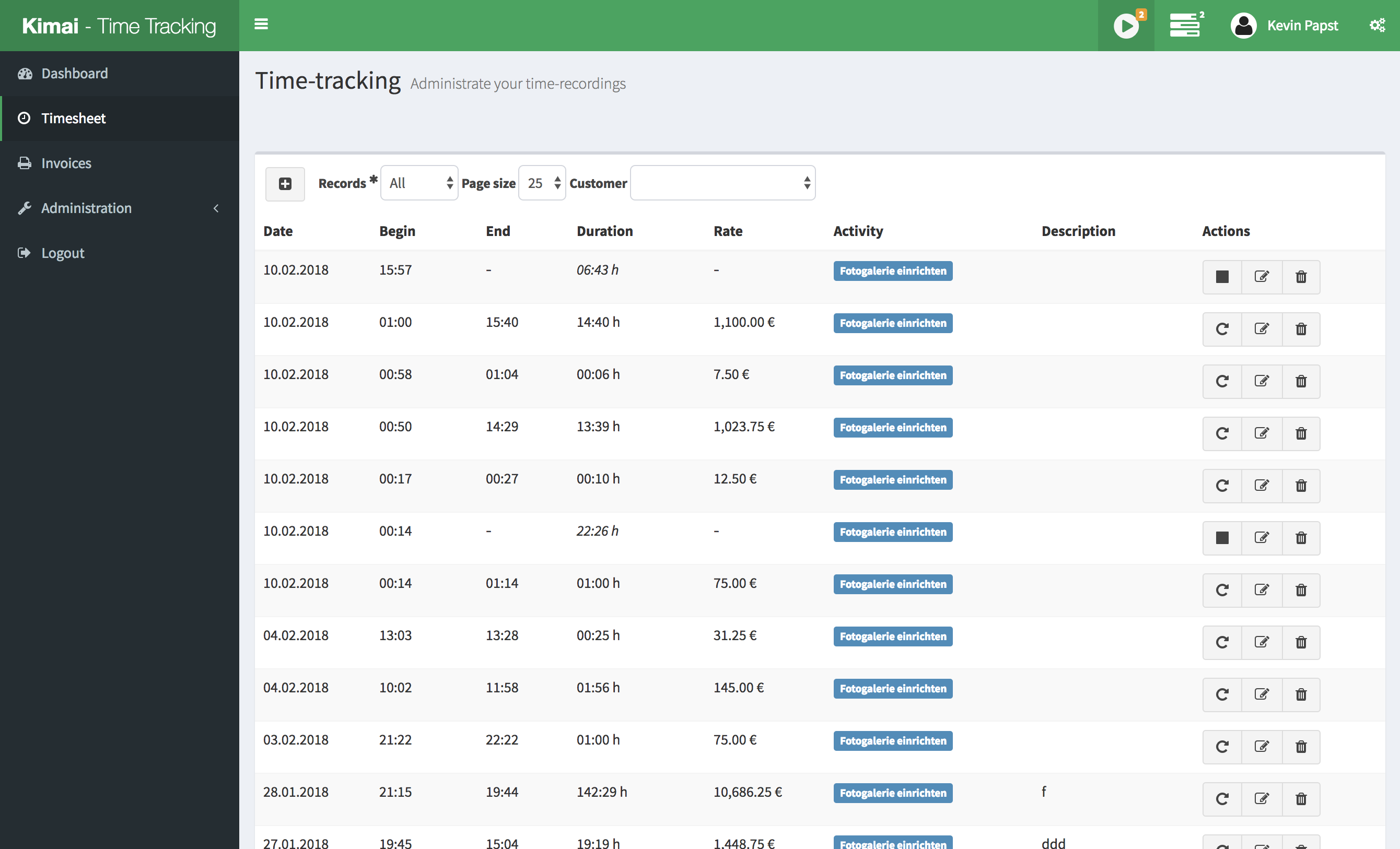
Where you need to look closely is the line between the free core and the paid extras. Working hour accounts with vacation, sickness and public holidays are sold as a plugin listed at €299 in the Kimai store, expenses and custom fields at €99 each, and a kiosk mode for badge or RFID clocking at €199. If you only need project hours and invoices, the core covers it. If you need attendance records too, budget for plugins or for the hosted edition, which bundles them.
Best for: agencies and consultancies with someone who can run a PHP application.
Hosted price: Kimai Cloud Standard costs €3.99 per user per month, Professional €4.99, both less with yearly billing (pricing).
2. solidtime
- Modern interface
- Billable rates
- Toggl import
- Desktop app
solidtime is the newest serious project here and it shows in the interface, which feels closer to a commercial tracker than anything else on this list. Its repository lists clients, projects and tasks, roles and permissions, billable rates set for projects, project members, organization members and organizations, and imports from Toggl, Clockify and CSV, so moving off a hosted tracker takes an afternoon. You get both a calendar and a timesheet view, and a desktop app that adds automatic activity tracking.
Check the edition before you plan around invoices. The on premise pricing page shows that the free open source edition does not include invoicing or the audit log; both need a Business licence that starts at €49 per year. On the cloud side, the free Solo edition is for one user and leaves out billable rates, invoicing and estimates, which come with Professional.
Best for: freelancers and small agencies moving off Toggl or Clockify who want a familiar interface on their own server.
Hosted price: free for one user; Professional €9 per user per month, or €8 billed yearly (pricing).
3. Titra
- Project time
- Absence projects
- GitLab and Wekan input
- Exports
Titra is aimed at freelancers, small businesses and teams who want project time and attendance in one place. Besides project hours it supports absence projects, so vacation and sick days can sit in the same records, and it shows results as charts and tables in real time with exports for further processing. Its out of the box connectors pull work in from Zammad, Wekan, GitLab and Excel, and send data out to Siwapp for invoicing, which is how Titra handles billing: it hands the hours to an invoicing tool rather than creating invoices itself.
The repository is busy, with version 1.2.0 tagged in 2026. The project’s own website is in German, so English speaking teams will lean on the GitHub documentation. Entry is quick thanks to autocomplete, but billing rates and invoices are not features the project publishes, so you need Siwapp or another tool for that part.
Best for: small teams in German speaking countries, or anyone already running Wekan, Zammad or Siwapp.
Hosted price: a private hosted instance costs €50 per month; the software itself is free.
4. Traggo
- Tags only
- Dashboards
- Calendar view
- Single binary
Traggo takes a different approach: there are no projects or tasks, only time spans with tags. You decide whether a tag means a client, a project, a type of work or something else. The project describes its feature set plainly as easy setup, customizable dashboards with diagrams, a list and calendar view of tracked time, a web interface with themes and simple user management. It is written in Go and ships as a single binary or a Docker image, so it runs comfortably on very small hardware.
For a team, that freedom cuts the other way. Nothing stops one person tagging “client:acme” and another “acme”, so reports are only as clean as your tagging discipline, and there are no rates, invoices or approvals. Development is slower than the projects above, with version 0.8.3 the latest release in its repository.
Best for: individuals and very small teams who want a lightweight tracker on a home server or a small VPS.
Hosted price: none; self hosting only.
Project management tools with time logging
If your team already lives in an issue tracker, a separate timer means double entry. These three log time directly against the work item.
5. Redmine
- Spent time on issues
- Activities
- Commit logging
- Time reports
Redmine is one of the oldest open source project trackers still in active development, with version 7.0.3 tagged in 2026. Time tracking is built in. According to the Redmine time tracking guide, you log time on an issue from its detail view, while updating it, or at project level by leaving the issue empty. Each entry is categorized by activity with an optional comment, and developers can log spent time straight from a commit message that references an issue. Spent time details and a spent time report then total the hours for the project.
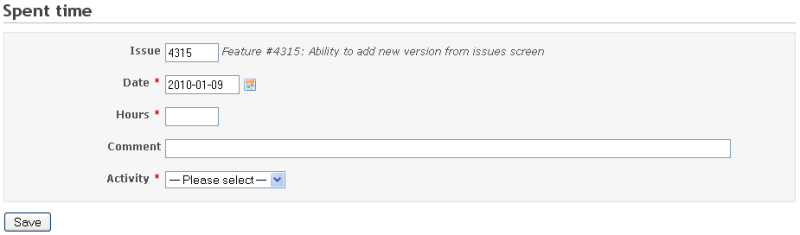
What Redmine lacks is money. The core has no billing rates, cost rates or invoices, and the guide only notes that time entries can be used to count a user’s billable hours. Teams that bill clients either export spent time and price it elsewhere or add community plugins, which then become another thing to keep compatible at each upgrade.
Best for: engineering and IT teams that already run Redmine and want hours next to the tickets.
Hosted price: the project itself does not sell hosting.
6. OpenProject
- Hourly rates
- Cost reports
- Budgets
- Calendar logging
OpenProject goes further than Redmine on money. Its time tracking features let people log time on work packages or on a My time tracking page with a calendar view where entries can be dragged between days. Admins set hourly rates per project member with a rate history, so labour costs are calculated from the rate valid on the day, and unit costs can be logged next to hours. Cost reports filter and group both, and project budgets compare actual labour and unit costs against what was budgeted.
The trade off is weight. OpenProject is a full project management suite with Gantt charts, boards and portfolios, so it is a bigger install than a dedicated tracker. Some controls, such as organization wide limits on daily hours and blocking entries in past months, are Enterprise features rather than part of the free Community edition.
Best for: organizations that need project costing next to delivery and are happy to run a larger system.
Hosted price: Community is free; Enterprise starts at $7.25 per user per month with a 25 user minimum (pricing).
7. Leantime
- Timesheets
- Goals and milestones
- Per project roles
- Docker image
Leantime describes itself as project management for people who are not project managers, and its design leans toward clarity over configuration. Time tracking and timesheets sit next to tasks with unlimited subtasks and dependencies, goals and metrics, idea boards and per project permissions. That makes it a reasonable choice when the main question is “how long did this task take” rather than “what do we invoice”.
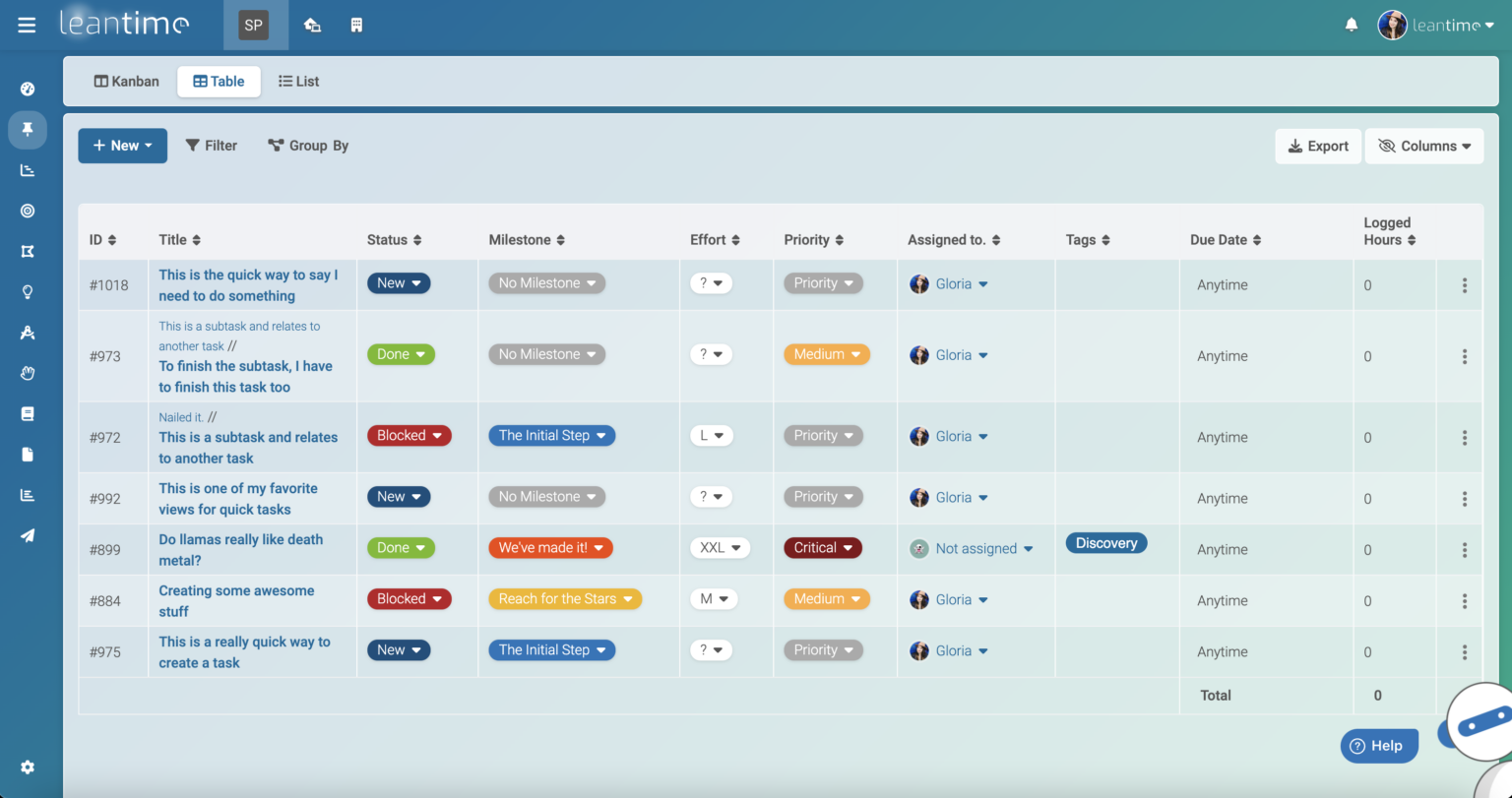
The repository is very active, with a release in 2026, and lists the requirements plainly: PHP 8.2 or newer and MySQL 8.0 or MariaDB 10.6, or the official Docker image. Billing rates and invoicing are not part of what the project publishes, so client billing needs another tool.
Best for: small teams that want lightweight task management with hours attached.
Hosted price: the Community edition is free to self host; the cloud version costs $10 per user per month, or $8 billed yearly (pricing).
Personal trackers and open source time clocks
Searches for an open source time clock or an open source punch clock usually come from one of two places: a freelancer who wants to clock in and out of client work, or an employer who has to record working hours. The two tools below serve the first group. For the second, the choice narrowed when TimeTrex stopped its free Community Edition in 2024, which leaves Kimai’s punch in mode, plus its paid kiosk plugin for badges, as the main open source route.
Employers on both sides of the Atlantic are expected to keep a working time record. In the EU, the Court of Justice ruled in case C-55/18 that employers must set up a system to measure each worker’s daily working time. In the US, DOL Fact Sheet 21 requires records of hours worked each day and each workweek for nonexempt staff, and lets employers use any timekeeping method as long as it is complete and accurate. A self hosted tool can satisfy either rule, provided the records are backed up and cannot quietly disappear.
8. TimeTagger
- Interactive timeline
- Tags
- PDF reports
- Pomodoro
TimeTagger is built around an interactive timeline: you see the day as blocks you can stretch, move and tag, which makes it easy to spot the gap between lunch and the afternoon call that never got logged. Like Traggo it uses tags rather than projects. Reports come out as PDF to bill clients or as a spreadsheet export, and there is an experimental Pomodoro timer and a command line client.
The project is aimed at individuals and freelancers. Its repository explains that it runs in single user mode on your own machine out of the box, that Docker images are provided for a server, and that multiple users need credentials set in the configuration. Teams that want several subscriptions on the hosted service are asked to contact the developer, which tells you it is maintained by one developer and built for individuals first.
Best for: freelancers who think in time blocks and bill from PDF reports.
Hosted price: €3 per month, or €144 once; self hosting is free.
9. Kapow
- Punch clock
- Several projects
- Billed checkbox
- Portable app
Kapow is a desktop punch clock for one person, and its appeal is how little it asks of you. You clock in and out with a Start and Stop button, keep separate projects, and double click any session to fix a mistake. Its most useful touch for freelancers is a Billed checkbox: tick it on the last session you invoiced, and the totals show only the work done since then, so you always know what you have not yet charged.
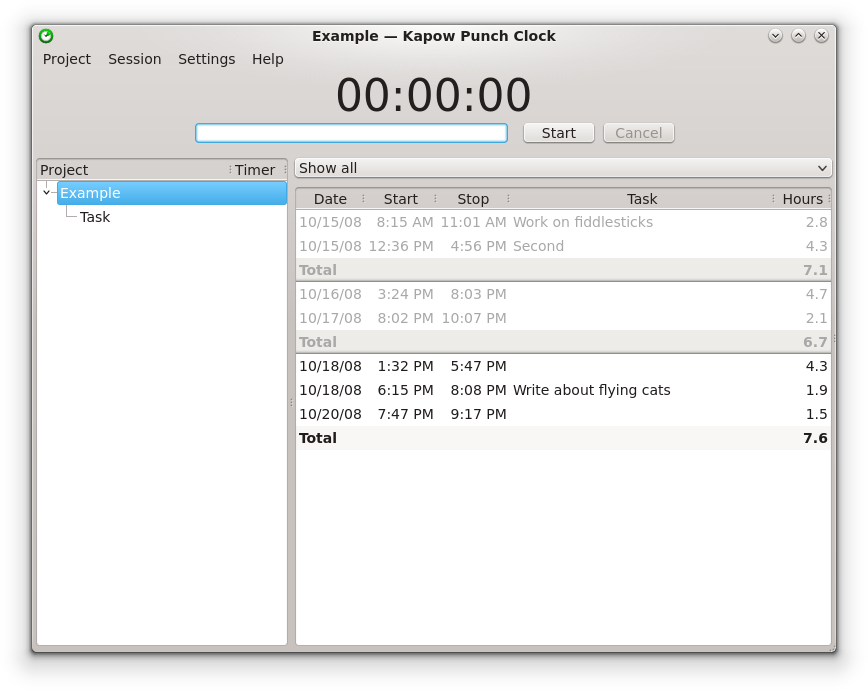
There is nothing to host. Kapow downloads for Windows, including a portable version, and for Linux, with an Ubuntu package. It is released under GPL 3.0, and version 1.7.1 came out in 2026, so it is still maintained. It has no sync between devices, no team features and no reporting beyond totals, so it suits a single laptop and nothing more.
Best for: a freelancer who wants an open source punch clock with no server, no account and no learning curve.
Hosted price: none; free download.
Looking for automatic or command line trackers? ActivityWatch, Super Productivity and Timewarrior are open source too, and we cover them in our guide to Linux time tracking software. Coding activity trackers are in our list of time tracking software for developers.
Billing features in the free editions
Most teams look for an open source timesheet or open source time tracker because the hours end up on an invoice or a cost report. This is where the free editions differ most, and where the paid extras start.
| Tool | Rates and invoices in the free edition | What paying adds |
|---|---|---|
| Kimai | User, customer and project rates, budgets and invoices in the core | Working hours and leave plugin €299; expenses €99; custom fields €99 |
| solidtime | Billable rates; no invoicing in the free self hosted edition | Invoicing with a Business licence from €49 per year |
| Titra | Not published; hours go to Siwapp for invoicing | Private hosted instance €50 per month |
| Traggo | No rates or invoices | No paid edition |
| Redmine | Spent time by activity; no rates or invoices in the core | No paid edition from the project |
| OpenProject | Hourly rates per member, cost reports and budgets | Enterprise editions from $7.25 per user per month, 25 user minimum |
| Leantime | Timesheets; rates and invoices not published | Cloud hosting from $8 per user per month billed yearly |
| TimeTagger | No rates; PDF reports for billing | Hosted service €3 per month |
| Kapow | Billed checkbox to count hours since the last invoice | No paid edition |
Only Kimai and OpenProject turn hours into money without extra tools in their free editions, and only Kimai produces invoices. If billing is the reason you are tracking time, that shortlist is two names long.
The real cost of running open source time tracking
The licence for open source time tracking software costs nothing. Running it does: a server, a few hours to install it, a few hours every month to apply updates and check that backups restore, and any paid plugins the free core leaves out. The clearest way to see the difference is to price the same open source project two ways, self hosted and in its own vendor’s cloud.
Take a 15 person consultancy in the EU that needs project hours, invoices and working time records with vacation. With Kimai that means the core plus the working hours plugin when self hosted, or Kimai Cloud Professional, which includes it. The plugin and cloud prices come from Kimai’s own pages. The server price, the hours and the €60 hourly cost of whoever does the admin work are illustrative assumptions, so swap in your own.
In year two the installation is behind you, so self hosting drops to €120 + €1,440 = €1,560, still more than twice the cloud bill. Three inputs move the answer:
- Admin time. Self hosting only matches the cloud in year two if upkeep falls to about 10 hours a year: (€718.20 − €120) ÷ €60 ≈ 10 hours, or under an hour a month.
- Team size. Server and admin costs barely grow with users while the cloud bill does. At €1,560 a year, self hosting wins from about 33 users: €1,560 ÷ (€3.99 × 12) ≈ 32.6.
- What “admin time” really costs. If a developer who bills clients at €100 an hour does the updates, every hour spent patching is €100 of lost billing, not €60 of salary.
The general SaaS versus on premise decision, worked over three years with server and admin costs, is in our guide to self hosted time tracking costs. For open source the lesson is simpler: the licence is the smallest line in the sum.


Where open source time tracking goes wrong
Most of these problems appear months after installation, when something changes. We found each of them while checking the projects above.
-
The free edition ends.
TimeTrex discontinued its free on site Community Edition in 2024. The announcement said existing installs would keep working but get no more updates or security patches, and that downloads would be phased out. Teams with years of attendance data had to migrate or run unpatched software. Before you commit, check who funds the project and whether it has a paid edition that could absorb the free one.
-
The feature you need is a paid extra.
Kimai’s working hours and leave, solidtime’s invoicing, OpenProject’s time entry limits: all are outside the free code. That is a fair way to fund development, but it means the “free” comparison only holds if the free core covers your actual workflow. List the three reports you need on day one and confirm each is in the open source edition.
-
Backups exist but have never been restored.
A familiar complaint from users of desktop trackers is a crash that took every entry with it, on a machine where a backup was planned but never set up. Time data is payroll and billing evidence. Schedule a restore test to a spare machine every quarter, and count it in the admin hours above.
-
Skipped updates turn into a migration.
Active projects release often; Kimai alone has tagged dozens of 2.x versions. Skip a year of releases and the next update can involve database changes, PHP upgrades and plugins that no longer load. Small, regular updates cost less than one big catch up.
-
The licence was never read.
Cattr and Anuko are often listed as open source but use the SSPL. AGPL tools are fine to run internally, but a modified version exposed to clients through a portal brings source sharing duties. Reading the LICENSE file takes ten minutes and saves a harder conversation with your legal team later.
-
Tracking too finely.
Project managers who have run minute by minute timers describe lower accuracy and lower trust, because people round, guess and resent the clock. Fifteen minute or half hour increments against tasks give better data. Logging hours against tasks with an estimate beside each one also answers the “are people working” question without screenshots, which is one reason we left Cattr out.
An option that is not open source: actiTIME
10. actiTIME
- Billing rates
- PDF invoices
- Cost and budgets
- Approvals
actiTIME is not open source: you cannot read or change its code. It is here for readers whose real goal behind “open source” is owning their data without maintaining a codebase. People log time on a weekly timesheet, a calendar view, the mobile app or the Chrome extension, against customers, projects and tasks. Managers approve timesheets and lock periods after invoicing.
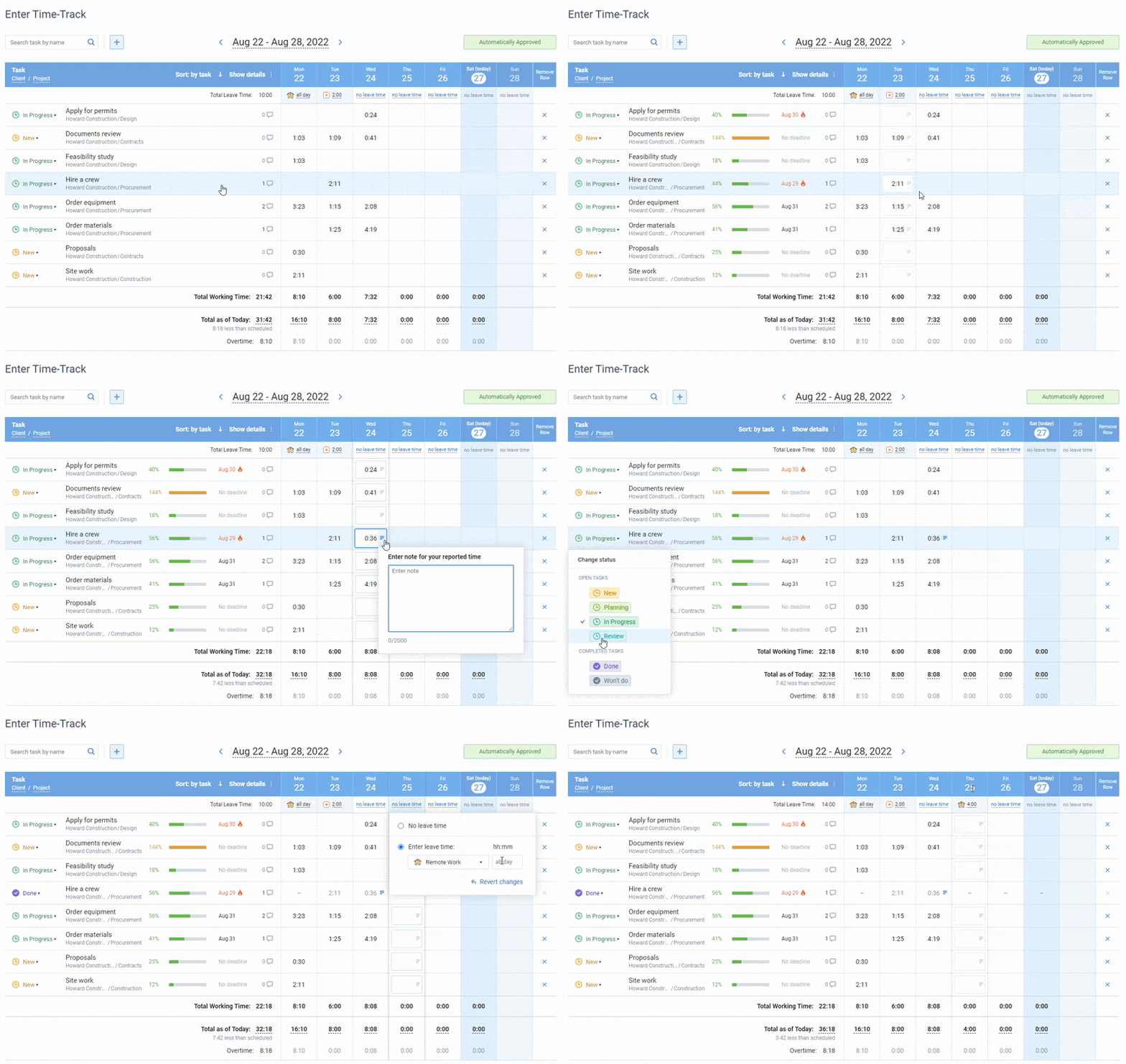
The difference from the tools above is that billing is built in rather than added. Each project bills either by type of work rates or by individual user rates with effective dates, and the Billing Summary report and PDF invoices follow that choice. Cost of work rates per person feed the Cost of Work report, and cost, billing and time budgets turn red when exceeded. The Profit/Loss report compares billable amounts with costs by customer or project, and the Estimated vs. Actual Time report shows where tasks overran. If you need the data on your own hardware, actiTIME Self-Hosted installs on your own server for a one time $120 per user.
Limitation: it is a closed product, so you cannot patch it yourself or fork it if the vendor changes direction.
Pricing: free for up to 3 users; cloud from $5 per user per month; Self-Hosted $120 per user, one time; 30 day free trial.

actiTIME enables us to balance workload better
I found in actiTIME all the requirements I was looking for. We are getting a lot of benefits – the tool enables us to better balance workload, have a constant view of what people are doing. I really recommend it, I evaluated a lot of tools, also had an in-house development before which demanded a lot of maintenance, and actiTIME solved all problems with no hassle.
Which one to pick
- You bill clients and can run a PHP app: Kimai. It is the only open source tool here with rates, budgets and invoices in the free core.
- You are leaving Toggl or Clockify and want a similar feel: solidtime, and budget for the Business licence if you need invoices.
- You need project costing inside a project management suite: OpenProject.
- Your team lives in Redmine already: keep Redmine’s spent time and export it for billing.
- You are a freelancer with one laptop: Kapow for a punch clock, TimeTagger if you prefer a timeline.
- You want a tiny self hosted tracker for a home lab: Traggo.
- You want your own data and built in billing but no code to maintain: actiTIME, in the cloud or Self-Hosted.
FAQ
Can a business use AGPL time tracking software for free?
Yes. Running an unmodified AGPL tool such as Kimai or solidtime for your own staff, on your own server, costs nothing and creates no obligation to publish anything. The duty to share source only applies if you modify the code and let outside users interact with that modified version over a network.
How do I get my data out if an open source project is abandoned?
Because you hold the database, the data is never locked away, but it may be in a schema no other tool reads. Export to CSV regularly, not only when the project is in trouble, and check that the export includes users, projects, dates and rates. solidtime’s importer accepts Toggl, Clockify and generic CSV files, which gives you an idea of the format a future tool will expect.
Is an open source time clock enough for working time records?
It can be. Neither the EU ruling in case C-55/18 nor the US recordkeeping rules require a particular product, only a complete and accurate record of daily hours. What auditors and courts care about is that entries cannot be silently changed after the fact and that the data survives, so pair any open source time clock with locked periods and tested backups.
Conclusion
Open source time tracking software gives you the code and the data, and in exchange you take on the server, the updates and the licence reading. For teams that bill clients, Kimai is the strongest choice, with OpenProject close behind when costing has to sit inside project management. For individuals, Kapow and TimeTagger do one thing well and need almost no upkeep.
If the appeal of open source was really control over your data and a predictable cost, and you would rather not maintain a server, start a free trial of actiTIME with full features for 30 days. After the trial, teams of up to 3 users can keep using it for free.