
For any business that charges for its time, billable hours are the difference between the work you do and the money you make. Track them well and you invoice accurately, spot your most profitable work, and get paid for every hour you earn. Track them poorly and revenue quietly leaks away in hours nobody recorded.
This guide covers billable hours end to end: what they are, how they differ from nonbillable and unassigned time, how to measure how well your team uses them, and the exact steps to track them accurately.
What are billable hours
Billable hours are the hours you spend on work a client pays for. They are tied to a specific client project and convert directly into revenue when you invoice. Any time that does not relate to paid client work, however necessary, is not billable.
The line is clearest in service fields that bill by the hour, such as law, consulting, accounting, and advertising. A lawyer’s billable hours include meeting clients, preparing documents, and appearing in court. The same lawyer’s nonbillable time covers answering internal email, bookkeeping, and firm meetings. Both matter, but only the first kind can be invoiced, which is why keeping them separate is the foundation of getting paid correctly.
Billable, nonbillable, and unassigned time
Work time splits into three parts, and understanding all three is what turns a timesheet into a profitability tool.
| Type | What it is | Examples |
|---|---|---|
| Billable time | Work tied to a client project that brings in revenue | Client meetings, project delivery, billable research |
| Nonbillable time | Necessary work that a client is not charged for; part of operating cost | Admin, internal meetings, bookkeeping, training |
| Unassigned time | Hours that are neither billable nor nonbillable, often idle or waiting | Waiting for a task assignment, downtime between projects |
Recording all three gives you the full picture. Billable time shows revenue, nonbillable time shows the real cost of running the work, and unassigned time reveals organizational gaps worth fixing. Leaving any of them out, especially small billable tasks like sorting a client inbox or doing research, quietly distorts how profitable your projects actually look.
Some tasks sit in a gray area. Project coordination, a brief status update, or a standup tied to a client’s work might count as billable under one contract and not under another. When time does not clearly belong to one category, agree with the client upfront on what counts, rather than deciding it after the invoice goes out.
How to measure billable time use: the utilization rate
The single most useful number here is the utilization rate: the share of total work time that is billable. It tells you how much of what you pay for actually earns revenue, and tracking it over time is the most common way to improve profitability from billable work.
The formula is simple:
There is no single correct target, since a realistic rate depends on the role and industry, but comparing the figure across people and periods matters more than hitting someone else’s number. As a rough anchor, agencies and consultancies often aim for 75 to 85 percent utilization, and freelancers commonly target 70 percent or higher. A rate that drifts down over time points to rising admin load or idle time, while a very high rate can signal burnout risk or too little investment in nonbillable work like business development. The goal is a healthy, sustainable balance, not 100 percent.
How to track your billable hours
Accurate billable tracking is a process, not a single action. These six steps set it up so the hours turn cleanly into invoices.
1. Set your billing rates
Your billing rate should reflect the value you deliver while staying competitive. Research what others in your field charge, factor in your experience and qualifications, and make sure the rate covers your costs and still leaves a profit. Rates that are too low lose money; rates set without research lose clients.
A quick way to get a starting number is to reverse engineer it from your income goal:
Treat this as a starting point rather than a final number, then adjust it against what your market actually pays.
2. Decide how often you invoice
Invoicing frequency is a balance between healthy cash flow and not overwhelming clients. Align it with your own cash needs, agree it with the client upfront, and adjust if payments run late. Weekly or biweekly suits ongoing costs; monthly suits clients used to that rhythm.
3. Plan out the project tasks
Break the project into clear tasks with deliverables and time estimates before the work starts. A planned project gives you something to track hours against, a firmer timeline to share with clients, and fewer surprises once the billable clock is running.
4. Keep a time log
A time log records billable hours against specific tasks. It can be paper or a spreadsheet, but dedicated software is far more reliable, especially across a team. See our comparison of digital vs paper timesheets for the full picture. With actiTIME you set billing rates by type of work so billable amounts calculate automatically, track time against specific projects and tasks, and cut the manual entry that introduces errors.
5. Analyze your time logs
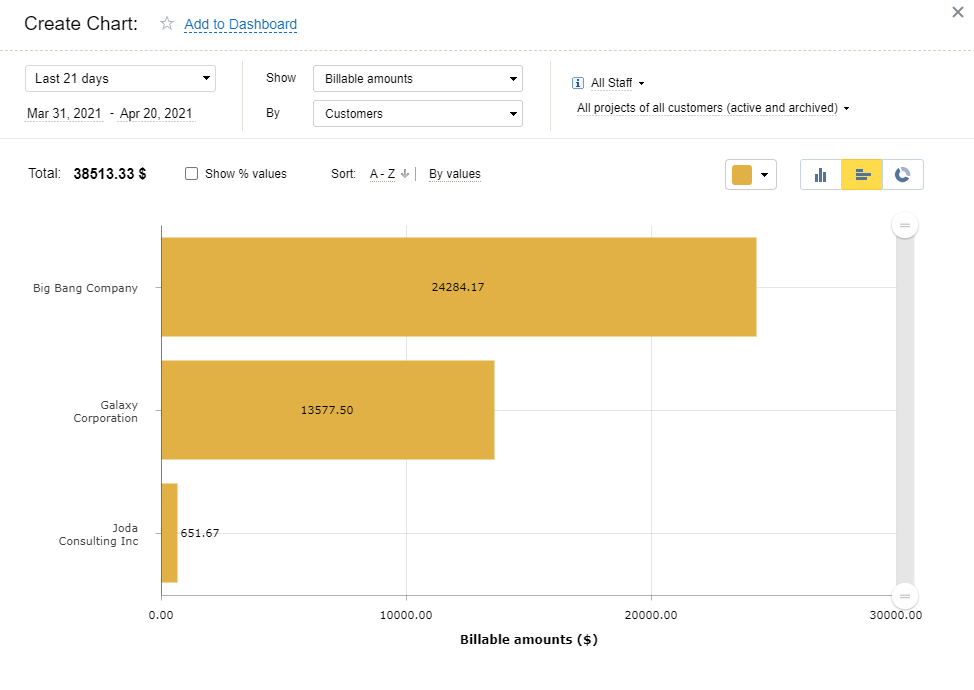
Reviewing logged hours is where the money is. Organize entries by client, date, and task; check that billable totals are accurate; look at nonbillable hours for inefficiencies to trim; and compare billable hours against project revenue to see which work is actually profitable. This is how you catch an unprofitable client before it costs you a year.

Time tracking became a breeze
With actiTIME’s mobile app, tracking time on the client’s side became a breeze. Now accountants simply switch on the timer on their phone as they start another task and get accurate time logs without taking notes.
6. Create and send invoices
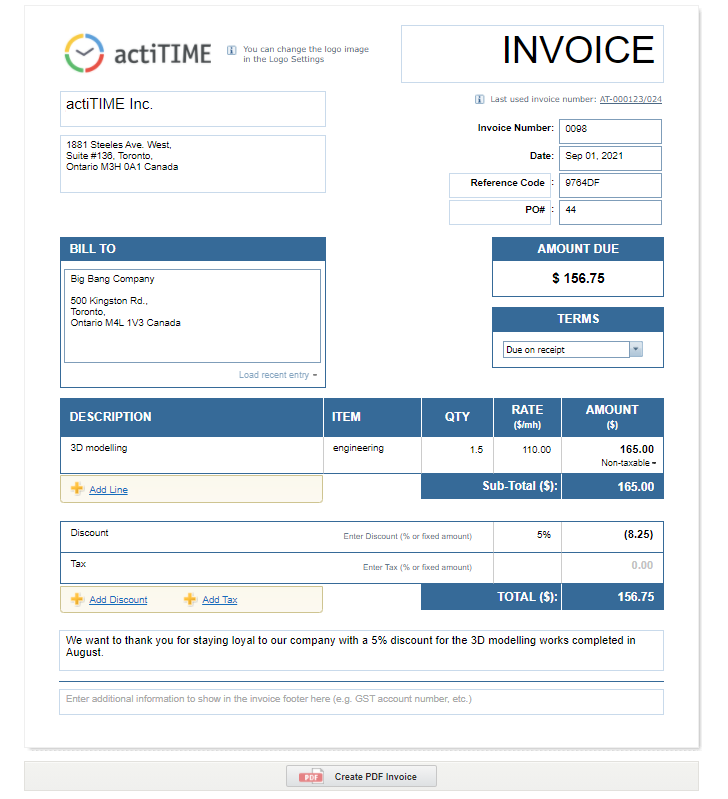
Turn the approved hours into clear, accurate invoices. Include your and the client’s details, a unique invoice number, a description of the work, the amounts, any taxes, and clear payment terms. actiTIME generates invoices directly from tracked billable time, with your branding and reusable templates, so this step stops being manual work.
Best practices for accurate billable time
Tracking is only as good as the data behind it. These habits keep the numbers honest, and they matter more than the tool you choose.
-
Log time every day.
The sooner hours are recorded, the more accurate they are. A week rebuilt from memory on Friday is a week of guesses. Make daily logging a routine for the whole team.
-
Review missing time regularly.
Some people always forget. Check timesheets weekly or biweekly and chase what is missing, or use automatic reminders for unsubmitted time.
-
Lock timesheets on a schedule.
Locking submitted time prevents later edits and nudges people to log sooner. Lock in line with your billing cycle, then use the locked data for billing, reporting, and analysis.
-
Capture every billable minute.
Small tasks add up. Recording the short calls, quick reviews, and research that people tend to skip is what keeps utilization and profitability figures real.
-
Track in small increments.
Recording time in six minute blocks, a tenth of an hour, keeps invoices precise and makes it far harder for small tasks to disappear into rounding.
Track billable hours with actiTIME
Billable time tracking does not have to be manual. actiTIME records billable and nonbillable hours by project, client, and type of work, calculates billable amounts automatically from your rates, and turns the result into reports and branded invoices. The Staff Performance Report and billing charts show exactly where time and revenue go, so you can bill accurately and improve how the team uses its hours.
If you are still choosing a tool, compare the options in our roundup of the best billable hours trackers.


Billable hours FAQ
What are billable hours?
Billable hours are the hours you spend on work a client pays for, tied to a specific project and charged at an agreed rate. They convert into revenue when you invoice. Time spent on internal or administrative work, such as email, bookkeeping, or team meetings, is nonbillable, since a client is not charged for it even though it keeps the business running.
How do you calculate billable hours?
Record the time spent on each client task, then multiply those hours by the billing rate for that work to get the billable amount. To see how efficiently time is used, calculate your utilization rate by dividing billable hours by total hours worked and multiplying by 100. For example, 32 billable hours in a 40 hour week is 80 percent utilization. Time tracking software does both calculations automatically.
What is a good utilization rate?
It depends on the role and industry, so there is no universal number, but the trend matters more than any single figure. Agencies and consultancies commonly aim for 75 to 85 percent, and freelancers often target 70 percent or higher, though these are starting points rather than rules. A rate falling over time usually signals rising admin load or idle hours, while a very high rate can point to burnout or too little time spent on business development. Aim for a level that is sustainable for your team rather than chasing 100 percent, and compare it across periods to see whether efficiency is improving.
What is the difference between billable hours and actual hours?
Actual hours, sometimes called regular or worked hours, cover everything an employee does in a day, billable and nonbillable alike. Billable hours are the portion of that time tied to paid client work. Comparing the two is exactly how utilization is calculated: the bigger the gap between actual and billable hours, the more of the day is going to nonbillable work.