
Do you feel overwhelmed by the spiraling costs of running an online shop? Has it been tough to keep up with rising fees and find ways to cut down on expenses?
Managing your finances doesn’t have to be a daunting task. With the right approach, proper planning, and a bit of creative problem-solving, you can reduce ecommerce operational costs without gutting the parts of the business that make it work.
How much does it cost to run an ecommerce business?
Running an ecommerce business can be expensive. Depending on the complexity of your products and services, you could be looking at anywhere from a few hundred dollars a year for hosting fees to tens of thousands for a fully customized marketplace.
Cost is just one of several ecommerce challenges, but it’s one you have more direct control over than most. There are numerous ways to launch and operate your online store without breaking the bank, from using templates to tapping free marketing resources. But no matter how small your initial costs are, don’t cut corners on customer experience and scalability. These play a major role in long-term success.
As a general benchmark, many ecommerce businesses aim to keep total operational costs under 30 percent of revenue. Where you land depends heavily on your product category and fulfillment model, but it’s a useful number to check yourself against.
When launching and managing an online business, it’s important to understand your associated costs so you can plan accordingly. Here are the main types of ecommerce expenses you need to account for:
12 main types of ecommerce expenses
- Payment processing – Typically charged by a payment processor for every online transaction, with rates varying depending on the type of processing service you choose.
- Merchant account – An agreement with a financial institution that allows you to accept payments from customers via credit or debit cards, e-checks, and other methods.
- Web hosting – Any ecommerce site needs a web host, which usually comes with a monthly fee. It’s worth paying for speed here: sites that load in under a second convert up to 2.5 times more visitors than ones taking five seconds, so a cheaper host that’s noticeably slower can cost you more in lost sales than it saves in fees.
- Domain name registration – Just like web hosting, this is necessary for any website and typically involves an annual fee.
- Shopping cart software – Automates the checkout process, with fees that depend on the platform you choose.
- Shipping and logistics – For most ecommerce businesses, shipping is one of the largest and most volatile cost lines, and it deserves closer attention than the rest of this list. Carriers bill by dimensional (DIM) weight, not just actual weight: a 1 kg item packed in a 40 x 30 x 30 cm box, for example, can get billed as if it weighed over 7 kg once DIM weight is applied, so an oversized box for a light item quietly inflates your rate. Last-mile delivery alone typically makes up 40 to 50 percent of total shipping cost, which is usually the first place to look for savings. As a rough guide, total shipping costs run 5 to 10 percent of revenue for small, light products, 8 to 14 percent for medium ones (apparel often sits around 13 percent), and 12 to 22 percent for heavy or oversized items, with cross-border orders reaching 15 to 30 percent. Blended across a typical product mix, 8 to 12 percent of revenue is a reasonable target to aim for; a heavier or bulkier catalog will naturally sit above that band no matter how well it’s optimized. You can pull these numbers down by right-sizing packaging to avoid DIM weight penalties, and once you’re shipping enough volume, by negotiating carrier contracts directly (worthwhile past roughly 2,000 packages or $10,000 in shipping spend a month) or through a 3PL, which typically brings 10 to 20 percent off ground rates and 20 to 30 percent off express. Hybrid last-mile services like UPS SurePost or FedEx SmartPost can cut costs by 30 to 50 percent on qualifying packages, and a free-shipping threshold set slightly above your average order value lifts order size instead of just eating margin.
- Advertising and marketing – To attract customers and drive sales, you’ll likely need to invest in advertising and marketing.
- Product creation and development – If you’re selling a product that needs to be created or developed, this adds further costs.
- Employee salaries and contractors – If you have employees or use contractors to help run your business, factor these into your budget too, including the hidden cost of losing people: replacing an employee can cost up to 200 percent of their annual salary once you count recruiting, onboarding, and lost productivity, so retention is itself a real line item here.
- Legal and accounting costs – You may need a lawyer and accountant for tasks related to setting up and running your ecommerce business, along with other fees tied to legal compliance, such as taxes.
- Maintenance and security – Every website requires a certain amount of maintenance, which brings additional expenses depending on the type of service provider you use. Don’t treat cybersecurity as an optional add-on here: a cyberattack costs a small business around $35,000 on average, so security patching and monitoring is money well spent, not overhead to cut.
- Miscellaneous costs – Other expenses may include software subscriptions, marketing materials, or customer rewards programs.
How to manage ecommerce costs
Plan
Good cost management starts with a solid project plan. That means setting a realistic budget for each quarter or year and mapping out your full cost structure by category, so nothing catches you off guard later. Good planning also means looking at potential risks early on, such as a slowdown in sales or an unexpected spike in a specific cost line, and having a response ready before it happens.
To build a budget for an ecommerce business or project:
- Calculate your startup costs by adding up all necessary items, such as hosting fees, website design, and initial marketing spend.
- Include overhead expenses such as workspace rent, software subscriptions, and preliminary inventory.
- Assign an owner to each cost category, so someone is accountable for keeping it on budget rather than everyone assuming someone else is watching it.
- Break down the monthly cost of recurring items like hosting and staff salaries so you can manage cash flow more precisely.
- Build in some padding for unexpected developments; no entrepreneur knows what’s around the corner.
Track
Once you’ve set a budget, the next step is tracking your actual spending against it. This is what tells you whether your plan is holding up, and it’s also how you catch a cost problem while it’s still small.
Tracking works best when you’re watching specific numbers rather than a general sense of “spending too much.” A few of the most useful ones to track regularly:
- Cost per order – total operational costs divided by total orders. If this creeps up quarter over quarter while your average order value stays flat, something in your cost structure is drifting.
- Shipping cost as a percentage of revenue – compare against the 8 to 12 percent benchmark from the shipping section above.
- Inventory turnover ratio – cost of goods sold divided by average inventory value, a sign of how efficiently cash is tied up in stock.
- Return rate – total returns divided by orders shipped, since returns quietly erase margin on every category above.
- Customer acquisition cost against customer lifetime value – whether what you’re spending to win a customer is actually paying off over time.
It also helps to know specifically where the money tends to leak, since it’s rarely spread evenly across the business:
- Dead stock – inventory that isn’t selling but is still costing you in storage and tied-up cash.
- Manual, repetitive work – order entry, data entry, and other tasks still being done by hand that could be automated or delegated.
- Split shipments and inefficient fulfillment – orders shipped from more than one location or in more than one box because of how inventory is spread out.
- Support tickets about order status – “where is my order” questions can account for 30 to 50 percent of support ticket volume, and each one is a small but real cost.
Record keeping is the primary tracking method available to most businesses, and tools like QuickBooks and FreshBooks can handle general accounting well. But when it comes to tracking staff-related costs specifically, actiTIME is a better fit.
With built-in time tracking and reporting features, actiTIME makes it easy to monitor employee hours, work-related costs, and individual productivity. Instead of tracking labor costs by hand, you can let actiTIME handle it for you, from cost calculations to invoicing.
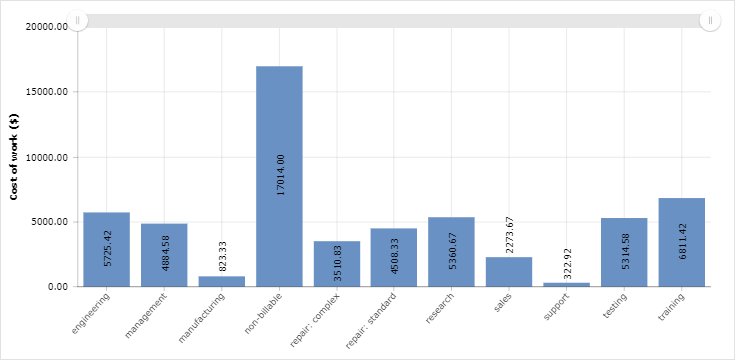
By leveraging actiTIME, you can keep a close eye on your labor budget and make sure nothing slips through the cracks.
Analyze
The last step is analysis: looking at the data you’ve gathered from tracking and figuring out what it means for your business going forward.
This means identifying patterns in spending, spotting where money could be saved or reallocated, and evaluating the return on investments you’ve already made. Set a regular cadence for this, quarterly works well for most businesses, rather than treating it as a one-time exercise. Costs and spending patterns shift as your business grows, so a plan that made sense six months ago may already be out of date.
Reduce costs by category
Here’s how to reduce ecommerce operational costs without hurting the customer experience that keeps people buying. Not every cost is worth cutting the same way, and going after them in the wrong order tends to backfire. A useful sequence is to eliminate outright waste first, since it costs nothing to fix; then tackle process inefficiencies; then move on to negotiating rates and contracts, which takes more leverage; and only then consider bigger structural changes like switching fulfillment models. Here’s where that plays out across the business:
Streamline your supply chain and inventory
Break down communication silos between your team, vendors, and warehouses, and use cloud-based tools to keep everyone working from the same data. Just-in-time and vendor-managed inventory approaches help you stock only what you need instead of tying up cash in shelf space, but don’t overcorrect into frequent stockouts either: about 60 percent of U.S. shoppers change their buying behavior when an item they want is unavailable, so running too lean costs sales just as surely as running too heavy costs storage. When you do end up with dead stock, get it off the shelf rather than paying to store it indefinitely: run a clearance sale, offer it as a bundle add-on to move it alongside a best seller, or write it off as a donation if a straight sale isn’t realistic. If you’re deciding where to focus first, start with your lowest-margin SKUs, since that’s where the easiest wins usually are, then apply the same discipline to your best sellers, where even a small per-unit saving adds up across volume.
Automate the busywork
Inventory syncing, order routing, shipping label generation, and returns processing are all prone to manual error and don’t need a person doing them by hand. The same goes for repetitive customer support questions, especially order-status (“where is my order”) tickets, which automation and self-service tracking can deflect before they ever reach an agent. Fraud detection is another area where automated transaction analysis catches problems faster and cheaper than manual review. None of this requires hiring extra staff or paying overtime, and automated processes tend to be more accurate as a side effect.
Cut acquisition costs without cutting your reach
Organic channels, like SEO and social media, let you reach a wide audience without paying for every click, and most ecommerce platforms include marketing tools that make simple campaigns easy to run without design or marketing experience. Beyond organic reach, review which paid channels are actually earning back what you spend on them against customer lifetime value, and shift budget toward the ones that are, plus toward retention marketing for existing customers, which is almost always cheaper than acquiring new ones. A subscription or repeat-purchase model, where it fits your product, has a similar effect: it lowers how often you need to spend on acquisition per dollar of revenue.
Reduce product returns
Returns are expensive, and they erase margin twice over: once on the lost sale, and again on the cost of processing the return itself. More than half of returns come down to size, fit, or color not matching expectations, so accurate, detailed product descriptions, real sizing guides, and photos or video from multiple angles go a long way. Customer reviews that mention fit and true-to-size accuracy help too, and offering exchanges instead of refunds keeps the sale while still solving the customer’s problem.
Negotiate with suppliers and carriers
Research which suppliers offer the best prices and terms for what you need, then ask directly about discounts, extended payment terms, or bulk pricing. A good supplier contract spells out pricing, payment terms and penalties, delivery schedules, quality standards, and how disputes get resolved, so there’s no ambiguity later. The same logic applies to shipping carriers once you have enough volume to negotiate with; see the shipping and logistics section above for typical savings ranges.
Consider outsourcing non-core work
Tasks like data entry, catalog management, or basic customer communication often cost significantly less through a virtual assistant or outsourced team than through a full-time hire, since you’re not paying benefits or covering downtime. The same applies to fulfillment: handing it to a third-party logistics provider turns a fixed warehouse cost into a variable one that scales with your order volume. Weigh the savings against the loss of direct control, and outsource the tasks that are the most repetitive and the least core to what makes your business distinct.
Consolidate your tech stack
It’s easy to end up paying for several tools that each do a piece of what one platform could do on its own. Audit your software subscriptions periodically, cut the ones that overlap, and look for platforms that combine functions, like email, order management, and reporting, in one place. Fewer tools also means less time spent on integrations and less data scattered across systems that don’t talk to each other.
Track time
Accurate time tracking helps you save money in two ways: it shows you where time is being wasted, and it lets you delegate tasks more effectively so your team works as efficiently as possible. This matters even more for ecommerce time tracking, where headcount often swings with the season, and actiTIME is built to make it easy.
actiTIME keeps tabs on the tasks that matter, giving you control over how you manage your time and project workloads, so your work stays organized and you’re not buried in paperwork or missed details.
Common mistakes when cutting costs
Cutting costs the wrong way tends to cost you more later, often in ways that don’t show up on a spending report right away. A few mistakes come up often enough to be worth calling out directly:
- Cutting a number without asking what it’s connected to. A cheaper shipping tier that adds two delivery days, or a support headcount cut that goes through before the chatbot is actually handling tickets, usually costs more in refunds and lost repeat customers than it saves on paper.
- Letting each department cut on its own. Shipping saving money by slowing down delivery, marketing saving money by cutting a channel that was quietly driving retention, a warehouse consolidation that nobody checked against customer delivery zones: each looks fine in isolation and adds up to a worse business.
- Cutting support or quality before automating. Removing staff or quality checks to save money immediately, before the process behind them is actually improved, tends to show up fast as slower service, more errors, or more returns.
- Concentrating too much risk in one place. Relying on a single warehouse, a single supplier, or a single carrier to save money leaves you exposed the moment something goes wrong with any one of them.
- Nobody owns keeping costs down once the initial push is over. A cost-cutting effort that ends when the project does tends to unwind on its own. Give someone ownership of watching the numbers on an ongoing basis, and consider rewarding people for flagging savings rather than only for hitting revenue targets.
Watch a few signals closely as you make cuts, since they’ll tell you if you’ve gone too far: a drop in customer satisfaction or Net Promoter Score, a rising return rate, or a growing volume of support tickets. Any of these appearing shortly after a cost-cutting change is a sign it’s worth reversing or adjusting before it does more damage than it saves.
How actiTIME helps you manage costs
Labor is often one of the largest and least visible cost lines on the list above, especially once you’re paying more than just yourself. actiTIME gives you a way to see that cost as it happens, instead of estimating it after the fact.
You can set a cost budget on any customer, project, or task, and watch it through a visual progress bar that turns red the moment you go over. That catches a labor overrun as it happens, rather than finding out at the end of the month. If you bill clients for your work, a matching billing budget and a Profit/Loss Report show billable amounts against actual cost side by side, so you can see whether a project actually turned a profit rather than simply kept everyone occupied.
Overtime and leave both carry their own cost, and actiTIME calculates both automatically based on the rates you set, so a seasonal overtime spike shows up as a real, accurate number in your Cost of Work Report instead of a rough guess.
Try setting up a cost budget on your next project with a free online trial and see where your labor costs actually stand.
Conclusion
Most of the savings in this guide don’t come from one dramatic cut. They come from knowing where your money actually goes, watching a handful of numbers instead of a vague feeling that costs are too high, and fixing the specific leaks: dead stock, an oversized shipping box, a support ticket that shouldn’t have needed a human. Start with whichever cost line on your list looks the most out of control, track it for a month, and go from there.
FAQ
Should a fast-growing ecommerce business still cut costs aggressively?
Not the same way a stagnant one should. Growing fast usually means accepting more up-front cost, in staffing, in inventory, in marketing, than a business with flat sales would. The mistakes above still apply: don’t cut support or automation investment just because sales are up, since that’s often when the cracks show fastest. The better move during a growth phase is watching cost per order and shipping cost as a percentage of revenue rather than the total dollar amount, since a rising total that’s tracking below your growth rate isn’t actually a problem.
Is dropshipping a good way to cut costs?
It can be, mainly because it removes inventory ownership, warehousing, and the risk of dead stock entirely; you only pay for a product once a customer has already bought it. The tradeoff is thinner margins per unit and less control over shipping times and product quality, since a third party is fulfilling the order. It tends to work best as a way to test new products or expand your catalog without adding warehousing costs, rather than as a wholesale replacement for a business that already has a working supply chain.
Do I need separate software to track costs, or can my accounting tool handle it?
General accounting tools like QuickBooks and FreshBooks are built for bookkeeping: invoices, expenses, tax categories. They aren’t built to show you where staff time and labor cost is actually going day to day. If most of your costs are software subscriptions, inventory, and supplier bills, your accounting tool is probably enough. If labor is a meaningful share of your costs, and you want to see cost per project or task rather than just a lump payroll number, that’s where a dedicated time and cost tracking tool like actiTIME comes in alongside your accounting software, not instead of it.