
We all want the same thing from healthcare: for patients to get well, and for the people caring for them to do it without running out of time, money, or patience.
Time tracking sits closer to that goal than it looks. Knowing how long tasks actually take lets a facility spot where a workflow breaks down, catch budget problems before they compound, and free up staff time that otherwise goes to guesswork and paperwork.
This is time tracking for healthcare as a practice, not a product: what it actually means in a clinical or care setting, why it matters beyond the obvious, the methods facilities actually use, the compliance rules behind it, and how to roll it out without disrupting patient care. If you are comparing specific tools instead, our tool-by-tool breakdown covers that ground.
What healthcare time tracking actually means
Healthcare time tracking is the practice of recording how long staff spend on specific tasks, patients, or activities – a nurse’s shift hours, a home health aide’s visit, a case manager’s care-coordination calls – so that the organization has an accurate, attributable record of the work instead of an estimate reconstructed later.
It is easy to confuse this with clinical documentation or EHR charting, since both happen inside the same shift and sometimes the same screen. The difference is what each record is for: clinical documentation captures what was done to or for a patient – vitals, medications, a procedure note – for continuity of care and the medical record. Time tracking captures how long the work took and who did it, for staffing, payroll, billing, and compliance. A chart note proves a wound was dressed; a time record proves who dressed it and for how long. Many healthcare employers need both, kept separately, because an auditor, a payer, or a labor board asks a different question of each one.
The stakes: staffing, burnout, and compliance
Workforce shortages and turnover
Staffing math in healthcare is tight enough that losing track of hours is not a rounding error. HRSA projects a national shortfall of 267,330 full-time registered nurses by 2028. The 2026 NSI National Health Care Retention and RN Staffing Report puts the national RN vacancy rate at 8.6 percent and hospital RN turnover at 17.6 percent, with an experienced RN taking 56 to 102 days to recruit – and replacing just one costs an average of $60,090.
Unpredictable patient volume compounds the problem: a unit can staff to historical averages and still be caught short on a bad day, or overstaffed on a quiet one, with no record of which shifts actually ran thin until the complaints start. Accurate time data is what turns that into a pattern that can be planned around instead of a recurring surprise.
Clinician burnout
The 2026 AMA National Physician Burnout Survey found 41.9 percent of physicians reported at least one burnout symptom in 2025 – down from the COVID-era peak of 62.8 percent in 2021, but still well above the 24.6 percent rate among the general working population. Long, irregular hours are a direct driver, and an organization that cannot see overtime accumulating in real time cannot intervene before it becomes a resignation.
Regulatory and compliance obligations
Several rules turn accurate time records into a legal requirement, beyond whatever operational benefit they already bring:
- Electronic Visit Verification (EVV): under Section 12006 of the 21st Century Cures Act, every state must verify Medicaid-funded personal care and home health visits electronically – capturing the service type, the individual receiving it, the date, the location, the provider, and the exact start and end time. States that fail to comply face federal funding reductions of up to 1 percent.
- Chronic Care Management (CCM) billing: CMS requires a minimum of 20 minutes of clinical staff time per month to bill CPT 99490, 30 minutes provided personally by a physician to bill 99491, or 60 minutes of clinical staff time for complex CCM under 99487 – and that time has to be documented as it happens, not reconstructed at billing time.
- Overtime and break rules: the Department of Labor’s healthcare-specific guidance covers rounding rules and the “8 and 80” overtime option available to hospitals and care facilities, and several states layer on their own requirements – Washington mandates a set number of meal and rest breaks scaled to shift length for covered healthcare workers, while California runs its own detailed, heavily litigated meal and rest break regime with separate rules for 12-hour shifts.
- Federal grant effort reporting: academic medical centers and research hospitals billing staff salaries to federal grants must support those charges with records that accurately reflect work performed, under 2 CFR 200.430 – a narrower rule that matters mainly to that specific slice of the industry and rarely touches frontline clinical staff directly.


How time actually gets tracked in healthcare
No single method fits every role in a hospital or care network, which is part of why a generic office time tracker often fails here. The methods actually in use break down roughly like this.
- Manual timesheets: still the baseline in smaller practices and administrative roles – staff log hours themselves, at the end of a shift or a pay period. Cheap to set up, but the least accurate method and the easiest to game or simply forget.
- Badge and real-time locating systems (RTLS): battery-powered Bluetooth, Wi-Fi, infrared, or ultra-wideband tags worn by staff communicate with fixed receivers placed around a facility, logging time-in-room or time-on-unit automatically. A peer-reviewed study found RTLS a feasible and accurate way to measure nurse time at the bedside, and the better systems can produce billing-grade timestamps without a nurse ever opening a timesheet during rounds.
- EHR-integrated timestamps: some systems capture time directly from activity already logged in the electronic health record – when a chart was opened, when a note was signed – reducing double entry, though this method only captures time spent inside the EHR itself, not time spent with a patient away from a screen.
- Mobile and GPS apps: the standard method for home health care, where staff move between patient homes rather than clocking in at one location. This is also the method EVV compliance is usually built on, since a mobile check-in naturally captures the location and timestamp data the mandate requires.
- Biometric clock-in: facial or fingerprint recognition at a kiosk, mostly an emerging option rather than a mainstream one today, aimed at the same buddy-punching problem manual timesheets have always had.
Pros and cons of tracking time in healthcare
The case for tracking time well is straightforward: real visibility into who is working, on what, and for how long – which feeds overtime control, staffing decisions, billing accuracy, and the documentation that EVV and CCM billing already require anyway. Facilities that already have to capture this data for compliance get the staffing and cost visibility essentially for free.
The trade-offs are just as real and worth naming honestly. Badge and RTLS systems in particular draw a genuine privacy objection: a system that logs a nurse’s location throughout a shift can read as surveillance rather than staffing support, especially when it is rolled out without explaining what the data is used for. Any new tracking method also adds a step to an already full shift, and a method that does not fit how a specific role actually works gets worked around rather than used – which produces worse data than having no system at all.
How to roll it out without disrupting care
A time tracking rollout in a clinical setting fails or succeeds on how much friction it adds to an already full shift, not on the software itself.
- Match the method to the role before picking one tool for everyone. A floor nurse, a home health aide, and a billing coordinator do not need the same tracking method, and forcing one onto all three is a common way rollouts stall.
- Involve the staff who will use it daily before configuration starts. Coordinators and frontline staff know where a workflow actually breaks before a project team does, and skipping this step is how a system ends up fighting the shift pattern it was supposed to support.
- Say plainly what the data is for, and what it is not for. The privacy objection to badge and RTLS tracking above is defused far more by a clear, honest answer to “what happens to this data” than by better technology.
- Pilot on one unit or department before a facility-wide rollout. A single unit surfaces workflow conflicts and EHR-integration gaps at a scale that is still fixable, instead of discovering them everywhere at once.
- Budget training and integration time separately from the software cost. Connecting a new system to an existing EHR, payroll, or scheduling tool is usually the slower part of the project, not learning the interface.
Common mistakes
- Treating it as a surveillance tool instead of a staffing one. Once staff believe a system exists to catch them rather than to support scheduling and workload decisions, adoption becomes an uphill fight regardless of the technology.
- Ignoring state-specific break and overtime rules. Meal and rest break requirements for healthcare shift workers vary sharply by state, and a time tracking setup built around one state’s rules can quietly misrepresent compliance in another.
- Collecting time data that never connects to billing or effort reporting. If CCM minutes, grant effort, or billable hours are sitting in a spreadsheet separate from the time tracking system, the organization is doing the data entry twice and still has nothing an auditor can quickly verify.
- Assuming one method covers every role. The method mismatch described above is less a one-time setup error than an ongoing drag, since a role whose method does not fit tends to produce bad data indefinitely, not just at launch.
actiTIME as a practical example
actiTIME is one example of a general-purpose time tracker that healthcare organizations use for the administrative and billing side of this picture – see its healthcare solutions page for the full feature list. It does not replace an EHR, an EVV system, or a CCM documentation workflow, and should not be treated as a system of record for any of those. What it does cover: staff log hours against a customer, project, or task through a weekly timesheet, a browser extension for automatic tracking, or a mobile app for staff who move between locations and need offline capture – a reasonable fit for home care providers and telehealth work specifically.
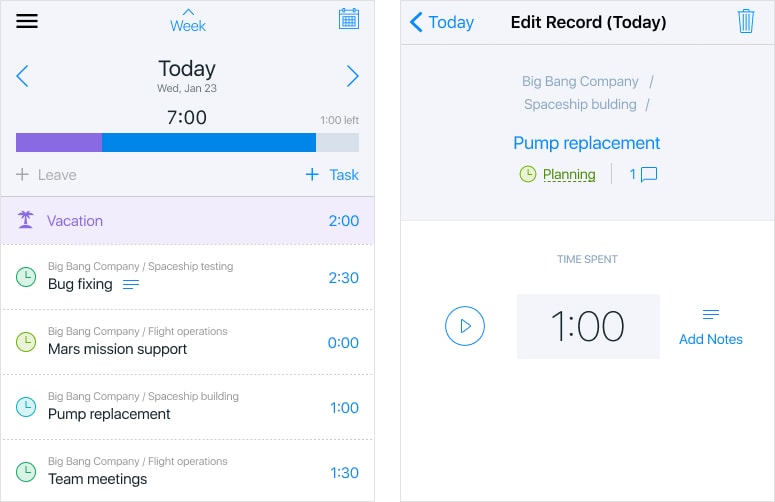
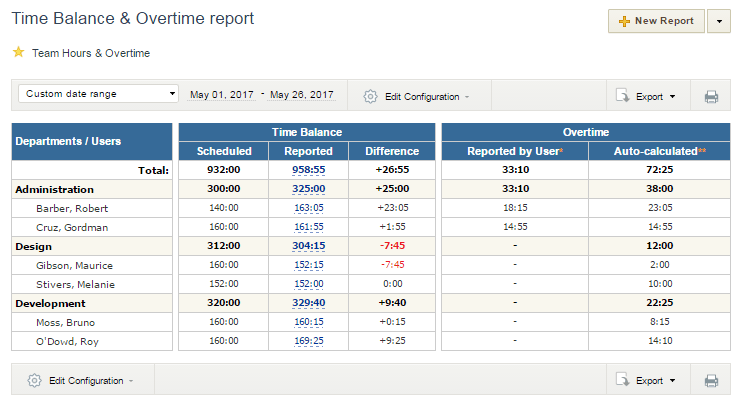
Automated overtime reports flag the pattern the burnout data above describes before it turns into a resignation, and hourly rates plus billable and non-billable work types give finance a usable record for cost and billing analysis.
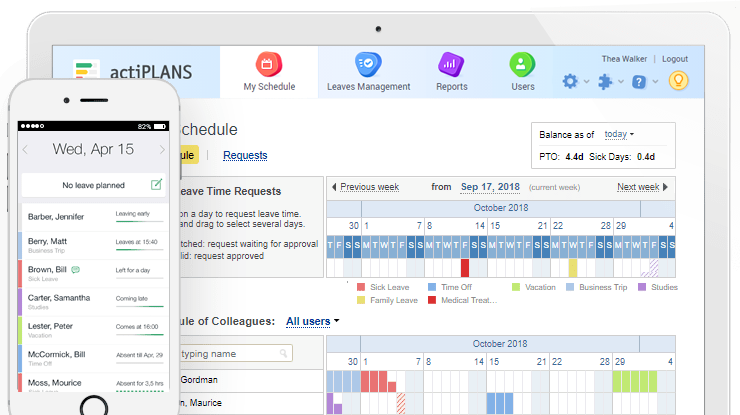
For absence and shift planning specifically, actiTIME integrates with actiPLANS, which handles leave requests, approvals, and shift scheduling on a visual timeline – useful context for staffing decisions, though it is a separate product from the time tracking itself.
Pricing: free for up to 3 users; 1–40 users at $6/user/month billed annually; 41–200 users at $5/user/month billed annually; 200+ users at $1,250/month billed annually; self-hosted from $120/user as a one-time purchase.
Conclusion
Health care time tracking is not one practice but several, depending on which role and which compliance rule is behind it – a floor nurse, a home health aide, and a CCM biller all need the hours captured for different reasons, in different ways. Getting it right means matching the method to the role, being upfront about what the data is for, and treating compliance requirements like EVV and CCM documentation as the floor to build on rather than a separate burden.
Done well, it pays for itself twice: once in the staffing, billing, and compliance visibility it provides directly, and again in the time it frees up for people whose actual job is caring for patients, not logging hours.
FAQ
Does EVV compliance replace the need for a separate time tracking system?
No. Electronic Visit Verification only captures visit-level data – who provided a Medicaid-funded service, where, and for how long – and only for the specific services the mandate covers. It gives a state or payer proof a visit happened; it does not give a manager overtime visibility, cross-role staffing data, or billing and cost reporting beyond that one program. Most home health care organizations end up running EVV for compliance and a broader time tracking system for everything EVV was never built to answer.
How much does poor time tracking actually cost a healthcare organization?
The pieces add up faster than they look in isolation. Replacing a single registered nurse costs an average of $60,090, and unmanaged overtime is one of the clearest paths to the resignation that triggers that cost. Add the staff hours spent reconstructing timesheets after the fact, the billing and effort-reporting errors that come from estimated rather than recorded time, and the risk of an EVV or CCM compliance gap, and the real cost of poor time tracking is rarely just “a few inaccurate timesheets” – it shows up in turnover, billing, and compliance exposure all at once.
Will accurate time tracking become standard everywhere, not just where a law requires it?
The compliance floor keeps rising rather than staying fixed. EVV and CCM billing already require it for specific services, and state-level meal and rest break rules for healthcare shift workers keep adding detail state by state, which makes manual self-reporting a growing liability even outside those specific mandates. The practical direction is clear even without a single federal law forcing it everywhere: organizations that already have accurate time data are better positioned for the next rule than ones that only track what a current mandate strictly requires.