



A project can have a strong plan and a capable team and still fail for one reason: it runs out of money. A project budget is what keeps that from happening. It sets out what the work will cost, gives you a line to measure spending against, and tells you early when something is drifting off course.
This guide covers the whole picture: what a project budget is, what goes into one, how to create it step by step, and how to manage it once the work starts. There is a short worked example along the way, and a free template you can download to build your own.
What is a project budget
A project budget is the total planned cost of a project, broken down by the work and resources needed to complete it. It is both a forecast and a control tool: it estimates what you expect to spend, and once the project starts, it becomes the baseline you measure actual spending against.
Most of what a budget covers falls into two groups. The first is resources, meaning the people, equipment, software, and materials the work requires. The second is activities, the tasks and operations that consume those resources on the way to the project goal. A good budget ties money to both, so you can see not just how much a project costs, but where the cost comes from.
What a project budget includes
Project costs usually fall into a handful of categories. Listing them explicitly is the best way to avoid the gaps that cause overruns later.
- Labor. Staff time is the largest cost on most projects. It is the hours your team spends multiplied by their cost rates.
- Materials and supplies. Physical goods consumed by the work, from raw materials to office supplies.
- Equipment. Tools and hardware you buy or rent for the project.
- Software and licenses. Subscriptions, tools, and per-seat licenses the team needs.
- Overhead. Indirect costs that keep the work running, such as rent, utilities, and administration, allocated to the project.
- Contingency reserve. A buffer, often 10 to 20 percent of the total, set aside for the surprises every project eventually meets.
Costs also split into direct costs, which are tied straight to the project, and indirect costs like overhead that support it without belonging to one task. Knowing which is which makes allocation and reporting far cleaner.
How to create a project budget in 5 steps
Building a budget follows the same path whether the project is large or small. These five steps take you from a blank page to a budget you can defend.
1. Define your project scope
You cannot cost work you have not defined, so start with a clear scope. Sit with your team and agree the goals, then break them into every task the project needs, big or small. Talk to stakeholders so nothing is missed, prioritize what is essential versus what is optional, and sketch a timeline that shows which tasks depend on others.
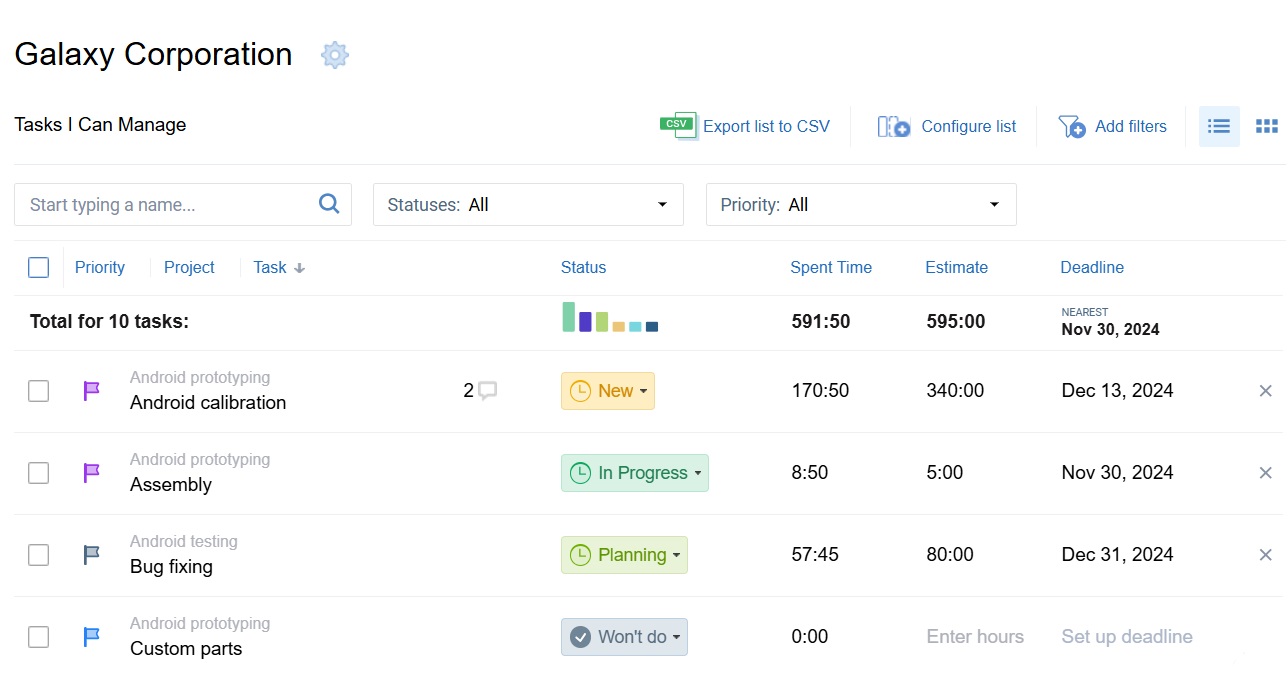
In actiTIME you can lay this out directly: create customers, projects, and tasks, add descriptions, set deadlines and priorities, and assign work to the right people. The result is a clear map of the activities and resources the project needs, which is the foundation for costing.
2. Research and estimate costs
With the scope set, estimate the cost of each item. List everything you will need, then research real prices using supplier quotes, current rates, and your own past projects. Colleagues who have run similar work are often the best source of numbers you will not find online. Add a contingency reserve of 10 to 20 percent for the unknowns, and keep refining the estimate as better data arrives.
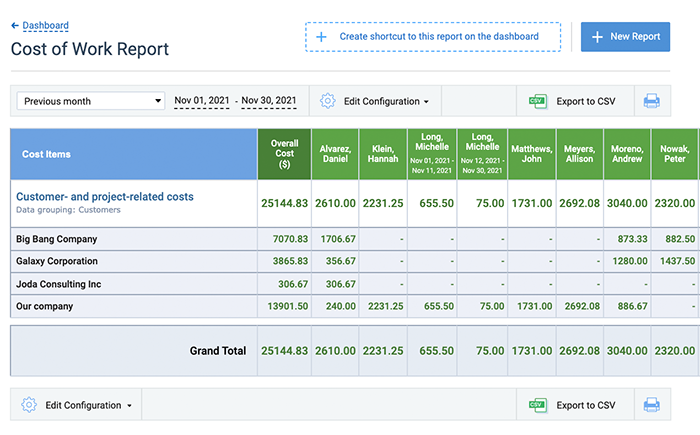
Historical data makes this far more accurate. If your team has tracked hours on past work in actiTIME, the Cost of Work Report shows exactly what similar projects cost in labor, giving you a real basis to estimate a new one instead of guessing. The right estimation technique depends on how much detail you have at this stage.
3. Allocate the budget across the work
Next, turn the estimate into allocated budgets. You can work top-down, assigning a total to a project or customer and breaking it down task by task, or bottom-up, budgeting each task and summing to the total. actiTIME supports both and lets you set budgets at three levels: customer, project, and task.
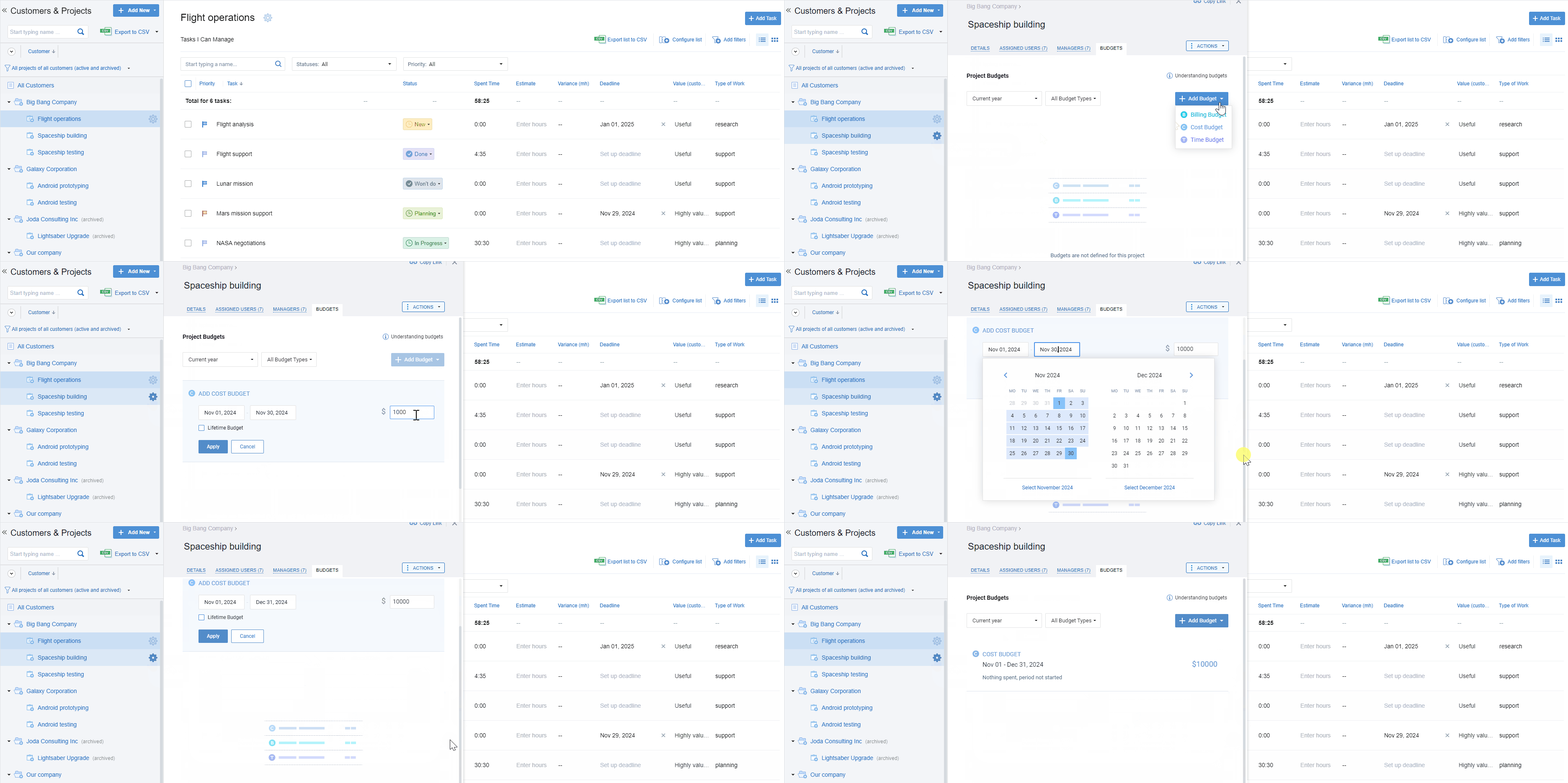
It also supports three budget types, which is worth using together. Cost budgets track staff and resource expense, billing budgets keep you inside what a client agreed to pay, and time budgets guard against schedule overruns. Setting all three gives you a rounded view of both money and time.
4. Track spending against the plan
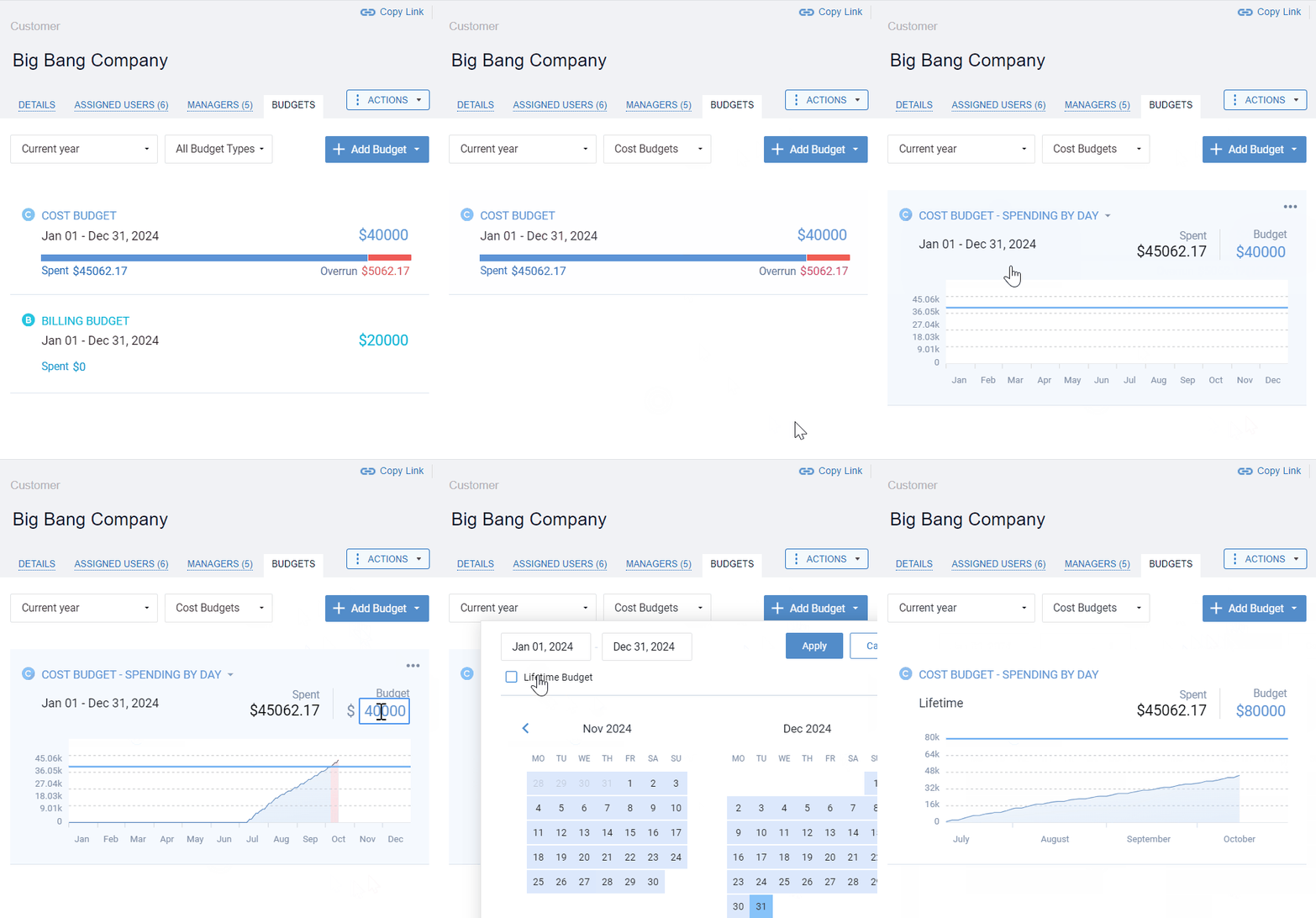
A budget only works if you watch it. As the team logs time and costs accrue, actiTIME calculates budget use automatically and shows it on a visual progress bar, which turns red the moment a budget is exceeded. Automatic email alerts warn managers when an overrun is looming, which is what lets a busy lead act before the money is gone rather than after.
5. Review and improve
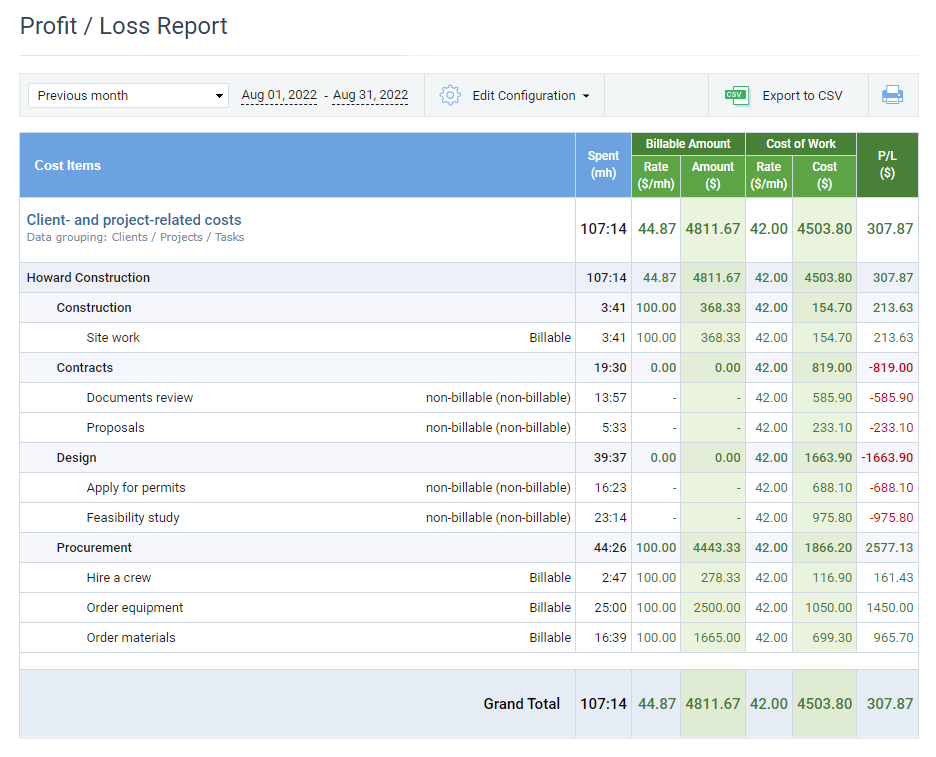
When the project closes, study what happened. Pull up the budget and compare planned against actual: where were you accurate, and where did the estimates miss. The Profit/Loss Report and Cost of Work Report show labor costs and revenue side by side, and the patterns you find, like consistently underestimating a certain kind of task, become the corrections that make your next budget sharper.
A simple project budget example
To see how the pieces fit, here is a small budget for a website design project. Labor is estimated as hours multiplied by each role’s cost rate, with a contingency reserve added at the end.
| Task | Hours | Rate | Cost |
|---|---|---|---|
| Discovery and planning | 20 | $50 | $1,000 |
| Design | 40 | $60 | $2,400 |
| Development | 80 | $55 | $4,400 |
| Testing and launch | 20 | $45 | $900 |
| Software and licenses | — | — | $600 |
| Subtotal | 160 | — | $9,300 |
| Contingency (15%) | — | — | $1,395 |
| Total project budget | — | — | $10,695 |
Real projects add more lines, but the shape stays the same: cost each task, add non-labor items, include a contingency, and total it up. Tracking the actual hours against these estimates as the work runs is what turns the budget from a one-time guess into a live control.
How to manage a project budget
Creating the budget is only half the job. Managing it well through the life of the project is what keeps you profitable, and it comes down to three habits.
- Monitor regularly. Check budget progress often rather than waiting for a month-end report. The earlier you see a task trending over, the more options you have to fix it.
- Update as things change. Scope shifts, prices move, and priorities change. Adjust the budget to reflect reality instead of defending a number that no longer fits.
- Control with data, not instinct. Use reports on cost, billing, and estimated versus actual time to decide where to spend and where to pull back, so every call has a number behind it.
Done consistently, budget management stops overspending before it happens and gives stakeholders confidence that the project is under control.
Project budgeting best practices
-
Align the budget with project goals.
Tie spending to both short-term milestones and long-term objectives so resources go where they matter most across the timeline.
-
Base it on evidence, not intuition.
Use historical data, expert input, and real quotes. Past records inform the estimate, but keep it forward-looking and grounded in current conditions.
-
Always include a contingency reserve.
A buffer of 10 to 20 percent absorbs the surprises that would otherwise turn into overruns.
-
Track at the task level.
Budgeting and tracking per task, not just per project, is what makes it possible to see exactly where money goes and to catch problems early.
-
Use the right estimation technique.
Simple methods suit early planning, while a detailed budget calls for more rigorous techniques. Match the method to the stage.
Project budget FAQ
What is a project budget?
A project budget is the total planned cost of a project, broken down by the tasks and resources needed to complete it. It works as a forecast before the project starts and as a baseline to control spending once it does. A complete budget covers labor, materials, equipment, software, overhead, and a contingency reserve for the unexpected.
What should a project budget include?
A project budget should include every cost category the work will touch: labor, which is usually the largest, plus materials, equipment, software and licenses, and a share of overhead. It should also include a contingency reserve, typically 10 to 20 percent of the total, to absorb surprises. Separating direct costs from indirect ones makes the budget easier to allocate and report against.
How do you manage a project budget?
Manage a project budget by monitoring spending against the plan regularly, updating the budget as scope and prices change, and controlling decisions with data rather than instinct. Tracking actual hours and costs at the task level, with alerts for looming overruns, lets you correct course early. Software like actiTIME automates this by calculating budget use in real time and flagging overruns before they grow.
Manage your project budget with actiTIME
A good budget keeps a project realistic, feasible, and profitable, no matter how complex the work gets. actiTIME makes it easier to get there, with cost, billing, and time budgets you can set at every level, visual tracking that flags overruns as they form, and reports that turn each finished project into better estimates for the next one.


Sign up for a free 30-day trial, no credit card required, and see how much easier project budgeting gets when the numbers track themselves.








