You open your task list and every item looks urgent. Your manager wants the report, a client wants a fix, and the project plan you promised yourself you would finish is still sitting there. When everything is called a priority, nothing really is.
Here is how to prioritize tasks in short: write every task down, mark what has a real deadline and what moves your main goal forward, estimate the effort, then rank the list with one method and give your top one to three items protected time before anything else. The method matters less than doing this every day.
This guide walks through that five step process, explains the difference between urgent and important work, and then covers 10 prioritization methods, each with a free worksheet, so you can pick the one that fits your day.
How to prioritize tasks in 5 steps
Every prioritization method in this article runs on the same basic process. If you only have ten minutes, do these five steps and skip the rest.
-
Write down every task.
Get everything out of your head and into one list: work tasks, requests from colleagues, errands, the half started idea from last week. A single list stops you from carrying open loops around in your memory and shows you how much work there really is.
-
Mark urgency and impact.
For each item, ask two questions. Does it have a real deadline or a real consequence if it slips? Does it move one of your main goals or your team’s goals forward? A task can be one, both or neither, and that difference drives everything else.
-
Estimate effort and check dependencies.
Note roughly how long each task will take and whether anyone is waiting on it. A 20 minute task that unblocks three colleagues often beats a two hour task that only affects you.
-
Rank the list with one method.
Pick a single method from the table below and use it to put your tasks in order. Switching methods every day is its own form of procrastination.
-
Schedule the top items and review daily.
Block time in your calendar for your top one to three tasks before email and meetings eat the day. At the end of the day, move unfinished items, drop what no longer matters and rank tomorrow’s list.
Urgent vs important tasks: what is the difference?
Urgent tasks demand attention now: a client complaint, a deadline today, a ringing phone. Important tasks contribute to your long term goals, such as planning a project, training or building a client relationship. Important work rarely shouts, which is why it keeps getting pushed back.
Researchers have measured this pull. In five experiments published in the Journal of Consumer Research in 2018, Meng Zhu, Yang Yang and Christopher Hsee found that people chose unimportant tasks with a lower payoff over important tasks with a higher payoff when the unimportant ones simply felt urgent, for example because they had an expiry date. They called it the mere urgency effect. The effect was stronger in people who saw themselves as busy, and reminding participants of each task’s payoff at the moment of choice reduced it.
That last finding is the practical lesson. Prioritizing works when you look at the outcome of each task before you start it, not after the urgent ones have already taken your morning.
Which task prioritization method should you choose?
Use the table to pick a starting point. Simple daily lists suit people with many small tasks; scoring models suit teams that need to compare projects or ideas.
| Method | How it works | Best for | Time to set up |
|---|---|---|---|
| Master list | One full list broken down into daily tasks | Feeling overwhelmed by scattered tasks | 30 minutes once, then 5 minutes a day |
| Eisenhower matrix | Sort by urgent and important into four quadrants | Separating firefighting from real progress | 10 minutes |
| Action priority matrix | Score impact and effort from 1 to 10 | Choosing between projects | 15 minutes |
| Ivy Lee method | Six tasks for tomorrow, ranked, done in order | Daily focus | 5 minutes a day |
| Two list strategy | 25 goals cut down to 5, the rest avoided | Long term goals and career planning | 30 minutes |
| Eat the frog | Hardest important task first thing in the morning | Procrastination | 2 minutes a day |
| ICE scoring | Score impact, confidence and ease | Ideas and features that are hard to compare | 20 minutes |
| ABCDE method | Label each task A to E | Long daily lists with similar looking items | 5 minutes a day |
| MoSCoW | Must, should, could and won’t have | Project scope and team requirements | 20 minutes per project |
| MIT list | One to three most important tasks a day | Heavy workload and burnout risk | 2 minutes a day |
1. Break a master list into daily tasks
The first thing most people do when they decide to take control of their work is list every task. That list frees up mental space and gives you the full picture of your workload. Once you have a master list, narrow it down to a daily list:
-
Separate short term and long term items.
Anything due within two weeks is short term; the rest is long term.
-
Break long or complex items into doable tasks.
“Prepare Q1 budget” becomes “export last year’s costs”, “ask team leads for estimates” and so on.
-
Set deadlines for short term tasks.
Use the real deadline where there is one and your own target date where there is not.
-
Pull today’s tasks into a daily list.
Choose only what you can realistically finish today.
-
Rank the daily list.
Use any method below to decide the order.

Paper works, but an electronic copy is easier to keep up to date. You can delete finished items, add new ones and get a visual overview of your progress.
Tools you may like: Master list worksheet, Google Sheets, Trello, Coggle.
2. Tell urgent from important with the Eisenhower matrix
If you are busy all day yet finish it without having done anything that mattered, you are probably spending your time on urgent work at the expense of important work. The Eisenhower matrix, also known as Covey’s time management matrix, sorts every task into one of four quadrants.
The idea is named after Dwight D. Eisenhower. In an address in Evanston, Illinois, on August 19, 1954, he quoted a former college president: “I have two kinds of problems, the urgent and the important.” Stephen Covey later turned the idea into the four quadrant grid that most people use today.
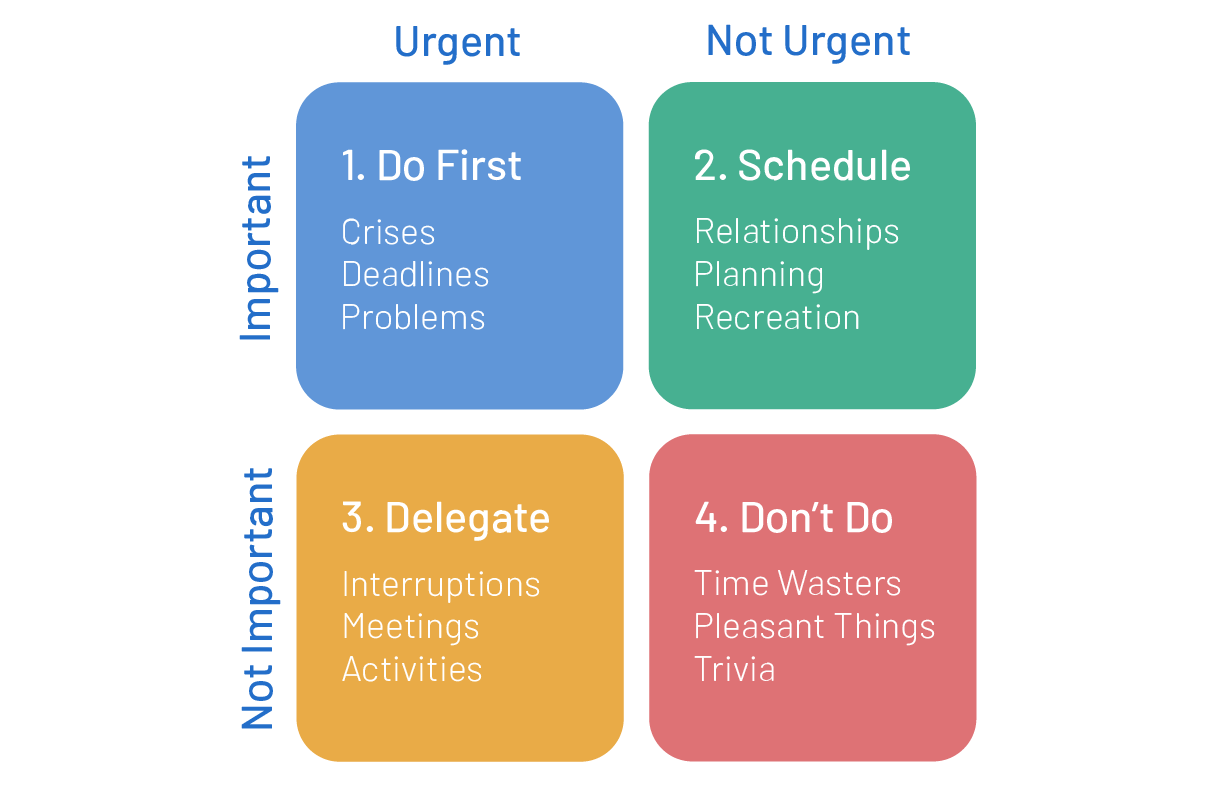
Q1: urgent and important tasks (crises)
These tasks need attention now and affect your goals: client complaints, emergencies, hard deadlines. Deal with them as they come, then ask what system or plan (a Q2 task) would stop the same crisis from happening again.

Q2: important but not urgent tasks (plans)
This quadrant holds the work that moves you forward but has no hard deadline: planning, training, relationship building, risk and budget reviews. It is where you should spend more of your time, and it is the first thing to go when the day gets busy. Two habits help. First, write down what you are working toward, because a goal you cannot name is easy to postpone. Second, book Q2 work into your calendar like a meeting so it has a fixed slot.
Q3: urgent but not important tasks (interruptions)
These tasks need attention now but do little for your own goals. They usually serve someone else’s priorities: most emails, many meetings, routine reports, quick favors. Helping colleagues feels important, which is why Q3 work so often passes for Q1. Batch it, renegotiate deadlines, delegate where you can and learn to say no politely.
Q4: neither urgent nor important tasks (distractions)
Irrelevant emails, endless scrolling and chat that goes nowhere. Cut these down as far as you can, or keep them for genuine downtime.
Tools you may like: Priority matrix worksheet, Trello, Coggle.
3. Weigh effort and impact with the action priority matrix
The action priority matrix also uses four quadrants, but the axes are impact and effort. Score each task from 1 to 10 on both, then place it on the grid.

- Quick wins (high impact, low effort) give a good return for little work. Do as many as you can.
- Major projects (high impact, high effort) need planning and a protected time slot, but they pay off.
- Fill-ins (low impact, low effort) can wait for spare moments, or go to someone else.
- Thankless tasks (low impact, high effort) should be dropped or questioned.
You can swap the scores for real units: impact in revenue, for example, and effort in estimated hours. Real units make the matrix far harder to argue with in a team meeting.
Tools you may like: Action priority matrix worksheet, Trello, Coggle.
4. Plan your days with the Ivy Lee method
The story goes that in 1918 Charles M. Schwab, president of Bethlehem Steel, asked the public relations consultant Ivy Lee how to make his executives more productive. Lee’s answer was a daily routine short enough to fit on an index card. James Clear dates the meeting to 1918 using Scott M. Cutlip’s history of public relations; treat the details of the anecdote as a story, but the method itself works.

-
At the end of the day, write down the six most important tasks for tomorrow.
No more than six.
-
Rank them from most to least important.
The order is the whole point.
-
Tomorrow, work on the first task until it is done.
Only then move to the second. Working on one thing at a time builds focus.
-
Carry unfinished tasks to the next list.
Put them at the top, then add new items until you have six again.
-
Repeat every working day.
For recurring tasks that land on your list every week, these workflow automation examples can help you take them off your plate.
Tools you may like: Ivy Lee worksheet, Google Keep, Trello, Excel or Google Sheets, or a paper weekly planner.
5. Use the two list strategy (attributed to Warren Buffett)
This method is usually credited to Warren Buffett through a story about his pilot, Mike Flint, popularized by James Clear. There is no record of Buffett describing it himself, so think of it as a useful exercise rather than an investor’s secret. It works best for goals over weeks or months, not for a single day.
-
Write down your top 25 goals or tasks for a fixed period.
If you have more, cut the list to 25.
-
Circle the five that matter most.
Imagine you could only achieve five. Which would they be?
-
Make the five your priority list.
This is list A.
-
Turn the other 20 into an “avoid at all costs” list.
This is list B. These are the goals most likely to steal your attention because you care about them a little.
-
When the five are done, start a new list of 25.
Some old list B items will come back; many will not.

The method looks almost too simple. Its value is in step four: most people stop at picking priorities and never decide what they will actively ignore.
Tools you may like: Two list prioritization worksheet, Trello.
6. Start your day by eating the frog
If you keep postponing the task that matters most, this one is for you. Plan each day in advance and do the hardest important task on your list (the frog) first thing in the morning, before the easy work fills the day.

The line “eat a live frog first thing in the morning and nothing worse will happen to you the rest of the day” is usually credited to Mark Twain. Quote Investigator found no evidence that Twain said it and traces the idea to the 18th century French writer Nicolas Chamfort. Brian Tracy built the method around it in his book Eat That Frog!, which can be boiled down to six steps:
-
Write down your goals.
Keep them specific.
-
Break each goal into tasks.
Then break the tasks into the smallest pieces you can.
-
Prioritize the tasks.
Delete or delegate what you can.
-
Pick tomorrow’s frog.
It is the task you are most likely to put off and most likely to make a difference.
-
Block the first hours of the morning for it.
No email before the frog.
-
Work on it until it is finished.
One task at a time.
Tools you may like: Eat the frog worksheet, Trello.
7. Score your priorities with the ICE model
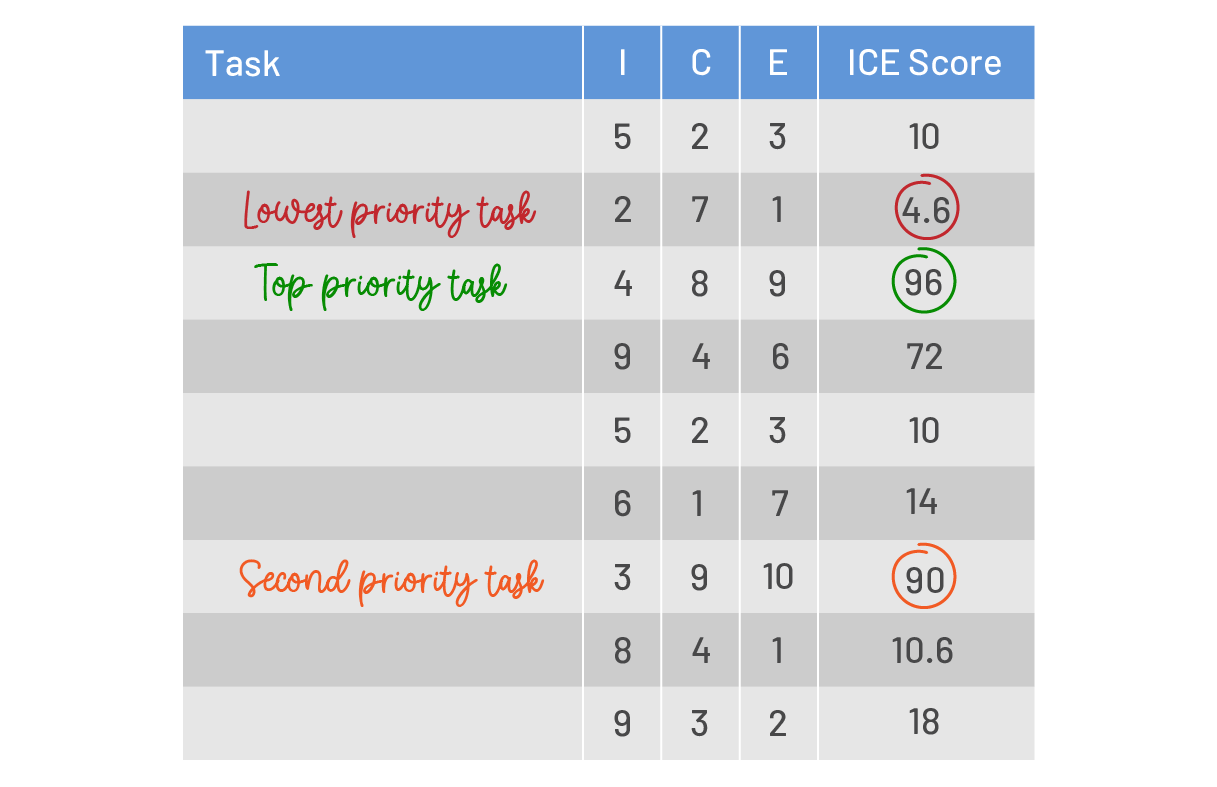
ICE scoring comes from product teams, who use it to choose which feature to build next, but it works just as well for tasks and projects. You rate each item from 1 to 10 on three questions:
- Impact: how much will this task move my project or goal?
- Confidence: how sure am I about the impact and ease scores?
- Ease: how little time and effort will it take? (10 means very easy)
Then calculate a score and sort the list from highest to lowest. The original version of this guide used an average:
Some teams multiply the three scores instead. Either works if everyone uses the same formula. The weak spot is subjectivity: the same person can score the same task differently on Monday and Friday, so score a whole batch in one sitting.
Tools you may like: ICE model worksheet, Excel or Google Sheets.
8. Build daily lists with the ABCDE method
The ABCDE method, also from Brian Tracy, is quick enough to use every morning. When your list feels too long, give every item one letter:
- A: must do, with serious consequences if skipped. If you have several, number them A1, A2, A3.
- B: should do, with mild consequences.
- C: nice to do, with no real consequence.
- D: delegate, to free time for A and B items.
- E: eliminate.
The rule is simple: never start a B task while an A task is still open.

Tools you may like: ABCDE method worksheet, Trello.
9. Prioritize tasks and requirements with MoSCoW
MoSCoW was developed by Dai Clegg at Oracle in 1994 for rapid application development, and it is still common in agile projects (background). It sorts tasks, ideas or requirements into four groups, each with a test question:
- Must have: can the project move forward if this is not done? If no, it is a must have.
- Should have: important, but can it wait a little without blocking the project? If yes, it is a should have.
- Could have: nice, but could you drop it before the deadline without real damage? If yes, it is a could have.
- Won’t have (this time): lowest impact. Park it or drop it, and say so openly.

MoSCoW is good for agreeing on scope with a team or a client. It does not help you order several items inside the same group, so pair it with Ivy Lee or ICE when you have ten must haves.
Tools you may like: MoSCoW prioritization worksheet, Trello.
10. Keep calm with a most important tasks (MIT) list
If the methods above feel like too much structure, try the simplest one. Leo Babauta, author of the Zen Habits blog, suggests in his book Zen to Done that you review your list each morning, write down one to three most important tasks (MITs) for the day and do them first. If you enjoy authors like Babauta, browse our list of the best productivity blogs.

The method works because it sets a goal you can actually reach. Under heavy load, most of us call everything a priority and end the day with nothing finished. Three tasks is not much, but it is enough to get through a crisis step by step without burning out.
Tools you may like: MIT list worksheet, Google Keep, Trello, or a paper weekly planner.
How to prioritize tasks at work when everything is urgent
At work, your priorities are rarely yours alone. Two managers can each call their request the top priority, and a client deadline can land on top of both. A method on paper does not settle that, but a few habits do.
- Ask for the ranking, not for more time. When two requests collide, show both to the people involved and ask, “Which one should come first?” It moves the decision to the person who owns the trade off.
- Check the real deadline. “ASAP” often means “this week”. One short question can turn a Q1 task into a Q2 task.
- Look at dependencies first. A task that blocks other people usually goes ahead of a task of similar value that only affects you.
- Know your capacity. If your week has 30 hours of focused time and the list holds 45 hours of estimates, something has to move. Say so on Monday, not on Friday.
- Keep priorities visible. A shared task board with a priority field stops the same discussion from happening every morning.
Your estimates are only as good as your history. If you track time against tasks, you can see how long similar work really took and plan your week from facts instead of hope. Our guide on how to improve time management shows how to run a one week time audit and build an estimate ratio from it.
When you feel you have no time at all
Sometimes the problem is not ranking tasks but the feeling that there is no time for anything beyond work. Time management writer Laura Vanderkam tackled this in her TEDWomen 2016 talk, How to gain control of your free time. Her starting point is that a week has 168 hours, and that people tend to overestimate their weekly commitments while underestimating their free time.
A useful test follows from that. Next time you say “I don’t have time for this”, try saying “this is not a priority right now” instead. If the sentence feels wrong, the task belongs on your list, and something else has to give way. If it feels right, you have just made a decision instead of an excuse.
Leave room for rest too. Choosing to go to bed an hour earlier is also prioritizing, and doing more is not worth much if it costs you constant stress and cancelled plans.
Common prioritization mistakes
- Ranking by how loud the request is. The person who emails three times is not always the person with the most important task.
- Starting with quick, easy tasks to “build momentum”. Ten small wins can easily fill the morning and push the frog to tomorrow.
- Having more than three top priorities. If you have seven, you have none.
- Never deciding what not to do. A priority list without a “not now” list keeps everything on the table.
- Ignoring estimates. A task you think takes an hour and actually takes four will wreck any ranking.
- Setting priorities once a quarter. Daily work changes daily; a five minute review at the end of each day keeps the list honest.
How to manage time and priorities with data
Poor prioritization is one of the most common time management problems. Every hour spent on a low impact task is an hour you do not get back. The fix is to see where your time actually goes and compare it with what you planned.
Time tracking software makes that comparison possible. In actiTIME, you can set a priority level for each task (predefined or custom, each with its own name and color) and use it to sort and filter tasks in the timesheet, the task list and reports. You can also add deadlines and time estimates to tasks, follow progress on a Kanban board or through custom workflow statuses, and compare planned and tracked hours in the Estimated vs. Actual Time report.
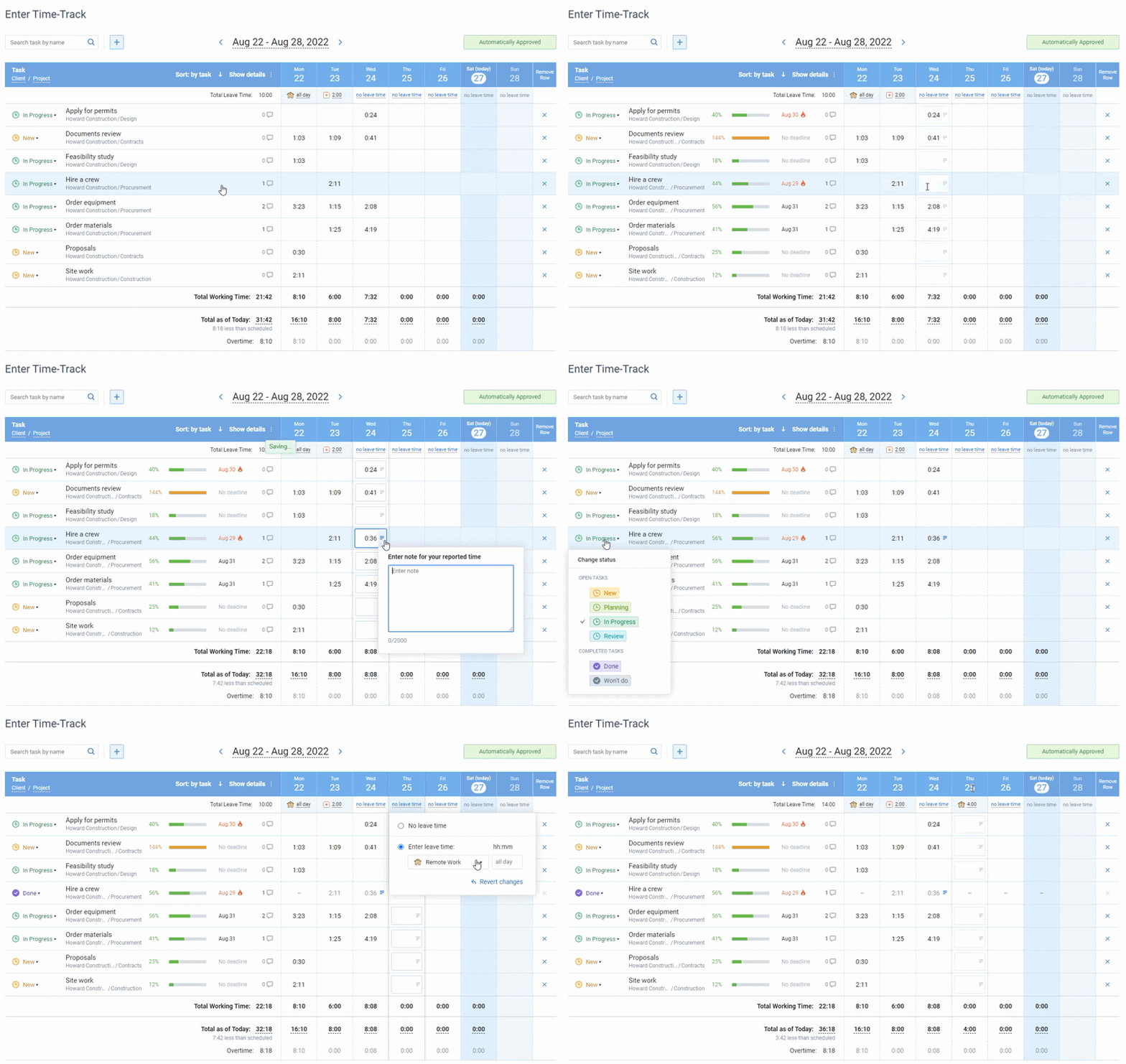
Online timesheet interface in actiTIME, where every user can select the task parameters they want to see in their timesheet
To record time, use the weekly timesheet, the mobile app or the Chrome extension. Task priority, estimates and budgets are part of the paid versions; the free version for up to 3 users covers basic time tracking.
FAQ
What is the best way to prioritize tasks?
List all tasks, mark which are urgent and which move your goals forward, estimate effort, rank the list with one method and schedule your top one to three tasks first. For most people, the Eisenhower matrix plus a short daily list (Ivy Lee or MIT) is enough.
What is the Eisenhower matrix?
It is a four quadrant grid that sorts tasks by urgency and importance: do urgent and important tasks now, schedule important but not urgent tasks, delegate or limit urgent but unimportant tasks, and drop tasks that are neither. It is named after Dwight D. Eisenhower, who described having “two kinds of problems, the urgent and the important” in a 1954 speech.
What is the 3-3-3 rule for tasks?
The 3-3-3 rule, usually credited to author Oliver Burkeman, splits the day into three hours of focused work on your most important project, three shorter tasks and three maintenance activities such as email or admin. It is a daily planning rule rather than a ranking method, so it pairs well with any method above for choosing the project that gets the three hours.
How do you prioritize when everything is important?
Compare consequences, not labels. Ask what happens if each task slips by one day and by one week, check who depends on it, and ask the requester which item comes first when two collide. Then limit yourself to three top priorities for the day.
How many priorities should you have per day?
One to three main tasks is a common limit (the MIT list and 3-3-3 rule both use it), with up to six ranked items in the Ivy Lee method. More than that and the list stops guiding your choices.
How do I answer “What are your top 3 priorities at work?”
Name the three outcomes your role exists to deliver this quarter, not three tasks. For example: ship the client portal on schedule, cut ticket response time, train the new hire. Then explain how you protect time for them, such as blocking mornings for focused work or reviewing your list every Friday.
How do you prioritize tasks as a team?
Agree on one method, usually MoSCoW or ICE for project work, and one place where priorities are visible, such as a task board with a priority field. Review it in a short weekly meeting and compare estimates with tracked time so the next round of planning is more realistic.
Start with tomorrow’s list
Pick one method from this guide and use it for a week before judging it. Prioritizing gets easier once you can see how long tasks really take, so pair it with time tracking. Start a free 30-day trial of actiTIME, or book a demo if you want a walkthrough.