
Being a developer is not easy – it is a mentally demanding job that requires many soft and hard skills and a certain set of personal traits to work productively and not burn out. So instead of working your way through the profession on your own, you can learn from experienced developers who have faced the most common problems and have learned their lessons.
By adopting their habits, you can save yourself many hours of unproductive work and grow faster with less stress.
This guide collects 28 developer productivity tips, most of them in the words of developers who shared them on dev.to and X. Each tip comes with first steps you can try this week, and the tips are grouped by where your time goes: tools, planning, focus, code, learning, and your own energy.
The tips are for you as an individual developer. If you lead a team and want to change how the whole team works, see our guide on how to increase developer productivity at the team level.
Developer productivity tips at a glance
The table lists all 28 productivity tips for software developers with a first step and how long it takes. The sections below explain each one and quote the developers who recommend it.
| Tip | First step | How long or how often |
|---|---|---|
| 1. Know your IDE | Learn one navigation shortcut a day | 5 minutes a day |
| 2. Learn the command line | Turn your three most-typed commands into aliases | 30 minutes |
| 3. Automate as much as you can | Script one task you did by hand this week | About an hour |
| 4. Invest in tools of the trade | Fix the one thing in your setup that bothers you every day | One evening |
| 5. Use AI coding assistants with care | Read every generated line before you commit it | Every time |
| 6. Never rush to code | Write a short plan before you open the editor | 10 minutes per task |
| 7. Avoid the golden hammer | Name two alternatives before you pick a tool | 15 minutes |
| 8. Use buffer time | Compare your last five estimates with the actual time | 30 minutes |
| 9. Set up tomorrow before you log off | End the day with a note or a failing test | 5 minutes |
| 10. Work on one task at a time | Mute chat during your next focus block | Daily |
| 11. Find your peak hours | Rate your concentration every couple of hours | One week |
| 12. Take breaks | Step away after 45–60 minutes of focused work | Daily |
| 13. Get unstuck faster | Set a time limit before you dig into a problem | Every time |
| 14. Write readable code | Rename one unclear function in your next change | Ongoing |
| 15. Write tests | Reproduce your next bug in a test before you fix it | Next bug |
| 16. Debug systematically | Read the whole stack trace before you search for the error | Every bug |
| 17. Review your commits | Read your own diff before you push | 10 minutes |
| 18. Don’t skip documentation | Open the official docs before a tutorial | 10 minutes |
| 19. Practice focused learning | Choose one skill for the next quarter | One hour to choose |
| 20. Read other people’s code | Read the source of one library you use | 30 minutes a week |
| 21. Build side projects | Start a small project with a tool you want to learn | A few evenings |
| 22. Build soft skills | Add steps to reproduce to your next bug report | Ongoing |
| 23. Don’t be afraid to make mistakes | Write down what your last bug taught you | 5 minutes |
| 24. Consider the far end of the productivity curve | Ask a senior which tool they would learn again | One conversation |
| 25. Track your time | Track one full week of work by task | One week |
| 26. Practice journaling | Log your sleep, energy, and mood for two weeks | 2 minutes a day |
| 27. Keep a record of your daily achievements | Keep a running list of what you shipped | 10 minutes a week |
| 28. Beware of developer burnout | Learn your own early warning signs | Ongoing |
Master your tools
1. Know your IDE
You repeat the same editor actions hundreds of times a week, so every step you take with the mouse adds up. The biggest gains come from a short list of features:
- Go to file and go to symbol, so you jump by name instead of browsing the project tree.
- Go to definition and find all references, to follow code without losing your place.
- Rename and extract refactorings, which update every usage safely across files.
- Multi-cursor editing for repetitive changes in one file.
- The built-in debugger with breakpoints and watch expressions, which shows far more than print statements.
- Your own snippets for the boilerplate you type every week.
Learn one new shortcut a day and use it on purpose until your fingers remember it. The command palette helps while you learn: it finds any action by name and shows its shortcut next to it.
“Learn how to use your IDE. Pay attention to the refactorings it provides, learn the navigation shortcuts, learn its capabilities.” – Adam Skinner
2. Learn the command line
For searching, editing, and running things, the command line beats any menu once you build these habits:
- Search your shell history with Ctrl+R to rerun long commands without retyping them.
- Use grep or ripgrep to find text across a whole repository in seconds.
- Turn commands you type every day into aliases, for example
gsforgit status. - Put multistep routines, such as resetting a local database, into a script in the repository so anyone on the project can run them.
For a structured start, MIT’s free course The Missing Semester of Your CS Education covers the shell, scripting, version control, and editors.
“Learn CLI commands, to search, replace, and edit on the fly.” – Joseph
3. Automate as much as you can
In his book ‘The Passionate Programmer’, Chad Fowler talks about building a great career as a software engineer, and automation is one of the tips that he gives. There are many aspects of the developer’s work that can be automated. You can implement automation tools for testing, code reviewing, and documentation, or take a closer look at your code editor for starters.
A simple rule helps: when you do the same thing by hand for the third time, turn it into a script, an alias, or an editor macro. Good first candidates are:
- formatting and linting on save,
- a pre-commit hook that runs the fast tests,
- project setup steps collected in one script,
- templates for pull request descriptions and bug reports.
Check that the automation pays for itself, though. A script that takes a day to write for a task you do twice a year will never return that day.
“Automate your repetitive tasks; everything you do that can be automated. You know you’re on the right track when you use regular expressions in your code editor at least once per day on a weekly average.” – DarkWiiPlayer
4. Invest in tools of the trade
Just as developers invest time in learning new languages and tools, they should also take their office tools seriously. If you work in an open space environment and the noise around distracts you, you should not hesitate to buy yourself a good pair of headphones! Or if you work from a home office, you should also make sure that the tools that you use for work are comfortable and reliable.
Screen space matters too. A second monitor or one large screen lets you keep code on one side and documentation or the running app on the other, so you stop switching windows every few seconds.
“Invest in noise-cancelling headphones. Whether you work in the office or from home, you need to concentrate to work in the flow.” – Stasy Barns
“Use a standing desk and invest in the ergonomic chair” – sudarshan
5. Use AI coding assistants with care
AI coding assistants write boilerplate, explain unfamiliar code, and suggest fixes. They also make it easy to accept code you haven’t fully read, and that can cost more time than it saves.
In a 2025 randomized trial by METR, 16 experienced open-source developers worked on 246 tasks in projects they knew well. With AI tools allowed, the tasks took 19% longer, yet afterward the developers estimated that AI had made them about 20% faster. In the Stack Overflow Developer Survey 2025, the most common frustration with AI tools, named by 66% of developers, was solutions that are “almost right, but not quite,” and 45% said debugging AI-generated code takes more time.
To get the time savings without the rework:
- Use AI for well-defined work you can check quickly: boilerplate, test scaffolding, regular expressions, converting data between formats.
- Give it context: the error message, the relevant code, and what you have already tried.
- Read every line before you commit it, and run the tests.
- Write the tests for generated code yourself or review them closely, because they define what correct means.
- Be especially careful with authentication, input validation, and your product’s business rules, which the tool doesn’t know.
- When the goal is to learn, try the problem on your own first, then ask the assistant to explain the solution rather than write it.
For an overview of AI assistants and other developer productivity tools, see our separate roundup.
Think before you write code
6. Never rush to code
Developers often rush to write code at the moment they receive specifications. But in reality, rushed code means that it will most likely require refactoring or cleaning up. Thus, taking your time to prepare for the coding process is one of the best productivity tips for developers you can apply.
A plan doesn’t have to be formal. Before you open the editor, write a few lines in the ticket or a scratch file:
- what the change must do and what it must not break,
- the inputs, outputs, and edge cases,
- the files or modules you expect to touch,
- questions to ask before you start.
For a new function or API, try writing its documentation or a usage example first. If it is hard to explain, the design probably needs another pass.
“Think things through (and discuss them with the user or customer when relevant) before you write any code” – leob
“Something my seniors taught me, plan first. Like really plan it in your head, writing the final thing down takes very little time. Figuring all of it out, that is what takes skill and patience” – Aman Jaiswal
“This is so true!! When I first started out, I used to be so excited to jump into the code and get lost in it. Dozens of bugs later, I could say I’m a bit more wise” – Raphael Jambalos
“In code, it never pays to rush” – Brian Marick
7. Avoid the golden hammer
The golden hammer anti-pattern is a cognitive bias that involves an over-reliance on familiar tools, languages, and platforms. This approach limits your learning potential and tech experience and degrades the quality of your work. One size never really fits all.
Before you reach for your favorite tool, write down two alternatives and one reason each might fit the task better. Your first choice may still win, but now you know why.
“Avoid the golden hammer. There is no one way to do something and learn early on to formulate your options, pros and cons, and pick the one that works for that situation. Also, avoid cultures that enforce this “one way to do something”.” – Melvyn Sopacua
8. Use buffer time
Agile teams measure multiple developer performance metrics, including team velocity – the amount of work a team can tackle during a single sprint. To understand your personal workload limits and restrictions, you can calculate your individual velocity, add little time buffers to it when estimating work activities, and enjoy working at a more relaxed pace.
Your personal velocity comes from comparing estimates with actual time. Track your hours by task for three or four weeks, note how much longer tasks take than you planned, and apply that ratio to new estimates. For buffers on whole projects, see how to estimate software development time.
“Try to estimate and track the real amount of time that you spent on the task. After you find personal velocity, you can control the pressure that the company is trying to put on you. For example, if you know that you will complete a task in 3 hours, you can estimate it in 4 hours and have some space to think and slow down.” – Ihor Klymenok
“One really important thing I wish I was better at when I got my first job was estimating the time needed for getting something done. Not sure whether it was my overconfidence in my abilities, the availability of a clear roadmap for the task in my mind (usually hindered by unexpected bugs), or both that led me to usually say less than what it actually took. Frustrated both me and my teammates before a senior helped me with this process. TLDR: Always keep a buffer when asked how much time some task will take to be done” – Anam.DevDes
9. Set up tomorrow before you log off
The first hour of the day often goes to deciding what to do. Spend five minutes before you stop working to answer three questions in a note: what you finished, what you will start tomorrow, and what is blocking you. The same note doubles as your stand-up update.
Try stopping in the middle of a task on purpose: leave a failing test, a TODO comment on the exact line, or a half-written function with an obvious next step. The next morning, you start typing within minutes instead of rereading code to find your place.


Protect your focus
10. Work on one task at a time
Every switch between tasks costs time to rebuild context. When Chris Parnin and Spencer Rugaber studied recorded programming sessions, developers started editing code within a minute in only about 10% of sessions. In the rest, they first spent minutes navigating the code to remember where they were.
To cut the number of switches:
- Mute chat and email notifications during focus blocks and check them at set times, for example every hour or two.
- Set a chat status that says when your focus block ends and how to reach you for incidents.
- Close the tabs and windows that belong to other tasks.
- While you wait for a build or a review, do something of a different kind, such as answering messages or reading documentation, rather than starting another coding task.
Our guide to helping developers work in the flow explains how to reach and keep a state of deep focus.
11. Find your peak hours
Most people have a part of the day when hard problems feel easier, and the timing differs from person to person. To find yours, rate your concentration from 1 to 5 every couple of hours for a week and note what you were working on.
Then put design work, tricky bugs, and new features into your best hours, and move meetings and email to the rest of the day. Our article on peak productivity hours explains the method in more detail.
12. Take breaks
Our brains are less productive without rest, and it’s especially true for knowledge workers. “Our brains are like sponges,” says Dr. Scott Bea, a psychologist at Cleveland Clinic. “They can only soak up so much information before they’re saturated, then they have to dry out a bit.” So, make sure to schedule rest time and unwind.
A break works better when you leave the screen: walk, stretch, or get a glass of water. Checking messages during a break keeps your attention on work, so your brain doesn’t get the rest it needs. Over a longer cycle, regular sleep and some exercise make focused days easier to come by.
“Even if you work for 12 hours a day, you’re probably only productive for around three hours. What you really need is 4 hours of deep work with regular breaks. Take a short break after working for 45-60 mins.” – Sachin N
13. Get unstuck faster
Everyone gets stuck, and hours of staring at the same problem rarely help. Set a time limit before you dig in, for example 30 minutes, and change your approach when it runs out without progress:
- Explain the problem out loud or in writing, as if to a colleague. This rubber duck method works because putting the problem into words often reveals the missing piece.
- Write down what you have tried and what you expected to happen.
- Ask a teammate and share that note. A clear question gets a fast answer, and five minutes of their time is cheaper than your lost afternoon.
- Step away. After a walk or a different task, the answer tends to come once your mind stops circling the same idea.
When an investigation drifts away from the task, stop and ask yourself: what is the least I need to know to move on?
Coding tips that save time later
These software development tips cost a few extra minutes while you write code and save hours when you or a teammate come back to it.
14. Write readable code
Writing readable code is one of the most important habits of a good developer. Such code is easier to understand and maintain, which cuts the time you and your teammates spend debugging it.
In practice, readable code comes down to four choices:
- Name variables and functions for what they do, so nobody needs a comment to understand them.
- Keep functions short enough to read without scrolling.
- Prefer plain code to clever one-liners.
- Use comments for the reasons behind the code: a business rule, a workaround, a link to the ticket.
“Write readable code, do not comment it out if the code is self-explanatory. That’s the reason why you use clear variable/method names.” – Victor A. Barzana
“Write readable and not complicated/fancy code – you’ll thank yourself later.” – Adrian Matei
15. Write tests
Automated tests pay back every time you change the code. With a good test suite, you can refactor without fear and skip repeated manual checks in the browser or terminal.
Ways to start without slowing down:
- When you get a bug, first write a test that reproduces it, then fix it. The same bug can’t come back unnoticed.
- Test what the code does rather than how it does it, so refactoring doesn’t break the tests.
- Keep the unit tests fast enough to run in seconds, and run them before every commit.
16. Debug systematically
Changing code at random to see what happens can eat a whole afternoon. A methodical approach is faster:
- Reproduce the bug reliably, with a test (see tip 15) or a short script.
- Read the whole error message and stack trace, including the first line that points to your own code.
- Narrow the search: check the data halfway along its path and cut the suspect area in half each time. For a bug that appeared recently,
git bisectfinds the commit that introduced it. - Change one thing at a time and check the result.
- Once it is fixed, note the cause in the commit message.
“Everyone knows that debugging is twice as hard as writing a program in the first place. So if you’re as clever as you can be when you write it, how will you ever debug it?” – Brian Kernighan, The Elements of Programming Style
17. Review your commits
Pre-commit code reviews have many benefits: they help developers get timely feedback, catch bugs and bad designs, and learn from fellow developers.
A quick self-review before you push:
- Read the full diff, not only the files you remember changing.
- Remove debug output, commented-out code, and unrelated formatting changes.
- Check that the commit message explains why the change was made.
- Split the change if it does more than one thing. Small pull requests get reviewed faster and more carefully.
When teammates ask you for a review, answer small requests quickly. Your reply unblocks them while the change is still fresh in their heads.
“Always review your commits before you send them, you will be amazed by how many bugs you will catch of yourself before getting into someone else’s eyes. You better waste 10 minutes of your time than 1 man hour of multiple colleagues.” – Victor A. Barzana
18. Don’t skip documentation
Documentation is created to educate users about the product or software it describes. It sounds obvious, but most of us, non-developers included, tend to use the item, the software, the program right away: we tend to think that we can read the interface and figure out how everything works on our own. So, read documentation thoroughly and always refer to the official sources.
“This is not a big mistake. This is something that all programmers do all the time Including me, and that is trying to skip the documentation and trying to work with new technology by yourself. This is fairly common If you are working with tools or software… We just jump into the UI and start using it.
However, like Quote says that, “You can save lots of hours of debugging If you just spend 10 min of time reading the documentation”. If you are not reading the documentation you could be reading unreliable sources. you could be reading from old sources. If the documentation is available, why not just go ahead and do that?
My best practice is to actually take official documentation If it is available or else you can stick to video tutorials or playlists. But also have an eye on what the official documentation says.” – Rajkumar Thangavel
Write documentation, too. A short README section on how to run, test, and deploy the project saves every new teammate, and you six months from now, an hour of guessing.
Keep learning
19. Practice focused learning
There’s a big controversy over whether developers should specialize or not. On one hand, the broader your knowledge, the more opportunities will be available to you. On the other hand, you risk becoming a “jack of all trades, master of none” and suffering from impostor syndrome and developer burnout.
A practical way to specialize: choose one skill per quarter that your current work needs, for example the database your team uses, and set aside an hour or two a week for it.
“Don’t try to learn “everything”, it’s a waste of time. Learn the fundamentals, then one or two languages and frameworks, and that’s it – don’t jump on every new bandwagon, ignore the fads and the hype. Specialize – life is too short, you can’t get good at a dozen things.” – leob
20. Read other people’s code
Reading good code teaches patterns that tutorials skip, because you see how real projects handle errors and edge cases. Good places to start are:
- the source of a library you use every day, starting from the function you call most,
- pull requests from senior teammates, including the review comments,
- well-maintained open-source projects in your language, especially their tests.
When a piece of code looks strange, run git blame to find the commit that introduced it and read the explanation.
21. Build side projects
Side projects come in many forms and have lots of different purposes. They accelerate your learning, foster creativity, expand your developer portfolio, and sometimes serve as a source of extra income.
Pick a scope you can finish in a few evenings, such as a command-line tool for a chore you repeat at work, and use it to try one new technology at a time.
“Hands-on projects / side projects are the best way to learn a technology” – Adrian Matei
22. Build soft skills
Writing good code is not enough – developers should also have solid non-technical skills, including communication, teamwork, time management, problem-solving, critical thinking, patience, and persistence.
Clear writing is the soft skill you use most: a bug report with steps to reproduce, a pull request description that explains the reason for a change, a question that shows what you checked before asking. Each one saves a round of follow-up messages.
“Nowadays developer jobs are moving remote so it becomes important to have better collaboration and teamwork skills. Public speaking adds an advantage.” – Atharva Shirdhankar
23. Don’t be afraid to make mistakes
Many developers, especially junior developers, think they are not capable of doing their job, underestimate their abilities, and are afraid to make mistakes.
Thus, one of the best tips for developers you may follow is to remind yourself every day that mistakes are important components of the learning process and there’s nothing bad about them. Mistakes also mean that you are trying: only those who do nothing make no mistakes.
“Recognise that, as a junior dev, you’re not yet able to write (much less understand) complex code patterns and syntax, and that’s okay. Your solution to X problem won’t be as elegant nor efficient as a dev who has 20 years of experience, and that’s okay.
It is always worth doing something badly, provided you are learning and growing while you do it. As long as you have a drive or passion for what you do, you will improve. Don’t try to rush it, enjoy the journey, never stop asking questions, and when you hit 20 years of experience (which you will eventually) remember that you are still and always will be a learner.” – Dan Walsh
“Bugs will happen. They don’t define your self-worth or competence and avoid any company culture that makes you feel worse about yourself when you leave a bug in your code. Instead: Own the bugs, analyze them (ask help from seniors if you get stuck), and learn.” – Melvyn Sopacua
24. Consider the far end of the productivity curve
Senior developers use productivity and automation tools that look and feel too complex for junior devs. So, juniors often look for and adopt alternative tools that turn out to be ineffective after they become a little more experienced.
Our productivity tip here is to listen to your mentor and learn the tools they advise you to learn – the learning curve won’t be easy, but your efforts will eventually pay off.
“Choose the tool that may slow you down at first but will help you later on. To give a hyperbolic example: One may achieve more today if they use notepad instead of vim; but if it takes you a month to learn the basics of vim, the next month of increased productivity will negate the lost time of the first month, and beyond that, it’s all saved time.” – DarkWiiPlayer
Look after yourself and your progress
25. Track your time
Accurate time tracking is one of the most useful developer productivity hacks for multiple reasons.
Above all, time tracking for developers helps to optimize their work, identify peak productivity time, plan and prioritize their workload. Freelance developers get an extra benefit: they can use time trackers to assess project profitability and bill their clients.
“Developers often feel like they are not productive enough. Most of the time, it’s not true. Use a free time tracker to record the time you’ve spent on your tasks and document important actions and milestones” – Jane
You don’t need to track to the minute. Log time by task and look at the week as a whole on Friday: how many hours went to coding, reviews, meetings, and support. To compare trackers before you pick one, see our roundup of the best time tracking software for developers.
26. Practice journaling
Journaling is a flexible tool that can take many forms and serve different purposes. You can use it for pouring out thoughts and emotions, which reduces stress and helps you cope with difficulties. Then, you can create a whole dashboard with daily bullet lists, habit trackers and more – for example, Notion works well for this. Whatever journaling technique you choose, it’ll most likely turn out to be beneficial to your mental health and personal growth – and this makes it a useful developer productivity hack.
“I use tables in Notion to record my sleeping, eating, sports, and activity habits, track productivity and mood. It might sound like a waste of time but after you have data for a few months, you’ll see what gives you energy and life satisfaction and what drains it from you” – Jane
27. Keep a record of your daily achievements
Have you ever kept a developer journal? It’s an effective tool for tracking your growth, career goals, and progress, unloading your mind, and more. The greatest benefit of a developer journal is the fact that you can map out your career development strategy and record your milestones and achievements. You get reasons to celebrate, and you get evidence to use when you ask for a promotion or a raise or look for a better job.
If you write the end-of-day note from tip 9, you already have the raw material: once a week, copy the items worth remembering into a running list with the date and the result.
“Write down what you’ve completed each day before going to bed.” – Sachin N
28. Beware of developer burnout
Burnout hits many developers at some point, and its consequences can be serious, up to quitting a job or leaving the profession. It’s very important to take care of yourself every day, be aware of the developer burnout symptoms, and know how to recover from it.
Our guide on how to prevent burnout lists the early signs and what to do when you notice them.
“Learn to identify when you’re burned out. Stop working for the day, or take a nap or something. If you don’t, you’re wasting your time and possibly creating new problems for tomorrow.” – Adam Skinner
How to make these tips stick
Programmer productivity grows from small habits repeated every day. Even good tips to improve developer productivity fail when you try all 28 at once: usually none of them sticks.
“I’m not a great programmer; I’m just a good programmer with great habits.” – Kent Beck, in Refactoring by Martin Fowler
Start with two tips
Pick two tips from the list for your level below, or the two that address your biggest daily frustration. Try them for two weeks, then keep what helps and drop the rest. Add the next tip only when the first two feel automatic.
Where to start at your level
- Junior developers: tips 1 (IDE), 13 (getting unstuck), 15 (tests), 17 (reviewing your commits), and 23 (mistakes). They build the basics and shorten the time you spend blocked.
- Mid-level developers: tips 6 (planning), 8 (buffer time), 10 (one task at a time), 16 (debugging), and 19 (focused learning). At this stage, more of your work is larger features with estimates attached.
- Senior developers: tips 3 (automation), 7 (the golden hammer), 18 (documentation), 20 (reading code), and 22 (soft skills). Your work increasingly helps other people move faster.
How to tell a tip is working
Your impression after a good or bad week is a weak guide: the METR study above showed how far a developer’s sense of speed can be from the measured result. Watch four simple signals while you try a tip instead:
- Focus hours: how many hours a day you spend on one task without interruptions.
- Estimate accuracy: how far your actual time is from your estimates.
- Interruptions: how often you switch tasks during a focus block.
- Rework: how often finished work comes back from review or testing.
Time tracking gives you estimate accuracy and a rough count of focus hours, and a simple tally in your journal covers interruptions and rework.
How actiTIME helps you see where your time goes
What is productivity after all? Productivity is the amount of work you do per unit of time. We can’t measure developer effort and the work done by lines of code, bugs fixed, completed tasks, or any other metrics because they are not equal and their number doesn’t mean productive work. Nevertheless, time is essential for planning work and understanding how much work we accomplish per unit of time.
So, consider registering your tasks and the time spent on them using time tracking software like actiTIME.
actiTIME gives you three ways to record time:
- web timesheets for entering hours by task,
- one-click timers in the mobile app,
- the Time Management Assistant Chrome extension, which records the websites and online tools you work in and sends that time to your timesheet based on rules you set.
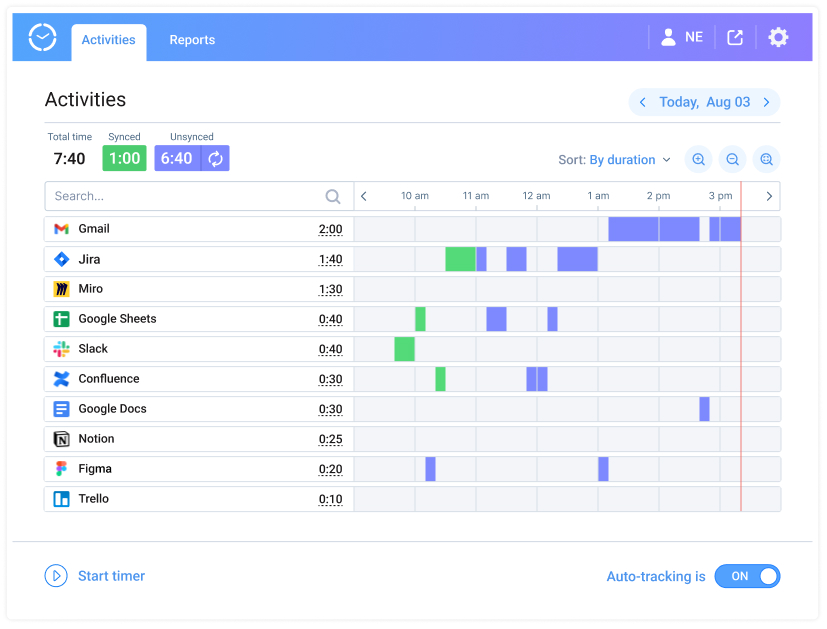
Forget about manual time tracking and get precise progress data with Time Management Assistant
actiTIME reports show where your hours went by project, task, and type of work, and compare tracked time with your estimates. It also connects to 2,000+ apps through Zapier and offers an API for custom integrations.
actiTIME has a free version for 1–3 users. Paid tiers cost $6 per user per month for 1–40 users and $5 for 41–200 users, billed annually; the Chrome extension isn’t included in the free version. To test it on your own work, start a free 30-day trial, no credit card required.
FAQ
How many hours a day do developers actually write code?
Less than most people expect. The Global Code Time Report, based on editor data from more than 250,000 developers, puts the median at 52 minutes of actual coding per day, plus about 41 minutes of other work in the editor, such as reading code and reviewing pull requests. The rest of the day goes to work outside the editor, such as meetings, chat, design discussions, and testing, which is why one protected focus block can matter more than a longer workday.
How long does it take to build a new productivity habit?
In a study by Phillippa Lally and colleagues at University College London, a new daily behavior took about 66 days on average to become automatic, with large differences between people and behaviors (summary of the research). Two weeks is enough to see whether a tip helps you, but making it automatic takes a couple of months of repetition, so add new tips gradually.
How can I stay productive when working remotely?
Give your workday clear edges: fixed start and end times and a place you use only for work, even if it is one corner of a room. Ask questions in writing with full context, so a teammate in another time zone can answer without a call. Agree with your team on the hours when you are available for calls. The end-of-day note from tip 9 helps here too: it lets you switch off in the evening and start quickly the next morning.
How do I get productive faster in a new codebase?
Get the project running and the tests passing on your machine first, and fix the setup instructions wherever they were wrong. Then follow one real request, such as a page load or an API call, from the entry point to the database and back. Read the last few weeks of merged pull requests to see how the team works, and pick a small bug or improvement as your first task. Write down questions as they come up and ask them in batches.
What should I do on days when I can’t focus at all?
Lower the bar. Commit to 15 minutes on the most important task: starting is often the hardest part, and momentum may carry you further. If it doesn’t, switch to work that needs less concentration, such as code reviews, documentation, small fixes, or tidying up tickets. If such days become frequent, check the guide linked in tip 28, because a constant lack of focus can be an early sign of burnout.