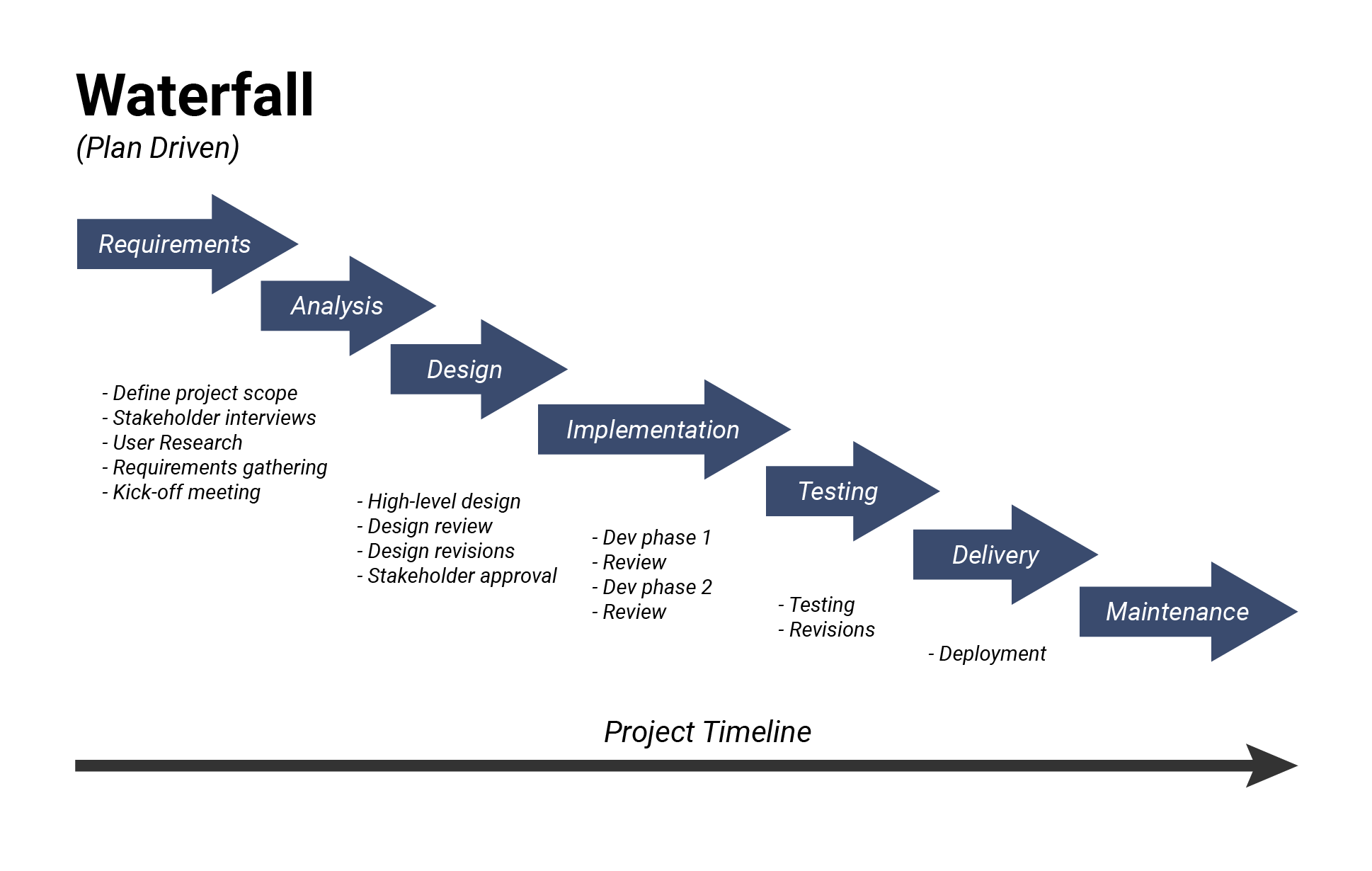
The waterfall methodology runs a project as a fixed sequence of phases: requirements, design, build, testing, delivery and maintenance. Each phase finishes and gets signed off before the next one starts, and the output of one phase is the input for the next. That is why the method is easy to schedule, easy to budget and hard to change halfway through.
The engineer usually credited with the waterfall model, Winston Royce, drew the sequential diagram in 1970 and wrote on the same page that this version “is risky and invites failure”. He spent the rest of his paper on how to fix it. This guide covers the phases, a worked example with hours and costs, what Royce actually recommended, the modified waterfall models that grew out of it, and the places where waterfall projects usually break.
- What is the waterfall methodology?
- What Royce actually wrote about the waterfall model
- The phases of the waterfall model
- Waterfall model example: a client portal, phase by phase
- How to implement the waterfall methodology
- Modified waterfall models
- Advantages and disadvantages of the waterfall model
- When to use the waterfall approach
- Waterfall vs agile in short
- Where waterfall projects break
- How to run a waterfall project in actiTIME
- FAQ
What is the waterfall methodology?
The waterfall methodology, also called the waterfall model, the waterfall method or the waterfall approach, is a linear way of managing a project in which work moves through a set of phases in one direction, like water over the steps of a cascade. The team gathers all requirements first, designs the whole solution next, builds it, tests it and hands it over. A phase is closed with a review and a sign off, and going back to an earlier phase is treated as an exception that costs time and money.
Three features define waterfall project management:
- Scope is fixed early. Requirements are written down and approved before design begins, so cost and schedule can be estimated for the whole project at the start.
- Documents carry the project. Each phase ends with a deliverable, such as a requirements specification or a design document, that the next phase works from.
- Testing and the client’s first look at the product come late. In the strict form, working results appear only after the build is complete.

The method came out of software engineering, but the logic is older and wider than code. You cannot pour a foundation before the building is designed or put up walls before the frame is finished, which is why construction, manufacturing and hardware projects still run largely in sequence. Where waterfall sits among the other approaches is covered in our overview of project management methodologies.
What Royce actually wrote about the waterfall model
Winston W. Royce described the sequence in “Managing the Development of Large Software Systems”, a paper for the IEEE WESCON conference in 1970, based on his work on spacecraft software. His diagram for a large program delivered to a customer has seven steps: system requirements, software requirements, analysis, program design, coding, testing and operations. The word “waterfall” does not appear anywhere in the paper. The name was attached to the diagram later.
Right after the diagram, Royce writes: “I believe in this concept, but the implementation described above is risky and invites failure.” His reason is testing. It is the first moment when timing, storage and data flows are experienced rather than analyzed, and if they fail, a patch will not do: the design has to change, the change can break the requirements, and the project returns to the start. In his words, one can then expect “up to a 100-percent overrun in schedule and/or costs” (Royce, 1970, archived PDF).
The rest of the paper lists five additions that, in his experience, turn the risky sequence into one that delivers. They still read like a practical checklist:
| Royce’s step (1970) | What he meant | What it looks like in a project today |
|---|---|---|
| 1. Program design comes first | Put a preliminary design in place before detailed analysis, so hard limits such as storage and timing surface early | A technical spike or architecture review before requirements are frozen |
| 2. Document the design | “Quite a lot” of documentation, kept current, because managing software is impossible without it | A living specification that every phase updates, not one written at the end |
| 3. Do it twice | Build a pilot version of the critical parts first; for a 30 month effort he suggests a pilot of about 10 months, for a 12 month effort about 3 months | A prototype or proof of concept for the riskiest component |
| 4. Plan, control and monitor testing | Testing is “the phase of greatest risk in terms of dollars and schedule” and it arrives when fallback options are fewest | Test cases written during design, test time protected in the schedule |
| 5. Involve the customer | Formal customer reviews at several points after requirements, because what a design will do “is subject to wide interpretation” | Client sign offs at design, at a mid build demo and before acceptance testing |
Royce also admits that each step costs extra money. His conclusion is that the simpler sequence “has never worked” on large software efforts in his experience, and that recovering from it cost far more than the five steps would have. The original waterfall model, then, already had feedback loops, an early prototype and customer checkpoints. Teams that run waterfall well today usually end up with something close to it.
The phases of the waterfall model
Sources disagree on the number of waterfall model phases. Five phase versions merge analysis into requirements and delivery into maintenance, while seven phase versions split them out. The count matters less than the rule behind it: every phase produces something concrete, and that output must be accepted before the next phase starts. Here is the seven phase version used in the diagram above, with the deliverable and the exit check for each.
| Phase | What the team produces | Exit check before moving on |
|---|---|---|
| 1. Requirements | A requirements document: features, constraints, acceptance criteria, budget and deadline | The client signs the document and agrees how changes will be handled |
| 2. Analysis | A feasibility review of the requirements against technology, people and money | Every requirement is confirmed as buildable within the budget |
| 3. Design | High level architecture, then detailed designs, data models and interface layouts | Design review passed; test cases drafted from the design |
| 4. Implementation | The product itself: code, components or physical work, often built in units | All units complete and unit tested |
| 5. Testing | Integration, system and acceptance tests, plus a defect log | No open critical defects; client accepts the result |
| 6. Delivery | Release, installation, data migration and user training | Product live and handed over |
| 7. Maintenance | Fixes, updates and small improvements under a support agreement | Runs until the product is replaced or the contract ends |
In projects outside software the names change but the sequence holds. A content team might run keyword research, outline, writing, design, editing and publishing in that order, with each step’s output feeding the next. A broader view of how phases group into initiation, execution and closing is in our guide to the project life cycle, and the documents each phase hands over are covered under deliverables in project management.
Waterfall model example: a client portal, phase by phase
Take a real life waterfall model example. A software agency agrees to build a customer portal for a logistics client: login, order tracking, invoice downloads and a support form. The contract fixes the scope and the delivery date, which is exactly the situation the waterfall approach suits. The agency breaks the work into phases and estimates each one. The figures below are illustrative.
| Phase | Estimated hours | Main tasks |
|---|---|---|
| Requirements and analysis | 120 (10%) | Stakeholder interviews, requirements document, sign off |
| Design | 180 (15%) | Architecture, database model, screen designs, design review |
| Implementation | 480 (40%) | Login, order tracking, invoices, support form, unit tests |
| Testing | 300 (25%) | Integration and system tests, client acceptance testing |
| Delivery | 120 (10%) | Deployment, data import, user training |
| Total | 1,200 | Maintenance billed separately under a support agreement |
Now suppose acceptance testing shows that order tracking cannot handle the client’s real data volume, because the database design assumed one warehouse and the client runs six. This is the exact case Royce warned about: the flaw sits in the design, so fixing it means going back two phases.
Move one input and the picture changes. If the same flaw is caught at the design review, before any code exists, the cost is the 90 hours of redesign, an overrun of 7.5%. If it is caught only after delivery, migration and training have to be redone as well, and the overrun climbs toward the 100% Royce described. The calculation is the strongest argument for the habits in his list: a short pilot of the riskiest part, test cases written during design, and a client review before the build.
Outside software, the same logic applies to building a house (design and permits, engineering drawings, procurement, construction, inspection, handover), a bridge or a certified aircraft part. In each case late changes are expensive and approvals depend on finished documents, which is why those projects stay sequential.
How to implement the waterfall methodology
Implementing the waterfall model is mostly about what you prepare before anyone starts building. That upfront work is what people mean by waterfall planning: the whole scope, schedule and budget are worked out before the build, instead of cycle by cycle. These steps turn the phases into a project the team can run:
-
Write the requirements and get them signed.
Describe features, constraints, acceptance criteria, budget and deadline in one document, and have the client approve it. Add how change requests will be priced and approved, because that clause decides most later disputes.
-
Break the scope into work packages.
Split each phase into deliverables and tasks with a work breakdown structure, so nothing in the requirements is left without an owner.
-
Estimate every task and set milestones.
Estimate hours per task and add them up per phase, then place a milestone at the end of each phase. Our guide to project time estimation covers the methods.
-
Lay the phases out on a timeline.
A Gantt chart is the classic waterfall tool because it shows dependencies, so you can see how a late phase pushes every phase after it. The result is the waterfall schedule, or timeline, that the client signs off along with the requirements.
-
Agree on change control.
Every change has a cost, even a small one. Decide who approves a change, how its hours and price are estimated, and when the schedule gets a new baseline. Many teams also set a small threshold below which the project manager can approve cosmetic changes without the full process, as long as each one is logged.
-
Hold a real gate review at the end of each phase.
Check the deliverable against the exit criteria, record open issues and get the sign off in writing. If a gate has never stopped a phase, check whether anyone reads the exit criteria.
-
Track hours against estimates every week.
Percent complete is easy to overstate. Hours spent compared with hours estimated, phase by phase, show an overrun while there is still time to act.
Modified waterfall models
A modified waterfall model keeps the sequence of phases but relaxes the rule that one phase must fully end before the next begins. In his 1996 book Rapid Development, Steve McConnell grouped three common variants under the name “modified waterfalls”. The first builds on Peter DeGrace’s sashimi model:
- Sashimi, or waterfall with overlapping phases. Design starts while the last requirements are being settled, and building starts while detailed design is still underway. It shortens the schedule, at the cost of less clear milestones and some rework when an earlier phase changes.
- Waterfall with subprojects. After the overall design, the system is split into parts that run through detailed design, build and test separately, so a finished part does not wait for the slowest one.
- Waterfall with risk reduction. A risk reduction step, often a prototype of the riskiest feature, comes before the main sequence. This is close to Royce’s own “do it twice”.
Many teams today go a step further and run a hybrid: a waterfall frame for contracts, budgets and milestones, and short iterative cycles inside the build phase. The Project Management Institute’s Pulse of the Profession 2024 report (global research, 2024) records a 57% increase in the use of hybrid approaches and finds that project teams perform equally well with predictive, hybrid and agile approaches. So the age of a method says little about whether it fits your project.
Hybrids have their own failure mode. When requirements and deadlines are fixed before the team starts its short cycles, there is little room to change direction even when a review shows the product is off target. The iterations then add meetings without adding flexibility.
Advantages and disadvantages of the waterfall model
The strengths and weaknesses of waterfall project management come from the same source, the fixed sequence, so each advantage has a matching downside:
| Aspect | Advantage | Disadvantage |
|---|---|---|
| Scope | Agreed up front, so cost and date can be quoted with confidence | Clients often learn what they need only after they see working results |
| Documentation | New team members can catch up from the documents; the project leaves a record | Writing and updating documents takes time that does not show up in the product |
| Progress tracking | Clear milestones make status easy to report | A milestone can look on time while hidden design problems wait for testing |
| Testing | A dedicated test phase with a complete product to test | Defects found late cost the most to fix, as the example above shows |
| Team structure | Specialists can hand over between phases; works with less experienced staff | Handovers lose context and slow decisions |
| Schedule | Dependencies are explicit and easy to put on a timeline | One late phase delays every phase after it |
When to use the waterfall approach
The waterfall approach works best when most of these statements are true for your project:
- Requirements are clear, complete and unlikely to change, or changes are expensive by nature, as in construction or hardware.
- The client wants a fixed price and a fixed date, and accepts a formal change process.
- Regulators, auditors or certification bodies expect documented phases and sign offs.
- The technology is familiar to the team, so design risks are low.
- The project is short enough that the market will not move before delivery.
If several of these are false, for example when you are building a new product for users you have not met yet, choose an iterative method or a hybrid instead. Common alternatives include agile frameworks such as Scrum and Kanban, the spiral model, rapid application development and joint application development.
Waterfall vs agile in short
The main difference between waterfall and agile is when the team learns. Waterfall front loads the learning into requirements and design and delivers once at the end. Agile delivers in short cycles, gets feedback after each one and lets requirements change between cycles, as the four values of the Agile Manifesto describe.

| Question | Waterfall | Agile |
|---|---|---|
| When is scope fixed? | At the start | Refined every cycle |
| When does the client see results? | At acceptance testing | At the end of each cycle |
| When does testing happen? | In its own phase after the build | Continuously |
| How is change handled? | Formal change requests | New items in the backlog |
| Best fit | Stable requirements, fixed contracts, regulated work | Uncertain requirements, products that evolve after launch |
For the agile side in depth, including Scrum roles and sprints, see our guide to agile project management.
Where waterfall projects break
Waterfall projects rarely fail on the day of delivery. The damage builds up quietly in the middle phases, in a few recognizable ways:
-
The signed requirements mean different things to different people.
A signature shows that both sides accepted the wording. It says little about whether they read it the same way. Royce noted that a design remains open to wide interpretation even after agreement, which is why he asked for customer reviews after the requirements phase too.
-
Testing gets squeezed.
Testing sits at the end, so every earlier delay eats into it. A 300 hour test phase cut to 150 hours to save the date usually returns as defects after delivery.
-
Small unlogged changes add up.
A label here, a field there, each approved in a hallway. Ten of them make one large change that nobody estimated, priced or added to the schedule.
-
Progress is reported in percent complete.
A phase that is “90% done” for three weeks running is a familiar sight. Hours logged against the estimate for that phase show the real position much earlier.
-
The client sees the product for the first time at acceptance.
By then every misunderstanding is built into the code or the structure. A demo in the middle of the build costs a day and saves the most expensive kind of rework.
-
Extra work never reaches the invoice.
On fixed price projects, hours spent on change requests often get logged against the original tasks. The client is never billed for them and the project looks like an estimating failure rather than a scope change.
How to run a waterfall project in actiTIME
actiTIME is project time tracking software built for billing. It is not a Gantt chart tool, but it covers the part of a waterfall project where most of the money is decided: tasks with estimates and deadlines for every phase, hours tracked against them, budgets that warn you early and billing that follows the hours. Here is how to set it up.
1. Turn the phases into workflow statuses. In the workflow settings, build your waterfall workflow by adding a custom status for each phase (Requirements, Analysis, Design, Coding, Testing, Operations) and give each one a color.

2. Create the project with estimates and deadlines. Under the customer, create the project and add the tasks from your work breakdown structure, each with an estimate, a deadline and a type of work. Tasks can also be imported from a CSV file.

3. Follow the phases on the Kanban board. Switch the Tasks view to the Kanban board, where each column is a phase. When every card in a column is closed, the phase is ready for its gate review. Teams that want more detail can split a phase into statuses such as “Design in progress”, “Design under review” and “Design done”.

4. Track time against the tasks. People log hours in the weekly timesheet, in Calendar View or in the mobile app, so every hour lands on a task inside a phase.
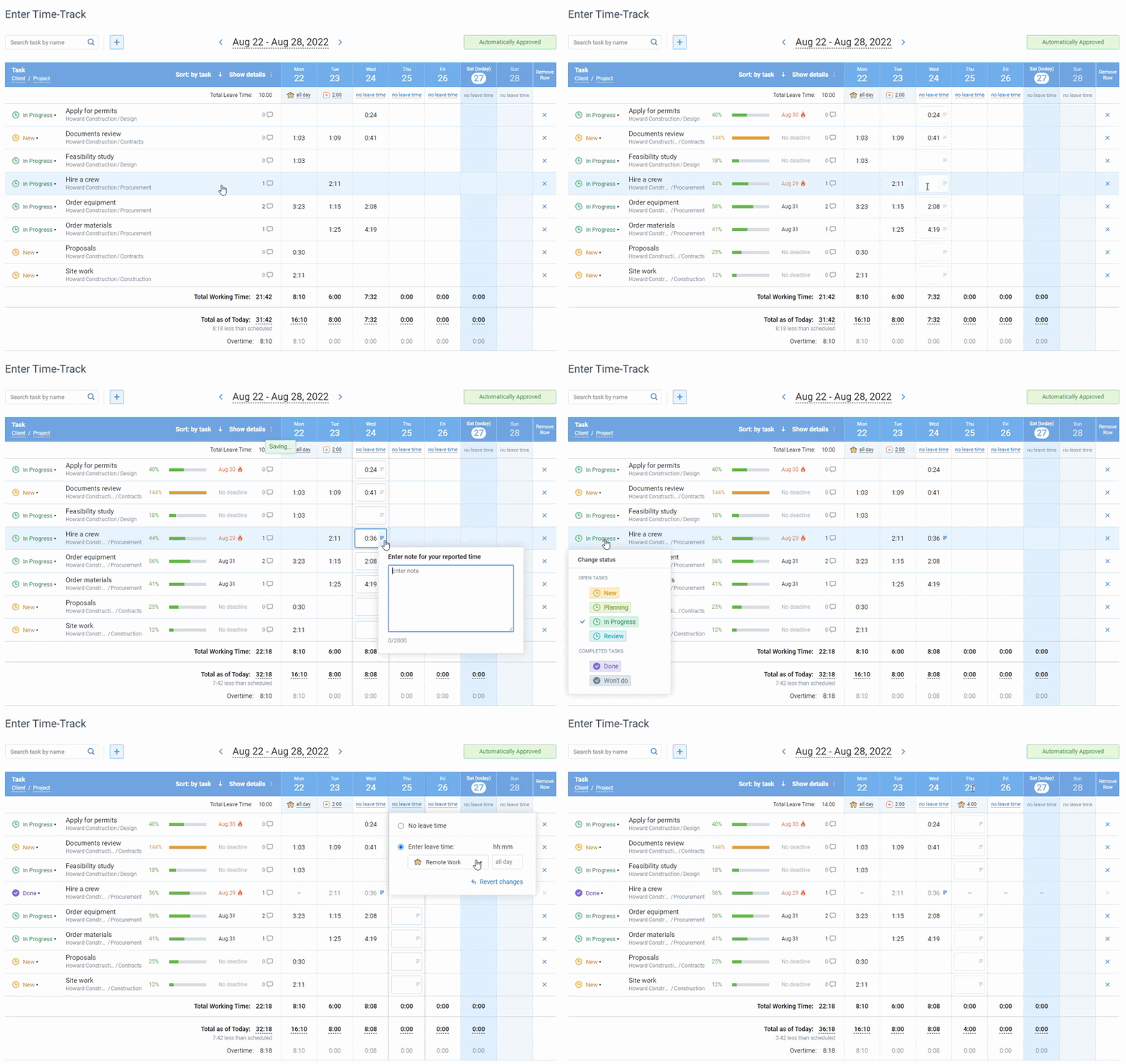
5. Catch overruns per phase. The Estimated vs. Actual Time Report shows the variance for each task, so a design phase running 40% over is visible at the design gate, not at testing. Time, cost and billing budgets can be set on the customer, project or task, and the progress bar turns red when a budget is exceeded.
6. Keep change requests billable. Log each approved change as its own task. Its hours then show up separately in the Billing Summary Report and on PDF invoices, priced by type of work rates or by user rates, whichever method the project uses, while the Cost of Work Report shows what the extra hours cost you. Task comments and change history keep the record of who asked for what.

Now we can better predict future project requirements
Our company needed a simple way of tracking time used on multiple projects – and actiTIME fit the need. Its interface is simple and easy to maintain. We use the application for time management, task estimation and also to communicate deadline information to our team members. Now having actiTIME we can better predict future project requirements!
Task estimates and budgets are not part of the free version, so set up your first waterfall project during the trial. Start a free trial of actiTIME with full features for 30 days. After the trial, teams of up to 3 users can keep using it for free, and paid use starts from $5 per user per month.
FAQ
Is the waterfall model the same as the SDLC?
No. The software development life cycle (SDLC) is the set of stages any software goes through, from requirements to maintenance. The waterfall model is one way to move through those stages, doing each one once and in order. Agile, spiral and incremental models move through the same stages in repeated cycles.
Is the waterfall methodology still used?
Yes, mainly where requirements are stable or changes are costly, such as construction, manufacturing, hardware and regulated work that expects documented phases and sign offs. In software it more often survives as the outer frame of a hybrid, with fixed milestones and budgets around iterative build cycles.
What is the difference between the waterfall model and the linear sequential model?
There is none in practice. “Linear sequential model” is an older textbook name for the classic waterfall model. Both describe phases completed one after another without returning to earlier ones.