A milestone is a point that marks progress. On a road it is a marker that tells travellers how far they have come. In a project it is a checkpoint with zero duration that confirms an important result, such as “design approved” or “testing passed”, and lets the next piece of work begin.
The definition is easy. Setting milestones well is harder, because most bad milestones are tasks or dates in disguise. This guide explains what a milestone is, what makes one real, how to set milestones step by step, and a worked example that shows how a milestone tells you about an overrun weeks before the deadline.
- What is a milestone?
- What is a milestone in project management?
- Milestone vs task, deliverable, deadline and dependency
- Types of milestones
- How to tell if something is a milestone
- How to set milestones in a project
- Worked example: milestones for a 10 week website project
- Where milestones go wrong
- How to track the work behind milestones in actiTIME
- FAQ
What is a milestone?
The dictionary milestone definition has two senses, and the second grew out of the first. Merriam-Webster defines a milestone as “a stone serving as a milepost” and, in the figurative sense, as “a significant point in development”. Graduating from college, a first job and a company’s tenth anniversary are milestones in that second sense.
The literal milestones are old. Roman road builders set stone markers along their roads, and the first ones appeared on the Appian Way, according to the encyclopedia entry on milestones. Their job was to tell a traveller where they were on the route and how far was left. A project milestone does the same thing for a team: it shows how far the work has come and confirms the team is still on the right road.
What is a milestone in project management?
A milestone in project management is a checkpoint on the schedule that confirms an important result has been reached, such as a phase closing, a deliverable being accepted or a decision being made. The Project Management Institute puts it more briefly: “a significant point or event in a portfolio, program, or project”, according to its PMI Lexicon of Project Management Terms (version 4.0). The same lexicon calls a list of milestones with planned dates a milestone schedule.
So what is a project milestone in practice? It has four properties:
- It takes no time. The work before a milestone costs hours and money, while the milestone is only the moment that work is confirmed as done. Scheduling tools show it as a task with zero duration, usually drawn as a diamond on a timeline, as the encyclopedia entry on project milestones describes.
- It is either reached or it isn’t. A task can sit at 90% for weeks, but a milestone has no percentage, so it gives a more honest picture of progress.
- Someone confirms it. A client, a sponsor, an inspector or a team lead checks a condition and says yes.
- Something depends on it: the next phase starts, a payment is released, a decision is made or another team can begin.
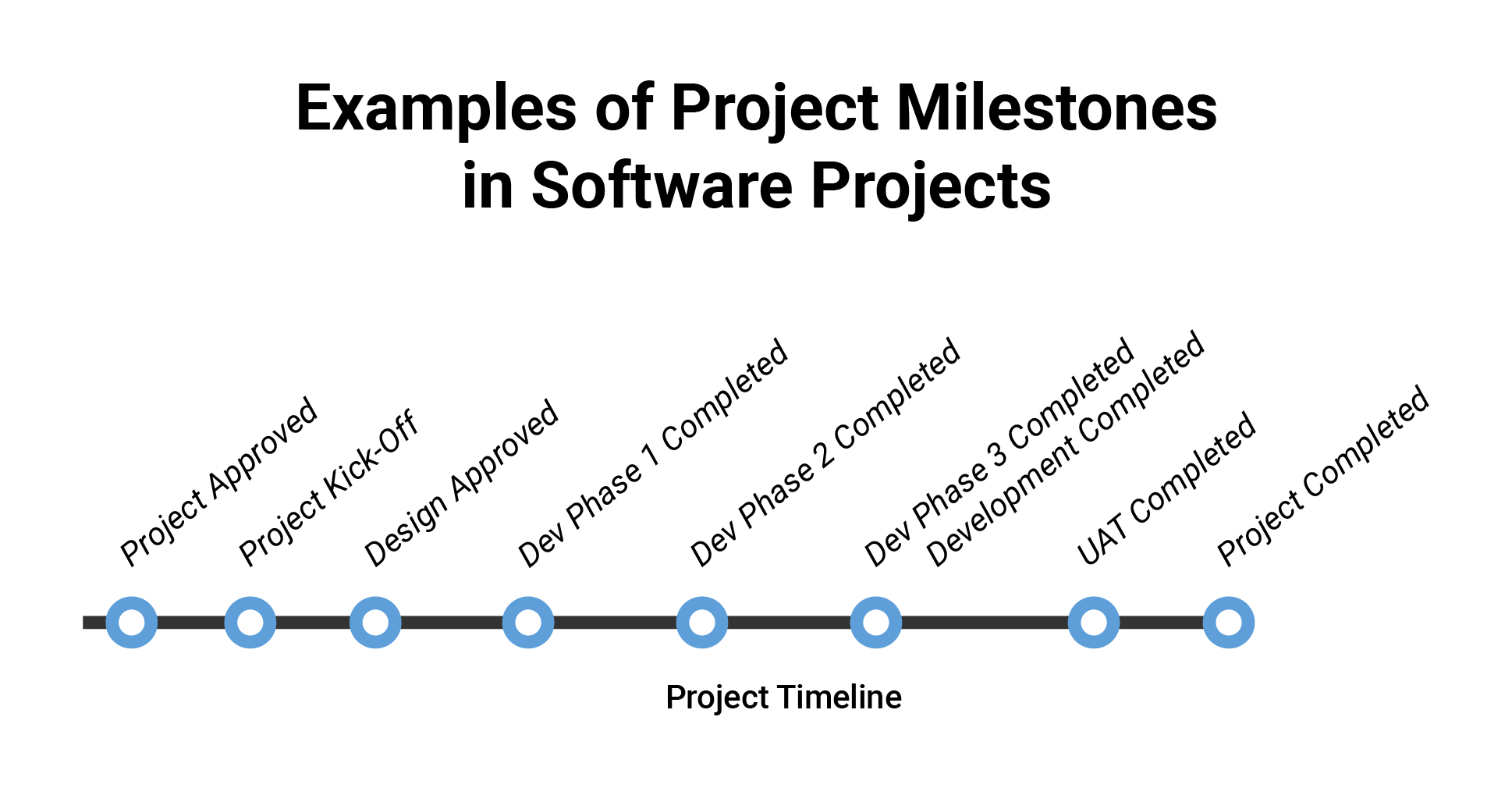
The timeline above shows typical milestones in a software project. None of them is work. Each one is the point where a body of work is finished and checked, from project approval to user acceptance testing (UAT) and completion.
Why bother? In the PMI Pulse of the Profession 2017, a global survey that included 200 senior executives, the most common primary cause named for failed strategic initiatives was a “lack of clearly defined and/or achievable milestones and objectives to measure progress”, at 37% of failures. Poor communication came second at 19%. The figure describes strategic initiatives that failed, not all projects, but it shows how often the problem starts with checkpoints nobody can measure.
Milestone vs task, deliverable, deadline and dependency
Most confusion about milestones comes from five neighbouring terms. The quickest way to tell them apart is to ask what each one commits you to.
| Term | What it is | How it differs from a milestone |
|---|---|---|
| Task | Work with an owner, a duration and a cost | Tasks lead up to a milestone; the milestone confirms a group of them is done |
| Deliverable | A product, result or capability handed to someone | The deliverable is the thing; the milestone is the moment it is accepted |
| Deadline | The date one piece of work is due | Every milestone has a date, but most deadlines are not milestones because nothing changes when they pass |
| Goal | The result the project exists to achieve | Milestones are the checkpoints that prove you are getting closer to the goal |
| Dependency | An input the project needs from outside, such as hardware the client supplies | A dependency enters the project; a milestone is an output of the project’s own work |
The last row matters more than it looks. Teams often put a client’s obligation, like “client provides test hardware”, on the schedule as a milestone. It is better tracked as an external dependency with its own date, because the team cannot confirm or control it. For a fuller list of goals, tasks and deliverables in project management next to milestones, with examples by phase and industry, see our project milestones examples.
Types of milestones
Milestones are easier to choose once you know what job each one does. The types below are practical groupings by purpose, not an official standard.
| Type | What happens when it is reached | Example |
|---|---|---|
| Phase gate | One phase closes and the next may start | Requirements approved |
| Decision point | Sponsors decide whether to continue, change course or stop | Prototype reviewed, go or no go agreed |
| Acceptance | A client or sponsor accepts a deliverable | Final design signed off by the client |
| Payment | A contract releases an invoice or a payment | Second instalment due on beta release |
| External check | An inspector, auditor or regulator confirms a standard is met | Foundation inspection passed |
| Handover | The result moves to the people who will run or support it | Product handed over to the support team |
You will also hear about key milestones. That label is about attention rather than type: key milestones are the few that sponsors and clients follow in status reports, while smaller supporting milestones stay in the team’s working schedule.
How to tell if something is a milestone
Run each candidate through four questions. If any answer is no, you are probably looking at a task, a deadline or a goal.
-
Can anyone check that it happened?
“Wireframes approved” can be checked. “Make progress on design” cannot. Write the condition so that two people would agree on whether it is met.
-
Does one person confirm it?
Name a single owner or approver. When two people share a milestone, neither of them chases it.
-
Does something depend on it?
A real milestone changes what happens next: the next phase starts, a payment is due, a team is released or a decision is made. If nothing changes when the date passes, it is a deadline.
-
Does it take zero work of its own?
If the item needs hours to complete, it is a task. Turn it into tasks and put the milestone at the point where those tasks are confirmed as done.
The test also stops a common habit: calling every small win a milestone. Two website teams can publish the same number of pages, and for one of them it is a real checkpoint while for the other it is an ordinary week. What decides it is what depends on that moment.
How to set milestones in a project
Setting project milestones works best after the scope and the main tasks are known, and before dates are promised to anyone. These six steps take you from a goal to a milestone schedule you can defend.
-
Start from the goal and the end point.
Write down what the project must achieve and what the contract or sponsor fixes: a launch date, a budget, payment terms, required approvals. If the end date is fixed, work backwards from it. Contract clauses about reviews, acceptance tests and payments are your first milestone candidates.
-
Break the work into tasks.
Split the scope into tasks small enough to estimate, ideally with a work breakdown structure. Milestones are easier to place once you can see which groups of tasks belong together.
-
Mark the points where something changes.
Go through the task list and put a milestone wherever a phase closes, a client or sponsor must approve, money changes hands, another team takes over or a go or no go decision is due. Ignore points where nothing changes.
-
Write the completion condition and name the owner.
“Design approved” becomes “all 12 page layouts reviewed, the client’s changes logged and approval confirmed in writing by the marketing director”. Decide in advance what evidence counts: a signed approval, a test report or an inspection certificate.
-
Date each milestone from estimates, not from the calendar.
Add up the estimated hours of the tasks before each milestone, divide by the hours your people can really give the project each week, and add a buffer where approvals depend on someone outside the team. Our guide on how to create a project timeline shows that conversion from hours to workdays in detail.
-
Save the baseline and review it.
Keep the original milestone dates and next to them record a forecast date and, later, the actual date. Review the list at every status meeting and escalate as soon as a forecast moves, while there is still time before the date.
How many milestones is enough? There is no fixed number: small projects may need two or three, larger ones ten or more. A useful check is the gap between them. If the team passes a milestone every few days, nobody treats it as important; if months pass between two milestones, problems will stay hidden too long. When uncertainty is high, as in research or a new kind of product, set closer milestones and expect the later ones to move.
If you want a ready format for the milestone list, download our free milestone chart template:
Worked example: milestones for a 10 week website project
Here is how the steps play out on a small client project. The figures are illustrative. An agency is building a website with four people, 480 estimated hours and a contract that pays in two instalments: one when the design is approved and one at launch.
| Milestone and owner | Completion condition | Estimated hours before it and target week |
|---|---|---|
| M1 Scope signed (account lead) | Sitemap, features and acceptance criteria signed by the client | 24 h, end of week 1 |
| M2 Design approved (client marketing director) | All 12 layouts approved in writing; first invoice released | 96 h (120 h total), end of week 3 |
| M3 Build complete (lead developer) | All pages built, content loaded, internal test checklist passed | 240 h (360 h total), end of week 7 |
| M4 Acceptance testing passed (client project owner) | No open critical issues after the client’s test round | 80 h (440 h total), end of week 9 |
| M5 Launch and handover (account lead) | Site live, logins and documentation handed over; final invoice released | 40 h (480 h total), end of week 10 |
At the end of week 3 the client approves the design, so M2 is reached on time. The date looks fine. The hours do not: the team tracked 150 hours up to M2 against 120 estimated. Because the milestone has an estimate attached, that gap is visible now, four weeks before the build is due.
The forecast for M3 moves from the end of week 7 to the middle of week 8, and every milestone after it moves with it unless the team acts. If the overrun up to M2 had been 10% (132 hours), the build would need about 24 extra hours, a fifth of a week, which the buffer could absorb. At 25% the project manager has three honest options: cut scope from the build, add hours and accept the cost, or agree a new launch date with the client. Making that call in week 3 is far cheaper than discovering the problem in week 9.
The example also shows why the payment milestone M2 had to carry a condition in writing. If the client had approved only some of the layouts, the first invoice would still be waiting, and the team would be building on a design that could change.
Where milestones go wrong
Milestone schedules tend to break in the same seven places.
-
Tasks dressed as milestones.
“Work on the homepage” has duration and no clear end. Split it into tasks and keep the milestone for the moment the homepage is approved.
-
“Ready for approval” reported as “approved”.
The team finishes its part and marks the milestone done, while the client has not looked at it yet. Report the two states separately, because the second one is the milestone.
-
Dependencies hidden as milestones.
Inputs the project waits for, such as client hardware, data or access, sit on the schedule as milestones the team cannot control. Track them as dependencies with owners on the other side, and raise them early when they slip.
-
Milestones met at the expense of other work.
Milestones usually show progress on the critical path only. People get moved from less visible work to hit the date, so the schedule looks healthy while other tasks fall behind. Check the whole task list, not just the next milestone.
-
Dates tracked, effort ignored.
A milestone reached on time with 25% more hours than estimated is a warning, as the worked example shows. Without tracked hours you only learn about the overrun when a later date slips.
-
Fixed dates on uncertain work.
When the team does not yet know how something will be built, firm milestones months ahead are guesses. Set nearer milestones, review the later ones after each one is reached, and tell stakeholders which dates are firm.
-
No look back after the project.
At closure, compare planned and actual dates for every milestone and sort each slip by cause. Ask which milestones were missed and why, what the miss cost, whether each milestone really mattered to the goal, and what the team did to recover. Those answers make the next milestone schedule more realistic.
Most of these problems are easier to catch when every milestone has an owner and a review rhythm in project progress monitoring.
How to track the work behind milestones in actiTIME
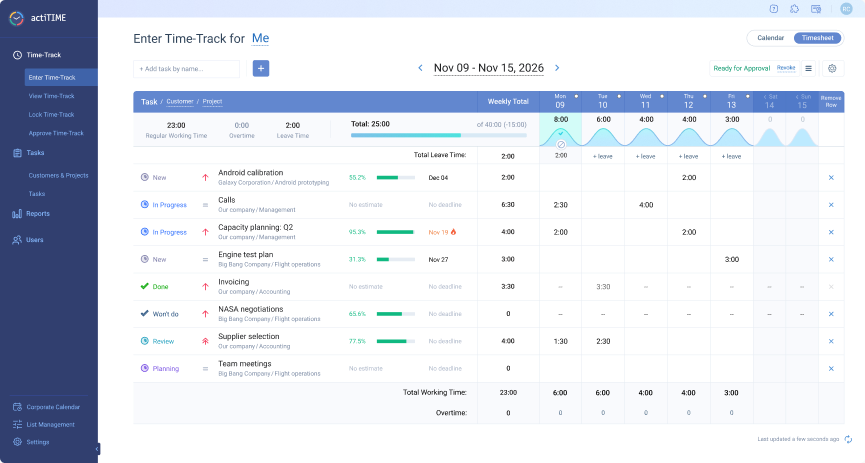
A milestone chart tells you whether a date was hit. It does not tell you how many hours it took or what they cost, and that is the part actiTIME covers. actiTIME is project time tracking software built for billing, not a Gantt chart tool, so the milestone dates themselves live in your schedule or milestone chart template, while actiTIME shows the effort and money behind each one.
A simple setup for a milestone schedule like the one in the example:
-
Group the work by milestone.
actiTIME organizes work as Customer, Project and Task. Put the tasks that lead to each milestone in the same project, or name a task after the milestone, such as “Design approval”.
-
Add estimates and deadlines.
Give each task an estimate in hours and a deadline with reminders. Custom workflow statuses and the Kanban board show which tasks still block a milestone.
-
Set budgets.
Time, cost and billing budgets can be set on a customer, project or task, and the progress bar turns red when a budget is exceeded.
-
Compare estimated and actual hours.
The Estimated vs. Actual Time Report shows a gap like the 25% in the worked example while there is still time to act on it.
-
Bill at the payment milestone.
On client work billed by the hour, the Billing Summary Report and PDF invoices turn the time tracked up to a payment milestone into billable amounts, by type of work rates or by user rates, depending on the billing method chosen for the project.

Now we can better predict future project requirements
Our company needed a simple way of tracking time used on multiple projects – and actiTIME fit the need. Its interface is simple and easy to maintain. We use the application for time management, task estimation and also to communicate deadline information to our team members. Now having actiTIME we can better predict future project requirements!
Task estimates and budgets are part of the full version, which starts from $5 per user per month. If you need a dedicated tool for drawing milestone timelines, see our roundup of apps to track project milestones.
To see the hours and costs behind every milestone, start a free trial of actiTIME with all features for 30 days. After the trial, teams of up to 3 users can keep using it for free.
FAQ
Can a milestone have a duration?
By definition, no: a milestone is a point in time, so it has zero duration and no cost of its own. If an item needs days of work, it is a task or a phase, and the milestone sits at its end. Some scheduling tools let you flag a task with a duration as a milestone for display, but the cleaner practice is to keep the work and the checkpoint separate.
What is a milestone payment?
A milestone payment is an amount a contract releases when a named milestone is reached, such as 30% on design approval and the rest on launch. It only works if the contract states the completion condition and who confirms it. Otherwise the payment can stall in an argument about whether the milestone was really met.
Are milestones used in agile projects?
Yes, but they look different. Agile teams rarely set phase gates; their milestones are usually releases, demos of a working increment, compliance reviews or dates fixed by the business, such as a trade show. The sprint rhythm handles short term progress, and milestones mark the few points that stakeholders outside the team care about.