Church management software (ChMS) is the database a church runs on: people and families, attendance, giving records and contribution statements, groups, volunteers and the Sunday check-in. For a small church the question is rarely which tool has the most features. It is which tool the office volunteer can learn in an afternoon, and what it will really cost once giving fees, hosting and add-ons are counted.
We checked eight church management software options against each vendor’s own pricing page. “Free” turned out to mean four different things, and one tool that several current roundups still list with a free tier now starts at $29 a month after a 30-day trial. Below you will find what each kind of free costs, a comparison table, an entry for every tool with its published limits, a worked example of what giving fees add, and the one job none of these tools does: tracking the hours of paid church staff.
- What “free” means in church management software
- 8 church management software options compared
- The best church management software for small churches
- What a ChMS leaves out: paid staff hours
- Worked example: what giving fees add to the bill
- Nonprofit software programs that accept churches
- Best pick by situation
- Where church software decisions go wrong
- FAQ
What “free” means in church management software
A search for free church management software returns tools that are free in very different ways. Some cap the number of people, some charge nothing monthly and earn their money on every donation, some give away the code and leave the server to you, and some are a trial with a free sign-up. Knowing which kind you are looking at tells you what the bill will be in year two.
| Kind of free | Examples | What you pay later |
|---|---|---|
| Free tier with a cap | ChMeetings (50 people), Planning Center (People free, other products capped) | A monthly fee once you pass the cap, plus processing fees on online gifts |
| No monthly fee, paid per gift | Tithely Giving, B1 Church | Card and bank processing fees on every donation |
| Free license, you host it | ChurchCRM, Rock RMS | Hosting, updates and someone with the skills to run a server; Rock also asks for a yearly donation |
| Free trial only | ChurchTrac, Breeze, Tithely Church Management | The full subscription after 30 days |
The second row deserves the most attention. A tool with no monthly fee can still be the most expensive option for a church whose members give online, because processing fees grow with every dollar given while a subscription stays flat. The worked example further down puts numbers on it.
8 church management software options compared
Prices below come from each vendor’s own pricing page. Where a vendor scales the price by the number of people in the database, the table shows the entry point and the size it covers.
| Tool | Best for | Starting price |
|---|---|---|
| ChurchTrac | Small churches that want accounting, website and ChMS in one bill | $29/month for 75 names; 30-day trial |
| Planning Center | Churches with worship teams and volunteer rotas | Free (People unlimited; other products capped) |
| Breeze | Churches that want one flat price with no limits on contacts | $72/month flat |
| ChMeetings | Very small churches and church plants | Free up to 50 people; from $12/month |
| Tithely | Churches starting online giving | Giving $0/month plus processing; All Access $119/month |
| B1 Church | Churches that want free app, website and check-in | Free; standard Stripe or PayPal fees on gifts |
| ChurchCRM | Churches with a volunteer who can manage web hosting | Free (MIT license); hosting about $3 to $10/month |
| Rock RMS | Large or growing churches with technical staff | Suggested donation $4.45 per weekly attendee per year, plus hosting |
The best church management software for small churches
1. ChurchTrac
Key features:
- Fund accounting
- Online giving
- Website and app
- Check-in
ChurchTrac is the all-in-one option for churches that would rather pay one bill than five. Every size includes the people database, fund accounting, giving, a website and member app, check-in, worship planning, volunteer scheduling, groups, events and registrations. Built-in fund accounting is the part that sets it apart: most ChMS products expect you to keep QuickBooks or a separate church accounting tool for the books.
Price depends only on how many names you track, and every adult, child, member or donor counts as one name. Archived names do not count, which helps a church that keeps old records. ChurchTrac says more than 14,000 churches use it, and it imports your people and families from a spreadsheet or your old provider at no charge.
The thing to know before you read older roundups: ChurchTrac no longer advertises a free tier. Its pricing page shows a 30-day free trial, then paid tiers only. Two-way texting is a $7 monthly add-on, and church plants can ask for a custom quote.
Pricing: $29/month for 75 names, $39 for 125, $59 for 250, $79 for 500, $99 for 1,000 and $119 for unlimited; 10% off when paid yearly.
2. Planning Center
Key features:
- Service planning
- Check-ins
- Groups
- Church Center app
Planning Center is a set of separate products that share one people database, and you pay only for the products you turn on. People, the member database with reporting and communication, is free with no limit on records. Calendar is free unless you manage room bookings, and the Church Center member app is free at its basic level.
The other products are free up to small caps: Services for 5 team members, Giving for 10 donations a month, Check-Ins for 10 a day, Groups for 15 members and Registrations for events of 5 people. A small church can run several products free and upgrade one at a time. Exceeding a cap does not switch anything off; Planning Center emails you a suggestion to upgrade if it happens more than once.
Services, the worship planning and scheduling product, is the reason many churches use Planning Center at all. The limitation is breadth: there is no accounting product in its lineup, so the books live elsewhere, and a church using five or six paid products will find the monthly total climbing.
Pricing: free tiers for every product; paid tiers priced per product by usage; US giving processed at 2.15% + $0.30 per card gift and $0.30 per ACH gift.
3. Breeze
Key features:
- Unlimited contacts
- Giving
- Check-in
- Text messaging
Breeze sells one thing at one price. The pricing page lists a single flat rate with no tiers by church size, no contracts and no termination fees, and the core features include unlimited contacts, online and text giving, text messaging, unlimited emails, event management, member directories, a mobile app, check-in with name tags, service planning and attendance and giving reports, with free phone and email support.
That flat price is the reason small church administrators like it. A church of 100 people and a church of 1,000 pay the same, so the budget does not change when the congregation grows. Breeze is now part of Tithely: its pricing page carries Tithely branding and sign-up runs through Tithely, and the same $72 price appears for Tithely Church Management.
For a church of 60 people, $72 a month is more than ChurchTrac’s smallest tier or a free ChMeetings account, so Breeze makes the most sense from roughly 100 people upward. Its feature list includes no fund accounting, so the books still need another tool.
Pricing: $72/month flat; a bundle with church website and app is offered through Tithely All Access at $119/month.
4. ChMeetings
Key features:
- Free plan
- Volunteer scheduling
- Worship planning
- Accounting
ChMeetings has one of the most usable free tiers among the paid ChMS vendors. Its Free Forever option covers up to 50 people and 50 donations a month, and it does not expire. For a church plant or a house church that is a real database with giving, not a trial.
Paid tiers scale by people. The first paid tier covers 100 people for $12 a month and adds online giving with pledges, volunteer scheduling and automations. Accounting arrives at the Small tier, $25 a month for up to 250 people, which makes ChMeetings one of the few options under $30 a month with the books built in. Above that, 500 people cost $40 a month and an unlimited database $60. ChMeetings says it migrates your data free and charges no setup fee.
The catch is the hard edge at 50. A growing church plant will cross it within a year, so treat the free tier as a starting point and check the price of the tier you will need in 18 months, not today.
Pricing: free up to 50 people; $12/month up to 100; $25 up to 250; $40 up to 500; $60 unlimited.
5. Tithely
Key features:
- Online giving
- Text giving
- Church app
- Website builder
Tithely started as a giving app and is still the quickest way for a small church to accept online donations without a monthly bill. Tithely Giving costs $0 a month; the church pays processing fees on each gift instead, 2.9% + $0.30 for cards and 1% + $0.30 for ACH bank transfers.
From there you can add the rest. Tithely Church Management costs a flat $72 a month with free data migration, no setup fees, no long-term contract and a 30-day trial. All Access, at $119 a month, adds service planning and a custom church website and app on top of giving and church management.
The trade-off sits in the fee line. A free giving plan is cheap while gifts are few, but at 2.9% per card gift the processing cost rises with every dollar given, and Planning Center’s published card rate is lower. A church moving most regular givers to ACH pays far less, because the percentage drops from 2.9% to 1%. Encourage bank transfers for recurring gifts whichever tool you choose.
Pricing: Giving $0/month plus processing; Church Management $72/month; All Access $119/month.
6. B1 Church
Key features:
- Member app
- Website builder
- Child check-in
- Giving
B1 Church is the free option most small churches have not heard of. It is built by Live Church Solutions, a 501(c)(3) nonprofit founded in 2012, and it combines a member app, a website builder, online giving, child check-in and church management in one database at no charge.
Unlike the open source tools below, B1 is hosted for you, so there is no server to rent or update. Its giving model is also unusually plain: B1 adds no fee of its own to donations, and the church pays only the standard processing rates of Stripe or PayPal.
The risk is dependence. With no subscription, there is no contract or service level to hold a vendor to, and the church relies on a small nonprofit staying funded. It suits a church that wants a free app and website first and is comfortable learning from documentation. Before moving every record into it, export a test file to confirm you can take your data out again.
Pricing: free; Stripe or PayPal processing fees on online gifts.
7. ChurchCRM
Key features:
- Open source
- Groups and events
- Attendance
- Contributions
ChurchCRM is free, open source software under the MIT license, with no subscription tiers and no per-member pricing. It covers families and members, groups with roles, events with check-in, attendance over time, contributions and email communication. The project has been active since 2013 and says it has more than 25,000 downloads and translations into 49 languages.
The only running cost is hosting. ChurchCRM’s own FAQ puts a standard shared hosting plan at $3 to $10 a month, and on hosts that offer one-click installers the provider handles server maintenance, security patches and backups. Data can be exported from the admin panel at any time, and because the code is public no vendor can raise the price or close your account.
The cost you will not find on a pricing page is people. Help comes from a Discord community and GitHub issues rather than a helpdesk, and someone at the church has to own upgrades. The interface is also plainer than the commercial tools above.
Pricing: free license; shared hosting about $3 to $10/month.
8. Rock RMS
Key features:
- Workflows
- Check-in
- Website CMS
- Open source
Rock RMS appears on most lists of free church management software, and it is the one most likely to surprise a small church. Rock is run by a nonprofit and funded by the churches that use it rather than sold: instead of a license fee it suggests a donation of $4.45 per average weekend attendee per year. For a church of 120 people that is about $534 a year before hosting.
Rock’s cloud hosting is billed as one monthly payment that combines that donation with a hosting fee. You can also host it yourself, but Rock is a large system with workflows, a rules engine, a built-in website CMS and support for several campuses, and it was designed for churches with staff who can configure it.
For a church under 300 people with no technical staff, Rock is usually more system than the job needs. For a growing church with an IT person, it is the most flexible option here and one you will not outgrow.
Pricing: suggested donation $4.45 per average weekend attendee per year; hosting extra.
What a ChMS leaves out: paid staff hours
Every tool above counts people in the pews, and none of them counts the hours of the people on the payroll. The church administrator, the part-time youth director, the custodian and the childcare workers are employees, and their time is the largest cost in many small church budgets. Volunteer scheduling in a ChMS shows who is serving on Sunday. It does not record how many hours a paid employee worked this week, whether that ran into overtime, or how much of the youth budget went on staff time.
That is a separate job, and it is the one actiTIME does. For what a church employee timesheet should record and when wage rules apply to church staff, see our guide to time tracking software for churches.
actiTIME
Key features:
- Timesheets
- Leave and overtime
- Cost budgets
- Approvals
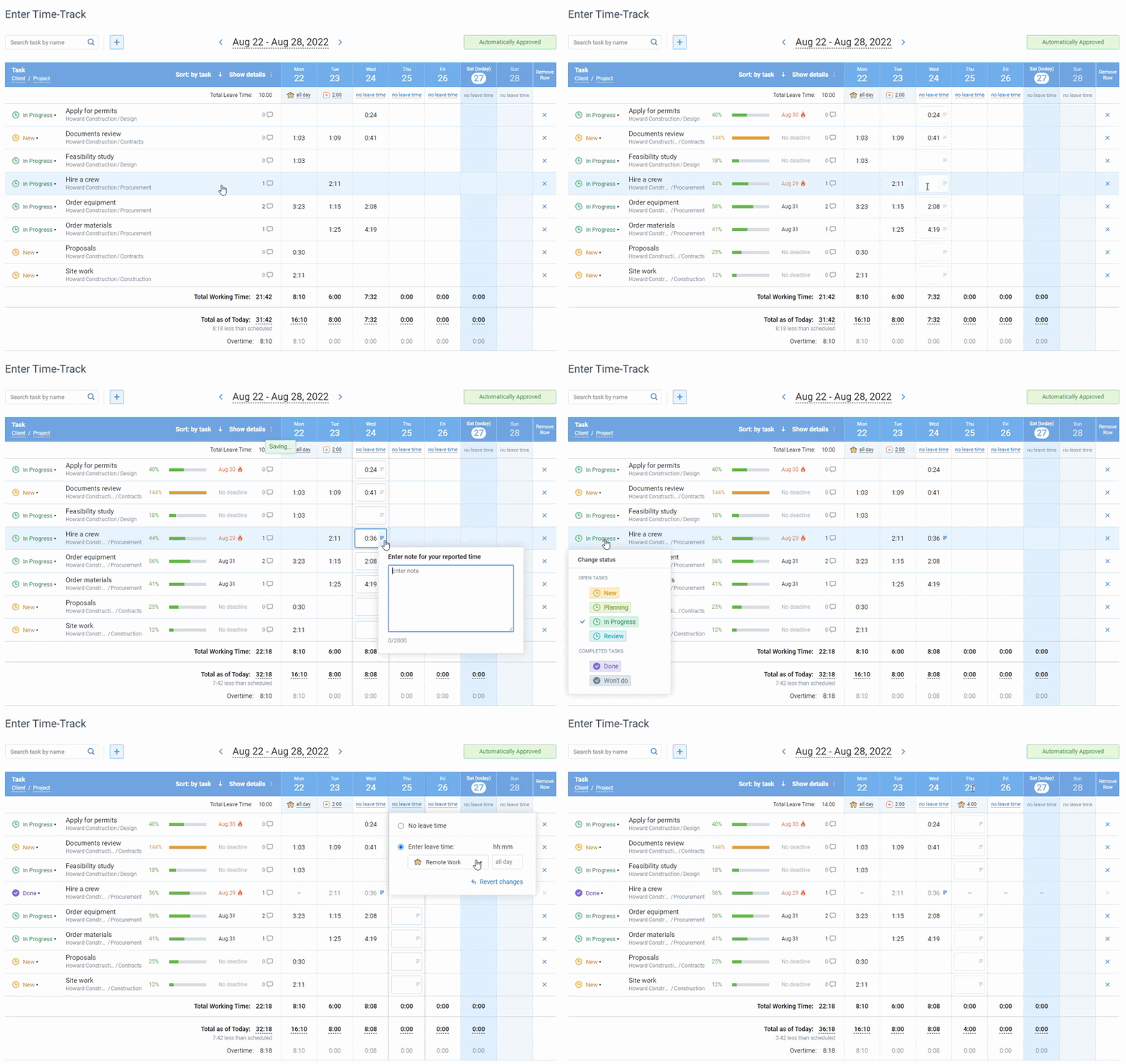
actiTIME is project time tracking software built for billing, and churches use it for the staff side of the work. Its three levels, customer, project and task, can be renamed, so a church can set them up as ministry, program and activity: Youth Ministry, Wednesday Night, Lesson Prep. Staff log hours in a weekly timesheet, in a calendar view with start and stop times, in the mobile app or with the Chrome extension.
Each staff member gets a cost of work rate, with separate regular, overtime and leave rates, so the Cost of Work Report shows what each ministry spent on staff time. Cost budgets per ministry turn red when they run over. Overtime can be calculated automatically, leave types can carry PTO and sick balances, and managers can approve weekly timesheets and lock approved weeks so they cannot be edited later.
It is not a ChMS: there is no member database, giving or check-in, and it does not run payroll. Use it next to the church management software you choose above.
Pricing: free for up to 3 users; Online from $5 per user per month; a Self-Hosted version for a one time fee. The pricing page notes discounted rates for nonprofit organizations. Every account starts with a full featured 30-day trial.

actiTIME more than meets the needs of my company
It’s an amazing product, it is extremely well-polished and a good deal better than other apps which have higher license fees. At this point, actiTIME more than meets the needs of my company. Thanks for developing such a wonderful app!
Worked example: what giving fees add to the bill
Subscription prices are the number churches compare, and they are often the smaller number. Take an illustrative church of 120 people that receives $150,000 a year online in 2,400 gifts, an average of $62.50 each, all by card. Using each vendor’s published US rates:
The gap in processing fees alone is larger than a full year of Breeze at its flat price. Now move half the gifts to ACH bank transfers. On Tithely the card half costs $2,535 and the ACH half $1,110 at 1% + $0.30, so the total falls to $3,645. On Planning Center, where ACH costs only $0.30 a gift, it falls to about $2,333. Getting regular givers onto bank transfers saves this church $1,400 to $1,600 a year, more than any difference in subscription price on this page.
These figures are illustrative and use published card rates for the US; some vendors, ChurchTrac among them, quote processing rates only on request, so ask for the rate in writing before you compare.
Nonprofit software programs that accept churches
The tools around the ChMS, email, documents and design, are often free through nonprofit programs. Churches qualify for the main ones in the US, but each program checks charitable status, and that is where churches get stuck. Under IRS rules, a church that meets the 501(c)(3) requirements is automatically tax exempt and does not have to apply for recognition, so many churches have no IRS determination letter for a verification service to find.
| Program | Do churches qualify? | The catch |
|---|---|---|
| Google for Nonprofits | Yes in the US; churches are not on the excluded list | Must be registered with the IRS as 501(c)(3), or belong to a group exemption through a central organization with that status |
| Microsoft nonprofit offers | Yes in the US; religious organizations are excluded only in India | Granted licenses are for paid employees and unpaid executive staff; church members cannot use them |
| Canva Nonprofits | Churches are not on the ineligible list | 501(c)(3) status verified through Goodstack, a mission that serves the public rather than members, up to 50 free seats, and every application is reviewed |
If your church has no determination letter, check whether your denomination holds a group exemption that covers you before you apply. Sources: Google for Nonprofits eligibility, Microsoft nonprofit eligibility and Canva Nonprofits eligibility guidelines. For a wider list of discounted tools, see our software tools for nonprofits.
Best pick by situation
- Church plant or house church under 50 people: ChMeetings Free Forever, or Planning Center’s free People database. Both cost nothing and do not expire.
- Small church that wants a free app and website: B1 Church, as long as someone is happy to learn from documentation.
- Church of 75 to 250 people that wants the books in the same tool: ChurchTrac, or ChMeetings from its $25 Small tier.
- Church of 100 to 1,000 people that wants one predictable price: Breeze at $72 a month flat.
- Church with a band, a tech team and several services: Planning Center, starting with Services and People.
- Church with a volunteer who runs websites for a living: ChurchCRM on shared hosting.
- Growing church on several sites, with technical staff: Rock RMS.
- Church with paid staff whose hours and costs nobody tracks: add actiTIME next to whichever ChMS you pick.
Where church software decisions go wrong
-
Choosing on the subscription and ignoring the fee line.
As the worked example shows, processing fees on online giving can cost more each year than the software. Compare card and ACH rates side by side, and ask vendors that do not publish rates for them in writing.
-
Trusting an old “free” label.
Free tiers change. ChurchTrac’s current pricing page shows paid tiers from $29 after a trial, while several roundups still describe a free tier. Read the vendor’s own pricing page on the day you decide.
-
Counting the license and not the labor.
Open source tools are free to license, not free to run. Someone has to install updates, watch backups and answer the pastor’s questions. If that person leaves, the church inherits a server nobody understands.
-
Buying for the church you hope to be.
Buy for the next 18 to 24 months. A 70-person church on an enterprise system pays for configuration work it never uses, and the data entry falls on the same part-time administrator.
-
Splitting the people list across tools.
When giving lives in one app, check-in in another and email in a third, the same family ends up with three different addresses. Pick one tool as the home of the people list and make the others read from it.
-
Never testing the export.
Before you import every record, export a sample with families, giving history and attendance. If the file is incomplete now, it will be incomplete the day you want to leave.


FAQ
What is the best church management software for a small church?
For most churches of 100 to 300 people, Breeze is the safest pick: one flat $72 monthly price, unlimited contacts and no contract. If the budget is tighter or you want the books in the same tool, choose ChurchTrac. Under 50 people, start free on ChMeetings.
Can church management software track staff hours or run payroll?
Generally not. A ChMS schedules volunteers and tracks attendance, but it does not keep the daily and weekly hours records that paid, non-exempt staff need, and none of the pricing pages we checked lists payroll. Churches usually pair a ChMS with a time tracking tool for staff hours and a payroll service or accountant for pay.
Do I still need church accounting software?
It depends on the ChMS. ChurchTrac includes fund accounting in every tier, and ChMeetings includes accounting from its $25 Small tier. Planning Center and Breeze list no accounting module, so their churches keep the general ledger in QuickBooks or a dedicated church accounting product.
Conclusion
The right church management software for a small church is the one your office volunteer can learn quickly, priced on the number of people you have now, with giving fees you have checked in writing. Free is real at ChMeetings, Planning Center and B1 Church; for one predictable bill, Breeze and ChurchTrac are hard to beat.
For the hours your paid staff put in, start a free trial of actiTIME with full features for 30 days. After the trial, teams of up to 3 users can keep using it for free.