Most advice on time management for teachers is written as if a teacher’s day were an office day. It isn’t. The bell decides most of your hours, and the work that decides how your evenings go, marking, lesson prep, emails home, data entry, has to fit into whatever is left: a planning period that gets eaten by cover, ten minutes before the first bell, the gap while students take a quiz.
That gap is measurable. In the US, teachers reported working 49 hours a week on average in 2025, ten hours more than they were contracted for, according to RAND’s State of the American Teacher survey. In England, full time teachers reported 51.2 hours a week in 2024, of which 23.3 were spent teaching (Department for Education, Working lives of teachers and leaders, wave 3). This guide is about those extra hours: how to find out where yours go, which strategies actually shrink them, and where teacher time management usually breaks down.
Why time management for teachers is different
An office worker who wants an uninterrupted morning can block their calendar. A teacher can’t move a class. Most of the school day is managed time, set by the timetable, and the unmanaged time arrives in short, unpredictable pieces. That changes which techniques work. Nobody gets a 90 minute deep work block between second and third period. You might get 12 minutes.
It also changes where the leaks are. In England’s wave 3 survey, 74% of teachers and middle leaders said they spend too much time on general administrative work, 44% said the same about individual lesson planning and 43% about marking. So the hours teachers most want back are admin hours, not teaching hours.
| Measure | United States (K to 12 public school teachers) | England (full time teachers) |
|---|---|---|
| Average hours worked per week | 49 (2025, RAND) | 51.2 (2024, DfE wave 3) |
| Hours beyond contract or spent teaching | About 10 hours more than contracted | 23.3 hours of the week spent teaching |
| Task named most often as taking too much time | Not reported in the same form | General admin (74%), then planning (44%) and marking (43%) |
The two surveys ask different questions, so the rows are not a like for like comparison between countries. What they share is the shape of the problem: the teaching hours are fixed, and everything around them expands. If you want to see how those hours fall across a typical day, our guide to the teacher schedule lays out sample days by grade level.
Start with a one week time audit
Every strategy below works better when you know which category is swallowing your week. Teachers who skip this step tend to optimize the thing that annoys them most, which is not always the thing that costs them most. A time audit takes one ordinary week and about two minutes a day.
-
Pick a normal week.
Not report card week and not the week before a holiday. You want the baseline, not the peak.
-
Log in blocks of 15 minutes or less.
Write down what you did outside direct teaching, using a few fixed categories. Sticky notes, a paper grid or an app all work; the categories matter more than the tool.
-
Include the work you do at home.
Sunday evening marking is where the unpaid hours hide. If you leave it out, the audit tells you nothing.
-
Add it up on Friday.
Total each category and compare it with what you expected. Most people underestimate admin and email, and overestimate how much planning time the timetable actually gives them.
| Category | What goes in it | Warning sign in the audit |
|---|---|---|
| Marking and feedback | Grading, written comments, entering grades | More than half of it happens at home |
| Lesson planning | Preparing lessons, slides, worksheets, differentiation | You build lessons from scratch that you taught last year |
| Admin | Data entry, forms, reports, copying, compliance tasks | It is the biggest category but you can’t name what it produced |
| Communication | Email, messages to parents, calls home | You check it more than five times a day |
| Meetings and duties | Department meetings, cover, lunch and bus duty | They land in your planning period more than once a week |
The audit also gives you something to bring to a line manager. “I’m overwhelmed” is hard to act on. “I spent 6 hours on data entry this week and 2 on planning” gives an administrator something specific to fix or take away.
What a few minutes per paper cost over a school year
Marking is the clearest case of small habits turning into large numbers, because it scales with the number of students. Here is an illustrative example for a secondary teacher with five classes of 28 students who marks one piece of written work per student each week, over a 36 week school year.
The sensitivity line is the interesting part. Cutting just one minute per paper (3 minutes to 2) still saves about 2.3 hours a week, or 84 hours across the year. Going the other way, letting each paper creep from 3 minutes to 4 adds the same 84 hours. The figures are illustrative, not survey data, but you can drop your own numbers from the audit into the same five lines.
9 time management strategies for teachers
These time management tips for teachers are ordered from the ones that cost nothing to set up to the ones that take a term to bed in. Pick the two that match the biggest category in your audit and ignore the rest for now.
1. Sort tasks by the slot they fit, not by subject
Keep your task list in groups by how long each item takes: under 5 minutes, about 15 minutes, and anything that needs 30 minutes or more of focus. When an unexpected 12 minute gap appears, you take something from the middle list instead of spending 4 minutes deciding what to do. Grouping similar tasks also cuts switching costs, which is the idea behind time batching: answer all parent emails in one sitting, enter all grades in one sitting.
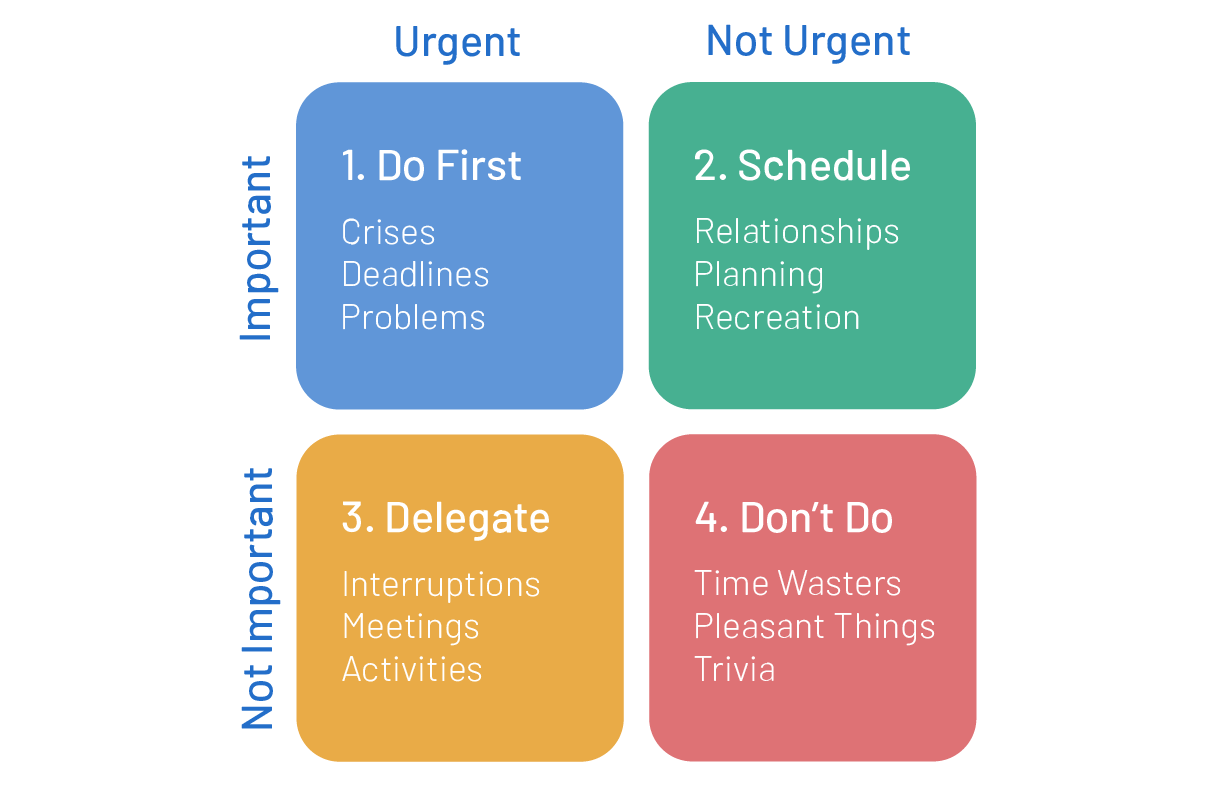
2. Prioritize with the urgent and important matrix
The Covey time management matrix splits tasks by urgency and importance. For teachers the useful quadrant is the second one, important but not urgent: building next unit’s materials, writing a reusable rubric, setting up a seating plan that heads off behaviour problems. Those are the tasks that keep turning into emergencies if you never schedule them. A practical rule is to keep no more than three priorities for a day; if everything is a priority, the list just rolls forward.
3. Make marking meaningful, manageable and motivating
That three part test comes from England’s Independent Teacher Workload Review Group report on marking (2016), which told teachers that if a marking approach is unmanageable or disproportionate, they should stop it. In practice that means:
- Write the rubric before the first paper, with the common mistakes already listed, and add to it as you go.
- Use comment codes (a letter or number for each frequent issue) instead of writing the same sentence 28 times.
- Give whole class feedback on the three errors most students made, and mark individual work in depth only on a rotation.
- Time one paper. If it runs over your target, the rubric needs fixing, not your stamina.
4. Time stamp your lesson plans, transitions included
Put a minutes column next to each part of the lesson, and give transitions their own rows: handing out materials, moving into groups, packing up. When a lesson overruns, the content is rarely the cause. More often because three transitions took four minutes each instead of one. Add a buffer of a few minutes and keep a short, no prep activity ready for when a segment finishes early.
5. Protect one planning block a week
You can’t block your whole calendar, but you can usually protect one recurring slot: the same free period every Tuesday, or the first hour after dismissal on Thursdays. Treat it as an appointment, close the email tab, and use it for important but not urgent work. Time blocking works for teachers when it is applied to the few slots you actually control rather than to the whole day.
6. Use the two minute rule for the small stuff
David Allen’s rule from Getting Things Done is simple: if something takes less than two minutes, do it now instead of writing it down. Replying “yes, Thursday works” to a parent, filing a permission slip, logging an absence. The rule fails if you apply it to everything, so keep it for genuinely tiny tasks and push the rest into your batches.
7. Reuse, share and stop rebuilding lessons
If a lesson worked last year, teach it again with small changes. Split unit planning with a colleague who teaches the same course, keep a shared folder of materials, and use the school’s existing resources before you design your own. The audit warning sign here is simple: if you are building from scratch something you have taught before, that is time you can get back.
8. Set a stop time and say no with a reason
Pick a time after which you don’t mark or answer email, and tell students and parents when they can expect replies. When you are asked to take on a committee or an event, answering “I can, if X comes off my list” is more useful than a flat no. Our guide to teacher work life balance covers boundaries in more depth.
9. Estimate tasks, then check the estimate
People routinely underestimate how long their own tasks will take. In a classic study by Buehler, Griffin and Ross (1994), students predicted they would finish their theses in 33.9 days on average; it took them 55.5. Teachers do the same with “I’ll just mark these tonight”. Write a time estimate next to each task, note the real time afterwards, and after two weeks you’ll know your own correction factor. If marking a set always takes 1.5 times your estimate, plan for that.


Time management in the classroom
Classroom time management is the other half of the job. It happens during lessons, and it is mostly about protecting instructional minutes. A few routines do most of the work:
- Teach the routines for coming in, getting materials and moving into groups in the first weeks, then time them with the class and try to beat the record.
- Put instructions on the board or a slide so you aren’t repeating them to every table.
- Keep a visible timer running during activities. Students pace themselves better when they can see the time left, and so do you.
- Use “ask three before me”: students check the instructions, a classmate and their notes before they come to you, which leaves you free for the students who really need help.
- Hand classroom jobs to students: giving out materials, collecting work, tidying up.
If you want apps for timers, planners and grading, our roundup of productivity tools for teachers compares them, and the guide to time management tools for the education industry covers tools for students and tutors.
Where teacher time management breaks down
Most teachers have tried a planner, a matrix or a new app at some point. When it doesn’t stick, it usually fails in one of these ways.
The list that never shrinks
A to do list without time estimates hides the fact that it holds 14 hours of work for a week with 5 free hours. The list isn’t the problem. The missing arithmetic is. Add estimates, total them, and decide what gets dropped before the week starts rather than on Thursday night.
The planning period that disappears
Cover, meetings and duties land in the free periods first. If your audit shows this happening more than once a week, it is a staffing issue, not a personal discipline issue, and the audit numbers are the evidence to raise it.
Techniques built for office hours
The Pomodoro technique assumes you can string together 25 minute blocks. A teacher with 10 to 45 minute gaps can’t always do that. Use it for the evening or weekend work you do choose to do, and use the slot sorted task list during the school day.
A new tool in the busiest month
Learning a new system in the middle of a term, while the marking piles up, usually ends with the old system plus an abandoned new one. Start new tools at the beginning of a term or after a break, and change one thing at a time.
Marking everything in full
The worked example above shows why this one matters most. If every piece of work gets full written feedback, marking time grows with every student you add, and no technique elsewhere can catch up with it.
Tracking your time as a teacher
A one week audit on paper is enough for most classroom teachers. Time tracking software becomes worth it in three situations: you want to repeat the audit every term without the paperwork, you run a department or a small school and need to see where staff hours go, or you are a tutor or run a tutoring business that bills clients for the hours.
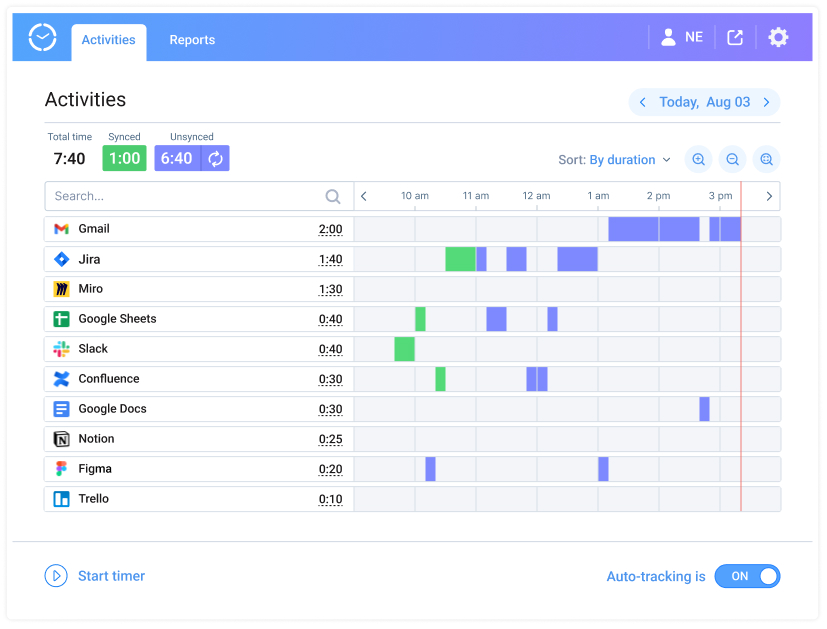
actiTIME is project time tracking software built for billing. For the first case, its free Time Management Assistant Chrome extension works as a standalone tool: it tracks your activity in the browser automatically, has a one click timer and shows personal productivity reports, so you can see how much of your evening went to the grade book or the inbox.
For departments, tutoring centers and private schools, the full product adds structure. You set up work as customers, projects and tasks (and can rename those levels, for example to classes, units and assignments), give each task an estimate and a deadline, and staff log hours in a weekly timesheet, a calendar view or the mobile app. The Estimated vs. Actual Time Report then shows where estimates were off, which is strategy 9 above done for a whole team. For tutoring businesses, tracked hours turn into billable amounts by type of work rates or by each tutor’s own rate, and into PDF invoices, so the time log and the bill come from the same record. Our page on time tracking for education has more detail.
actiTIME is free for up to 3 users after the 30 day trial, and paid online access starts from $5 per user per month. It does not build timetables or class schedules, so it sits alongside your school’s scheduling system rather than replacing it.

actiTIME enables us to balance workload better
I found in actiTIME all the requirements I was looking for. We are getting a lot of benefits – the tool enables us to better balance workload, have a constant view of what people are doing. I really recommend it, I evaluated a lot of tools, also had an in-house development before which demanded a lot of maintenance, and actiTIME solved all problems with no hassle.
FAQ
What are the 5 P’s of time management?
The 5 P’s usually refers to the saying “proper planning prevents poor performance”. In a teaching context it means the time you spend on preparation, such as a written rubric or a time stamped lesson plan, is repaid during the week. Some classroom management guides use a different 5 P’s (prompt, prepared, productive, polite, positive), which describe student behaviour expectations rather than your own time.
How should a new teacher manage time in the first year?
Run the one week audit in your first month, then fix only the biggest category. Borrow lesson materials from colleagues instead of building every unit yourself, set a fixed stop time from the start, and use a rubric for every marked assignment. First year teachers who try to perfect everything at once tend to burn out before they get faster, so aim for good enough and reuse what works.
What if the work genuinely doesn’t fit into the hours?
Then better personal time management won’t close the gap, and it shouldn’t have to. Take your audit totals and your task list with estimates to your line manager and ask which tasks to drop or delay. Specific numbers make that conversation easier, and they are the start of a fix rather than a complaint. Our article on teacher stress covers what to do when workload becomes a health issue.
The short version
Teachers can’t move the bell, so time management for teachers is about the hours around it. Audit one normal week, find the category that costs the most, and apply the two strategies that target it. For most teachers that is marking (rubrics, comment codes, whole class feedback) and admin (batching, the two minute rule, a protected planning block). Recheck after a term.
If you want to track time against tasks and compare estimates with reality, start a free trial of actiTIME with full features for 30 days. After the trial, teams of up to 3 users can keep using it for free.