Roadmap software turns a list of goals and initiatives into a shared picture of what a team will build next and why. The tools look alike in demos: drag a bar onto a timeline, group it by theme, share a link. They differ in two places that decide the purchase. The first is the kind of roadmap they are built for, which can be a product strategy roadmap, a public roadmap for customers or a project timeline. The second is who you pay for, because some vendors charge for every person who opens the roadmap and others charge only for the people who edit it.
This guide compares 12 roadmap tools on both points. It works out what a team of 5 editors and 40 stakeholders pays in each one, shows what the free options really cover and lists the ways roadmaps tend to fail once they are in use. Prices come from each vendor’s own pricing page.
- What roadmap software does, and its three kinds
- Quick comparison
- Who you pay for: a worked cost example
- 12 best roadmap software tools
- Free roadmap software: where each free option stops
- How to choose roadmap software
- Best pick by situation
- Where roadmap software goes wrong
- Tracking the hours behind roadmap items
- FAQ
What roadmap software does, and its three kinds
A roadmap shows what a team intends to deliver and why, at the level of initiatives and outcomes rather than individual tasks. Roadmap software keeps that picture in one place, links each item to the ideas and requests behind it, and shares a version of it with people who do not work in the tool every day.
A roadmap is not the same thing as a schedule. It answers what and why, while a schedule answers how and when. Teams that blur the two end up with a roadmap that is really a Gantt chart with dates on every bar, and every slipped task shows up as a broken promise. If you need the scheduling side, our guides to the Gantt chart and to designing a project timeline cover it.
Search for roadmap tools and you get three different kinds of product mixed together:
| Kind of tool | Question it answers | Tools in this guide |
|---|---|---|
| Product roadmap platform | What should we build next, and which evidence supports it? | Aha! Roadmaps, Productboard, ProdPad, Jira Product Discovery, airfocus, ProductPlan, Tempo Strategic Roadmaps, Craft.io |
| Public roadmap and feedback board | What are customers asking for, and what is planned or shipped? | Canny |
| Project tool with roadmap views | When will the work land, and who is doing it? | ClickUp, monday.com, and Creately for a drawn roadmap |
Many teams run two of these side by side: product roadmap software for the strategy, and a project or delivery tool where the work is scheduled and done. The rest of this guide helps you pick the first and decide whether you need the second.
Quick comparison
| Tool | Best for | Entry price and free option |
|---|---|---|
| Aha! Roadmaps | Product organizations with a formal strategy process | From $59 per user per month (billed annually); 30 day trial |
| Productboard | Teams turning large volumes of feedback into a roadmap | Quote only, minimum 5 makers; no price published |
| ProdPad | Teams that want Now/Next/Later roadmaps tied to objectives | From $20 per editor per month per module (billed annually); trial of at least 7 days |
| Jira Product Discovery | Teams that already deliver in Jira | Free for 3 creators; from $10.50 per creator per month |
| airfocus | Teams that prioritize with scoring frameworks | Quote only; no free trial |
| ProductPlan | Presenting roadmaps to executives and customers | Quote only; demo instead of a trial |
| Tempo Strategic Roadmaps | Visual timeline roadmaps for presentations | From $19 per editor per month (billed annually); 14 day trial |
| Craft.io | Product teams that want specs and roadmaps together | From $19 per editor per month (billed yearly); 14 day trial |
| Canny | Public roadmaps with customer voting | Free up to 25 tracked users; Pro from $79 per month (billed yearly) |
| ClickUp | Roadmap and day to day work in one workspace | Free plan; Business from $17 per user per month (billed yearly) |
| monday.com | Visual project roadmaps with many free viewers | Free for 2 seats; Standard from $12 per seat per month (billed annually) |
| Creately | Drawing a one off roadmap on a canvas | Free plan; Pro $8 per editor per month |
Who you pay for: a worked cost example
A roadmap is written by a few people and read by many. Product managers and leads edit it; sales, support, executives and engineers mostly look at it. That makes the vendor’s seat rule more important than the headline price. Some tools let viewers in for free, some count everyone who has an account, and one counts the customers who vote.
Take an illustrative team: 5 editors who build the roadmap and 40 stakeholders who need to see it, on the entry tier that includes roadmaps, billed annually where the vendor offers it.
The same team pays anywhere from $52.50 to $2,655 a month, a 50 fold spread, and most of it comes from the seat rule rather than the feature list. Two details are easy to miss. Aha! Roadmaps’ Enterprise tier is cheaper than Premium for this team because Premium bills “all users regardless of their role”, while Enterprise adds unlimited free viewers. Tempo drops to $245 if stakeholders only open the published roadmap URL instead of needing reviewer seats.
Sensitivity: grow the audience from 40 to 100 stakeholders and Aha! Premium rises to 105 x $59 = $6,195 per month, and Tempo with reviewer seats rises to $245 + 95 x $5 = $720. Every other figure above stays the same, because those tools do not charge for readers. Productboard, airfocus and ProductPlan publish no prices, so ask each one how it counts viewers before the demo, not after.
12 best roadmap software tools
The first eight tools are product roadmap platforms, number nine is a public roadmap board, and the last three are project or drawing tools with roadmap views. Each entry covers who the tool suits, what sets it apart, a verified limit and the main drawback.
1. Aha! Roadmaps
Key features:
- Ideas portal
- Idea scoring
- Ideas to features
- Free viewers
Aha! Roadmaps suits larger product organizations that run a formal strategy process and need the roadmap to show why each item is there, which is the question leadership reviews keep asking. Every plan includes Ideas Essentials, so customers and colleagues can submit ideas to an online portal, the team scores them and promotes the winners straight into features on the roadmap.
The seat rule is the thing to read twice. On Premium you pay for every user whatever their role. From Enterprise up, reviewers and viewers are free and you pay only for workspace owners and contributors, which is why Enterprise came out cheaper in the cost example above. Aha! also states on its pricing page that prices rise 3% a year. It is a lot of software for a small team, and the setup work pays off only if someone owns the strategy layer.
Pricing: Premium $59 per user per month billed annually ($74 monthly); Enterprise $99 ($124 monthly); Enterprise+ $149, annual only; 30 day trial, no credit card.
2. Productboard
Key features:
- Timeline roadmaps
- Column roadmaps
- Product portal
- Voting questions
Productboard is built for product teams that receive more customer input than they can read and want it in the same system as the roadmap, so that prioritization starts from what customers asked for. Roadmaps come in timeline and column formats, and the Business plan includes two product portals where customers vote and answer custom questions about each idea.
Pricing is based on makers, the people who build roadmaps and manage feedback. Contributors do not count as makers, but Business caps them at 25, while Enterprise lifts the cap. Both plans require at least 5 makers, and the pricing page publishes no figures, so the only way to a number is a demo. Objective hierarchies, SAML single sign-on and the Salesforce integration are Enterprise only, which matters for sales led companies that want account data next to feedback.
Pricing: Business and Enterprise, both quote only; minimum 5 makers; no free plan or trial listed on the pricing page.
3. ProdPad
Key features:
- Now/Next/Later
- OKRs
- Idea backlog
- Feedback
ProdPad suits teams that have given up on date based roadmaps. Its Roadmaps module uses the Now/Next/Later format, which its co-founder Janna Bastow created: items sit in time horizons instead of on dates, and each initiative carries the objective it serves. Stakeholders see what is being worked on and why without reading a date as a promise.
Pricing is modular. Roadmaps, Ideas and Feedback are separate modules billed per editor, and power ups such as Publishing, OKR and Portfolio are added on top of at least one module. A team that only needs roadmaps pays for one module, while the full set of three modules triples the per editor cost before any power ups. Reviewers are free and unlimited, which keeps the bill low for wide audiences. The trial starts at 7 days and the pricing page says it can be extended to more than 30 days free.
Pricing: each module $20 per editor per month billed annually ($25 monthly); power ups $10 per editor per month billed annually ($12 monthly); Enterprise on request.
4. Jira Product Discovery
Key features:
- Idea scoring
- Timeline views
- Published views
- Jira delivery links
Jira Product Discovery is Atlassian’s tool for collecting ideas, scoring them and laying them out as roadmaps, connected to the epics where engineers do the work. For a team already on Jira, that link is the main reason to choose it: an item’s delivery progress shows up on the roadmap without a sync tool in between.
Only creators pay. Contributors, who can comment and add insights, are free and unlimited on every plan, although they need an Atlassian account. Timeline views are on the Free plan, and from Standard you can publish read-only views to people who have no Jira access, which covers the executive or partner audience. Cross-project roadmaps and hierarchies sit on Premium. The product is available only on Atlassian Cloud. The Free plan also has limits beyond the 3 creators: 2 GB of storage and 100 automation steps a month.
Pricing: Free for 3 creators; Standard $10.50 and Premium $26.25 per creator per month on monthly billing (annual billing saves up to 17%); 14 day trial of paid plans.
5. airfocus
Key features:
- Priority scoring
- Gantt and timeline
- Customer portal
- Unlimited viewers
airfocus suits teams that want their priorities to come out of a scoring model they define, such as value against effort or a weighted set of criteria, rather than from whoever argues loudest. Items move from the scored list to board, timeline and Gantt views, and a branded portal lets customers vote and react to ideas. The Professional plan includes two portals. Contributors and workspaces are free and unlimited, and the viewer role is unlimited too, so the audience side of the bill stays flat.
Buying it is slower than with most tools here. The pricing page lists Professional and Enterprise with “Request pricing” only and states plainly that airfocus does not offer a free trial, so evaluation runs through a demo. OKRs and SAML single sign-on are paid add-ons on Professional. Teams that want to test a roadmap tool with real data before talking to sales will find that a hurdle, while teams already set on a scoring approach may not mind.
Pricing: Professional and Enterprise on request; no free trial.
6. ProductPlan
Key features:
- Timeline roadmaps
- Live share links
- Free viewers
- Idea capture
ProductPlan is for product leaders whose main roadmap job is communication: a clear timeline for the board meeting, a simpler version for a key customer, another for partners. Any roadmap can be shared as a live link with customers, partners and executives at no extra cost, so the version people see is always the current one rather than last quarter’s slide. Roadmaps are unlimited.
The seat rule is simple. You pay for anyone who builds, edits or manages roadmaps, and viewers are free. What you cannot do is find a price. The pricing page shows a single plan behind a “Book a Demo” button and lists no free plan or self serve trial. For a team comparing costs, that means a sales conversation before you know whether ProductPlan fits the budget. If a customer voting portal is on your list, confirm it in the demo, because the pricing page does not name one.
Pricing: one plan, quote only; viewers free; demo instead of a trial.
7. Tempo Strategic Roadmaps (formerly Roadmunk)
Key features:
- Timeline and swimlanes
- Publish to URL
- Jira sync
- Feedback portal
Roadmunk is now Tempo Strategic Roadmaps, and the old roadmunk.com address redirects there. It is a visual roadmapping tool for teams that present timelines to different audiences and want them to look polished without a designer. Roadmaps can be published to a URL, and the publishing mode depends on the tier: manual on Starter, on a schedule on Business and in real time on Professional.
Editors pay, and each account includes a set number of reviewers: 3 on Starter, 5 on Business and 10 on Professional, with extra reviewers at $5 each per month. Exported roadmaps can be opened by anyone. Business can add two-way sync with Jira and Azure DevOps for $9 per collaborator per month. The Starter tier is thin for product work: it has no feedback portal, no idea prioritization and no dependencies, so most product teams will start at Business. All prices on the page are for annual billing.
Pricing: Starter $19, Business $49, Professional $99 per editor per month billed annually; Enterprise custom; 14 day trial.
8. Craft.io
Key features:
- Timeline
- Kanban
- Swimlanes
- Capacity add-on
Craft.io is a product management platform for teams that want roadmaps, feature specs and prioritization in the same place, for teams whose roadmap items need detailed requirements behind them. Timeline, kanban and swimlane roadmaps are available on every tier, and contributors are unlimited and free on all plans. On Pro and Enterprise, viewers are unlimited too.
The gap between the two published tiers is wide. Starter allows one workspace, up to 3 workspace views and up to 5 custom fields, and add-ons are not available on it. Pro removes those limits and opens the add-ons for OKRs, a feedback portal and capacity planning, each billed per editor. A team that needs a customer portal and OKRs on Pro pays the base price plus two add-ons per editor. Craft.io makes sense when the spec side matters; if you only need a roadmap to show, a lighter tool costs less.
Pricing: Starter $19 per editor per month billed yearly ($24 monthly); Pro $79 ($99 monthly); add-ons $15 per editor per month billed yearly; Enterprise custom; 14 day trial, no credit card.
9. Canny
Key features:
- Feedback boards
- Voting
- Public roadmap
- Spend limit
Canny sits on the customer side of roadmapping. Customers post requests, vote and comment, and the team moves items through statuses on a public roadmap. It suits software companies that want to show customers their requests are heard and to stop answering “is this coming?” one ticket at a time.
The price is tied to tracked users, which Canny defines as any user associated with feedback, so the bill grows with customer engagement rather than team size. The Free plan covers 25 tracked users and 5 managers with unlimited boards. Watch the upgrade rule: if you do not set a spend limit, Canny automatically moves the account to the next tier when you pass the limit. CRM and single sign-on integrations are on Business only. For internal prioritization and timelines you will still want a planning tool or Jira, so budget for both.
Pricing: Free up to 25 tracked users; Pro from $79 per month billed yearly; Business on request.
10. ClickUp
Key features:
- Gantt view
- Timeline view
- Read-only guests
- Docs
ClickUp suits teams that want the roadmap and the work under it in one workspace. A roadmap item is a task or list with subtasks, so progress on the roadmap moves as the team closes work, and docs and goals sit next to it. That is convenient for a project roadmap and weaker for product strategy, since there is no built in feedback portal or idea scoring of the kind Productboard or airfocus offer.
Check which views your tier includes. According to ClickUp’s views availability page, the Free plan gets 60 uses each of the Gantt and Timeline views, and the pricing page notes that uses are cumulative and do not reset. Gantt is unlimited from Core, but Timeline is included only from Business. Billing is per member and the whole workspace upgrades together, while paid plans include unlimited read-only guests, which is how stakeholders can follow the roadmap without a seat.
Pricing: Free Forever; Core $9 and Business $17 per user per month billed yearly; Enterprise custom.
11. monday.com
Key features:
- Timeline view
- Gantt view
- Free viewers
- Boards
monday.com works for teams that want a colorful, easy to read roadmap built from a board: each row is an initiative, columns hold owner, status and dates, and the same board can switch to a timeline or Gantt view. Non technical teams such as marketing or operations pick it up quickly, and the roadmap can sit next to the boards where the work is tracked.
Two pricing details shape the decision. Timeline and Gantt views first appear on the Standard plan, so the Basic plan is not a roadmap tool. Paid plans start at 3 seats, which sets a floor on the bill, while unlimited free viewers from Basic upward keep the stakeholder side free. The Free plan covers up to 2 seats and 3 boards, enough to sketch a roadmap but not to run one for a team. Like ClickUp, monday.com has no product feedback portal or idea scoring, so it fits project roadmaps better than product strategy.
Pricing: Free for 2 seats; Basic $9, Standard $12, Pro $19 per seat per month billed annually; minimum 3 seats; 14 day trial of Pro.
12. Creately
Key features:
- Infinite canvas
- All diagram types
- Free plan
- Flat Business price
Creately is a diagramming canvas, and its plans page names no roadmap specific feature. You draw the roadmap as a diagram, rearrange it with colleagues and present it. That suits a one off strategy workshop, an early stage startup that needs a picture for investors, or anyone who wants a roadmap image without adopting a new tool.
The trade off is that a drawn roadmap knows nothing about the work. Items do not link to tasks, ideas or votes, so the picture goes stale the moment plans change unless someone redraws it. The Free plan gives an infinite canvas with all diagram types but caps each diagram at 45 shapes and does not export PNG, JPEG or PDF, which limits sharing outside the tool. Pro is billed per editor; Business is a flat price per organization, and the old Team plan is closed to new subscribers. Use it for the workshop, then move the result into one of the tools above if the roadmap needs to live.
Pricing: Free; Pro $8 per editor per month billed monthly; Business $149 per organization per month billed monthly; Enterprise custom.
Free roadmap software: where each free option stops
Five of the twelve tools have a free plan, and each one stops at a different point. Free roadmap software works for a small team or a first roadmap; past that, the limit you hit tells you which paid tier you actually need.
| Tool | What the free plan includes | Where it stops |
|---|---|---|
| Jira Product Discovery | 3 creators, unlimited free contributors, timeline views | 2 GB storage, 100 automation steps a month, no published views |
| Canny | 25 tracked users, 5 managers, unlimited boards | The 26th customer who votes or posts |
| ClickUp | Unlimited members, 60 MB storage, 5 Spaces | 60 uses each of Gantt and Timeline views, which never reset |
| monday.com | Up to 2 seats, 3 boards, 3 Docs | No Timeline or Gantt view until Standard |
| Creately | Infinite canvas, all diagram types | 45 shapes per diagram, no image or PDF export |
Of these, Jira Product Discovery is the only free option that is a full product roadmap tool, and only for teams of up to 3 people who edit. The others give you either a public board with a small audience, a project tool with capped roadmap views, or a drawing. Aha! Roadmaps, ProdPad, Tempo and Craft.io offer trials instead, and airfocus, Productboard and ProductPlan list no free trial on their pricing pages. For general work management on a budget, see our roundup of free project management software.
How to choose roadmap software
Most teams can narrow the list with six questions, asked in this order:
-
Who is the roadmap for?
Leadership and the product team need a product roadmap platform. Customers need a public board. The delivery team needs dates and owners, which a project tool handles. If the answer is all three, plan for two tools.
-
How many people edit, and how many only read?
Count both groups and apply each vendor’s seat rule, as in the cost example. A tool that is cheap per editor can still be the expensive one if it bills readers.
-
Dates or horizons?
Timeline roadmaps suit release driven and contractual work. Now/Next/Later suits product teams whose priorities shift every quarter. Most platforms offer both, but each one is built around one of them.
-
Where does the evidence come from?
If ideas and requests arrive from support, sales and customers, you need feedback intake and scoring, which Productboard, airfocus, ProdPad and Aha! provide and the project tools do not.
-
What does the delivery team use?
A roadmap that is not linked to the issue tracker goes stale. Jira Product Discovery links natively to Jira; Tempo sells a two-way Jira and Azure DevOps sync; check the integration for any other pairing before you buy.
-
Can you see a price before a demo?
Three tools here publish no price. If your purchase process needs a number early, start with the ones that do.
Best pick by situation
- You already run delivery in Jira: Jira Product Discovery. It is free for 3 creators and costs the least per editor once you pay.
- You want horizons instead of dates: ProdPad, since Now/Next/Later is its native format and reviewers are free.
- You drown in customer feedback: Productboard, if you can accept a 5 maker minimum and a quote based price.
- You run a formal strategy process for a large product organization: Aha! Roadmaps, and compare Enterprise against Premium if many people only read.
- You mainly present roadmaps to executives and customers: ProductPlan for live links with free viewers, or Tempo if you want published prices.
- You want customers to vote on a public roadmap: Canny, with a spend limit set from day one.
- You need a project roadmap next to the team’s tasks: monday.com on Standard for non technical teams, ClickUp on Business for teams that want docs and goals in the same workspace.
- You need one roadmap picture for a workshop: Creately’s free plan.
Where roadmap software goes wrong
Most roadmap problems show up a few months after rollout, and few of them are caused by the tool itself:
-
The roadmap turns into a Gantt chart.
Every item gets a start and end date, the roadmap becomes a schedule, and each slipped task reads as a broken commitment. Keep dates on the delivery plan and themes or horizons on the roadmap, and review the two in different meetings.
-
Unplanned work never appears.
Bugs, support escalations and small fixes are not attached to any roadmap item, so they are invisible when the team explains why an initiative slipped. Give that work a home, even a catch all item, so its size is visible next to the planned work.
-
Readers become a line item.
A tool chosen for 5 editors gets rolled out to 60 people, and a per user seat rule multiplies the bill. Check the seat rule against your real audience before renewal, not only at purchase.
-
Public roadmaps promise dates.
Once a customer sees a quarter next to a feature, it becomes a commitment that sales will be asked about. Public boards work best with status columns such as under consideration, planned, in progress and shipped.
-
The roadmap and the issue tracker drift apart.
Without a working sync, someone updates statuses by hand, then stops. Within a quarter the roadmap shows work as planned that shipped weeks ago.
-
Nobody knows what an item cost.
Roadmap tools record what was planned and whether it shipped, not how many hours it took. Without that number, the next round of estimates repeats the last round’s mistakes, and finance has nothing to split between new development and maintenance when it asks.
Tracking the hours behind roadmap items
The last failure mode is the one a roadmap tool cannot fix on its own, because none of the twelve tools above is built to record the hours people spend. That is where a time tracker fits beside the roadmap. actiTIME is not a roadmap tool and has no roadmap view. It is project time tracking software built for billing, and it answers the question roadmaps leave open: how much effort did each initiative actually take?
The setup mirrors the roadmap. Work in actiTIME is organized as customer, project and task, and the level names can be changed, so a project can stand for a roadmap initiative and its tasks for the deliverables under it. Each task can carry an estimate in hours and a deadline. People log time against those tasks in a weekly timesheet, a calendar view, the mobile app or the Chrome extension. Unplanned work gets its own tasks, so bug fixing and support time show up next to the initiatives they slowed down.
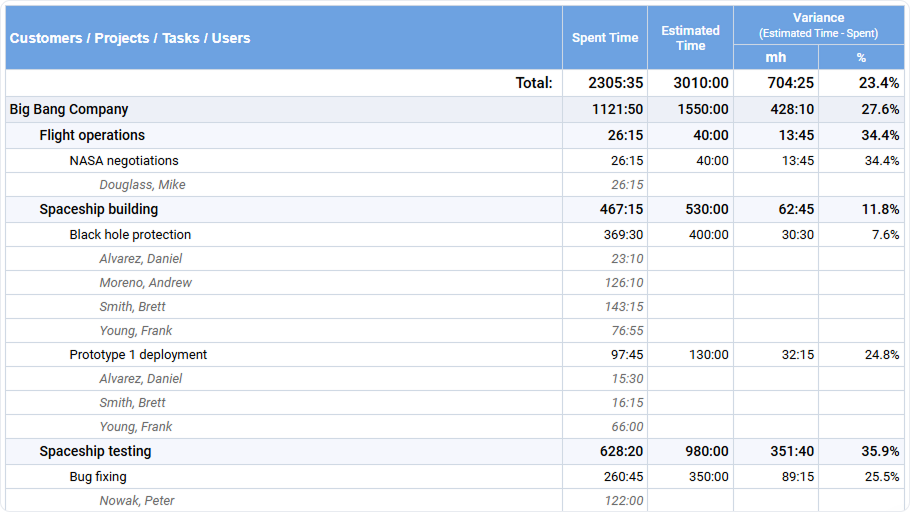
The Estimated vs. Actual Time Report then shows the variance for every initiative and task. Say an initiative was estimated at 400 hours and the team logged 520: the report shows the 120 hour overrun and which tasks and people it came from. With cost rates set for each person, the Cost of Work Report turns those hours into what the initiative cost, and time or cost budgets at project or task level turn red when they are exceeded. More on estimates is in our guide to time estimation in actiTIME.
actiTIME is free for up to 3 users, and paid versions start from $5 per user per month. Start a free trial with full features for 30 days; after the trial, teams of up to 3 users can keep using it for free.

Now we can better predict future project requirements
Our company needed a simple way of tracking time used on multiple projects – and actiTIME fit the need. Its interface is simple and easy to maintain. We use the application for time management, task estimation and also to communicate deadline information to our team members. Now having actiTIME we can better predict future project requirements!
FAQ
Can I make a roadmap in Excel or Google Sheets?
Yes, and many teams start that way: one row per initiative, columns for quarters, colored cells for status. A spreadsheet works for a single team with one audience. It breaks when several people edit it, when you need different views for executives and engineers, or when items have to link to feedback and delivery work, and that is usually when teams move to roadmap software.
What is the difference between a roadmap and a project timeline?
A roadmap shows what you intend to deliver and why, usually grouped by theme or time horizon. A project timeline shows when each piece of work happens and in what order, with dates, dependencies and milestones. The roadmap changes when priorities change; the timeline changes when the work moves.
Does Jira have a roadmap tool?
Yes. Jira Product Discovery is Atlassian’s product roadmap tool, with idea scoring, timeline views on the free plan and read-only published views from Standard. It links roadmap items to the Jira epics where delivery happens, and it is free for up to 3 creators.