Work management is the way a team decides, assigns, tracks and reviews all of its work: client projects, recurring jobs such as reporting or maintenance, and the requests that arrive in the middle of the week. Project management covers only the first of those three, and when a deadline slips, the other two are often the reason: nobody counted them before the date was promised.
This guide explains what work management is, how it differs from project management, the five steps of the work management process, and a worked example that shows where a team’s week really goes. It ends with the failures that make a work management system stop working and how to run the process in actiTIME.
What is work management?
Work management is the practice of deciding what work a team takes on, who does it and when, and then tracking it until it is finished and reviewing what it cost. It covers every kind of work the team does, not only projects.
Most teams carry three kinds of work at the same time:
- Projects: work with a defined result, a start and an end, such as a website build or a product launch.
- Recurring work: jobs that repeat on a schedule and never finish, such as monthly reports, payroll, maintenance or client support.
- Requests: unplanned work that arrives from clients, managers or other teams, from a quick fix to a “can you look at this today”.
The Work Management Institute defines it as the discipline of clarifying, coordinating and completing all organizational work, and stresses the last word: work that is neatly organized but never reliably finished is not well managed. The same source draws a line worth keeping in mind. A work management system is the software where the practice is carried out, and buying one does not give a team the practice, in the same way that owning accounting software does not mean the books are kept.
Surveys suggest the problem is large. In Asana’s Anatomy of Work Index, a survey of 10,223 knowledge workers in Australia, Germany, Japan, New Zealand, the UK and the US run by Sapio Research for Asana, respondents said they spent 60% of their day on coordination such as status updates, searching for information and shifting priorities, 27% on the skilled work they were hired for and 13% on strategic thinking (Asana, 2019 release). The figures are self-reported and come from a vendor of work management software, so treat them as a signal of the problem rather than a benchmark.
Work management vs project management
Project management runs one effort with a fixed scope, deadline and budget until it closes. Work management sits one level above it and decides how that project shares the same people with everything else the team must do. A project can be on schedule on paper while the designer assigned to it spends half of each week on support tickets that appear in no project at all.
| Question | Work management | Project management |
|---|---|---|
| What does it cover? | All work of a team or company: projects, recurring work and requests | One project with a defined result |
| How long does it last? | Ongoing, with no end date | Temporary, from kickoff to closure |
| Main decision | What the team takes on this week and what waits | How to deliver this scope on time and on budget |
| Typical measures | Hours by kind of work, capacity used, work finished per week | Schedule variance, estimated vs actual hours, budget used |
| Who owns it | Team leads, department heads, operations managers | The project manager |
The two overlap more than the table suggests. A furniture workshop that builds cabinets to order can treat each cabinet as a small project while the shop as a whole runs as routine work. For the methods that run a single project, such as waterfall, Scrum or Kanban, see our overview of project management methodologies.
Where a team’s week goes: a worked example
Take a team of five at an agency, each working 40 hours a week. The team has committed to 120 hours of estimated project tasks for the coming week. The numbers below are illustrative, but the shape is common.
The project manager sees a third of the week’s tasks slip and suspects the estimates. The estimates were fine. The commitment was made against 200 hours when only 82 were free. Now move one input. If the team caps requests at 15 hours by routing them through one intake point, project capacity rises to 97 hours and the shortfall falls to 23 hours. That is still a gap, but the team sees it on Monday and can move a deadline or cut scope before the client hears about it on Friday.
This is the core of work management: count all the work, not only the projects, before you promise anything. You can only count it if hours are tracked against recurring work and requests as well as against project tasks.
The essentials of work management
Whatever tool or method a team uses, a working setup has five elements. Each answers one question that a team lead should be able to answer in under a minute.
| Element | Question it answers | What it looks like in practice |
|---|---|---|
| Intake | What work is coming in, and from whom? | One place where every request becomes a task with an owner and a due date |
| Prioritization | What gets done first when not everything fits? | A short, agreed rule for ranking work, applied every week |
| Assignment and capacity | Who does it, and do they have the hours? | Assignments checked against each person’s available hours, not only against skills |
| Tracking | Where does each piece of work stand, and how long is it taking? | Task statuses plus hours logged against tasks |
| Review | What did the work cost, and what should change? | A weekly look at estimated vs actual hours and a monthly look at hours by kind of work |
Two of these have their own guides. For ranking methods, see how to prioritize tasks. For balancing hours across people, see our guide to workload management.
The work management process in 5 steps
The process repeats as a weekly loop:
- Inventory
- Intake and priorities
- Assign
- Track
- Review
-
Make an inventory of all the work.
List every project, every recurring job and the usual sources of requests, with a rough number of hours per week for each. Ask the team, because recurring work is often known only to the person who does it. If one kind of work takes a large share of capacity, such as a team spending 40% of its hours on manual data checks, that is a candidate for automation or for a separate owner.
-
Set intake and priority rules.
Decide where new requests go, what information a request needs before anyone starts it, and who can change priorities. A request without an owner, a due date and an expected size goes back to the sender. Keep the priority rule short enough that everyone applies it the same way.
-
Assign work against capacity.
Before committing to project work, subtract recurring work, expected requests, meetings and leave from each person’s hours, as in the example above. Assign what fits. When something does not fit, decide what waits, and say so to the person who asked.
-
Track status and hours on tasks.
Keep a status on every task and log hours against tasks, including recurring work and requests. Hours logged against tasks tell you where the week went. Hours logged against people only tell you that someone was busy.
-
Review every week and adjust every month.
Each week, compare estimated and actual hours and look at what slipped and why. Each month, look at hours by kind of work. If requests keep growing, tighten intake. If recurring work keeps eating project time, staff it separately or reduce it.

Work management examples
The same five steps look different depending on the mix of work a team carries.
- Marketing agency. Client campaigns are projects, monthly reporting and social posting are recurring, and client change requests are the main source of unplanned work. The key rule is intake: every change request becomes a task with its own estimate, so its hours are visible and can be billed instead of disappearing into the campaign.
- IT or software support team. Most of the week is recurring work and tickets, with an occasional upgrade project. Some teams rotate one person out of project work each cycle to handle all support, so the rest of the team can commit to project dates they can keep.
- Engineering or architecture firm. Projects dominate, but each project carries recurring coordination such as site visits, permit paperwork and client meetings. Logging those hours on their own tasks shows how much of a fixed fee goes to coordination rather than design.
- Internal operations team. Finance or HR teams run almost entirely on recurring cycles such as month end close, payroll or onboarding. Work management here means standard task lists for each cycle and a review of how long each cycle really takes.
Where work management goes wrong
The same failures show up in team after team:
-
The tool arrives before the rules.
A team buys a platform, moves its task lists in and expects order to follow. Without agreed intake and priority rules, the new tool shows the same chaos in more colors. Settle who decides priorities and where requests go first, then configure the tool to match.
-
Recurring work stays invisible.
If support, reporting and maintenance are not tracked as tasks, they never appear in capacity numbers, and every project estimate looks optimistic. The fix is to give recurring work its own tasks and log hours to them like anything else.
-
Everything is a top priority.
When five managers can each mark work as urgent, the person doing the work ends up setting priorities by whoever asked last. One person, or one short meeting a week, needs the final say.
-
The team is split across too many systems.
People who serve several clients often keep tasks in each client’s own tool and copy them into a personal list, which costs hours and is always out of date. Pick one place where the team’s own view of its work lives, even if clients keep their systems.
-
Tracking turns into monitoring.
Activity monitoring tells you a laptop was busy, which was never the question. Hours logged against tasks with deadlines and estimates show what is getting done without treating people as suspects.
-
Nobody reviews the data.
Logging hours without looking at them is overhead with no return. If a weekly review never changed a priority or an estimate, shorten the review or change what it looks at.
How to run work management in actiTIME
actiTIME is project time tracking software built for billing, and it covers the tracking and review half of work management: tasks with estimates and deadlines, hours logged against them, and reports that show where the time and money went. A typical setup for the five steps above looks like this.
1. Put all kinds of work into one structure. actiTIME organizes work as Customer, Project and Task, and time is always tracked at the task level. Client projects go under their customers. Recurring work and requests can live under a customer you create for internal work, with a project for each recurring stream, so their hours stop being invisible. Tasks can be created one by one or imported from a CSV file.
2. Assign work to the right people. Managers assign customers, projects or tasks to team members. Assigning a project includes all its tasks, and with work assignments turned on, each person sees only the work assigned to them.
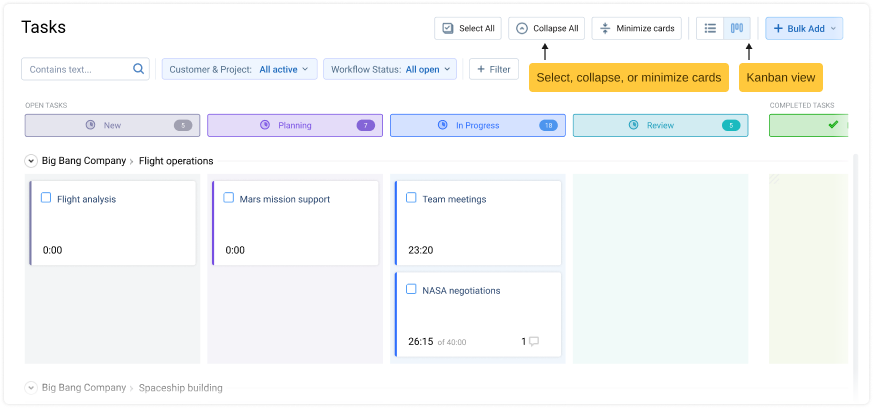
3. Set estimates, deadlines and priorities. Each task can carry an estimate in hours, a deadline with reminders and a priority level with its own name and color. Custom workflow statuses and the Kanban board show where every task stands and where work piles up.
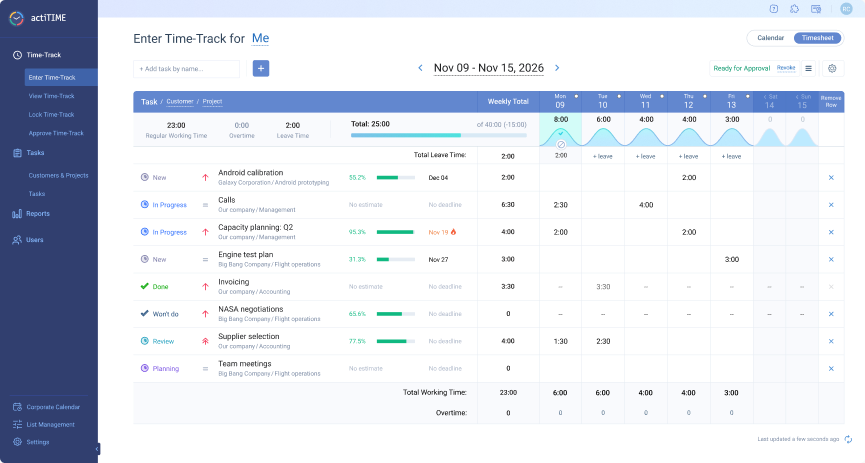
4. Log hours against tasks. People record time in the weekly timesheet, in Calendar View, in the mobile app or with the Time Management Assistant Chrome extension. Leave is logged in the same timesheet, so absences show up next to work hours.
5. Review with reports. The Estimated vs. Actual Time Report shows the variance for every task, project and customer. The Time-Track Report groups hours by project, customer, user or type of work, which is how you see the split between project work, recurring work and requests from the worked example. Time, cost and billing budgets can be set on a customer, project or task, and the progress bar turns red when a budget is exceeded.

For client work, the same hours feed billing: the Billing Summary Report and PDF invoices use type of work rates or user rates, depending on the method each project uses, and the Cost of Work Report shows what those hours cost the company. actiTIME is not a resource scheduling tool, so it shows capacity through hours tracked and estimated rather than through a booking calendar. For a comparison of tools built around task boards, see our roundup of task tracking software.

actiTIME enables us to balance workload better
I found in actiTIME all the requirements I was looking for. We are getting a lot of benefits – the tool enables us to better balance workload, have a constant view of what people are doing. I really recommend it, I evaluated a lot of tools, also had an in-house development before which demanded a lot of maintenance, and actiTIME solved all problems with no hassle.
Task estimates, priorities and budgets are not part of the free version, so set up your work structure during the trial. Start a free trial of actiTIME with full features for 30 days. After the trial, teams of up to 3 users can keep using it for free, and paid use starts from $5 per user per month.
FAQ
Is work management the same as workflow management?
No. Workflow management runs one repeatable sequence of steps, such as how an invoice moves from draft to approval to payment. Work management decides how all the team’s work, including many workflows and projects, shares the same people and hours. A team can have well designed workflows and still miss deadlines because nobody counted the total load.
What is the difference between work management software and project management software?
Project management software is built around a single project’s schedule, tasks and dependencies. Work management software aims to show all of a team’s work in one place, projects and ongoing work alike. In practice the categories overlap, and the deciding question is whether the tool lets you track recurring work and requests as easily as project tasks. For a comparison of tools, see our list of productivity and work management tools.
Who is responsible for work management?
In a small company, usually the team lead or owner. In larger organizations, department heads own it for their teams, and an operations or PMO function sets shared rules for intake and reporting. Whoever owns it needs the authority to say no to new work or move a deadline, because work management without that authority is only record keeping.