You know your days could be better organized, but advice from a blog post rarely sticks. A good productivity course gives you a system, a structure to practice it and someone experienced explaining why it works. The catch is that course catalogs are huge, and many listings are outdated or vague about what you’ll actually pay.
We checked eight productivity and time management courses on LinkedIn Learning, Coursera and Udemy in November 2026. If you want a short, practical start, take Time Management Fundamentals by Dave Crenshaw (under two hours). If you want a university certificate, choose Work Smarter, Not Harder from UC Irvine on Coursera. If you only have half an hour, David Allen’s Getting Things Done is the quickest. Below you’ll find a comparison table, how to choose, details for each course and how to make what you learn stick.
Productivity courses compared
Details come from each provider’s course page, checked in November 2026. Udemy pages could not be opened by our checker, so Udemy lengths are approximate and come from third party course directories. Prices change often and depend on your country, so the table shows how you pay rather than a fixed price.
| Course | Provider | Length | How you pay | Certificate |
|---|---|---|---|---|
| Time Management Fundamentals | LinkedIn Learning (Dave Crenshaw) | 1 h 47 min | Subscription, 1 month free trial | Certificate of completion |
| Getting Things Done | LinkedIn Learning (David Allen) | 30 min | Subscription, 1 month free trial | Certificate of completion |
| Work Smarter, Not Harder | Coursera (UC Irvine, Margaret Meloni) | About 9 h | Free to enroll; certificate paid or with Coursera Plus | Shareable certificate |
| Learning How to Learn | Coursera (Deep Teaching Solutions) | About 15 h | Free to enroll; certificate paid or with Coursera Plus | Shareable certificate |
| Productivity and Time Management for the Overwhelmed | Udemy (Josh Paulsen) | About 2 h | One time purchase | Certificate of completion |
| Time Management & Productivity Best Practices | Udemy (Steve Ballinger) | 2 to 3 h | One time purchase | Certificate of completion |
| Time Management Mastery: Do More, Stress Less | Udemy (Alexis Haselberger) | About 2 h | One time purchase | Certificate of completion |
| Time Management for Freelancers | Udemy (Claudia Simonetto) | 57 min | One time purchase | Certificate of completion |
How to choose a productivity course
Before you pick, decide what problem you’re trying to solve. A course on prioritization won’t help much if your real issue is constant interruptions. These questions narrow the choice quickly.
- What’s your main problem? Too many tasks points to prioritization and planning. Constant distraction points to focus and habits. Procrastination points to motivation and learning techniques.
- How much time can you give it? A 30 minute course you finish beats a nine hour course you abandon after the first module.
- Do you need a certificate? If you plan to show it to an employer, a university backed Coursera certificate usually carries more weight than a course completion badge.
- How do you want to pay? Subscriptions make sense if you’ll take several courses. A one time purchase is better for a single course.
- Does it include practice? Look for exercises, templates or assignments. Watching videos alone rarely changes habits.
- Is it current? Check the release or update date. Advice about email and chat tools ages quickly.
If you’d like to understand the basics first, our time management guide and overview of time management techniques will help you see which approach suits you.
Productivity courses for time management
1. Time Management Fundamentals by Dave Crenshaw (LinkedIn Learning)
Length: 1 h 47 min. Certificate: certificate of completion. Access: LinkedIn Learning subscription with a one month free trial. Rating: 4.7 out of 5 from 27,247 ratings (course page, November 2026).
Dave Crenshaw, a business coach and author, teaches a practical system for managing your time built around three areas: space, mind and time. The current version was released in 2022. It covers building organizing habits and clearing workspace clutter, gathering loose tasks into one inbox, processing email, and creating a time budget so your best hours go to your most important work. It’s a good first course if you want one coherent system rather than a list of tips.
Best for: anyone who wants a complete, short system they can start using the same week.
2. Getting Things Done by David Allen (LinkedIn Learning)
Length: 30 min. Certificate: certificate of completion. Access: LinkedIn Learning subscription with a one month free trial. Rating: 4.7 out of 5 from 10,196 ratings (course page, November 2026).
David Allen created the Getting Things Done (GTD) method, and in this short course he explains its five steps: capture, clarify, organize, reflect and engage. The idea is to get every commitment out of your head into a trusted system, so you can decide what to work on without worrying about what you’ve forgotten. The course dates from 2014, but the method itself hasn’t changed.
Best for: people who feel overwhelmed by loose ends and want a quick introduction to a well known method.
3. Work Smarter, Not Harder: Time Management for Personal & Professional Productivity by Margaret Meloni (Coursera, UC Irvine)
Length: about 9 hours across four modules. Certificate: shareable certificate. Access: free to enroll; the certificate requires payment or a Coursera Plus subscription. Rating: 4.6 out of 5 from 16,937 reviews, with 582,986 learners enrolled (course page, November 2026).
This beginner course from the University of California, Irvine is part of Coursera’s Career Success specialization. Its four modules cover time management fundamentals and planning, balancing work and life and delegating, communication and scheduling, and focus. It includes assignments, which makes it more hands on than most video courses.
Best for: learners who want a structured course with a certificate from a university.
4. Learning How to Learn: Powerful mental tools to help you master tough subjects by Barbara Oakley and Terrence Sejnowski (Coursera)
Length: about 15 hours across four modules. Certificate: shareable certificate. Access: free to enroll; the certificate requires payment or a Coursera Plus subscription. Rating: 4.8 out of 5 from 93,295 reviews, with more than 4.2 million learners enrolled (course page, November 2026).
This isn’t a time management course in the narrow sense, but it’s one of the most popular courses on Coursera for a reason. It explains how focus and memory work, and a whole module is about procrastination, which is often the real cause of an unproductive day. It’s useful if you regularly need to learn new skills at work.
Best for: people whose productivity problem is procrastination or learning new material.


5. Productivity and Time Management for the Overwhelmed by Josh Paulsen (Udemy)
Length: about 2 hours. Certificate: certificate of completion. Access: one time purchase; the price depends on your region and current promotions.
As the title suggests, this course is aimed at people who feel buried. It starts with the habits that quietly drain productivity, then covers core concepts and specific techniques for planning your day and managing your energy. It’s short enough to finish in an evening.
Best for: people who feel overwhelmed and want quick, practical fixes.
6. Time Management & Productivity Best Practices: Get More Done by Steve Ballinger (Udemy)
Length: 2 to 3 hours. Certificate: certificate of completion. Access: one time purchase; the price depends on your region and current promotions.
Steve Ballinger focuses on tips you can apply straight away in everyday office situations: email, voicemail, meetings, working with colleagues and with your boss. It’s less about a single system and more about many small changes that add up.
Best for: office workers who lose a lot of time to email and meetings.
7. Time Management Mastery: Do More, Stress Less by Alexis Haselberger (Udemy)
Length: about 2 hours. Certificate: certificate of completion. Access: one time purchase; the price depends on your region and current promotions.
Alexis Haselberger, a time management and productivity coach, teaches how to build a personal productivity system: single tasking, time blocking, prioritization frameworks and taking proper breaks. The course comes with a large set of downloadable worksheets, so you finish with a working system rather than a page of notes.
Best for: people who want to reduce stress as much as get more done.
8. Time Management for Freelancers: Plan Less, Finish More by Claudia Simonetto (Udemy)
Length: under 1 hour (17 lectures). Certificate: certificate of completion. Access: one time purchase; the price depends on your region and current promotions.
This short course is built for freelancers who stay busy but still feel behind. It shows how to turn a yearly goal into monthly, weekly and daily plans with backward planning, how to prioritize client work with the Eisenhower Matrix, and how to use the 2 minute rule, Pomodoro sessions and time boxing so tasks finish on time.
Best for: freelancers who juggle several clients and want a simple planning routine.
Free vs paid productivity courses
Can you learn productivity for free? Partly. On Coursera, both courses in this list show a free enrollment option, but the certificate and graded assignments require payment or a Coursera Plus subscription. LinkedIn Learning offers a one month free trial, which is enough time to finish both LinkedIn courses above several times over. Udemy courses are paid, though prices drop often during sales.
Paying makes sense when you want a certificate, graded practice or access to a whole library. If you just want the ideas, a free enrollment or trial is usually enough. Many employers also give staff access to a learning platform, so check with HR before you buy.
Productivity courses for teams
If you’re choosing a course for a team, pick one short course everyone takes in the same week, then agree on two or three shared habits, such as no meetings before 11 or fixed times for checking chat. A shared method matters more than which course you choose, because one person time blocking while everyone else expects instant replies doesn’t work. Ask the platform about team access before buying seats one by one; LinkedIn Learning, for example, shows a “Buy for my team” option on its course pages.
Then measure. Without data, it’s hard to tell whether a training changed anything or just made people feel more organized for a week.
How to make a productivity course stick
Productivity improves when behavior changes, and behavior changes when you can see it. That’s why a course works best when you combine it with a simple way to measure how you spend your time. Track your time for a week or two before the course, apply one or two techniques, then compare. You’ll see whether more of your hours now go to the work that matters, or whether old habits crept back.
actiTIME works well for this. Create your tasks, log hours against them in a weekly timesheet or calendar view, and after a while run a report to see where your time goes, by project, task or type of work. The Estimated vs. Actual Time Report shows whether your planning got more realistic after the course.
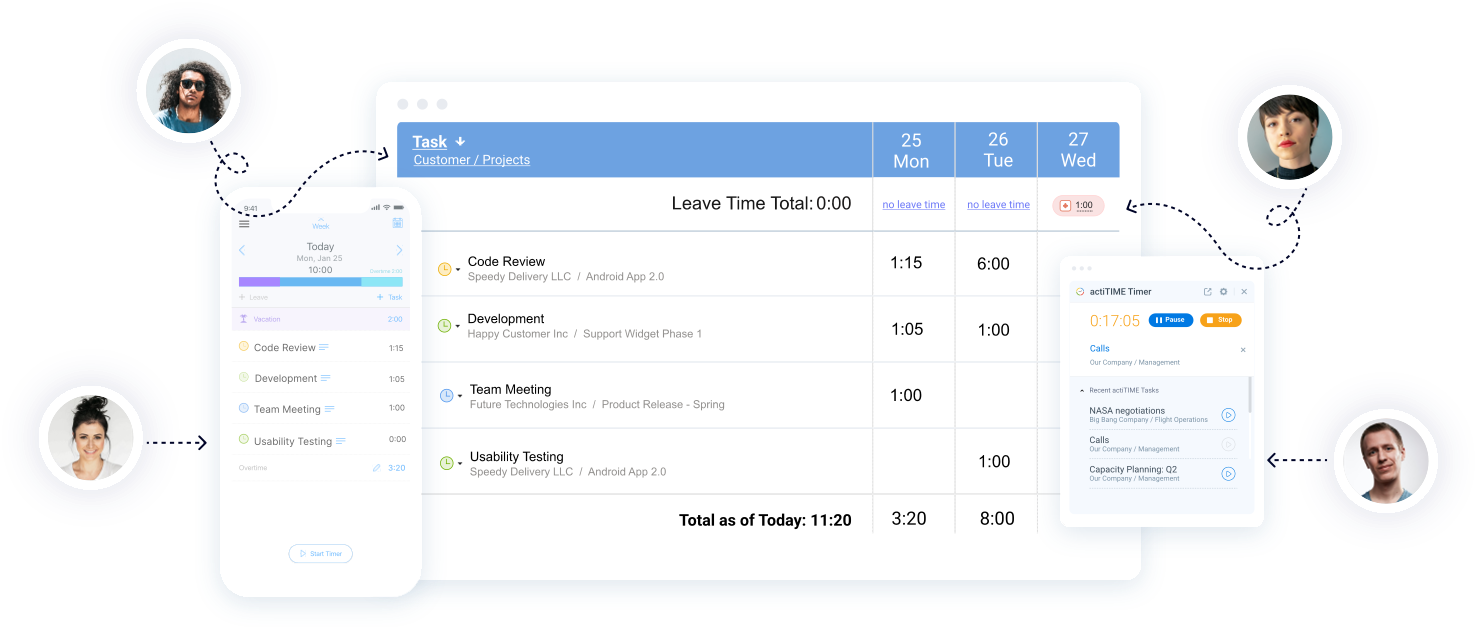
With a clear view of your patterns (how you spread time across the day, which kinds of tasks take longer than you think and where you’re fastest), you’ll know which areas need work and which lessons from your course to apply next. For more ideas, see our guide to workplace productivity and our article on fake productivity.
FAQ
What is the best productivity course?
It depends on your goal. For a short, complete system, Time Management Fundamentals by Dave Crenshaw on LinkedIn Learning is a strong start. For a university certificate, Work Smarter, Not Harder from UC Irvine on Coursera is the better fit. For procrastination, try Learning How to Learn on Coursera.
Are there free productivity courses?
Yes, with limits. Coursera lets you enroll in courses such as Work Smarter, Not Harder and Learning How to Learn for free, but the certificate requires payment or Coursera Plus. LinkedIn Learning offers a one month free trial that covers its full library.
Can I get a certificate for a productivity course?
Yes. LinkedIn Learning and Udemy give certificates of completion. Coursera gives shareable certificates for completed courses, which carry the partner institution’s name, such as UC Irvine for Work Smarter, Not Harder.
How long does a productivity course take?
The courses in this list range from 30 minutes (Getting Things Done) to about 15 hours (Learning How to Learn). Most video courses on Udemy and LinkedIn Learning take one to three hours.
Are productivity courses worth it?
They’re worth it if you apply what you learn. A course gives you a method and a reason to try it, but the results come from practicing one or two techniques for several weeks and checking whether your time use actually changed.
What do productivity courses teach?
Most cover prioritization, planning your day and week, managing email and distractions, beating procrastination, setting goals and building routines. Some, like Getting Things Done, teach one complete method. Others offer a collection of tips.
What is the best productivity course for a team?
Pick something short that everyone can finish in a week, such as Time Management Fundamentals or Getting Things Done, so the team shares the same vocabulary and habits. Then track time before and after to see whether anything changed.
Turn what you learn into results
A good productivity course gives you a method. Measuring your time shows whether that method is working. actiTIME helps you see where your hours go across tasks and projects and how that compares with your plans. Start a free 30-day trial, or book a demo if you want a walkthrough.