Project management time tracking connects hours to the work that produced them. Instead of just recording that someone worked eight hours on Tuesday, it shows which project, task and client those hours went to, what they cost, and whether the project is still on schedule.
That distinction matters. Generic time tracking tells you when people clock in and out. Time tracking for project management tells you whether the project is burning through its budget, which tasks are taking longer than estimated, and whether you have enough hours left to deliver on time. If your team works in projects, whether billable client work or internal initiatives, a project time tracker is the tool that turns raw hours into decisions.
This roundup covers 11 tools for project management time tracking, each taking a different approach to the same problem. Some focus on billable time and invoicing, others on resource planning or Gantt-based scheduling, and a few try to do it all. We tested each one and broke down what it actually does well, so you can find the right fit without signing up for seven free trials.
Prefer the visual tour? This side-by-side look at eleven project time trackers helps you find the one that turns your team’s hours into clear budget and profit data.
What to look for in a project time tracker
Before comparing tools, it helps to know which features separate real project management time tracking from a basic stopwatch app. These are the five that decide it.
Task-level time logging. The tool should let you log hours against specific tasks within a project, not just against the project itself. That granularity is what makes reports useful for estimating future work and spotting where time gets lost.
Estimates vs. actuals. Knowing that a task took 20 hours is only useful if you can compare it to the 12 hours you originally planned. Look for a tracker that lets you set time or cost estimates and then see the variance as work progresses.
Budget and cost visibility. Logging hours is one thing. Seeing what those hours cost and whether the project is still profitable is another. The best project time trackers connect hours to pay rates and billing rates so you can monitor budgets in real time.
Reports that answer project questions. You need more than a list of time entries. Look for reports that break down time by project, client, user and date, and that can show profitability, overtime and resource utilization.
Low-friction entry. If filling in the timesheet takes more effort than it’s worth, your team won’t do it. Manual timesheets, one-click timers, calendar views and mobile apps all reduce that friction in different ways.
Project time tracker comparison
The table below summarizes what each tool does best and what it costs.
| Tool | Best for | Pricing |
|---|---|---|
| actiTIME | Project hours, budgets and reporting in one place | Free up to 3 users, then $6/user/month |
| Teamwork | Agencies managing multiple client projects | Free up to 5 users, then from $10.99/user/month |
| Harvest | Billable time tracking with invoicing | Free for 1 seat and 2 projects, then from $9/seat/month + usage fees |
| OpenProject | Open source project management with time tracking | Free community edition, then $7.25/user/month |
| GoodDay | Planning, tracking and analysis in one workspace | Free up to 15 users, then $4/user/month |
| Toggl Track | Quick setup with strong project-level reporting | Free up to 5 users, then $9/user/month |
| Flowlu | Customizable project tracking for small teams | Free up to 2 users, then $9/user/month |
| TeamGantt | Gantt-based planning with time tracking | Free —, then $24/month (project-based) |
| Bitrix24 | Project collaboration with built-in time tracking | Free unlimited users, then $61/org/month |
| Replicon | Time, costs and project governance at scale | Free —, then $6/user/month |
| Insightful | Time data plus workforce analytics | Free —, then from $8/user/month |
Free project time trackers
1. actiTIME
Key features:
- Project budgets
- Cost and billing reports
- Overtime tracking
- Kanban and timesheets
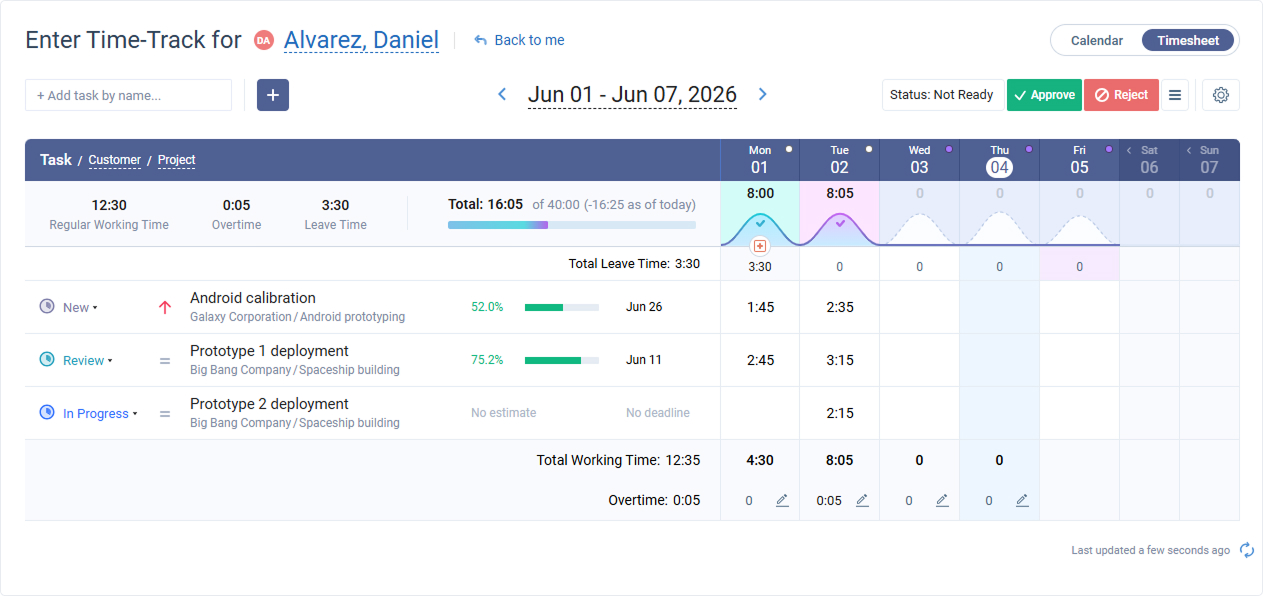
actiTIME is a project time tracker built around a three-level work structure: customers, projects and tasks. You assign team members to specific tasks, they log hours in weekly timesheets or a calendar view, and the system calculates costs, billable amounts and overtime automatically based on the rates you set.
What separates actiTIME from simpler trackers is the financial layer. You can set time and cost budgets at the project or task level and watch them in real time as the team logs hours. The Cost of Work Report shows what you are spending on staff. The Billing Summary shows what you can invoice. And the Profit/Loss Report compares the two, so you know whether a project is actually making money or just keeping people busy.
For tracking progress, actiTIME includes a Kanban board, workflow statuses, deadline alerts and an Estimated vs. Actual Time Report that shows where plans diverge from reality. There is also a Chrome extension (Time Management Assistant) that tracks activity automatically and syncs to your timesheets.
Capterra rating: 4.6/5 (150 reviews)
Pricing:
- Free for 1 to 3 users (limited features)
- 30-day free trial (full features)
- Paid: from $6/user/month
- Self-hosted: $120/user, one-time payment

Now we can better predict future project requirements
Our company needed a simple way of tracking time used on multiple projects – and actiTIME fit the need. Its interface is simple and easy to maintain. We use the application for time management, task estimation and also to communicate deadline information to our team members. Now having actiTIME we can better predict future project requirements!
2. Teamwork
Key features:
- Resource management
- Profitability reports
- Client project views
- Task dependencies
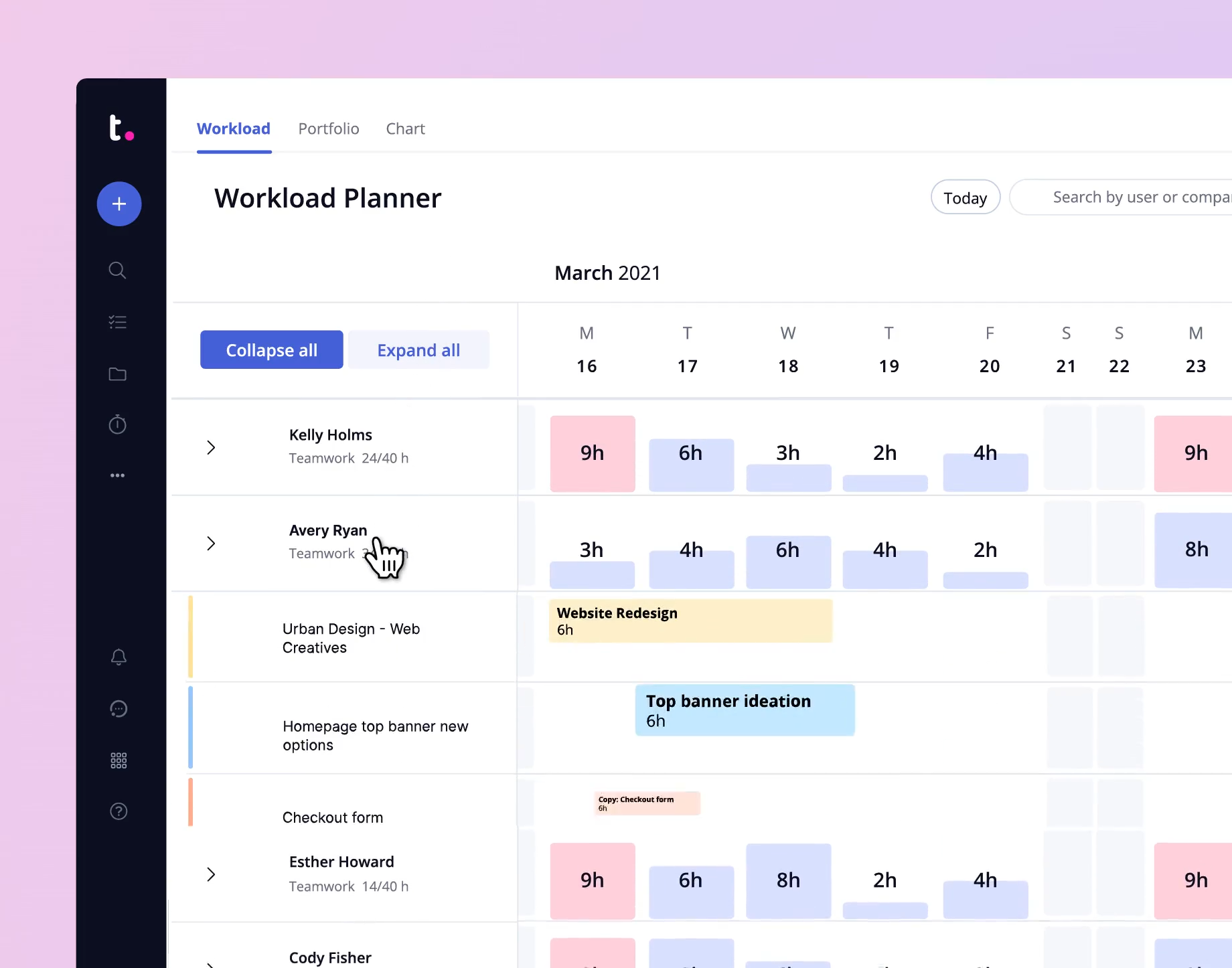
Teamwork is a project management platform with built-in time tracking, and it is particularly popular with agencies and professional services firms that manage multiple client projects simultaneously.
The resource management side is where Teamwork stands out. You can visualize workloads across your team, see who has capacity, and redistribute tasks before someone hits a wall. Time logged against tasks feeds into profitability reports, so you can see which clients and projects are actually worth the effort. Teamwork also supports Kanban and Scrum boards, task dependencies and client-facing project views, which makes it a solid fit for service teams that need to keep clients in the loop without giving them full access.
Capterra rating: 4.5/5 (866 reviews)
Pricing:
- Free for up to 5 users
- Paid options from $10.99/user/month
3. Harvest
Key features:
- Invoicing from time entries
- Budget tracking
- Team utilization
- Payment integrations
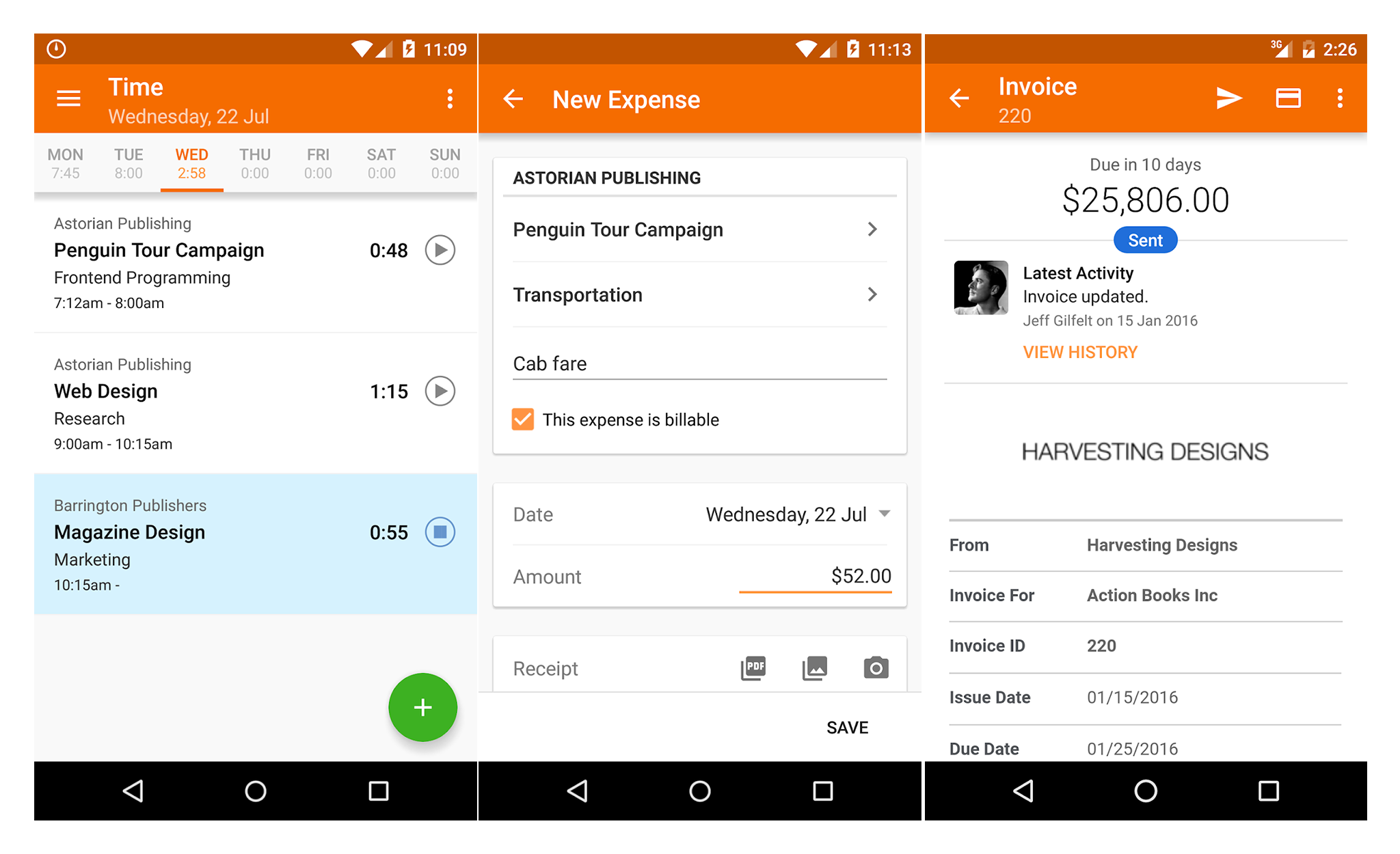
Harvest focuses on the financial side of project time tracking. You log hours against projects and tasks, and Harvest turns those entries into cost reports, budget tracking and professional invoices.
One thing to know about Harvest in 2026: the pricing model changed significantly. After an acquisition in mid-2025, Harvest moved from a flat per-seat fee to a base rate plus usage-based charges. The base rate starts at $9/seat/month (annual billing), but you may pay more if you exceed the included limits on projects, clients, tasks and invoices. If your team runs many small projects, check whether the usage caps fit your workflow before committing.
Harvest integrates with payment platforms so clients can pay invoices directly online, which speeds up collections. The reporting side covers project budgets vs. actuals, team utilization and expense tracking. It is a strong choice for teams where billable time and cash flow visibility are the top priorities.
Capterra rating: 4.6/5 (592 reviews)
Pricing:
- Free for 1 seat and 2 projects
- Teams: from $9/seat/month (annual) or $11/seat/month (monthly), plus usage-based fees above included limits
- Enterprise: from $14/seat/month
4. OpenProject
Key features:
- Open source
- Gantt charts
- Agile boards
- Wiki documentation
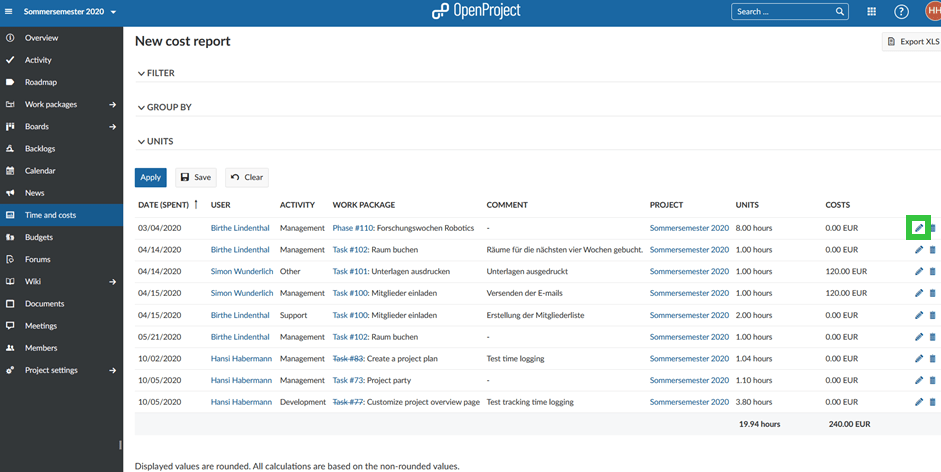
OpenProject is an open source project management platform with time tracking built in. The community edition is free with no user limit, which makes it a practical option for teams that want project tracking without a recurring subscription and have the capacity to self-host. Prefer a tool you can install yourself? Browse our list of project management software downloads.
Beyond time tracking, OpenProject includes Gantt charts, Agile boards (supporting both Kanban and Scrum), work package templates and a built-in wiki for project documentation. Cost tracking is also available, though the more advanced features (like multi-project dashboards and custom reporting) require a paid version.
The trade-off is that OpenProject is more complex to set up than most SaaS tools on this list, especially if you self-host. But for teams that want full control over their data and the ability to customize the platform, it is hard to beat on value.
Capterra rating: 4.5/5 (160 reviews)
Pricing:
- Free community edition (self-hosted)
- Cloud: from $7.25/user/month (minimum 5 users)
5. GoodDay
Key features:
- 15-user free tier
- Custom workflows
- KPI analytics
- Multiple project views
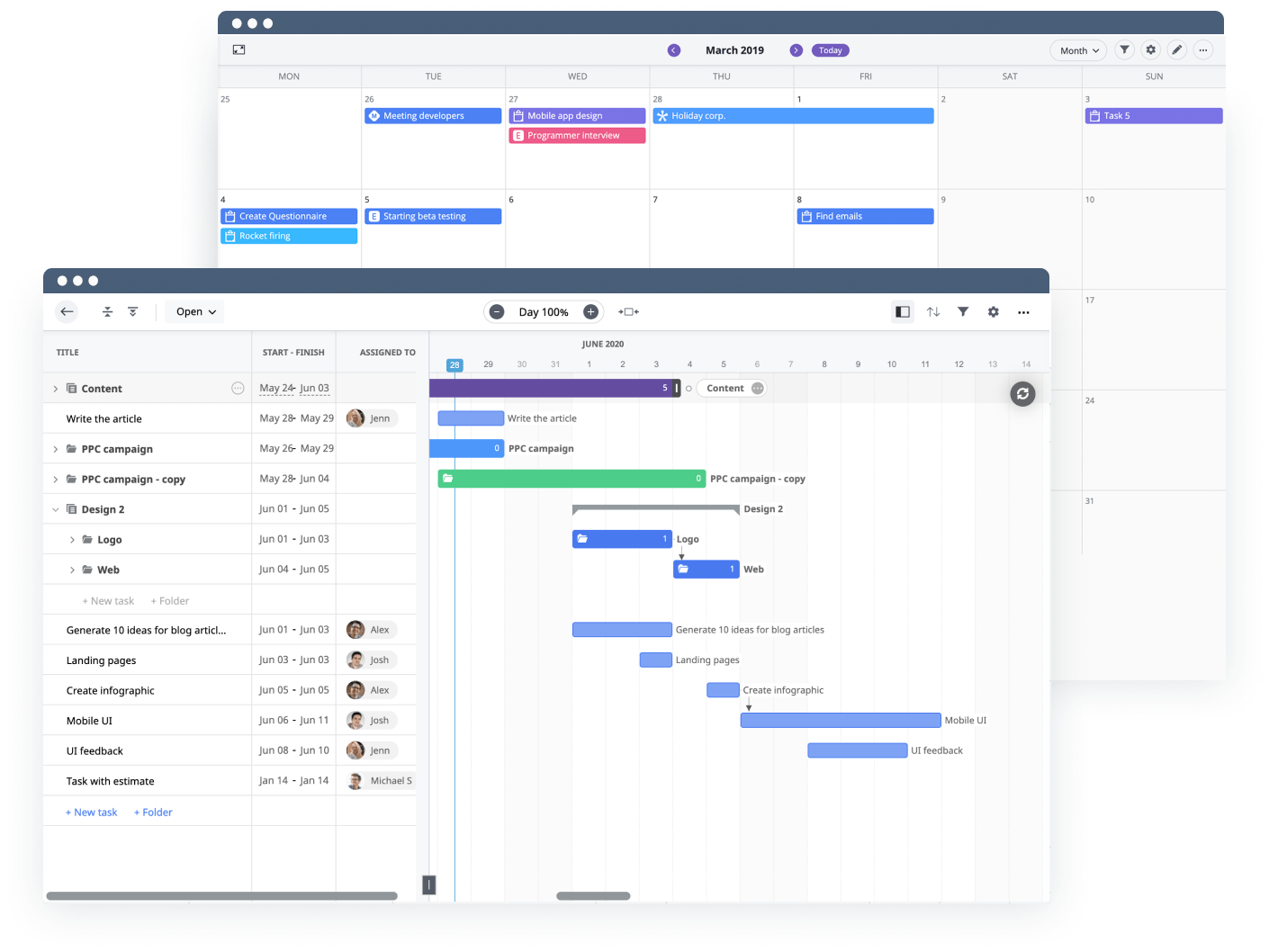
GoodDay combines project planning, time tracking, budgeting and analytics in a single workspace. The free version supports up to 15 users with unlimited projects and tasks, which is one of the more generous free tiers in this category.
The tool supports multiple project views (Gantt, Kanban, calendar, list) and lets you define custom workflows, set KPIs and run analytics across teams. Time tracking is integrated into tasks, so hours log where they belong without switching between apps.
For teams that want one tool instead of three, GoodDay covers a lot of ground. The downside is that the breadth of features can make the interface feel dense until you figure out which views and settings matter for your workflow.
Capterra rating: 4.7/5 (146 reviews)
Pricing:
- Free for up to 15 users
- Professional: $4/user/month
- Business: $7/user/month
6. Toggl Track
Key features:
- One-click timer
- Project-level reports
- Billable rates
- Activity tracking
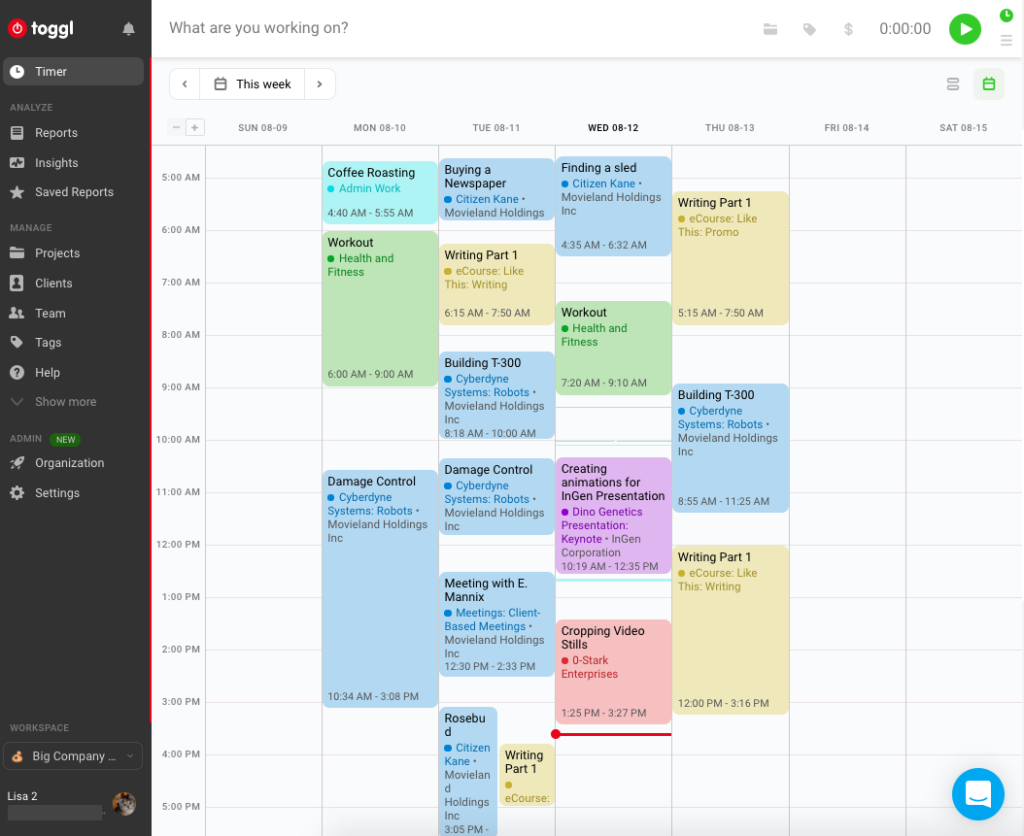
Toggl Track is one of the more widely used time trackers, and for good reason: it is fast to set up and the reporting is strong. You can start a timer with one click, tag entries by project and client, and pull reports that break down time by almost any dimension you need.
One feature worth noting is the automated activity tracking, which logs which websites and apps a user visits throughout the day. This data stays private to the user (managers cannot see it), which makes it a productivity self-assessment tool rather than a surveillance one. Toggl also supports project budgets, billable rates and team dashboards.
Where Toggl falls short compared to some other tools on this list is project management depth. There are no Gantt charts, no task dependencies, and no Kanban boards. If you need time tracking layered on top of project planning, Toggl may leave you using a second tool. If you just need clean time data and strong reports, it delivers.
Capterra rating: 4.7/5 (2,331 reviews)
Pricing:
- Free for up to 5 users
- Starter: $9/user/month
- Premium: $18/user/month
7. Flowlu
Key features:
- CRM included
- Kanban boards
- Agile workflows
- Project cost tracking
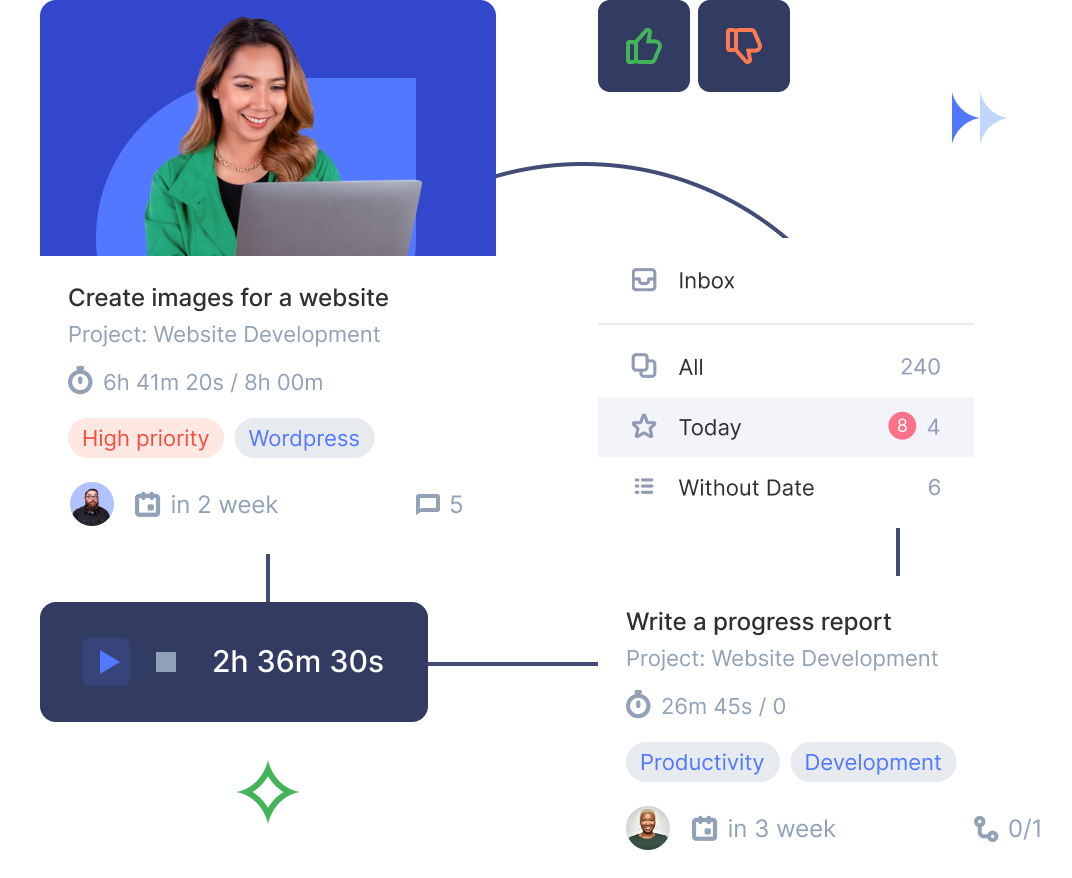
Flowlu is a business management platform that includes project tracking, CRM, invoicing and a knowledge base. For time tracking, it offers built-in timesheets and timers that log hours against projects and tasks.
One thing to be aware of: Flowlu switched from flat-bundle pricing to per-seat pricing in September 2025. For teams under about 6 people, the new model is cheaper. For teams above 10, it costs more than the old bundles. Worth doing the math before signing up.
Flowlu supports Kanban boards, real-time performance charts, Agile workflows and project cost tracking. It is highly customizable, which makes it flexible enough for different industries, but also means there is a learning curve before everything is configured the way you want it.
Capterra rating: 4.8/5 (349 reviews)
Pricing:
- Free for up to 2 users
- Essential: $9/user/month (annual) or $12/user/month (monthly)
- Advanced: $17/user/month (annual) or $22/user/month (monthly)
Paid project time trackers
8. TeamGantt
Key features:
- Gantt-first planning
- Task dependencies
- Resource management
- Estimate vs. actual
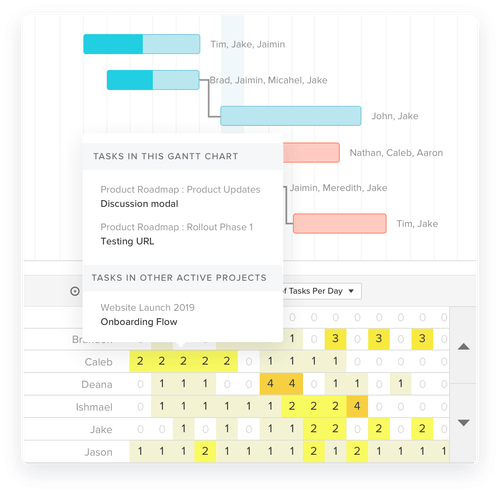
TeamGantt is a Gantt-chart-first project tool with time tracking built in. If your team plans work in timelines with task dependencies and milestones, TeamGantt lets you track hours against those same tasks and compare actual time to your original estimates.
The pricing model is project-based rather than per-user, which means the cost depends on how many active projects you run. The Basic option covers 2 projects with up to 10 collaborators. Business covers 5 projects with unlimited collaborators plus workload management and critical path analysis. This model can be economical for small teams with a few ongoing projects, but it gets expensive if you run many projects in parallel.
TeamGantt also supports resource management, portfolio views and team chat. The time tracking module uses both manual timesheets and one-click timers.
Capterra rating: 4.6/5 (201 reviews)
Pricing:
- Basic: $24/month (2 projects, 10 collaborators)
- Business: $120/month (5 projects, unlimited collaborators)
- Builder Edition: $199/month (10 projects, built for construction)
- 20% discount for annual billing
9. Bitrix24
Key features:
- Per-org pricing
- CRM and chat included
- Gantt and Kanban
- Team calendars
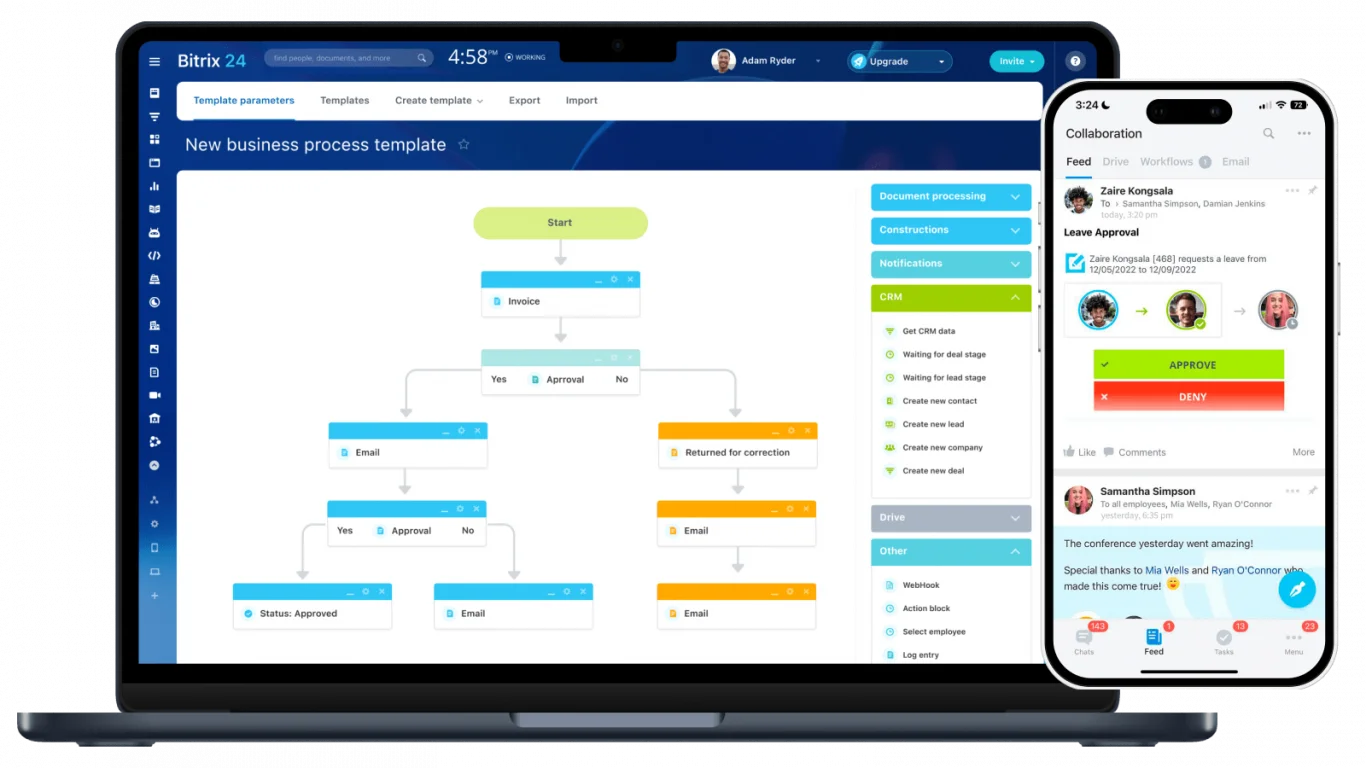
Bitrix24 is a work management system that bundles project planning, task management, CRM, document storage, team chat and time tracking into one platform. It is the broadest tool on this list in terms of what it tries to do.
For project time tracking specifically, Bitrix24 includes task timers, Kanban boards, Gantt charts, team calendars and to-do lists. The pricing is per-organization rather than per-user, which makes it cost-effective for larger teams. A team of 50 people on the Standard option pays roughly $2.50 per user per month.
The downside is complexity. Bitrix24 packs so many features into one interface that finding what you need can take longer than it should, especially during setup. If you want a focused project time tracker, the feature density may feel like overkill. If you want a single platform for everything from time tracking to CRM to internal chat, Bitrix24 covers a lot of ground for the price.
Capterra rating: 4.2/5 (847 reviews)
Pricing:
- Free (unlimited users, limited features)
- Basic: $61/org/month (up to 5 users)
- Standard: $124/org/month (up to 50 users)
- Professional: $249/org/month (up to 100 users)
10. Replicon
Key features:
- Modular pricing
- Approval workflows
- AI timesheet suggestions
- GPS tracking
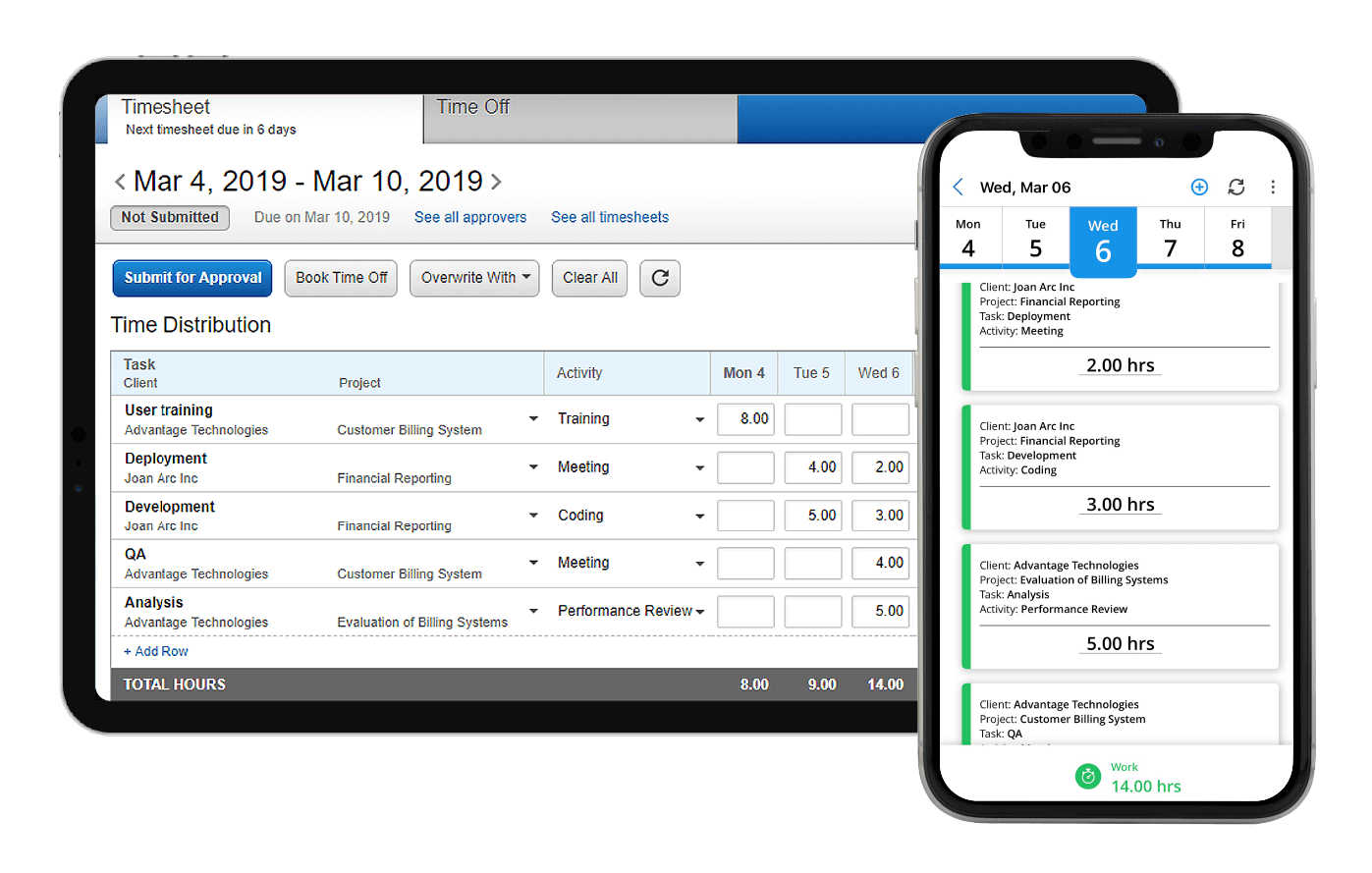
Replicon takes a modular approach to project time tracking. Instead of a single bundled product, you pick the modules you need: time and attendance, project time tracking, expense management or workforce management. This lets you pay for exactly the functionality you use, which can be economical or expensive depending on how many modules you stack.
The project time tracking module ($12/user/month) includes timesheets with customizable approval workflows, project cost tracking, billing rate management and real-time dashboards. Replicon also offers AI-powered timesheet suggestions that pre-populate entries based on calendar events and work patterns, and GPS tracking for teams that work across multiple job sites.
Replicon is built for larger organizations that need governance, compliance and audit-ready time records. Smaller teams may find the setup and configuration heavier than necessary. If you don’t need that level of governance, our list of Replicon alternatives covers lighter and more affordable options.
Capterra rating: 4.5/5 (524 reviews)
Pricing:
- Time and Attendance: from $6/user/month
- Project Time Tracking: from $12/user/month
- Modules can be combined; volume discounts available
11. Insightful
Key features:
- Workforce analytics
- App and website tracking
- Productivity reports
- Capacity insights
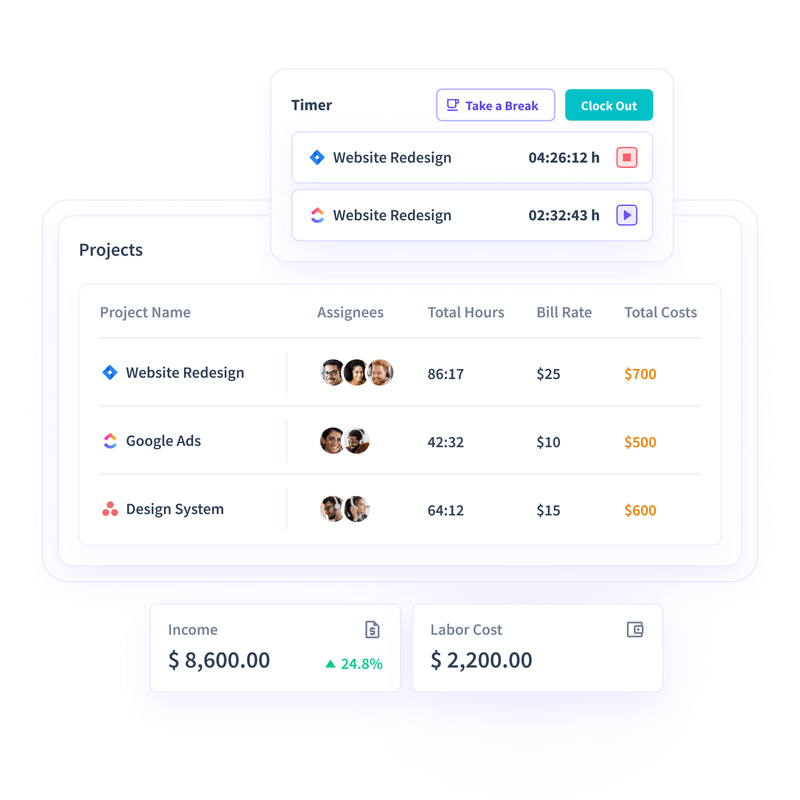
Insightful combines project time tracking with workforce analytics. Beyond logging hours against tasks, it tracks which apps and websites employees use, takes periodic screenshots, and generates productivity reports that show how time is actually spent across the team.
The workforce analytics side gives managers visibility into work patterns, capacity, and app usage trends. The productivity reports can help spot bottlenecks and inefficiencies that timesheet data alone would miss.
A word of caution: the monitoring features (screenshots, activity tracking) can damage trust if rolled out without transparency. Insightful works best when the team knows exactly what is being tracked and why, and when the data is used for process improvement rather than policing.
Capterra rating: 4.7/5 (96 reviews)
Pricing:
- Workforce Analytics: from $8/user/month
- Workflow Optimization: from $15/user/month
- Bundle: $16/user/month
FAQ
What is the difference between a project time tracker and a regular time tracker?
A regular time tracker records how many hours someone worked. A project time tracker ties those hours to specific projects, tasks and clients, which means you can track budgets, compare estimates to actuals, calculate project costs and generate billing reports. If you just need attendance, a regular tracker is enough. If you manage projects and need to know where time goes within them, you need a project time tracker.
Can salaried employees use project time trackers?
Yes. Project time tracking is not just for hourly workers. Salaried teams use it to monitor project budgets, measure how long tasks actually take vs. estimates, and make better resource allocation decisions. Even when you are not billing by the hour, knowing where hours go helps you plan future projects more accurately.
Do free project time trackers have enough features for real use?
It depends on team size and what you need. actiTIME’s free version supports up to 3 users with time tracking, project management and basic reporting. GoodDay offers a free version for up to 15 users with full project features. Toggl Track’s free tier covers up to 5 users. For small teams, these can work well long-term. Larger teams will typically hit user limits or need advanced features like billing, budgets or approvals that live in paid versions.
How do I get my team to actually fill in their timesheets?
Keep it simple. Tools with one-click timers, mobile apps and weekly timesheet views (rather than daily logs) tend to get better adoption. It also helps to connect time tracking to something the team cares about, like accurate project estimates that prevent scope creep, rather than framing it as surveillance. Some tools, like Toggl Track and Replicon, offer automated suggestions based on calendar events, which reduces the manual effort even further.
Is open source project time tracking software reliable?
OpenProject, the main open source option on this list, is used by government agencies and large organizations. Open source does not mean unfinished. The trade-off is that you handle hosting, updates and configuration yourself (or pay for a managed cloud version). If your team has the technical capacity, the open source route gives you full data control and no vendor lock-in.
What is project management time tracking?
Project management time tracking records hours against specific projects, tasks and clients rather than against the working day. That link is what turns a timesheet into a management tool: it shows which projects are consuming budget, which estimates were wrong, and what the delivered work actually cost. Plain time tracking answers when somebody worked. Time tracking for project management answers what the work was worth.
Find the right project time tracker
The right approach to time tracking for project management depends on what your team actually needs. If billable time and invoicing are the priority, Harvest or actiTIME will give you the financial visibility you need. If you want project planning and time tracking in one tool, Teamwork, OpenProject or GoodDay cover both. If you just need clean time data and reports without the project management layer, Toggl Track is hard to beat for simplicity.
You can start with a full-featured 30-day trial at no cost.