
Manufacturing time tracking means recording two different things about the same shift. The first is attendance: when each person clocked in and out, which payroll needs. The second is labor time: how many of those hours went to which work order, operation and activity, which costing and quoting need. Most plants handle the first well and the second poorly, and job costs go wrong in the gap between them.
This guide explains what to track on the shop floor, how to turn the hours into labor efficiency, utilization and cost per job (with a worked example), which labor rules shape the way time is recorded, the ways tracking breaks down in practice, and how to roll it out without slowing production.
- What manufacturing time tracking covers
- Why clock hours alone do not show what a job cost
- What to track on the shop floor
- Production time tracking metrics, with a worked example
- Labor rules that shape how time is recorded
- Ways to capture time in a plant
- Where manufacturing time tracking goes wrong
- How to roll it out in six steps
- Tracking manufacturing time in actiTIME
- FAQ
What manufacturing time tracking covers
Time tracking in a plant started with the punch clock, and for a long time its only job was to work out wages. A time clock still answers that question well. It cannot answer what a batch, a work order or a customer job actually consumed, because a person who clocks in at 6:00 and out at 14:30 may have set up two machines, run three jobs, waited 40 minutes for material and spent half an hour on a preventive maintenance task.
So manufacturing time tracking has two layers, and it helps to name them separately:
| Layer | What it records | Who relies on it |
|---|---|---|
| Attendance time | Shift start and end, breaks, overtime, leave | Payroll, HR, compliance |
| Direct labor time | Hours on a specific work order or operation: setup, run, rework | Job costing, quoting, production managers |
| Indirect labor time | Paid hours not tied to one job: maintenance, cleaning, training, waiting, meetings | Overhead rates, capacity and staffing decisions |
Direct and indirect labor should add up to attendance time. When they don’t, the missing hours are the first thing to look into.
Why clock hours alone do not show what a job cost
US production and nonsupervisory employees in manufacturing averaged 41.8 hours a week in the latest 2026 data, and 4.1 of those hours were overtime, according to the Bureau of Labor Statistics (Table B-7, preliminary, seasonally adjusted). Their average hourly earnings were $30.43 (Table B-8). Overtime at that level is a routine part of the week, so the question of which job caused it matters for cost.
A clock record tells you that someone worked 45 hours and was paid five of them at time and a half. It does not tell you that those five hours went to a rush order that was quoted at straight time. Without job level hours, the premium lands in general overhead, the rush order looks profitable, and the next quote repeats the mistake. The same thing happens with rework: if it is booked as normal run time, the defect never shows up as a cost.
Job level labor tracking also feeds three decisions that a payroll record cannot support: whether the standard times used for quoting are still right, whether a line has enough people for next month’s orders, and whether a job that went over budget did so because of setup, rework or waiting. For the last one, see our guide to the causes of cost overruns.
What to track on the shop floor
The most useful structure for production time tracking is a short hierarchy: the work order or job, the operation within it (cutting, welding, assembly, inspection), and an activity type that says what kind of time it was. The activity type is what separates productive time from the time a plant pays for without getting output.
| Activity type | Direct or indirect | Why track it separately |
|---|---|---|
| Setup and changeover | Direct, charged to the job | Small batches carry the same setup as large ones; quotes for short runs depend on it |
| Run time | Direct | Compared with standard hours to measure labor efficiency |
| Rework | Direct, flagged | Makes quality problems visible as hours and money |
| Waiting for material, tools or instructions | Indirect | Shows supply and scheduling problems that look like slow workers |
| Maintenance and cleaning | Indirect | Needed for overhead rates and for planned downtime |
| Training, meetings, safety briefings | Indirect | Real paid hours that otherwise vanish into run time |
Six to eight activity types are enough for most plants. Forty codes look precise on paper, but operators pick whichever one is first in the list, and the data ends up less accurate than with six. Always include a code for helping on another job or another line: when there is nowhere to put that time, people book it to whatever they were on before, and two jobs end up wrong.
Production time tracking metrics, with a worked example
Three numbers come straight out of job level time data.
- Labor efficiency = standard hours earned / actual hours on the job x 100. Standard hours earned are the hours the job should take at the standard rate for the quantity produced. Above 100% means the job beat the standard.
- Labor utilization = direct hours / paid attendance hours x 100. It shows how much of the paid time went to jobs at all.
- Labor cost per job = hours on the job x each person’s hourly cost, plus any overtime premium charged to the job.
Here is how they work on one job. The figures are illustrative; the hourly rate is the BLS manufacturing average quoted above. A shop has an order for 200 steel brackets. The standard is 0.15 hours per bracket, and the job was quoted on that basis. The crew logged 36 hours on it: 3 hours of setup, 29 hours of run time and 4 hours of rework after a fixture problem. Six of the 36 hours were worked as overtime.
Actual labor came in 30% above the quote, and the time records show why: the 4 rework hours ($121.72) and the overtime premium ($91.29) explain $213.01 of the $273.87. Fix the fixture so rework drops to 1 hour and efficiency rises to 90.9% (30 / 33). If the 3 saved hours come off the overtime, the job costs $136.94 less (3 x $45.645).
Utilization works at the crew level. Say three operators each worked 41.8 paid hours in the week, which is 125.4 hours, and logged 98 hours to work orders. Utilization is 98 / 125.4 = 78.1%. The other 27.4 hours are indirect time, and the activity codes tell you whether they went to maintenance, training or waiting for material. Waiting is usually the one worth fixing first. Our guide to resource management covers how to use utilization without turning it into a target people learn to game.
Labor rules that shape how time is recorded
Whatever the system, the rules on what counts as working time decide how attendance is recorded. A few that affect plants directly:
- Short breaks are paid time in the US. Under the Fair Labor Standards Act, rest periods of about 5 to 20 minutes must be counted as hours worked (29 CFR 785.18). A meal period of 30 minutes or more, with the employee fully relieved of duty, ordinarily does not count (29 CFR 785.19).
- Machine preparation is work. The regulations give the example of an operator who oils, greases or cleans a lathe or installs a new cutting tool at the start of the day: that is part of the principal activity, as is changing clothes when the job cannot be done without it (29 CFR 785.24). If the clock starts after that work, the record is short.
- Rounding is allowed only if it evens out. Recording start and stop times to the nearest 5 minutes, tenth or quarter hour is accepted as long as it does not, over time, underpay employees for the time they actually worked (29 CFR 785.48). Rounding that always favors the employer fails that test.
- Records of hours are required. Employers covered by the FLSA must keep hours worked each workday and each workweek for nonexempt employees (29 CFR 516.2).
- Outside the US the rules differ. In the UK, workers who work more than 6 hours a day are entitled to one uninterrupted 20 minute break, which does not have to be paid, and to 11 hours of rest between working days (GOV.UK). In the EU, the Court of Justice ruled in 2019 that member states must require employers to set up a system that measures the time each worker works each day (Case C-55/18).
Overtime rules are where most payroll disputes start. If your plant runs regular overtime, our article on how to reduce overtime shows how to find its causes in timesheet data.
Ways to capture time in a plant
There is no single right method of time tracking for manufacturing. The choice depends on how many people share a station, whether they have phones on the floor, and how often they switch jobs during a shift.
| Method | Works well when | Watch out for |
|---|---|---|
| Paper job tickets | Very small shops with a few long jobs | Entries written from memory, retyping, lost tickets (see digital vs paper timesheets) |
| Wall time clock (badge, PIN, biometric) | Large hourly workforces where attendance is the main need | Records attendance only unless it also takes job codes; queues at shift change |
| Shared tablet or terminal at a work center | Operators switch jobs several times a shift | People forget to stop one job before starting the next |
| Mobile app with a timer | Maintenance techs, supervisors, engineers and staff who move around the site | Phone policies on the floor; needs a network connection |
| Web timesheet or calendar | Engineering, quality, scheduling and office staff | Filled in on Friday from memory if nobody checks daily |
| Machine data from an MES | Automated lines where machine time matters more than labor time | Shows when a machine ran, not who worked on it or why it stopped |
Most plants end up with two methods: a clock or terminal for attendance and a job level method for the people whose time is charged to work orders. If you are comparing specific products, our list of manufacturing time tracking systems reviews them side by side.


Where manufacturing time tracking goes wrong
Most failures come from how the data is collected and what it is used for, rather than from the tool itself.
- When job time is entered after the shift, the day gets split into round numbers across the jobs someone remembers. Capture start and stop as they happen, even if the record is rough.
- Without codes for waiting, maintenance and cleaning, indirect hours get booked to whatever job was open, and that job looks slow.
- If rework has no code of its own, quality problems never show up as cost, and nobody gets the budget to fix the fixture.
- The overtime premium often lands on whichever job happened to run last. Set a rule instead: overtime caused by a specific job, such as a rush order or a late customer change, is charged to that job, and overtime caused by general understaffing goes to overhead. Then apply it the same way every week.
- Efficiency compares actual hours with a standard, so a standard set years ago on a different machine makes the figure meaningless. Review standards against actual averages at least once a year.
- When low efficiency leads to blame, people pad easy jobs and underreport the hard ones, and the data stops being useful. Use the numbers to find process problems first.
- Chasing precision backfires too. Managers usually need hours to the nearest quarter hour, and logging should take each person a few minutes a day.
How to roll it out in six steps
-
Start with one line or one cell.
Run a pilot for two to four weeks on a part of the plant with a mix of short and long jobs. Check the totals against payroll every week.
-
Agree on the structure and the codes.
Work order, operation and six to eight activity types, including one for helping elsewhere. Write one sentence per code so two people would book the same work the same way.
-
Set standards from history.
Use actual hours from similar past jobs to set or check standard hours per unit or per operation. This is analogous estimating: the more job data you collect, the better the next quote gets.
-
Write down the attendance rules.
Rounding, paid and unpaid breaks, machine preparation before the shift, and how overtime is approved. Make sure they match the rules that apply at each site.
-
Approve weekly and lock closed periods.
A supervisor reviews and approves time each week, and approved weeks are locked so that costs already sent to payroll or invoiced do not change. Our guide to timesheet approval covers the workflow.
-
Review three numbers every week.
Efficiency per job, utilization per crew and the top three causes of indirect time. Act on the largest one before adding more codes or reports.
Tracking manufacturing time in actiTIME
actiTIME is project time tracking software built for billing. In a plant it fits the job level layer: work orders, operations and the cost and billing behind them. It suits job shops, contract and make to order manufacturers, engineering and R&D teams, maintenance crews and the office staff around production. It is not an MES and not a badge time clock: it does not read machine data, and logging time requires an internet connection. If your main need is attendance for several hundred hourly workers, a dedicated time and attendance system fits better, and actiTIME can sit next to it for job costing.
Here is how the setup maps to a plant:
- actiTIME organizes work as Customer, Project and Task, and all three level names can be renamed in General Settings, for example to Customer, Work order and Operation. Time is always tracked at the task level.
- Types of work such as setup, run, rework or maintenance are assigned to tasks and marked billable or non-billable.
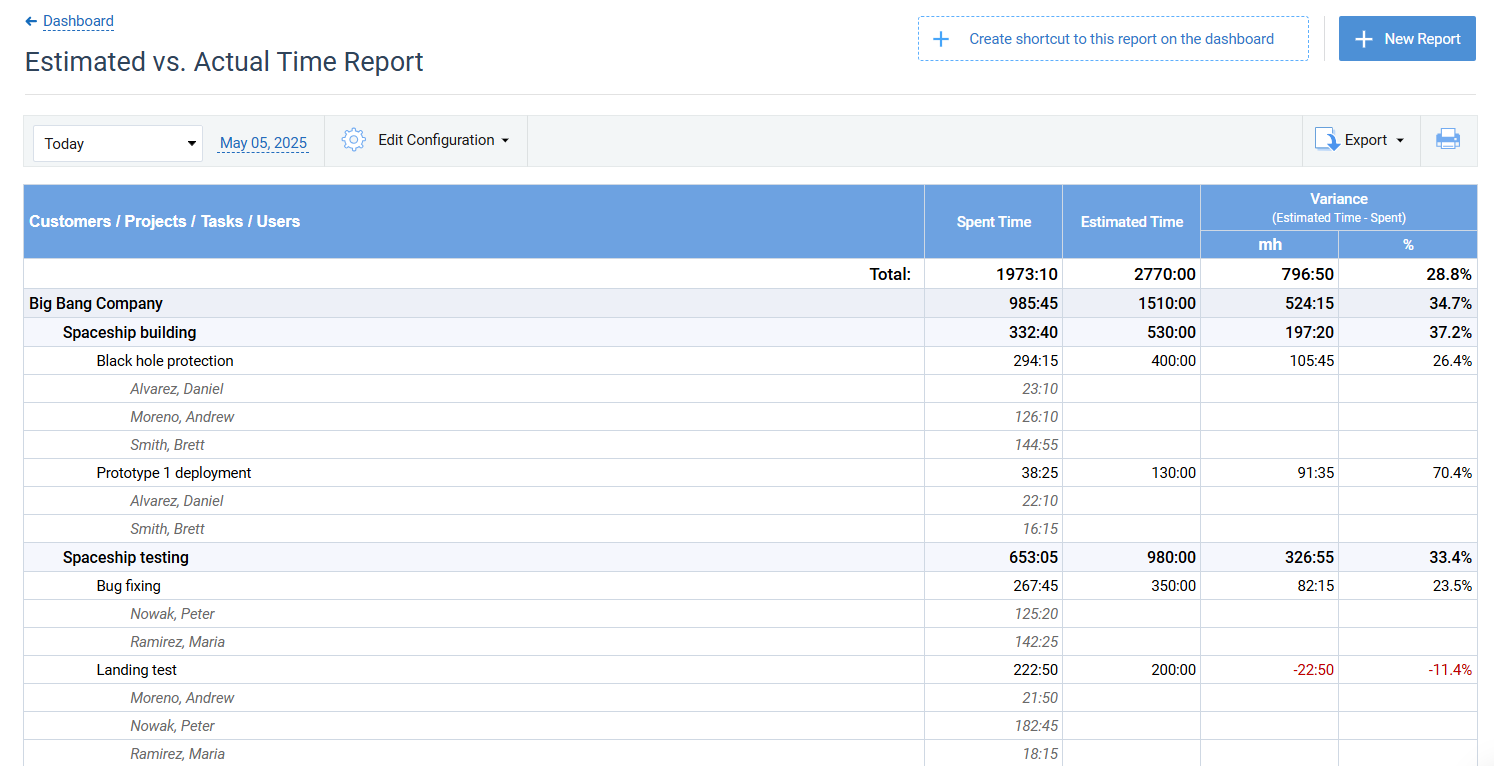
- Standard hours go in as an estimate on each operation, and the Estimated vs. Actual Time Report compares them with actual hours.
- Each person has cost of work rates for regular, overtime and leave time. The Cost of Work Report shows hours and labor cost per user, including overtime.
- Time and cost budgets can be set per customer, work order or operation; the progress bar turns red when a budget is exceeded.
- Overtime Registration calculates overtime automatically or lets people enter it, and the Time Balance and Overtime Report shows it across users.
- Time-Track Approval lets supervisors approve weeks in bulk, and Lock Time-Track stops edits after approval or invoicing.
- People log time in a weekly Timesheet View, in a Calendar View with start and stop times, or with a timer in the mobile app.
For contract manufacturers and engineering shops that bill time and materials, the same hours become client billing. Each project uses either billing rates per type of work or billing rates per user, the Billing Summary Report totals billable amounts, and PDF invoices are generated from tracked time. Time records can also go to QuickBooks Online for payroll and invoicing, or to other systems through Zapier and the API.

We reduced payroll processing to 45 minutes per week
actiTIME is very robust, integrated well into your business process, and most important, helps you focus on your business instead of monkeying around with technology. actiTIME has reduced our payroll processing from 4-6 hours per week to 45 minutes per week.
actiTIME is free for teams of up to 3 users, the online version costs from $5 per user per month, and a self-hosted version is available for a one-time $120 per user.
FAQ
What is the difference between time and attendance and manufacturing time tracking?
Time and attendance records when people start and finish work, their breaks and their overtime, and its main output is payroll. Manufacturing time tracking in the wider sense adds job level hours: which work order, operation and activity each hour went to. Payroll needs the first; job costing, quoting and efficiency need the second.
How do you track production time without slowing workers down?
Put capture where the work happens: a shared tablet at the work center or a timer on a phone, with the work order list already filtered to that station. Keep activity codes to six to eight and ask only for start and stop. In practice, most of the slowdown comes from long code lists on the screen.
Is manufacturing time tracking worth it for a small job shop?
Yes, if you quote jobs. In the worked example above, one 200 piece order used $273.87 more labor than its quote, and a shop running ten orders like that a month would leave about $2,700 of labor unrecovered without knowing which jobs caused it. A small shop does not need hardware to start: a timer on a phone or a shared tablet and six activity codes are enough.
Start tracking job hours, not just shifts
Clock hours show what you paid, while job hours show what each order cost and whether your standards and quotes still hold. Start with one line, a short list of codes and a weekly review of the numbers.
Start a free trial of actiTIME with full features for 30 days. After the trial, teams of up to 3 users can keep using it for free.