Most advice on how to increase productivity asks you to do more, usually by starting earlier or staying later. Productivity is a ratio, though, of useful output to the hours that went into it, and adding hours changes only the bottom of that ratio. The fastest way to increase productivity at work is usually the opposite move: find the hours that produce nothing, remove them, and give that time back to the work that counts.
This guide starts there. It shows with a worked example why cutting work beats adding hours, then gives 20 ways to increase productivity in the workplace, grouped by the lever each one pulls, so you can pick the one that matches your problem instead of trying all of them. Managers get a separate section on team productivity, followed by the fixes that backfire and how to check whether anything changed.
How to increase productivity: the short answer
To increase productivity, raise the amount of finished, useful work you produce in the same number of hours. In practice that comes down to five moves, in this order:
-
See where the week goes.
Log one normal week of work against tasks so you know how many hours reach the work you are paid for.
-
Remove work that produces nothing.
Status meetings that could be a written update, duplicate reports and tasks nobody needs any more.
-
Protect attention for the work that is left.
Fewer interruptions, one task at a time, and messages handled in batches.
-
Finish before you start something new.
Fewer open tasks, a clear definition of done and less rework.
-
Check the result after a few weeks.
Compare output per hour before and after one change, then keep it or drop it.
If you first want the definition of productivity and how to calculate it, read our explainer on workplace productivity, which also reviews the research on long hours, interruptions and engagement. This page is the practical part: what to change on Monday.
Why cutting work beats adding hours
The instinct when work piles up is to stretch the day. The evidence says extra hours buy less than the hours before them. In a reanalysis of munition workers in Britain during the First World War, economist John Pencavel found that output rose in step with hours up to about 49 hours a week and more slowly after that, and that output at 70 hours differed little from output at 56 hours (Pencavel, IZA Discussion Paper 8129, 2014). That was physical factory work a century ago, so the thresholds do not transfer to an office. The shape of the curve does: past a point, each added hour returns less.
Office work also has a lot of room to cut. In Microsoft’s 2023 Work Trend Index, built on a survey of 31,000 people in 31 countries and on Microsoft 365 usage data, the average employee spent 57% of their time communicating in meetings, email and chat and 43% creating in documents, spreadsheets and presentations. In the same report 68% of people said they did not have enough uninterrupted focus time during the workday (Microsoft Work Trend Index 2023). Some of that communication is the work itself. The rest is the first place to look for hours you can win back.
Worked example: five more hours or four hours back
Take an analyst who finishes 10 client reports in a 40 hour week. A week of time tracked against tasks shows where the hours went: 22 hours of focused report work, 8 hours of meetings, 4 hours fixing reports that came back with corrections and 6 hours of messages and admin. The figures are illustrative, but the method works on any real week.
Option A adds less than one report and costs the analyst an extra hour every evening, while output per hour falls. Option B produces more than Option A in fewer hours, and the gain repeats every week without anyone working longer. Even the smaller version, cutting rework alone, beats staying late. None of this was visible before the week was tracked, which is why the first step is always to look.


20 ways to increase productivity at work
The ways below show how to increase productivity at work, grouped by the lever each one pulls. Read the group headings first and start with the group that matches what your tracked week showed. If you have not tracked a week yet, our guide on how to improve time management walks through a one week time audit in detail.
See where the time goes
1. Track time against tasks, not against the clock. A log of when you arrived and left says nothing about output. A log of hours per task shows which work took longer than it should and which hours went nowhere. Track small items too, such as calls, quick requests and the time spent finding files, because those are the hours people forget when they reconstruct a week from memory.
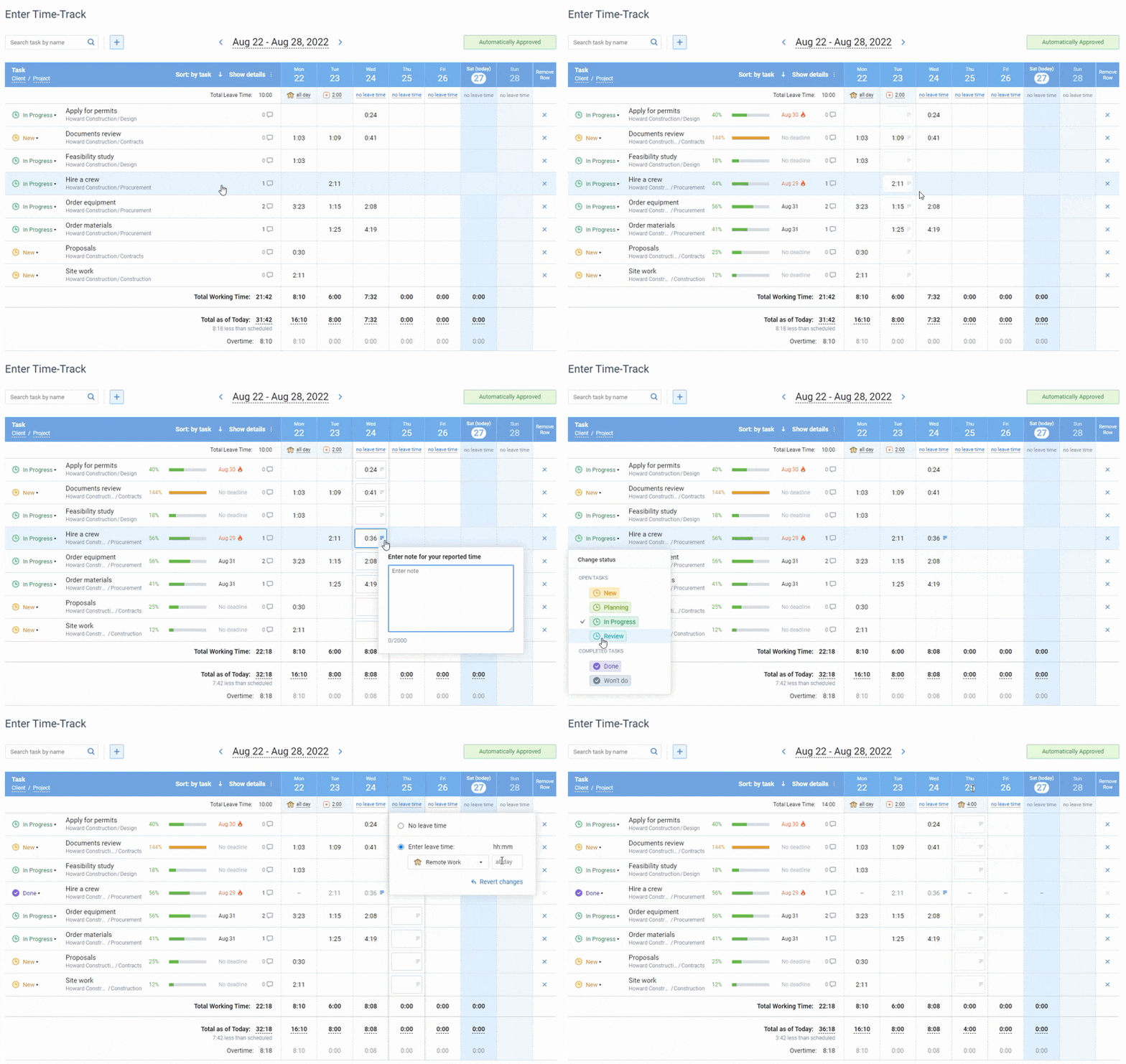
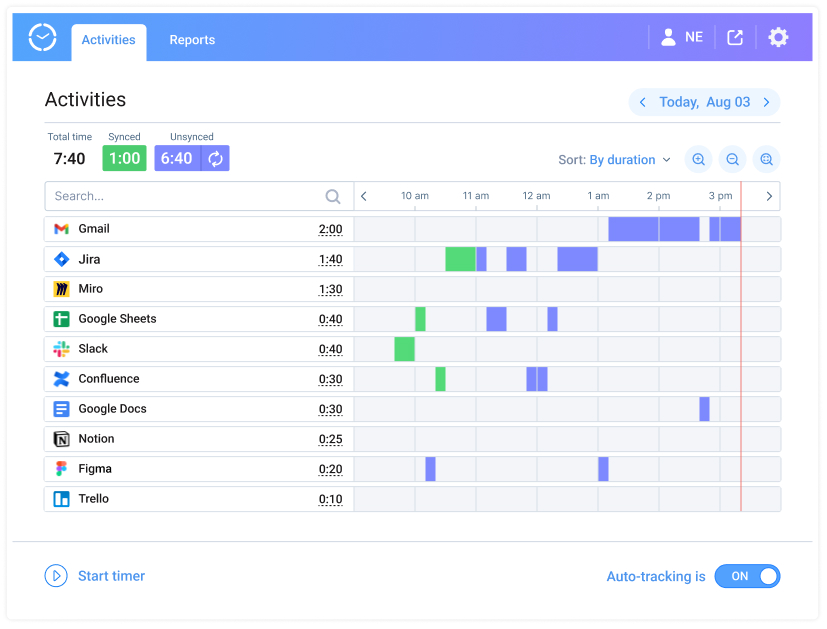
2. Let a tracker fill the gaps. Manual logs miss the scattered minutes between tasks. An automatic activity tracker such as the Time Management Assistant Chrome extension records which apps and sites took your time, so the week you review is the week you actually had.
Remove work that produces nothing
3. Turn status meetings into written updates. A meeting whose only purpose is to report progress can usually be replaced by three lines in a shared document. Keep live meetings for decisions and problems, and use our guide to running effective meetings for the ones that stay. The meeting cost calculator puts a number on a recurring meeting before you defend it.
4. Stop reports nobody reads. Ask who uses each recurring report and what they decide with it. If nobody can answer, pause it for a month and see whether anyone notices.
5. Close tasks that no longer matter. Old tasks stay on lists long after the reason for them has gone, and each one costs a little attention every time you scan the list. Review open tasks once a week and delete, delegate or defer anything that will not move a goal this month. Apply the same test to new requests: ask where the new task ranks against what you already have, and answer “not this week” when it ranks lower.
6. Automate the repeats. Anything you do the same way every week, such as the same email, the same spreadsheet cleanup or the same file naming, is a candidate for a template, a filter or an automation rule. Learning the shortcuts and settings of the tools you already use often saves more time than adding a new tool.
Protect attention
7. Book focus blocks. Put one or two blocks of 60 to 90 minutes on your calendar for the hardest task of the day and treat them like meetings. Time blocking extends the same idea to the whole day.
8. Batch messages. Check email and chat at set times rather than whenever a notification appears, and tell colleagues when you will reply. Keeping the first hour of the day free of email protects the time when most people still have a clear head. Time batching applies this to other small tasks too.
9. Do one task at a time. Switching between tasks has a cost even when each switch feels instant. Psychologist David Meyer has said that the mental blocks created by shifting between tasks can cost as much as 40% of someone’s productive time (American Psychological Association). Our article on multitasking myths looks at what the studies measured and when doing two things at once is fine.
10. Write down your distractions for a week. Note each interruption, whether it was work related, and one idea to handle it. Patterns show up quickly, and most fixes are simple: a do not disturb status, muted group chats or a fixed time for personal messages.

Pick fewer priorities
11. Choose the day’s few tasks the evening before. The Ivy Lee method limits tomorrow’s list to six tasks in order of importance, and you work through them one at a time. A lighter version is the 3-3-3 method described in the FAQ below. Both work because the decision about what matters is made once, not every time you finish something.
12. Find the 20% that matters. The Pareto principle suggests that a small share of tasks produces most of the results. Ask your manager or client which tasks those are, do them first and handle the rest without rushing.

13. Grade tasks from A to E. With the ABCDE method, A tasks have serious consequences if skipped, B tasks have mild ones, C tasks have none, D tasks can be delegated and E tasks can be dropped. The value is in the D and E grades, because they remove work rather than reorder it. For more methods, see how to prioritize tasks when everything feels like top priority.

14. Do the hardest task first. The “eat the frog” approach puts the task you are most likely to postpone at the start of the day, before messages and meetings take over. If a task keeps sliding, our guide on how to stop procrastinating helps you find out why.

Finish more than you start
15. Limit work in progress. A client gets nothing from ten unfinished tasks and gets something from every finished one. Set a limit on how many tasks can be in progress at once and start a new one only when one is done. A Kanban board makes the limit visible.
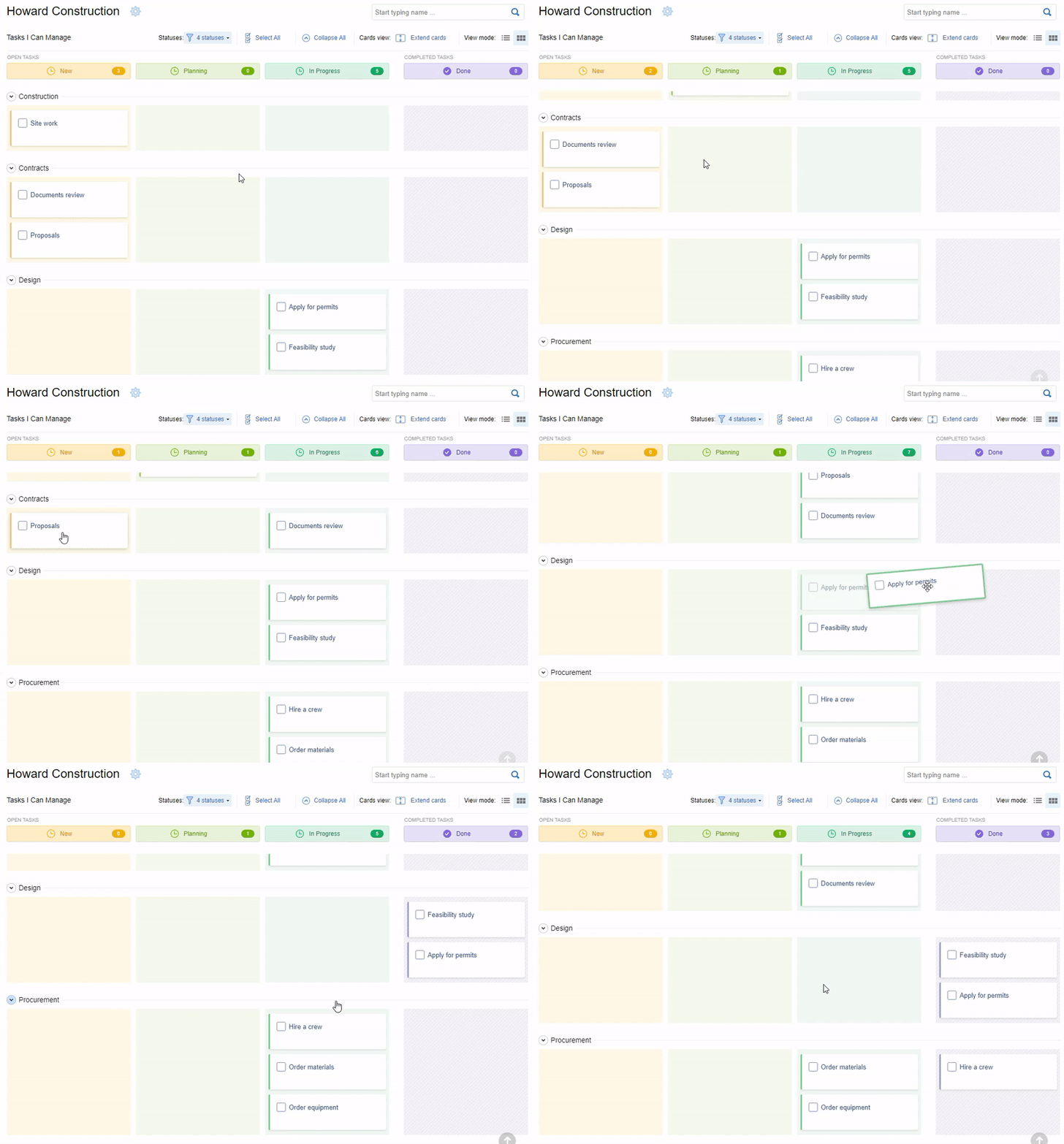
16. Agree on what done means before you start. Rework is the most expensive kind of lost time because the hours were already spent once. Before starting a task, write down who it is for, what format it takes and how it will be checked. Ten minutes of questions at the start is cheaper than a returned report.
17. Break big projects into tasks you can finish in a day. Large tasks are easy to postpone and hard to estimate. Small ones show progress, which keeps motivation up, and they make it obvious when something is stuck. Ask for feedback on the first piece instead of the finished whole, so a wrong direction costs a day rather than a week.
Estimate and review
18. Estimate every task and compare. Write an estimate before you start and look at the actual hours when you finish. Most people underestimate, which is a well documented bias known as the planning fallacy. After a few weeks you will know your own ratio of actual to estimated time and can set deadlines you will meet.

19. Review the week for 15 minutes. On Friday, look at what you finished, where time went and which task took far longer than expected. Pick one change for next week. Without this review, you are guessing which of the other changes helped.
Keep the pace sustainable
20. Take breaks, sleep and keep normal hours. Focus runs in cycles, and pushing through fatigue tends to produce mistakes that cost more time later. Some people work well with the 25 minute intervals of the Pomodoro Technique. Others prefer the Flowtime approach, where you work until your focus fades, note the time and then rest for as long as you need. Try both for a week each. Sleep matters more than any technique, and our article on the effects of sleep deprivation on productivity explains why. If concentration problems, low energy or loss of motivation last for weeks, talk to a doctor rather than looking for another productivity method, since these can be symptoms of burnout, anxiety, ADHD or depression.
For the mindset side of personal productivity, such as motivation and daily habits, see our guide on how to be productive every day.
Which fix to try first
Changing several habits at once makes it impossible to tell which one helped. Match the symptom you see in your tracked week to a row below and start with that fix alone.
| What you see | Likely cause | Fix to try first |
|---|---|---|
| Long weeks, few finished tasks | Too much work in progress | Limit work in progress (15) |
| Finished work comes back with corrections | Unclear requirements | Agree on what done means (16) |
| Meetings and messages take more hours than core work | Communication crowding out creation | Written updates and batched messages (3, 8) |
| Plenty of core hours, but no block longer than 30 minutes | Fragmented attention | Focus blocks (7) |
| Deadlines slip by a similar margin every time | Optimistic estimates | Estimate and compare (18) |
| Busy every day, but the important task did not move | Priorities set by whatever arrives | Choose tomorrow’s tasks tonight (11) |
| Output fell in the weeks after overtime | Fatigue | Normal hours and real breaks (20) |
Give each change two to four weeks before judging it, since the first week of any new habit is usually slower. Measure the same output you measured before, and if you want a structured way to do that, see our guide to productivity measurement.
How managers can increase team productivity
Individual habits help, but most of what slows a team is decided by its manager: how work is assigned, how many meetings exist and how clear the goals are. These are the levers only a manager can pull.
- Set goals with a deadline and an owner. “Finish when you can” invites drift, while “the draft is due Thursday and Ana owns it” does not. Make deadlines realistic and adjust them when someone explains why they cannot be met.
- Break projects into tasks with estimates. When every task has an estimate and a deadline, progress is visible without anyone asking for a status update, and the gap between estimated and actual hours shows where a project is going wrong early.
- Balance the workload. A team is only as fast as its most overloaded person. Compare assigned work across people before handing out more, and move tasks when one person’s list is far longer than the others’.
- Remove blockers daily. A task waiting for an approval, an answer or a file costs the whole wait time. Ask what is blocked, not what everyone did yesterday.
- Cut team meetings first. Every recurring meeting multiplies its length by the number of attendees. Review the team calendar once a quarter and remove or shorten anything that no longer leads to decisions. Some teams go further and agree on quiet hours or one meeting free day a week, so focus time does not depend on each person defending it alone.
- Compare the team with its own past. If the team runs similar projects every month, compare hours per project month to month. A rising number is a question to investigate with the team, not a verdict on any one person.
- Recognize finished work. Praise outcomes, such as a delivered project or a solved client problem, rather than long hours. Rewarding hours teaches people to stay late.
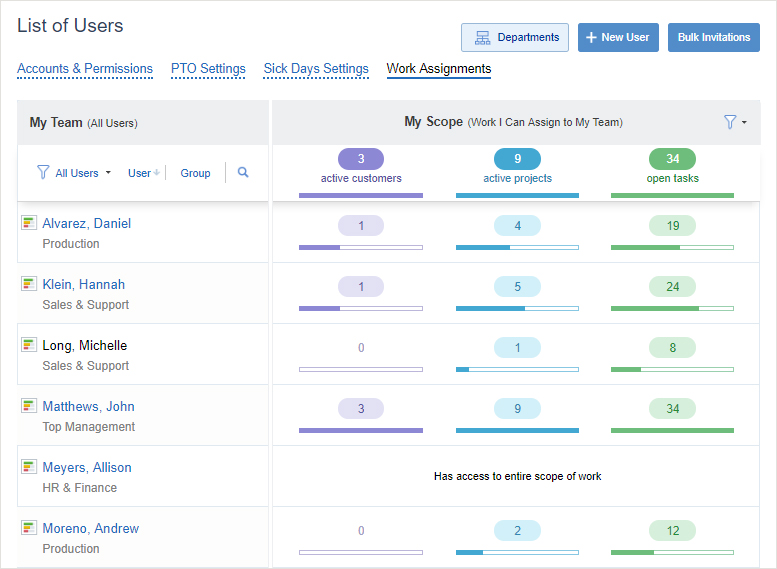
Many managers reach for monitoring software when productivity drops. Screenshots and keystroke counts show that a laptop was busy, which was never the question. Hours logged against tasks with estimates and deadlines show whether the work moved, and they do it without the trust problems that come with surveillance. Our guide on how to monitor employee productivity covers the respectful options. To estimate what a change is worth before you make it, try the employee productivity calculator.
Productivity fixes that backfire
Some popular ways to increase productivity make it worse. These are the ones to watch for.
- Working longer to catch up. It works for a week. After that, output per hour falls, mistakes rise and the extra hours become the new normal. The worked example above shows why removing work beats adding hours.
- Getting faster instead of getting fewer interruptions. In a 2008 study by Gloria Mark and colleagues, people who were interrupted finished their tasks in less time with no loss of quality, but reported more stress, frustration, time pressure and effort (Mark, Gudith and Klocke, CHI 2008). So a team that seems to cope with constant interruptions may simply be paying for it in stress. The study ran with 48 participants in a lab, so treat it as a warning sign, not a measure of your team.
- Collecting productivity apps. Each new app adds setup time, another place to check and another login. One task list and one place to log time usually beat five specialized tools.
- Measuring activity instead of output. Counting tasks closed, lines written or emails sent rewards whoever splits work into the most pieces. A person who produces less but with fewer errors can be the more productive one. Measure finished, useful work, and watch quality alongside the count.
- Comparing individuals against each other. People work on tasks of different size and difficulty, so ranking them on hours or task counts creates resentment and gaming. Compare each person and each team with their own past instead.
- Changing everything at once. A new prioritization method, new focus blocks and a new tool in the same week leave you with no idea which one helped. Change one thing, measure, then change the next.
- Perfecting work nobody asked to be perfect. Polishing past the point where the client notices is time taken from the next task. Agree on the quality bar up front, give the task a fixed amount of time and stop when it runs out, and if this is a habit, read our guide on dealing with perfectionism at work.
- Looking busy. Instant replies, full calendars and late evenings signal effort but not output. Our article on fake productivity shows how to tell the difference.
How actiTIME helps you see what changed
Every way in this guide depends on knowing where the hours went before and after a change. actiTIME is project time tracking software where people log time against tasks, so each hour is tied to the work it produced, and managers see the results in reports rather than in status meetings.
- Time entry that fits the work. Log hours in a weekly Timesheet View, as start and stop times in Calendar View, with a timer in the mobile app for iOS and Android, or automatically with the Time Management Assistant Chrome extension.
- Estimates and deadlines on every task. Set estimated hours and due dates on tasks, add priorities and custom workflow statuses, and move tasks across a Kanban board.
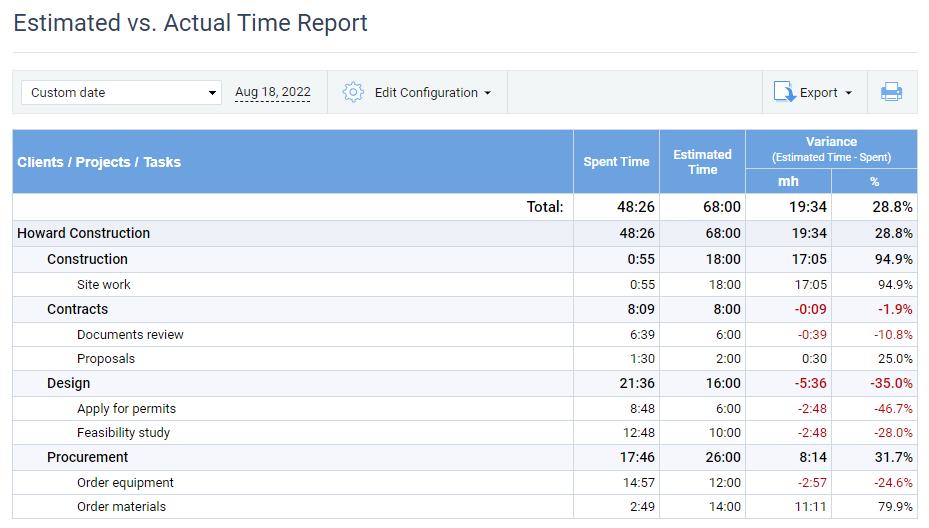
- Estimated vs. Actual Time Report. Shows the variance between estimates and tracked time across tasks and projects, so you can see which kinds of work run over.
- Time-Track Report. Groups hours by project, customer, user or type of work, which gives you the breakdown for the worked example above.
- Time Balance and Overtime Report. Compares work time with scheduled hours across users, so regular overtime shows up before it turns into burnout.
- Time budgets. Set a time budget on a customer, project or task, and the progress bar turns red when it is exceeded.
- Reports dashboard. Real time widgets and saved report shortcuts show trends without rebuilding a report every week.
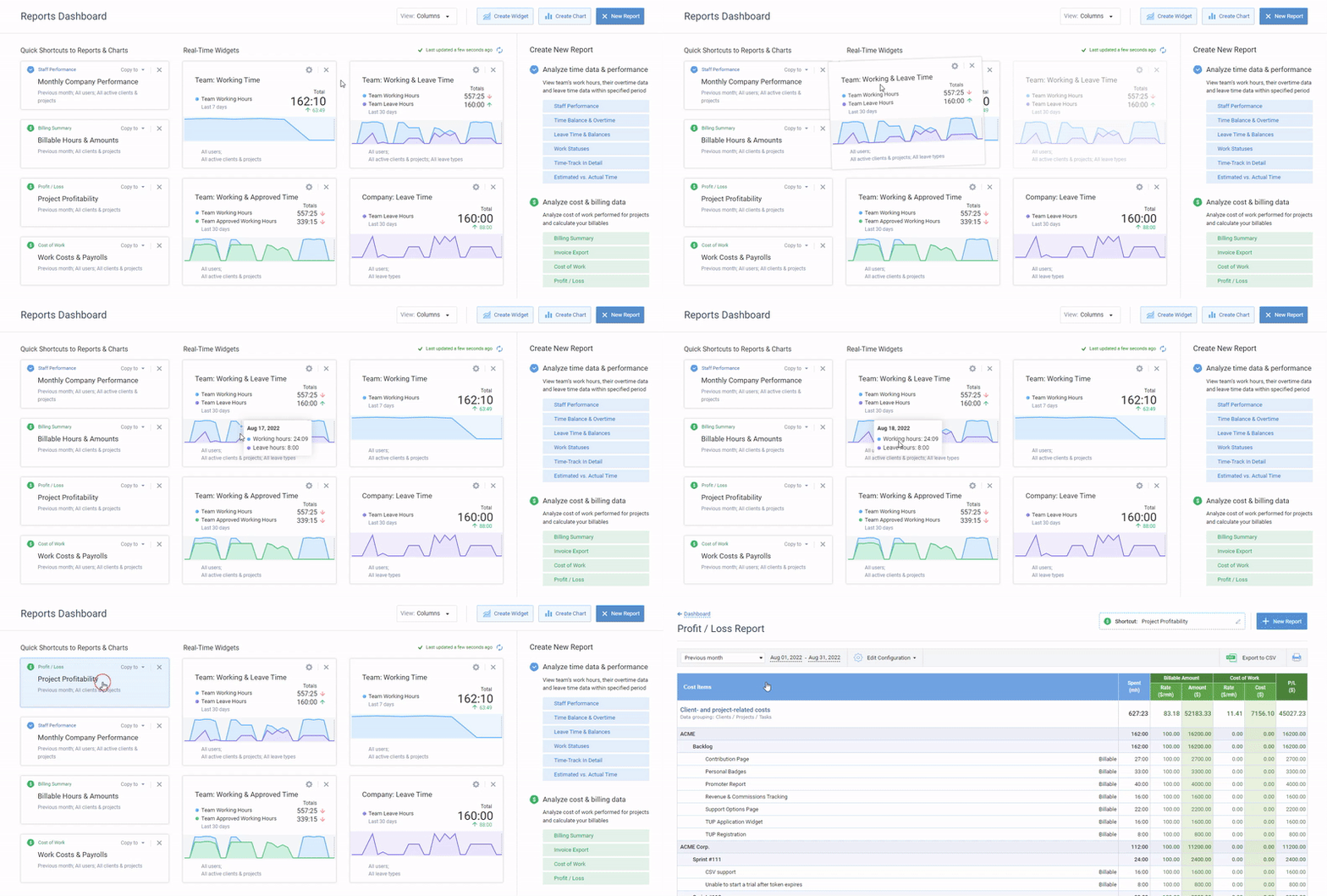
For client work, the same hours flow into billing: billable amounts by type of work rates or by user rates, the Billing Summary Report and PDF invoices, so the time a team tracks to improve productivity is also the time it bills.

Now we can better predict future project requirements
Our company needed a simple way of tracking time used on multiple projects – and actiTIME fit the need. Its interface is simple and easy to maintain. We use the application for time management, task estimation and also to communicate deadline information to our team members. Now having actiTIME we can better predict future project requirements!
actiTIME is free for teams of up to 3 users, and paid options start from $5 per user per month. Start a free trial with every feature included for 30 days. After the trial, teams of up to 3 users can keep using it for free.
FAQ
What is the 3-3-3 rule of productivity?
The 3-3-3 method, described by author Oliver Burkeman, splits the day into three hours of deep work on your most important project, three urgent tasks that need less focus, and three maintenance tasks such as answering email or scheduling other work (Lifehacker). It works because it caps the day at a realistic amount of deep work instead of a list that can never be finished.
What causes a lack of productivity at work?
The most common causes are too many meetings and messages, too many tasks open at once, unclear requirements that lead to rework, optimistic estimates and long hours that cause fatigue. Health problems such as poor sleep, burnout or depression can also be the cause, and they need a doctor rather than a technique. Tracking one week against tasks usually shows which cause is yours.
How long does it take to increase productivity?
Removing work, such as a cancelled meeting or a dropped report, frees time in the first week. Habit changes such as focus blocks or estimating every task usually take two to four weeks before they show up in output, because the first weeks include the cost of learning the habit. Compare output per hour over the same period before and after the change to know whether it worked.