Many late projects were late on paper before the first task started. The estimate was built from a vague scope, assumed everyone would be available full time and came from one person’s guess, so the schedule had no chance. Accurate project time estimation is less about picking the right formula and more about feeding the estimate the right inputs: a detailed breakdown of the work, the team’s real capacity, input from the people who will do the work, data from past projects and an explicit allowance for risk. Give the result as a range, track actual time against it and adjust as you learn.
This guide walks through those inputs as seven steps, with a worked example, and then covers how to run estimation as a team without falling into groupthink or padding. For definitions and a full list of techniques, see our guide to time estimation in project management.
What makes a project time estimate accurate?
Project time estimation predicts how many hours, days or weeks the work will take and when it can be finished. It sits next to cost estimation, and the two depend on each other because most project costs are people’s time. An estimate you can rely on usually has these qualities:
- It is built from a breakdown of the work, not from the project as one block.
- It accounts for the hours people actually have, after other projects, meetings and leave.
- The people who will do each task have reviewed or produced the numbers for it.
- It has been checked against how long similar work took before.
- Known risks have a named buffer instead of hidden padding.
- It is stated as a range and tightened as the project moves forward.

The last point matters more than it seems. Early in a project, a top down estimate based on similar projects is often all you can produce, and it is rough. Once the project is approved and the work is broken down, a bottom up estimate built from individual tasks is more detailed and more accurate, as the open textbook Essentials of Project Management (Adam Farag, 2021) explains. Estimates should get more accurate as time goes on, and a plan that never revisits them wastes that gain.
7 steps to more accurate project time estimation
1. Define the scope and what done means
You cannot estimate work you have not described. Start with the project’s goals, the deliverables and the conditions for accepting each one, including the client’s expectations if there is a client. “Build a landing page” can mean two days or three weeks depending on whether it includes copy, design rounds, integrations and testing. Write down what is out of scope as well, because unstated assumptions are where estimates quietly go wrong.
2. Break the work down into tasks
A work breakdown structure splits deliverables into tasks small enough to estimate with confidence. Keep splitting until each task is small enough that the person doing it can say how long it takes without guessing. The breakdown makes hidden work visible: reviews, handoffs, approvals, testing, deployment and project management itself. These are the items a single “about three months” estimate tends to leave out.
3. Check your team’s real capacity
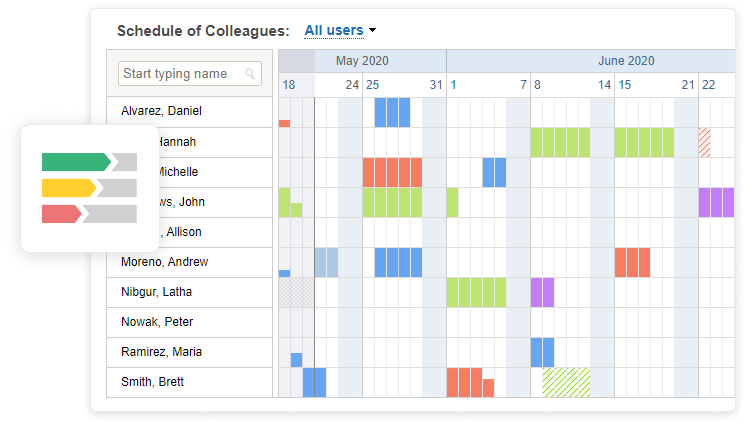
Effort and duration are different numbers. A task that needs 40 hours of work does not take one week if the person doing it spends half of each day on another project. To turn effort into a schedule, look at how many hours each person can actually give this project after other commitments, meetings, holidays and planned leave. Overloading one specialist with several complex tasks in the same week is a classic way to create a delay the estimate never showed.
Leave and schedule tools help here. In actiPLANS, managers see who is in, who is out and why, and employees request time off in advance, so planned absences can go into the project schedule before they become a surprise.
4. Ask the people who will do the work
The person who will build, write or test a piece of work usually knows more about how long it takes than the person planning it. Ask them for the estimate, or at least for a review of yours. Even on small projects, one person cannot keep track of every detail that affects duration. How to run this well, and the traps to avoid, are covered in the team estimation section below.

5. Use historical data and expert judgment
Past projects are the best evidence you have. With analogous estimating, you take the actual duration of a similar project and adjust it for differences in size, complexity and team. It only works if the projects really are comparable in scope, deliverables and conditions, and if you check what has changed since, such as new tools, new people or a different client.
If you have never done this kind of project, expert judgment fills the gap: people who have delivered similar work, inside or outside the company, can tell you which tasks are usually underestimated and what a realistic range looks like. Ask them about the steps, not only for a total, so you can see what their number includes.

Historical data only exists if someone recorded it. Teams that track time against tasks build this reference library as a side effect of normal work. Teams that do not are estimating from memory, and memory tends to remember projects as shorter than they were. Our article on the planning fallacy explains why that bias is so persistent.
6. Assess risks and size the buffer
At a 2002 news briefing, US Secretary of Defense Donald Rumsfeld distinguished known knowns, known unknowns and unknown unknowns. The phrase stuck because it fits project work well.

A risk review turns as many unknowns as possible into known risks: unclear requirements, dependencies on other teams or vendors, new technology, key people who might be unavailable. For each one, estimate how much time it would cost if it happened. A three point estimate is a simple way to put that uncertainty into numbers. For each task you give an optimistic time (a), a most likely time (m) and a pessimistic time (b), and the weighted average is (a + 4m + b) / 6, the formula given in Essentials of Project Management.
The figures above are illustrative. Notice that the weighted estimate (7 days) is higher than the most likely one (6 days) because the pessimistic case is far away. That is the point: the method makes the cost of risk visible. Unknown unknowns cannot be listed, so add a separate contingency at project level, sized from how much your past projects overran, and keep it visible in the plan rather than spreading it inside task estimates.
7. Track actual time and update the estimate
Add up the task estimates and buffers, map them onto people’s capacity, and you have the project schedule. Then compare it with reality from the first week. Tracking time against tasks shows early where the estimate is drifting, while there is still time to change scope, add people or reset expectations. It also gives you the historical data for step 5 on the next project.
In actiTIME, you set an estimate in hours for each task, and your team logs time against those tasks in a weekly timesheet, the calendar view or the mobile app. The Estimated vs. Actual Time Report shows the variance by task, project or person, and a time budget on the project turns red when it is exceeded. Our step by step guide to time estimation in actiTIME shows the setup.

Now we can better predict future project requirements
Our company needed a simple way of tracking time used on multiple projects – and actiTIME fit the need. Its interface is simple and easy to maintain. We use the application for time management, task estimation and also to communicate deadline information to our team members. Now having actiTIME we can better predict future project requirements!
How your team makes project estimates more accurate
An estimate is only as good as the information behind it, and much of that information sits with the team: how people actually work, which tools slow them down, which tasks always take longer than they look. Bringing the team into estimation helps in three ways.
- The people doing the work know details a manager does not, so their numbers start closer to reality.
- A group reviews each other’s assumptions. One person’s blind spot is often another person’s daily work, and a discussion catches gaps a single estimator would miss.
- People who helped set an estimate understand the scope better and are more committed to it than people handed a deadline.
This is also the answer to a common exam and interview question: all team members should be included in time and effort estimates because they have the most accurate knowledge of the work, because shared estimates reduce individual bias, and because involvement builds commitment to the schedule. It only works if people feel safe giving an honest number. In a team where a long estimate is treated as a lack of skill, people will give the number they think the manager wants.
How to involve your team in estimation
For most teams, the simplest format is an estimation meeting where each task is presented, questions are answered and people estimate. A few structured techniques help the meeting produce better numbers:
- Planning poker: everyone picks an estimate privately and reveals it at the same time, and the highest and lowest estimators explain their reasoning before the next round. Revealing at once stops the first number spoken from anchoring the rest. See our guide to story point estimation for details.
- Wideband Delphi: a facilitator collects estimates anonymously, shares the spread and the reasons, and repeats the rounds until the estimates converge. It works well when seniority would otherwise dominate the discussion.
- Three point estimates from each person, which turn disagreement about risk into a visible range instead of an argument.
In a large organization you cannot put everyone in one room. An estimation group made up of experienced people from each department can review estimates for the whole project. Structured questionnaires sent to the people who will do specific tasks are another option: they capture less nuance than a discussion, but they collect input in a consistent format from people across locations and time zones. For more on making group decisions work, see our article on improving group decision making.
Team estimation pitfalls and how to avoid them
Group estimation reduces individual bias but brings problems of its own.
Groupthink
Groupthink happens when a group settles on an answer too early because people want to avoid conflict or defer to whoever spoke first or ranks highest. In estimation, it shows up as a quick consensus around the manager’s number. Private estimates revealed at the same time, a facilitator who asks the quietest people first and including people with different roles all help.

Sandbagging
Sandbagging means deliberately setting a low expectation so you can beat it, for example estimating 10 hours for a task you know takes 8. It is common where people are praised only for overdelivering. Rewarding accurate estimates rather than early finishes, and reviewing variance in both directions, removes the incentive.
Unintentional padding
Some buffer is healthy, but when every person quietly adds extra time to every task, the total balloons and work tends to expand to fill it. Padding usually grows where people are punished for missing deadlines. The fix is to make the buffer explicit: one visible contingency based on a risk review, not hidden extras inside each task. Velaction’s note on buffer time covers the idea in more detail.
Inconsistent estimating styles
Some people estimate by gut feeling, others by counting every step. Both are useful, but if each person uses a different approach and a different unit, the numbers will not add up cleanly. Agree on a shared routine: the same unit, the same definition of done, the same rule for when to split a task and the same way of stating uncertainty.
Protecting the estimate once work starts
An accurate estimate can still miss if the scope keeps moving. Some change is normal once work begins, but every change has a time cost. Before accepting one, estimate what it adds, decide what moves to make room for it and update the schedule openly. Stay flexible about how the work gets done, and strict about scope additions that nobody has estimated. A project timeline template makes those changes easier to see.
FAQ
What is project time estimation?
Project time estimation is predicting how long a project’s tasks and the project as a whole will take, in hours, days or weeks. It is the basis for the schedule, the budget and any client commitment, since most project costs come from people’s time.
Why should all team members be included in time and effort estimates?
Because the people doing the work know best how long it takes, because a group catches assumptions one estimator would miss, and because people who helped set an estimate are more committed to meeting it. Their input is only useful if they can give honest numbers without pressure.
Do estimates become more accurate as the project progresses?
They should. Early estimates are top down and rough because little is known. As the work is broken down and tasks are completed, you can replace rough figures with bottom up estimates and actual times. Update the estimate at each milestone rather than defending the first number.
How much buffer should you add to a project estimate?
There is no universal percentage. Size the buffer from your own history: if similar projects overran by an average of 20%, a 5% buffer is not realistic. Keep the buffer as a visible contingency at project level, linked to the risks you identified, rather than padding individual tasks.
What is a three point estimate?
It is an estimate built from three values for each task: optimistic (a), most likely (m) and pessimistic (b). The weighted average (a + 4m + b) / 6 gives the expected duration, and the gap between a and b shows how uncertain the task is.
How do you estimate time for a project you have never done before?
Find the closest comparable projects, inside or outside the company, and ask people who delivered them for their judgment. Break the work down as far as you can, use three point estimates to express the uncertainty, give a wide range and narrow it after the first milestones.
Why are project time estimates so often wrong?
The usual causes are a vague scope, ignoring people’s real availability, estimates made by someone who will not do the work, no data from past projects, unlisted risks and the planning fallacy, which is the tendency to underestimate your own tasks even when similar ones ran late.
Who should estimate project tasks?
The people who will do each task, reviewed by the project manager and, for unfamiliar work, by an experienced expert. The project manager combines the task estimates, capacity and buffers into the schedule.
Conclusion
Accurate project time estimation comes from better inputs: a clear scope, a real breakdown, honest capacity, the team’s knowledge, data from past work and a visible risk buffer, all revisited as the project moves. The data part is the one most teams skip, and it is the one that improves every estimate after this one.
actiTIME lets you set task estimates, track time against them and compare estimated and actual hours in one report. Start a free 30-day trial, or book a demo if you want a walkthrough.