![13 Best On-Premises Business Software Tools [2026]](https://www.actitime.com/wp-content/uploads/2020/05/self-hosted-business-products.png)
Businesses that handle sensitive data, operate under strict compliance requirements, or want full ownership of their technology stack often choose on-premises software over cloud subscriptions. On-premises tools, also called self-hosted software, run on servers you control. Your data stays within your network, you can customize deployments to fit your workflows, and in many cases you pay a single license fee instead of ongoing per-user charges.
The trade-off is that you handle installation, maintenance, and updates yourself. For many organizations, though, the control and cost predictability more than justify the operational overhead.
This article reviews 13 on-premises business software tools that cover the categories most teams need: time tracking, project management, CRM, ERP, accounting, analytics, communication, help desk, scheduling, and document management.
What Is On-Premises Software?
On-premises software (sometimes written as on-premise software) is any application installed and operated on hardware that your organization owns or leases, rather than accessed through a cloud provider. You download the software, deploy it to your own physical or virtual servers, and manage it internally.
The term is often used interchangeably with “self-hosted software,” though the two carry a subtle distinction. On-premises strictly refers to applications running on infrastructure physically located at your site, while self-hosted can also describe software deployed on a private cloud server or dedicated VPS that you manage. In practice, most self-hosted apps qualify under both definitions, and businesses tend to treat the terms as equivalent.
Why businesses choose on-premises software over SaaS alternatives:
- Full data ownership. Customer records, financial data, and employee information never touch external servers.
- Regulatory compliance. Industries such as healthcare, finance, legal, and government often require that specific data stays within a controlled environment.
- Predictable costs. Many on-premises tools charge a single license fee rather than recurring subscriptions, which lowers the total cost of ownership for larger teams.
- Customization. With access to configuration files or source code, you can tailor the software to match internal processes.
- Operational independence. No reliance on a vendor’s uptime, pricing changes, or feature deprecation decisions.
The tools below are among the most capable and actively maintained self-hosted options you can deploy in 2026.
Best On-Premises Business Software
The 13 tools below cover the operational categories that most businesses need. We evaluated each one based on the quality of its self-hosted offering, pricing transparency, community or vendor support, and how actively the product is maintained.
| Tool | Category | Self-Hosted Price | Open Source |
|---|---|---|---|
| actiTIME | Time tracking, project management | $120/user, one-time | No |
| Nextcloud Hub | Collaboration, file sharing | Free (Community); Enterprise from €71.29/user/yr | Yes |
| OpenProject | Project management | Free (Community); Enterprise available | Yes |
| Metabase | Business intelligence | Free (Open Source edition) | Yes |
| Rocket.Chat | Team communication | Free (Community); Enterprise: contact sales | Yes |
| Odoo | ERP | Free (Community); Custom from €29.90/user/mo | Partially |
| Akaunting | Accounting, invoicing | Free | Yes |
| Dolibarr | CRM, ERP | Free | Yes |
| Matomo | Web analytics | Free | Yes |
| Zammad | Help desk, customer support | Free; Support from €2,999/yr | Yes |
| TimeCamp | Time tracking, monitoring | Enterprise only, contact sales | No |
| Cal.com | Appointment scheduling | Free | Yes |
| Paperless-ngx | Document management | Free | Yes |
1. Self-hosted time tracking and project management with actiTIME
actiTIME is a time tracking and project management platform that comes in both cloud and self-hosted versions. It goes beyond simple hour logging by connecting tracked time to project costs, billing, and profitability, giving managers a clear view of where hours go and how they translate into financial outcomes.
The self-hosted version runs on your own server infrastructure, which means your timesheet data, cost rates, and client billing details stay entirely within your organization. actiTIME is built for teams across industries that need self-hosted time tracking combined with meaningful project reporting, including professional services firms, engineering teams, consultancies, and enterprises with compliance requirements.
- Timesheet and calendar views for tracking hours against project tasks, with support for manual entry, automatic timers, and a mobile app
- Kanban board for visual task progress tracking and workload management
- Cost, billing, and profit/loss reports that connect tracked hours to real financial data
- Budget tracking at the customer, project, or task level with visual progress indicators
- Automated leave management with PTO accrual rules, balance tracking, and configurable leave types
- Overtime calculation and control with separate pay rates for regular, overtime, and leave time
The self-hosted version of actiTIME costs $120 per user as a single payment with no recurring subscription. For teams of 200 or more, an unlimited license is available at $25,000. Every license includes human support and free product onboarding, and you can start with a full-featured 30-day trial before committing.

We reduced payroll processing to 45 minutes per week
actiTIME is very robust, integrated well into your business process, and most important, helps you focus on your business instead of monkeying around with technology. actiTIME has reduced our payroll processing from 4-6 hours per week to 45 minutes per week.
2. File sharing and team collaboration with Nextcloud Hub
Nextcloud Hub is a widely adopted open-source platform for file sharing, real-time collaboration, and internal communication. It provides many of the same capabilities as Google Workspace or Microsoft 365, but everything runs on infrastructure you control.
Nextcloud lets teams store, sync, and share documents across devices with granular access permissions. It also includes modules for video conferencing, email, calendars, contacts, and workflow automation. All of these integrate with each other, so you can run a full internal collaboration stack without sending data to external servers.
- File sync and sharing with versioning, comments, and access control across web, desktop, and mobile clients
- Built-in Talk module for audio and video conferencing, screen sharing, and persistent chat
- Groupware suite for email, calendars, contacts, and task management
- Workflow automation to enforce compliance rules and reduce manual processes
- Over 400 apps through the Nextcloud App Store for extending functionality
The Nextcloud Community edition is free to download and self-host with no user limits. For organizations that need enterprise support, clustering, and advanced compliance features, paid subscriptions start at €71.29 per user per year for the Standard tier (minimum 100 users). Premium and Ultimate tiers provide faster support response times, additional integrations, and access to advanced productivity tools like Nextcloud Assistant.
3. Self-hosted project management software with OpenProject
OpenProject is an open-source project management platform built for teams that need structured planning, time tracking, and collaboration in a self-hosted environment. It supports classic (waterfall), agile, and hybrid methodologies. Construction companies use it for multi-phase scheduling; software teams use it for sprint planning. Both get the same core toolset.
OpenProject covers the full project lifecycle, from initiation through delivery, with solid scheduling, resource allocation, and progress tracking. If you need self-hosted project management software that can stand in for cloud tools like Asana or Monday.com, OpenProject is one of the most mature options out there. It has been downloaded more than 20 million times.
- Interactive Gantt charts for scheduling, dependency management, and timeline visualization
- Agile boards with Scrum and Kanban support for iterative workflows
- Built-in time tracking and cost reporting linked to work packages
- Team Planner for visual workload management and resource allocation
- Integrations with Nextcloud, GitHub, GitLab, OneDrive, and SharePoint
The Community edition is free and open-source under GPL v3. An Enterprise on-premises edition adds professional support, security features, and advanced access controls at pricing that varies by team size (contact OpenProject for a quote).
4. Business intelligence and data analysis with Metabase
Most business intelligence tools assume you are comfortable with SQL. Metabase does not. You connect it to your database, and anyone on your team can build queries, create charts, and assemble dashboards through a visual interface without writing a line of code.
Because Metabase connects directly to your internal databases, your data never passes through external services. That matters for companies handling sensitive financial, medical, or customer records. Teams use Metabase for tracking revenue metrics, monitoring operational KPIs, investigating data quality issues, and making more informed decisions.
- Visual query builder that generates SQL automatically, so technical and non-technical users can explore data independently
- Interactive dashboards with filters, drill-down navigation, and automatic refresh
- SQL editor for advanced users who want full control over their queries
- Scheduled reports delivered via email or Slack
- Data sandboxing and granular permissions for secure, row-level access control
The open-source edition of Metabase is free to self-host with no user limits. You can run it on a single server or scale across multiple instances. Pro and Enterprise editions are available for teams that need additional features such as content embedding, audit logs, or priority support.
5. Centralized team communication with Rocket.Chat
If your organization needs a self-hosted alternative to Slack or Microsoft Teams, Rocket.Chat is worth a look. It brings team messaging, video calls, and customer conversations into a single interface while keeping all conversation data on your own servers.
Rocket.Chat works for both internal team collaboration and external customer support. You can connect it to social media channels, email, and other messaging platforms to manage customer interactions from one place, which makes it valuable for support teams that need omnichannel communication without relying on cloud services. Deployment is flexible: you can install Rocket.Chat on a Linux server, run it inside Docker containers, or deploy on Kubernetes for high availability. The platform supports single sign-on through LDAP, SAML, and OAuth for simplified user management.
- Real-time messaging with public and private channels, direct messages, and threaded conversations
- Video and audio conferencing with screen sharing
- Omnichannel inbox that aggregates customer messages from WhatsApp, Facebook, Instagram, email, and live chat
- End-to-end encryption and two-factor authentication for secure communications
- Marketplace with integrations and bots for extending functionality
The Community edition is free to self-host under an open-source license. For organizations that need compliance features, advanced federation, or dedicated support, Enterprise plans are available through the Rocket.Chat sales team.
6. Self-hosted ERP with Odoo
Odoo covers nearly every operational area a business has: sales, inventory, HR, manufacturing, accounting, and more. Its modular design lets you start with one or two apps and expand over time, so you deploy only what you actually use.
If you want a self-hosted ERP that can replace multiple standalone tools, Odoo is one of the most complete options on the market. The Community edition is open-source and free, and it includes core modules for CRM, invoicing, inventory, and project management. The Enterprise edition adds advanced features such as full accounting, marketing automation, studio customization, and on-premises deployment support.
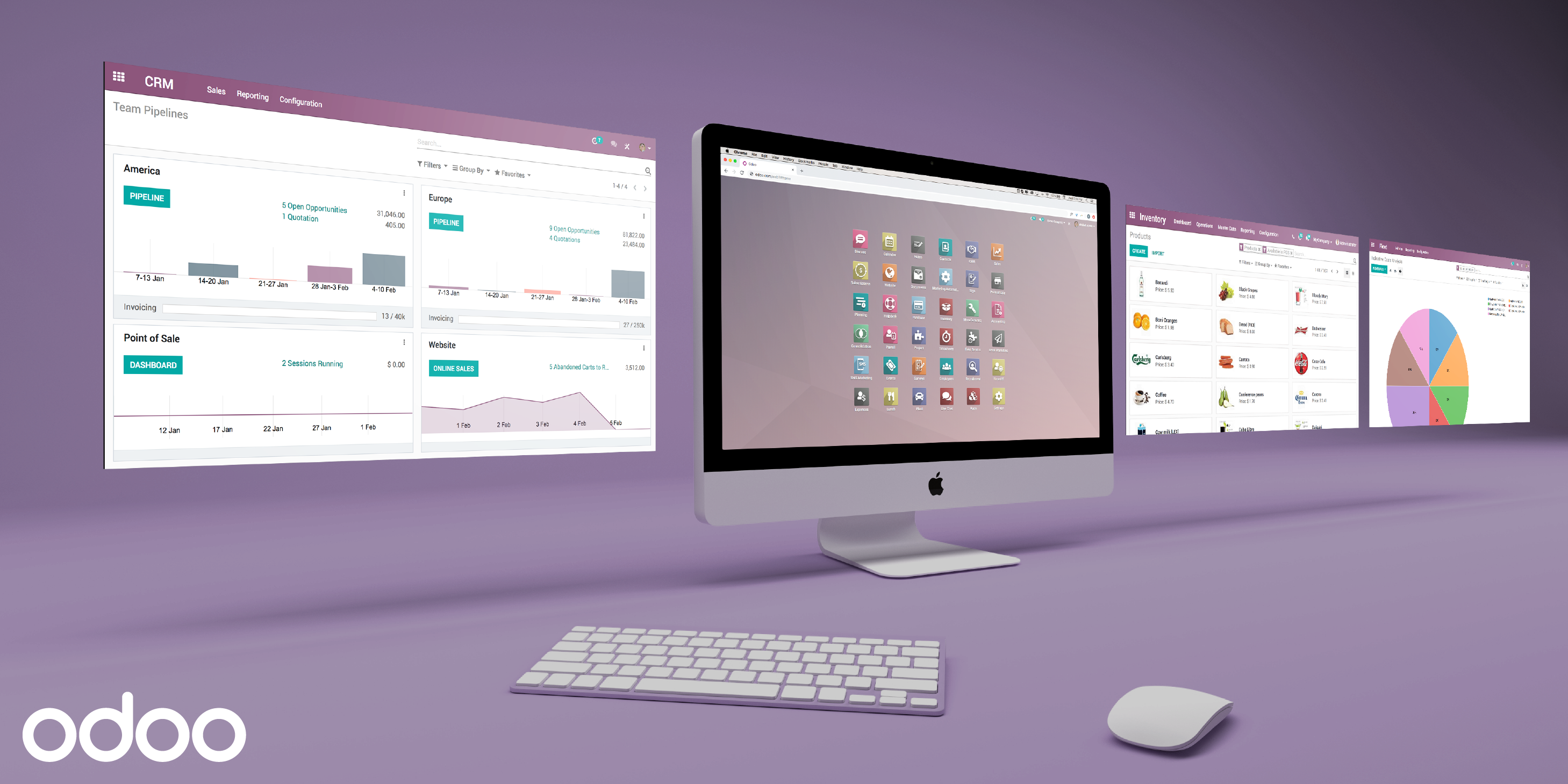
- Integrated CRM, sales pipeline, and quotation management
- Full accounting suite with bank reconciliation, financial reports, and tax management
- HR modules covering recruitment, employee appraisal, time off management, attendance, and payroll
- Inventory and warehouse management with stock tracking in real time
- Manufacturing resource planning and quality control
- Hundreds of community and official modules through the Odoo app ecosystem
Odoo Community is free to self-host. For the full feature set with on-premises deployment, the Custom plan costs €29.90 per user per month (billed yearly) and includes Odoo Studio, external API access, and multi-company support. The Standard plan at €19.90 per user per month is available for cloud deployments only.
7. Self-hosted accounting software with Akaunting
Akaunting is an open-source accounting platform built for small and midsize businesses that need full control over their financial data. If you are looking for self-hosted accounting software that covers invoicing, expense tracking, and financial reporting without vendor lock-in, Akaunting provides a modern interface that runs entirely on your infrastructure.
The platform handles the core accounting workflows that most businesses need: creating and sending invoices, tracking payments and expenses, reconciling bank transactions, and generating financial statements. It uses double-entry accounting, which ensures accurate books and simplifies compliance with standard practices.
- Double-entry accounting with chart of accounts, journal entries, and balance sheets
- Invoice creation, automated payment reminders, and a client portal for viewing and paying invoices
- Expense tracking with receipt uploads and categorization
- Bank feed connections and transaction reconciliation
- Multi-currency and multi-company support
- Financial reports including profit and loss, cash flow, and tax summaries
The self-hosted edition of Akaunting is free, with no user limits. The source code is available for inspection and modification, so you can see exactly how your financial data is processed and stored.


8. Self-hosted CRM and ERP with Dolibarr
Unlike most ERP platforms that target mid-market and enterprise buyers, Dolibarr works just as well for freelancers and solo entrepreneurs as it does for larger companies. It is an open-source ERP and CRM with modules for sales, invoicing, inventory, HR, and accounting that you can turn on or off as needed.
If you want a self-hosted CRM with ERP functionality and do not want to pay for a license, Dolibarr is one of the most accessible options. A large community contributes modules, translations, and documentation, and installation is simple on standard Linux hosting.
- CRM with contact management, lead tracking, opportunity pipeline, and activity logging
- Quote, order, and invoice management with PDF generation
- Product and stock management with warehouse tracking
- HR features including employee records, leave management, and expense reports
- Accounting with ledger, bank reconciliation, and financial reports
- Over 1,000 community modules through the Dolistore marketplace
Dolibarr is free to download and self-host under the GPL license with no paid tiers or feature restrictions. An online demo is available on the Dolibarr website so you can explore the interface before committing to a full installation.
9. Web analytics with Matomo
If you want Google Analytics-level insight into your website traffic without sending that data to Google, Matomo is the most established self-hosted alternative. It covers visitor behavior, marketing campaign performance, and conversion tracking, and your analytics data stays on servers you own.
This matters for organizations that operate under strict data privacy regulations such as GDPR, HIPAA, or CCPA, because Matomo lets you collect and analyze web data without sharing it externally. You retain full ownership of your analytics data, and since the platform does not require third-party cookies, visitor tracking can be more accurate than with tools that rely on consent-based cookie mechanisms.
- Complete traffic analysis with visitor logs, dashboards updated in real time, and session recordings
- Goal and conversion tracking with funnel visualization
- Campaign tracking and SEO reporting including keyword analysis
- Heatmaps and A/B testing (available as premium plugins)
- Built-in GDPR compliance tools including consent management and data anonymization
- Google Analytics data import for migration from GA
The self-hosted version of Matomo is free to download and use with no limits on data volume. Premium features such as heatmaps, session recordings, and A/B testing are available as paid plugins. A cloud version is offered for teams that prefer managed hosting.
10. Self-hosted help desk software with Zammad
Support teams that deal with requests from email, phone, chat, and social media often end up switching between tools all day. Zammad is an open-source ticketing platform that pulls all of those channels into a single inbox. If you need self-hosted help desk software, Zammad handles channel unification while keeping customer conversation data on your own servers.
Zammad is built for teams that want a clean support workflow without the complexity of enterprise ITSM tools. Agents can search across all tickets in real time, use text modules to respond faster, and track the time spent on each request for internal reporting.
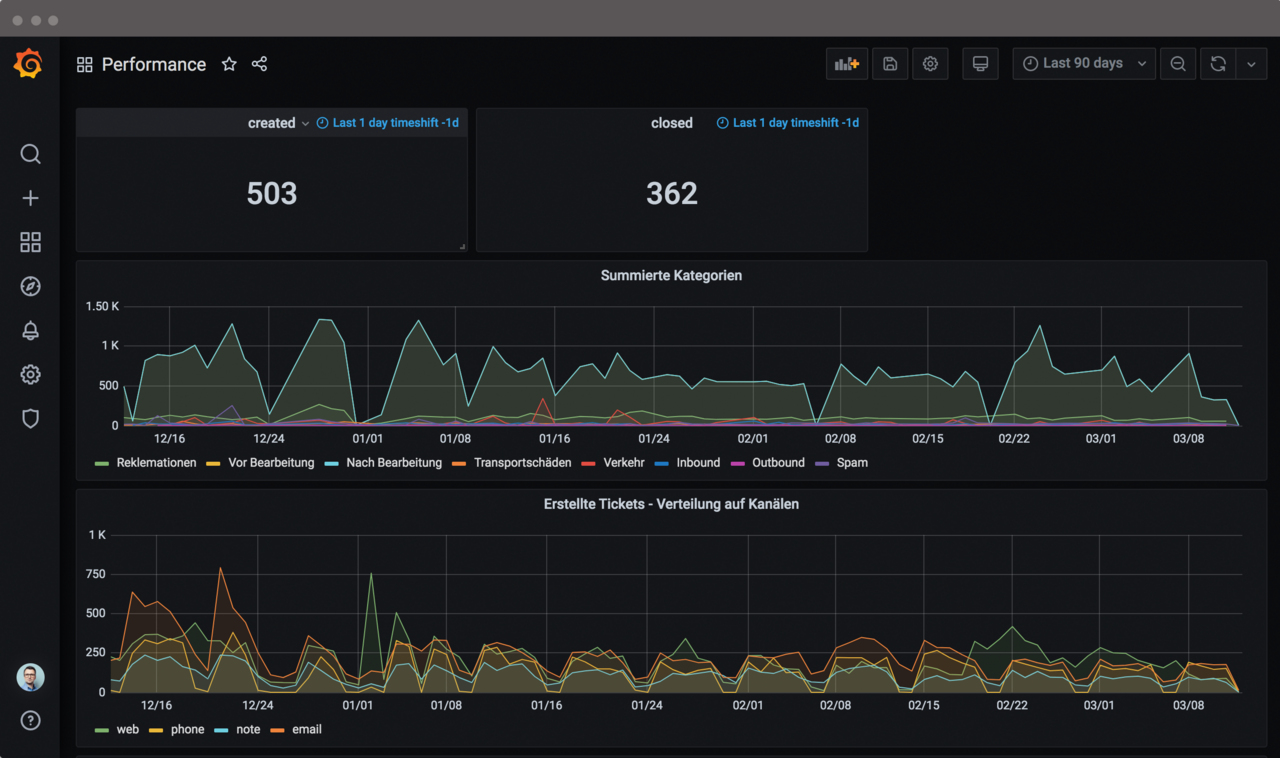
- Unified inbox that aggregates tickets from email, phone, live chat, Twitter, Facebook, and Telegram
- Knowledge base builder for customer-facing help articles and internal documentation
- Templates and text modules for faster, more consistent responses
- Time tracking on individual tickets for workload analysis
- Reporting dashboards for monitoring team performance and resolution metrics
- Roles and permissions system with granular access control
Zammad is free to download and self-host on Linux or through Docker. Paid support packages start at €2,999 per year for the Business tier, which includes email support, bug escalations, and security advisories. Enterprise (€5,999/year) and Corporation (€9,999/year) tiers offer faster response times, phone support, and more service requests.
11. Automatic time tracking and monitoring with TimeCamp
TimeCamp is a time tracking and productivity management tool that offers an on-premises deployment option for larger organizations. While primarily known as a cloud product, TimeCamp provides a self-hosted version for enterprises that need their time tracking data on internal infrastructure due to compliance, security, or data governance requirements.
The platform combines automatic time tracking with project time management, employee attendance monitoring, and billing features. TimeCamp can track time in the background by detecting which applications and websites a team member uses during the workday, then it automatically assigns that time to relevant projects. This approach reduces the manual effort of filling in timesheets while producing detailed productivity data.
- Automatic time tracking that categorizes activities by application and website usage
- Project time tracking with unlimited entries and billable time logging
- Productivity reports that show how time is distributed across tasks, projects, and team members
- Automated invoicing based on tracked billable hours
- Attendance tracking with analysis of employee availability and working patterns
- Integrations with project management, accounting, and communication tools
The on-premises version of TimeCamp is available for organizations with 100 or more employees. Pricing depends on team size and requirements, so you need to contact TimeCamp directly for a quote.
12. Appointment scheduling with Cal.com
Cal.com is an open-source scheduling platform that eliminates the back-and-forth of booking meetings. It works similarly to Calendly or Acuity Scheduling, but with the option to self-host the entire application, which means your calendar data and booking information stay on servers you control.
The platform handles everything from one-on-one meetings and group events to round-robin scheduling across teams. Cal.com connects to your existing calendars (Google, Outlook, Apple) to check availability automatically, supports timezone detection for international scheduling, and sends automated reminders to reduce missed appointments.
- Customizable booking pages with branded links and embeddable scheduling widgets
- Calendar integration with automatic conflict detection to prevent double bookings
- Round-robin and collective scheduling for distributing bookings across team members
- Built-in video conferencing plus integrations with Zoom, Google Meet, and Microsoft Teams
- Automated email and SMS reminders with follow-up workflows
- Payment collection through Stripe and support for over 65 languages
The self-hosted version of Cal.com is free and available on GitHub. You can deploy it using Docker on your own server. For teams that prefer a managed solution, cloud plans start from free for individuals, with Teams ($16/user/month) and Organizations ($37/user/month) tiers for larger groups.
13. Document management with Paperless-ngx
Offices that still deal with paper invoices, contracts, and receipts can use Paperless-ngx to turn that paperwork into a searchable digital archive. It is an open-source document management system you host yourself, so your files never pass through a third-party cloud service.
When you scan a document or drop a PDF into Paperless-ngx, the system applies optical character recognition (OCR) to extract the text, then automatically categorizes and tags the document based on rules you define. Over time, the software learns your organizational patterns and becomes more accurate at sorting incoming files. The result is a fully searchable archive where you can locate any document in seconds using keyword search, tags, date ranges, or custom metadata.
- Automatic OCR processing for scanned documents and PDFs with support for multiple languages
- Machine-learning-based tagging and categorization that improves with use
- Full text search across your entire document archive
- Customizable consumption workflows that process documents from email, scanners, or watched folders
- Multi-user access with permissions for shared document libraries
- Web interface accessible from any browser, with a design that works on mobile devices
Paperless-ngx is free and open-source under the GPL v3 license. The recommended deployment method is Docker Compose, which makes setup straightforward on most Linux servers. The project has over 44,000 stars on GitHub, which speaks to the size and activity of the community behind it.
How to Choose On-Premises Software
Not every organization needs the same mix of on-premises tools, and the right selection depends on your team size, industry, budget, and technical capacity. Here are a few criteria that can help narrow the field:
Data sensitivity. If you handle financial records, medical data, or personally identifiable information, prioritize tools with strong encryption, access controls, and compliance features. actiTIME, Nextcloud, and Matomo are particularly strong in environments where data must stay within a controlled perimeter.
Total cost of ownership. Free open-source tools eliminate license fees, but factor in the staff time required for server administration, updates, and troubleshooting. For smaller teams without dedicated IT staff, a tool with a commercial support option (such as Zammad Enterprise or Nextcloud Premium) can reduce operational risk.
Integration requirements. Check whether the tool connects to systems you already use. Odoo and Dolibarr function best when you adopt their broader ecosystem, while tools like Metabase and Cal.com integrate easily into an existing stack without requiring you to change other parts of your workflow.
Scalability. Consider how the tool performs and how pricing changes as your team grows. Single-fee licensing models like actiTIME’s one-time payment become more cost-effective at scale, while per-user monthly pricing can add up quickly beyond 50 or 100 users.
Start with the category that addresses your most pressing operational need, deploy one tool at a time, and expand from there. For more on the considerations involved, see our guide to choosing between self-hosted and SaaS time tracking.
If your team needs to track hours, manage projects, and understand where time translates into revenue, start a free 30-day trial of actiTIME to see how it works in your environment.