
Keeping a tight grip on your budget is as crucial as laying a strong foundation for a building. However, wrestling with cost overruns and unexpected expenses is way too common in the construction industry.
According to this study, 63% of construction projects go through cost overruns on a global scale. On average, they exceed initial budgets by 24%, while post-project work revisions and fixes account for a 6% increase in the overall cost.
Effective budget management is what separates the two. Here’s what to look for in construction budget tracking software before you commit to one, followed by the tools that do it well.
What to look for in construction budget tracking software
Here’s what actually separates tools that keep a project financially on track from ones that just look good in a demo.
-
Job costing and cost categorization.
Construction budgets involve many categories – materials, labor, subcontractors, equipment, permits, overhead – each with its own line items. The software should let you track construction costs by job and category, not just as one lump sum.
-
Real-time budget vs. actual.
Decisions in construction often need to be made fast, based on the current financial picture. Real-time spend-versus-budget visibility matters more here than a report that arrives once a month.
-
Integrations with existing tools.
Budget tracking software should sync with the accounting, project management, and procurement systems already in use, so financial data doesn’t end up siloed in yet another system.
-
Forecasting and predictive insight.
The ability to project where a budget is heading, not just report where it’s been, helps catch problems – like underestimated material or labor costs – before they turn into overruns.
-
Change order management.
Change orders are one of the most common causes of budget overruns. The software should let you document them, assess their financial impact, and adjust the budget accordingly, instead of losing track of what was actually approved.
-
Reporting for audits and compliance.
Construction projects are subject to various regulations and reporting requirements, so the software needs to produce the documentation audits or regulatory reviews actually ask for.
-
Centralized access for all stakeholders.
Architects, engineers, contractors, and suppliers all need visibility into budget status. A shared platform beats scattered spreadsheets and email threads for keeping everyone on the same numbers.
-
Data security and access control.
Budget data touches payroll, subcontractor rates, and profit margins that shouldn’t be visible to everyone on a project. Look for encryption, role-based permissions, and an audit trail of who changed what – not just who viewed a report.
-
Vendor support and implementation.
How a vendor handles onboarding often predicts how the tool performs later – a rushed setup means miscategorized costs and bad data from day one. Check what implementation support is actually included, not just promised on a sales call.
-
Measurable ROI.
A good budget tracking tool should show its own value over time: tighter estimate-to-actual variance, less time spent reconciling spreadsheets, and faster financial reporting. If a vendor can’t point to outcomes like these, that’s worth noting before you commit.
Based on this, here are the construction budget tracking tools that do it well and can help keep your projects financially sound.
The 10 best construction budgeting software tools
1. actiTIME
Key features:
- Time tracking
- Time budgets
- Cost monitoring
- Client billing
- Estimates
- Task priorities
- Performance reports
- Mobile app
- Integrations
This study indicates that schedule overruns are as frequent in construction projects as cost overruns and, in fact, they often increase overspending by a significant degree.
As the authors suggest, in order to take both time and cost overruns under control, you need to make your entire project management process more effective. And actiTIME can readily assist you with that.
As a versatile time tracking software actiTIME helps to keep tabs on the use of time, monitor costs, bill clients, and pinpoint those areas where efficiency can be amped up.
actiTIME’s budget workflow, step by step
Let’s suppose you renovate old houses – here’s how actiTIME fits into that project from start to finish:
-
Plan the work and set budgets.
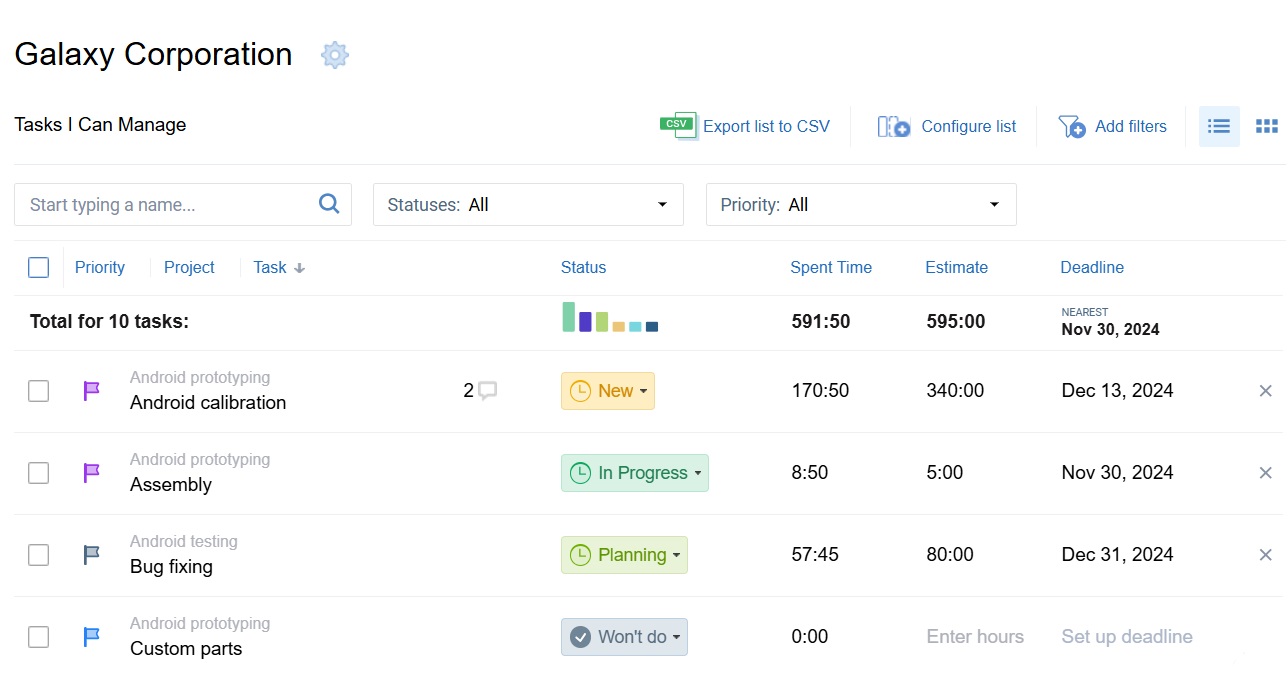
Apply actiTIME’s work scope management functionality to create tasks and assign them to employees. Allocate time, cost, and billing budgets to entire customers and projects or to individual tasks, and set task priorities and deadlines so your team knows what to do first.
-
Track time and monitor spend as work happens.
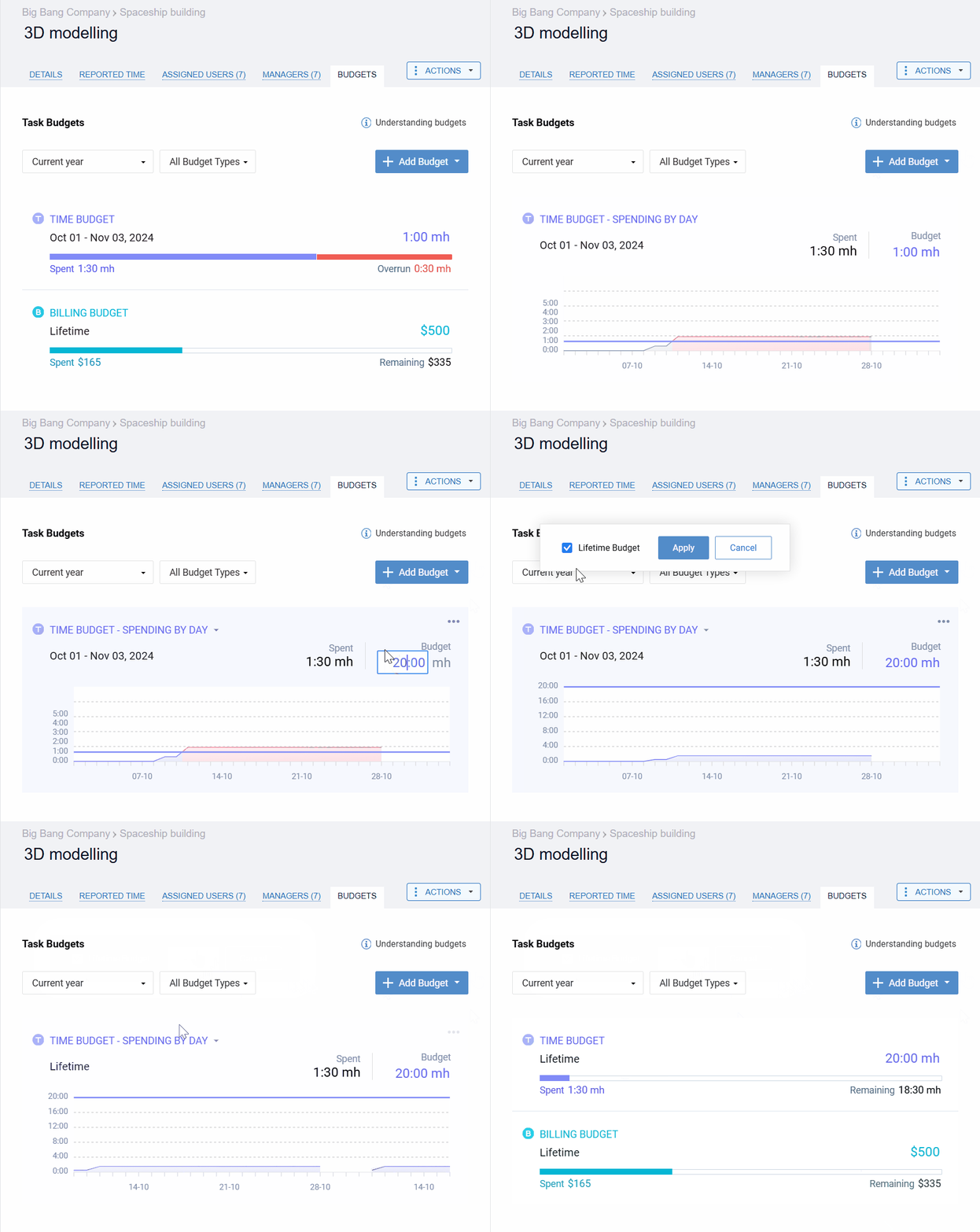
Employees log hours via intuitive weekly timesheets, the mobile app, or a fully automated browser extension. Colorful progress bars give a quick snapshot of where you stand financially, and automated notifications flag budget overruns before they turn into real problems.
-
Review results once the project wraps up.
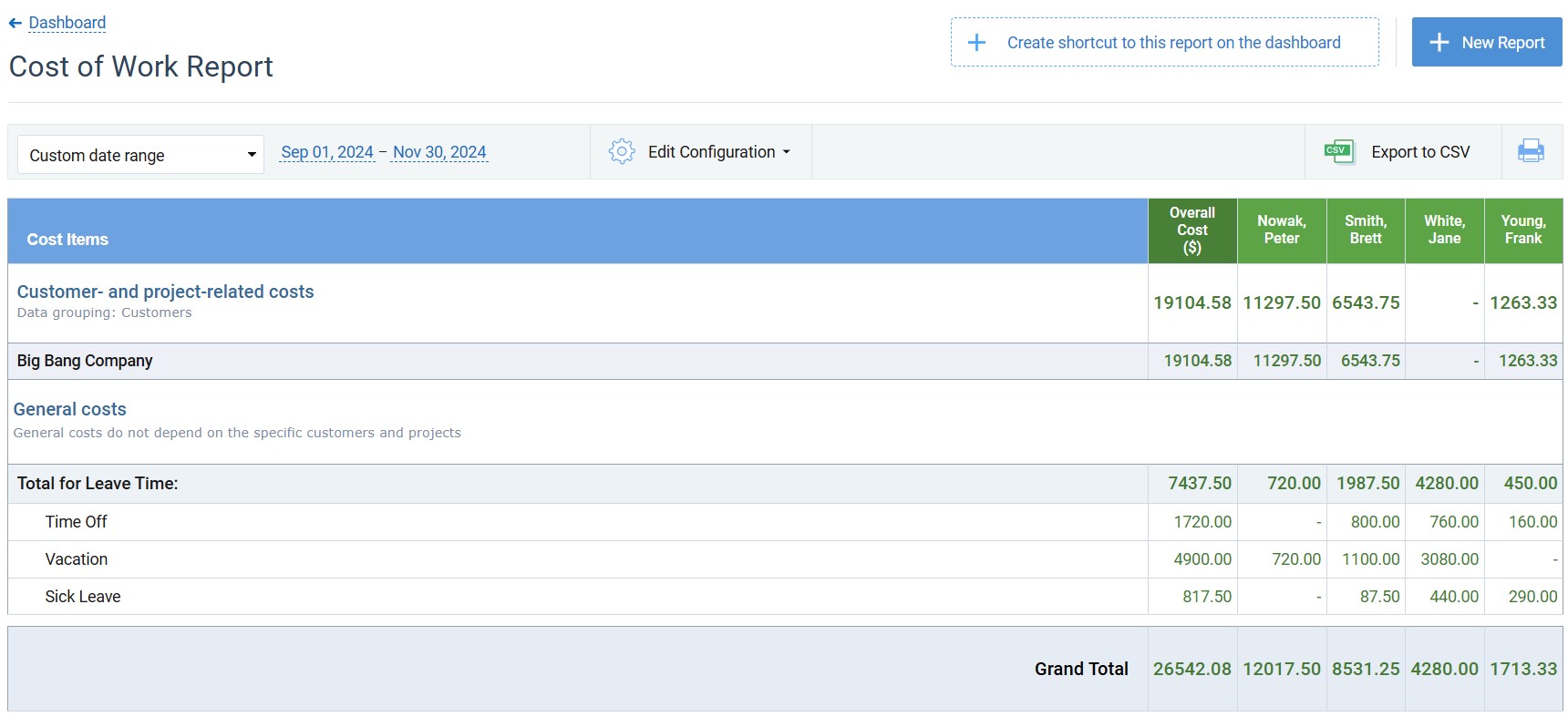
actiTIME’s performance reports let you dive deep into your financial data – uncovering team productivity trends, avoidable inefficiencies, and savings opportunities that make your next renovation more profitable than the last.
Key construction budgeting challenges actiTIME helps to solve:
#1: Inadequate project estimates.
#2: Superficial insight into the ongoing use of resources (including money and time).
#3: Uncontrolled scope creep.
Best for: Construction projects of any size that want budget tracking tied directly to time tracking and client billing, not a bolted-on module.
Pricing: Free forever for up to 3 users; Online from $6/user/month (1–40 users) or $5/user/month (41–200 users) billed annually – $7/$6 per user/month if billed monthly; Self-Hosted $120/user, one-time.
Free trial: 30-day full-featured trial; after that, buy or switch to the permanent free version.
Rating: Capterra 4.6 (111 reviews).
Pros:
- Budget tracking is native to the same tool that handles time tracking and client billing, not a separate integration
- Self-hosted option for firms that need to keep financial data on their own infrastructure
- Free version has no time limit and no feature-gated trial tricks
Cons:
- Not a full construction ERP – no takeoffs, bidding, or drawing management, so pair it with a field-ops tool for those needs
- Free plan is capped at 3 users and leaves out overtime registration and task estimates
Easy to compare estimated and actual hours
“Easy to track hours, both actual and estimated, easy to compare estimated and actual hours.”
Kelly M., H&S Coordinator, Construction – actiTIME review on Capterra
2. BrickControl
Key features:
- Budget planning
- Project estimation
- Cost variance analysis
- Job costing
Studies show that inadequate estimates are among the key causes of cost overruns in construction projects. And while getting accurate estimates is truly challenging since there are many factors that are hard to foresee, BrickControl is on a mission to change that by helping you to organize and process an ocean of data in a centralized way.
BrickControl is all about accurate cost estimation and impeccable money control. It uses such variables as materials, labor, and timelines to help you come up with precise forecasts and avoid project overruns.
Besides, BrickControl allows for a streamlined estimation process – its powerful automation features will save you lots of time, minimize the risk of errors, and prompt ideas to make informed decisions with confidence.
Key construction budgeting challenges BrickControl helps to solve:
#1: Inaccurate budget estimation.
#2: Poor project planning.
Best for: Medium to large-scale construction projects that want one platform covering the full cycle from estimating to completion.
Pricing: Basic from €49/month (2 users); Business from €99/month (3 users); Premium from €149/month (5 users); Enterprise custom, unlimited users. Additional users scale by tier.
Free trial: 14 days, all features unlocked, no card required – BrickControl’s own terms of service contain inconsistent boilerplate elsewhere (referencing both 7 and 30 days), but 14 days is the figure used on their actual signup flow.
Rating: Capterra 4.5 (41 reviews).
Pros:
- Covers the full construction cycle – estimating, budgeting, purchase orders, labor and machinery cost allocation – in one system
- Integrations with QuickBooks, Oracle NetSuite, and Sage 200 for firms already on those platforms
Cons:
- Purchase orders, Gantt planning, and warehouse management are excluded from the Basic plan
- Monthly-vs-annual pricing display and trial length are inconsistent across BrickControl’s own pages – confirm both directly before committing
Fast and accurate analysis of project costs
“Working with BrickControl allows us to see fast and accurate analysis of the costs of our works.”
Jose B., Manager, Construction – BrickControl review on Capterra
3. BuildEnd
Key features:
- Budget alerts
- Invoice and payment tracking
- Budget variance analysis
- Cost monitoring
According to Multiproject, effective budgeting starts with careful preparation of your contract documents and procurement strategy at the early stages of project planning. In other words, you need to take a broader picture into account, and BuildEnd’s handy toolset can make that happen.
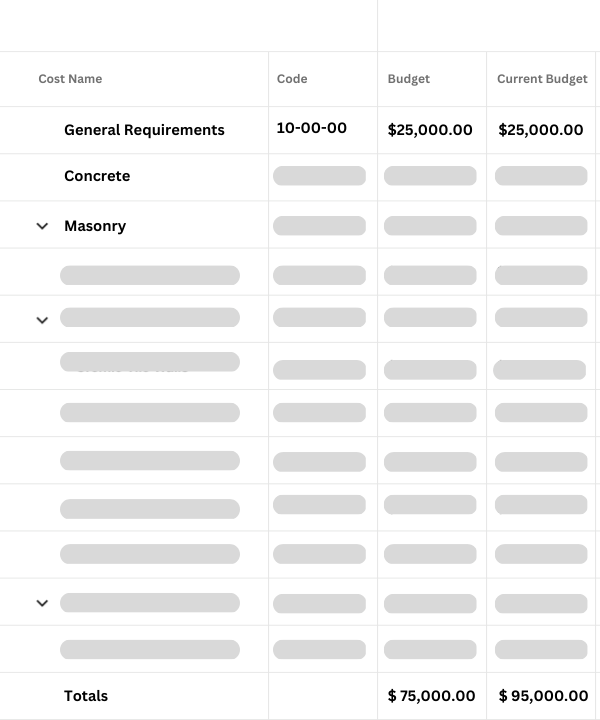
Using BuildEnd, you can track already committed expenses, as well as still pending and uncommitted ones. By analyzing how they could potentially affect your budget (or already do so), you gain deeper insights into your projects’ financial performance, get a chance to enhance work planning and keep the financial chaos at bay.
On top of that, you can integrate BuildEnd’s construction budgeting features with its change and contract management modules. Such integration allows you to align the financial side of your projects with their other aspects and, thus, manage everything from a broader perspective.
Key construction budgeting challenges BuildEnd helps to solve:
#1: Lack of a large-scale picture of what can affect your project.
#2: Weak progress control.
#3: Inaccurate forecasts.
Best for: Large-scale commercial and residential construction projects run by general contractors.
Pricing: Not publicly listed – one flat platform fee covering unlimited users and all modules, per BuildEnd’s own claim, but the exact figure requires a custom quote.
Free trial: None advertised – pricing and onboarding go through a sales quote process.
Rating: Too few reviews yet to be meaningful (2 on Capterra) – not enough of a sample to treat as a reliable signal either way.
Pros:
- Ties budget, commitments, and actuals directly to cost codes with an automated change-order workflow
- One flat fee for unlimited users and all modules, rather than per-seat pricing that scales with team size
Cons:
- No pricing published anywhere – budgeting for it requires a sales conversation before you get a real number
- Review base is still too thin to judge real-world reliability from
4. JobTread
Key features:
- Project estimates
- Real-time budget tracking
- Budget reports
- Customizable views
According to the New Jersey Builders Association, job costing is key to getting higher profits in construction businesses as it helps to see how you make money through a thorough analysis of various expenses – compare your spending to revenues, and you can see what drives your business and what simply eats up your resources.
That’s one of the ways to enhance construction budgeting, and JobTread truly shines in this regard.
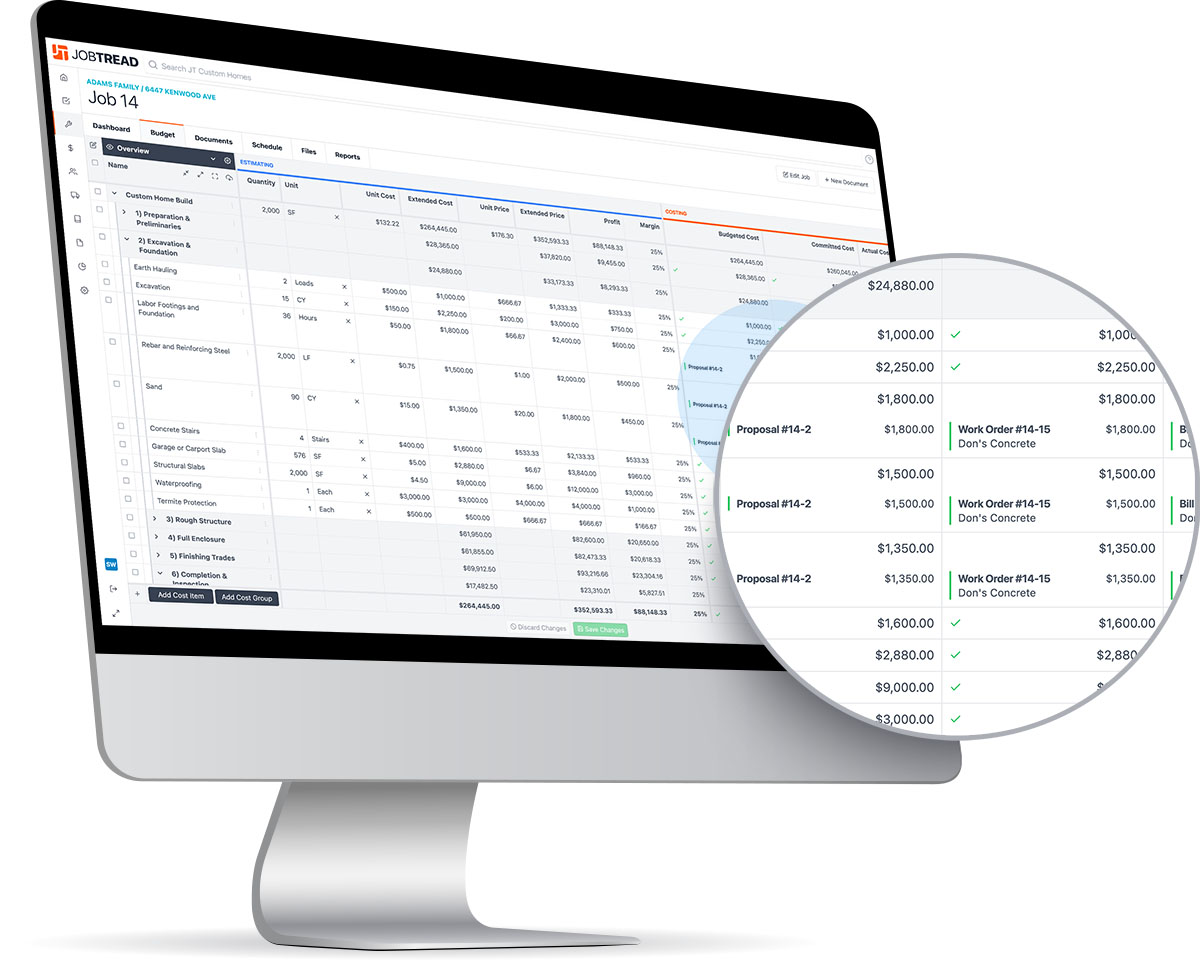
JobTread allows you to monitor and record all kinds of expenses throughout the lifecycle of your project.
Then, using historical job costing data, you can craft accurate estimates, set realistic financial limits, and effortlessly share your evidence-based expectations with clients and stakeholders to gain their trust and avoid costly surprises down the road.
Key construction budgeting challenges JobTread helps to solve:
#1: Superficial cost monitoring and analysis.
#2: Lack of stakeholder engagement in the budgeting and construction project management process.
Best for: Small-to-midsize construction businesses that want estimating, budgeting, and cost control consolidated in one place.
Pricing: $199/month base (1 user); additional users from $20/user/month (2–10 users, monthly) or $16/user/month (annual), dropping further at higher user counts.
Free trial: No credit-card-free trial – instead, a 30-day money-back guarantee on monthly subscriptions.
Rating: Capterra 4.9 (143 reviews).
Pros:
- Every feature is included on every plan – no feature-gating between tiers
- Large, strongly positive review base (4.9 across 143 Capterra reviews)
Cons:
- No true free trial – billing starts at signup, backed by a refund guarantee rather than a trial period
- Per-user cost is highest in the 2–10 user band before the rate steps down at higher tiers
Job costing that shows exactly where a job ended up
“JobTread makes it fast and easy to do job costing on previous jobs to evaluate our financials and where we ended up. This way I know where to adjust my figures to make sure my next jobs are the most profitable.”
Brian Wymer, JB Contracting – JobTread customer testimonial
5. Knowify
Key features:
- Cost tracking
- Budget templates
- E-signable proposals
- Purchase orders
Speaking of a comprehensive approach to project management, Knowify is designed to cater it to you on a silver plate. This software streamlines everything from job costing and contract management to time tracking and invoicing.
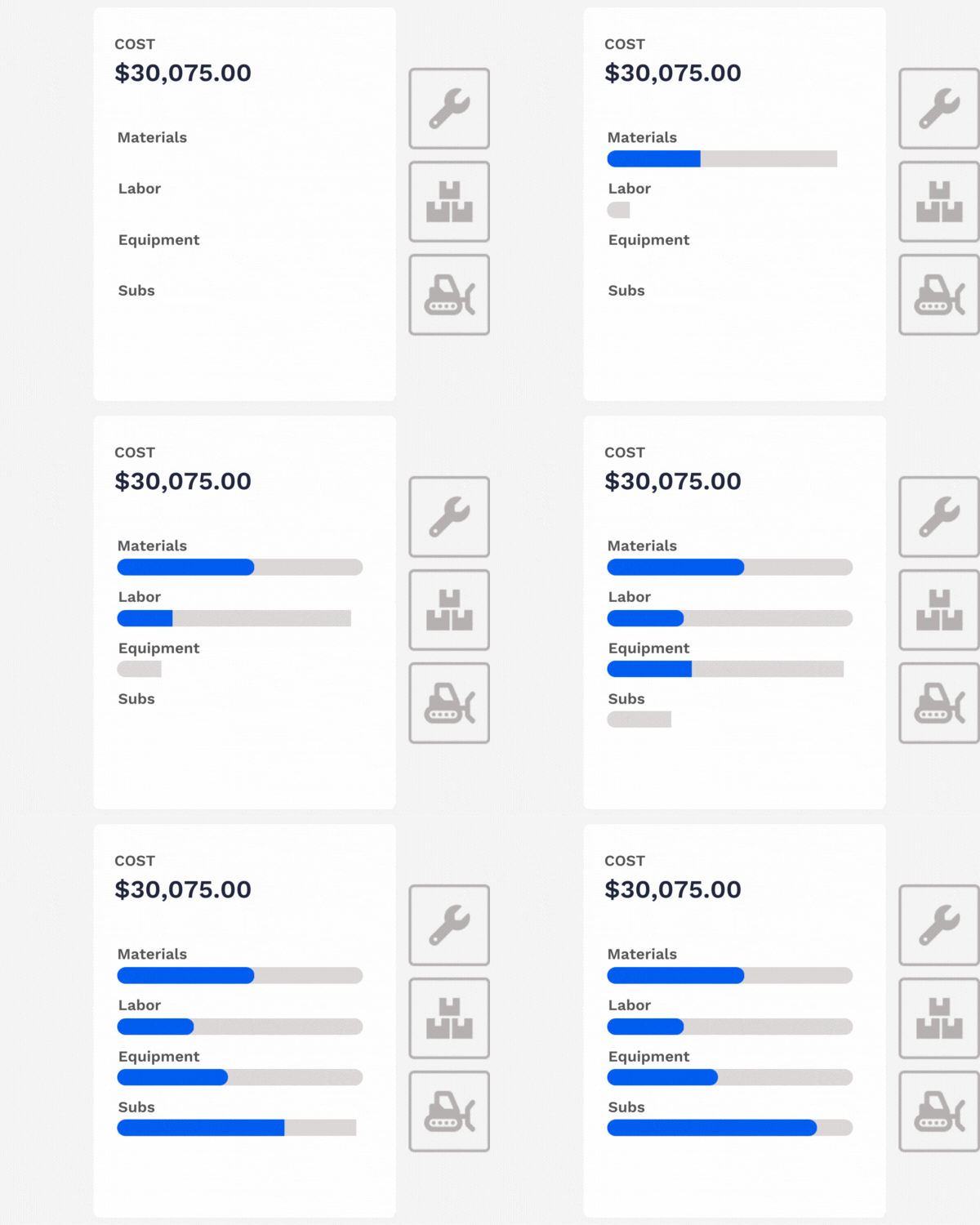
With Knowify, your can build quotes and proposals directly from your budgets. This way, the software lets you avoid double data entry or embarrassing errors.
First, run Knowify reports to gleen data for accurate cost estimation and use custom budget templates to cut down on setup time when managing recurring projects. Then, once you’ve got your budget nailed down, whip up a professional-looking proposal in just one click and send it to your project stakeholders for approval.
Lastly, you can choose from a variety of Knowify’s cost tracking methods to see where every dollar goes and ensure your projects remain profitable. Thanks to daily logs, visual progress bars and similar gear, the software arms you with the knowledge to pivot when costs start to go out of control + keep your bottom line healthy and your stress levels low. Construction managers can use automated construction wip reports to track projects in real time, prevent overspending, and optimize resources while getting a clear view of budget and project performance.
Key construction budgeting challenges Knowify helps to solve:
#1: Ineffective and partial cost tracking.
#2: Inadequate project scheduling that leads to work delays and cost overruns.
Best for: Residential and commercial remodeling, specialty trades, and small-to-mid-sized contractor operations.
Pricing: Core $149/month (1 user, or $99/month billed annually); Advanced $399/month (10 users, or $329/month annually); each additional user $29/month; Enterprise custom.
Free trial: Available on Core and Advanced; exact length not stated on the pricing page. Enterprise is quote-only, with no trial button shown.
Rating: Capterra 4.5 (109 reviews).
Pros:
- Real-time job costing ties directly to purchases, bills, and expenses as they happen
- Change orders flow automatically into invoicing, cutting out a manual re-entry step
Cons:
- Additional users cost $29/month each – pricier to scale than several alternatives here
- The cheaper annual rate isn’t advertised as prominently as the monthly price
See the GP of your projects quickly
“Knowify allows you to see the GP of your projects quickly and has simple ways of accessing many tools.”
Carlos U., General Manager, Construction (11–50 employees) – Knowify review on Capterra
Get Our Free Budget Tracking Templates
As you can see, professional construction budget tracking software isn’t that cheap. So, if you manage small projects and don’t need sophisticated budget management features, you can use our budget tracking templates to organize your cost data in a simple way.
They are absolutely free to use, so give them a try before committing to something more expensive.
6. Lentune
Key features:
- Cost monitoring
- Profit tracking
- Budget variance analysis
- Mobile app
Lentune improves the way construction businesses handle finances – streamlining everything from invoicing to integrating with existing financial systems.
Comprehensive data analysis is Lentune’s key strength. For instance, you can keep tabs on where your money is coming from and where it’s going. Then, using back-costing functionality, you can analyze historical data to identify potential inefficiencies and promote savings in your future projects.
And of course, Lentune allows for budget variance analysis. In other words, you can compare your actual performance with budgeted figures to easily expose any discrepancies. By understanding what didn’t go as planned, you’ll be in a better position to adapt your strategies and stay ahead of the game in the future.
Key construction budgeting challenges Lentune helps to solve:
#1: Poor understanding of what drains your resources and what generates profit.
#2: Ineffective retrospective analysis of project costs.
Best for: Complex construction projects – mainly in Australia and New Zealand – that need detailed financial oversight and compliance-ready reporting.
Pricing: Not publicly tiered – typical businesses start from around NZD $900/month for unlimited users, plus a one-time implementation fee.
Free trial: None offered – onboarding goes straight into a paid go-live process, typically around 30 days.
Rating: Capterra: no reviews yet. G2: 4.5 (2 reviews).
Pros:
- Real-time cost tracking updates as commitments and expenses occur, not just when they’re processed
- Retentions and progress-claims handling built specifically for AU/NZ compliance requirements
Cons:
- No free trial – you commit to onboarding before you can properly test it
- Still a thin review record (2 on G2, 0 on Capterra), so you’re relying mostly on the vendor’s own claims
7. Linarc
Key features:
- Budget forecasts
- Cost tracking
- Exposure reports
- Integrations
According to Deloitte, automated data analytics helps businesses overcome a plethora of budgeting challenges, including inflexible decision-making, error-prone manual processes, and difficulty in considering multiple variables at once.
Thanks to its robust reporting and forecasting features, Linarc steps up as an excellent solution to these problems.
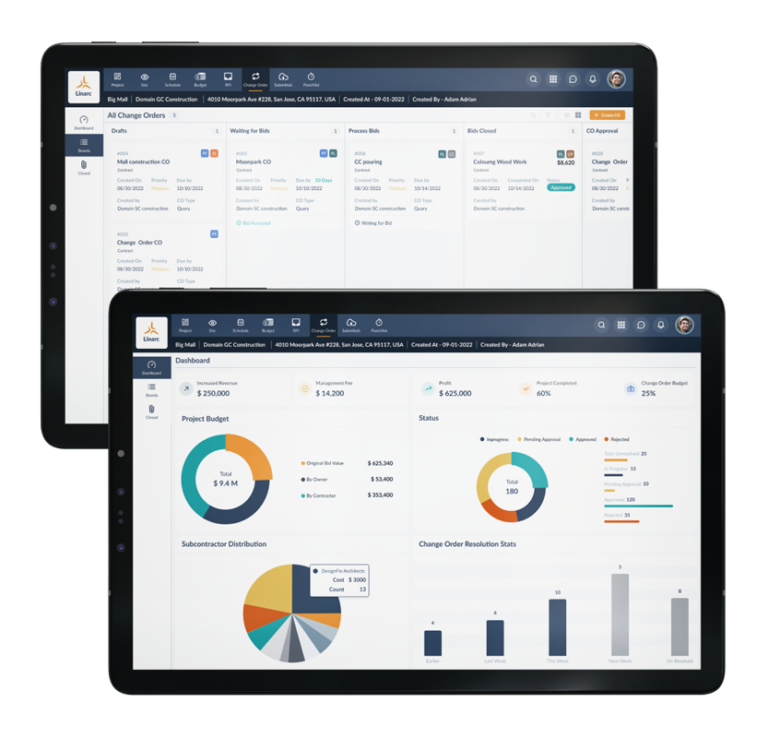
Linarc automates budget forecasts, letting you plan resources effortlessly and accurately.
Besides, as a truly modern piece of construction budget tracking software, it plays nicely with other financial tools, from accounting software to payment processing systems. By integrating it with third-party platforms you already use, you can spend less time on data entry and reduce the risk of errors in your budgeting processes multifold.
Key construction budgeting challenges Linarc helps to solve:
#1: Error-prone manual calculations.
#2: Poor cost and profit analysis.
#3: Ineffective project collaboration.
Best for: Complex construction projects that need seamless coordination and communication among multiple stakeholders.
Pricing: Not published – Linarc describes a “transparent flat-rate subscription” covering unlimited users and projects, but the actual figure requires contacting sales.
Free trial: 21 days, no credit card required, full platform access.
Rating: No Capterra or G2 reviews yet.
Pros:
- Flat-rate pricing claims unlimited users and projects for one price rather than per-seat costs that grow with your team
- 21-day trial with no credit card required, longer than most competitors here
Cons:
- No public pricing figure despite the “flat-rate” framing – get the actual number before assuming it fits your budget
- No independent review record yet, and named accounting integrations aren’t confirmed on Linarc’s own site
8. LiveCosts
Key features:
- Real-time job costing
- Purchase order tracking
- AI-powered invoice extraction with 3-way matching
- Budget vs. actuals reporting
Real-time job costing is where most budget overruns actually get caught – or missed. LiveCosts is built specifically for tracking construction costs as they happen, connecting labor, materials, plant, and subcontractor costs to a live budget picture instead of a monthly reconciliation.
The software captures purchase orders and invoices as they come in, using AI-powered line-item extraction and 3-way matching to flag discrepancies before they become disputes. Budgets can be built from templates or imported, then tracked against actuals with Budget vs. Actuals, WIP, and P&L reporting.
Because it’s purpose-built for contractors – general, electrical, plumbing, HVAC, civil, and subcontractors – rather than adapted from generic accounting software, the cost categories and workflows already match how construction budgets actually get spent.
Key construction budgeting challenges LiveCosts helps to solve:
#1: Budget-vs-actual visibility that only shows up after the money is already spent.
#2: Manual invoice matching that eats office time and still misses discrepancies.
Best for: Small-to-mid-sized contractors and subcontractors managing multiple projects who need centralized cost tracking without adapting generic accounting software.
Pricing: Not published – quote-only via LiveCosts’ sales team.
Free trial: None advertised.
Rating: No Capterra reviews yet.
Pros:
- Job costing, purchase orders, and AI-powered invoice extraction with 3-way matching built specifically for construction, not adapted from generic accounting software
- Connects to QuickBooks, Xero, and Sage for firms already running one of those
Cons:
- No published pricing or free trial – you’ll need a sales conversation before you can properly evaluate it
- No independent review record yet
9. Planyard
Key features:
- Budget variance tracking
- Team collaboration
- Project dashboards
- Outstanding payments
As Heather V. MacArthur fairly notes in her recent piece for Forbes, in order to help your business get what it truly needs, attain bigger-picture goals, and turn weaknesses into strengths, budgeting should be collaborative.
That’s exactly where Planyard comes in handy – it facilitates a cross-functional budgeting process thanks to flexible permission controls and centralized financial data storage.
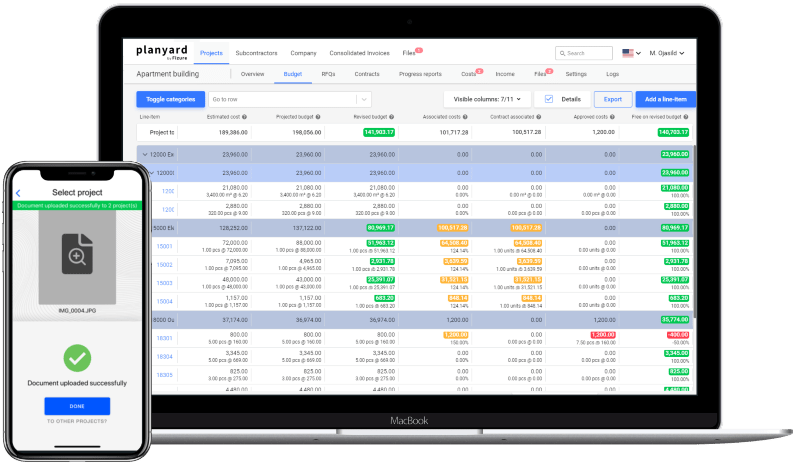
Planyard lets you assign different financial responsibilities across your project team so that everyone knows their part in managing the finances. This way, you can foster better oversight and accountability across multiple departments, letting some employees contribute to decision-making and keeping others in the loop with the established plans.
On top of that, Planyard features a project portfolio dashboard with intuitive visuals and easily digestible data from all your projects. Use it to quickly assess the status and performance of each project, make informed decisions, prioritize tasks, and efficiently allocate resources across your portfolio.
Key construction budgeting challenges Planyard helps to solve:
#1: Insufficient stakeholder engagement.
#2: Overly rigid budgeting process.
#3: Incomplete picture of financial project performance.
Best for: Small and medium-sized commercial, residential, and infrastructure projects that want cross-functional budget collaboration.
Pricing: Estimating $52/PM/month; Essential $105/PM/month (+$43/month per support seat); Professional $158/PM/month; Ultimate $210/PM/month; Enterprise custom. Priced per project manager, not per general user.
Free trial: 14 days, full access, no credit card required.
Rating: Capterra 4.7 (16 reviews) – listed at a legacy “Fizure” URL on Capterra, but displayed under the Planyard name.
Pros:
- Real-time budget-vs-actual via Cost Value Reconciliation, plus built-in subcontractor payment applications
- Connects to Xero, QuickBooks, Sage, and Procore
Cons:
- Priced per project manager plus a separate per-seat fee for supporting staff – model it against your actual team structure, not just the headline number
- Still a fairly small review base to judge long-term reliability from
10. Vitruvi
Key features:
- Cost monitoring
- Transaction approvals
- Payment management
- Financial reports
As AI is taking charge of more and more routine processes every day, automation is no more just a nice-to-have thing but a must-have for any business that strives to stay competitive and thrive.
As recent data shows, 90% of employees report an increase in their productivity thanks to automation. And that’s what Vitruvi can do to every aspect of your construction project – from planning, collaboration, and budget tracking.
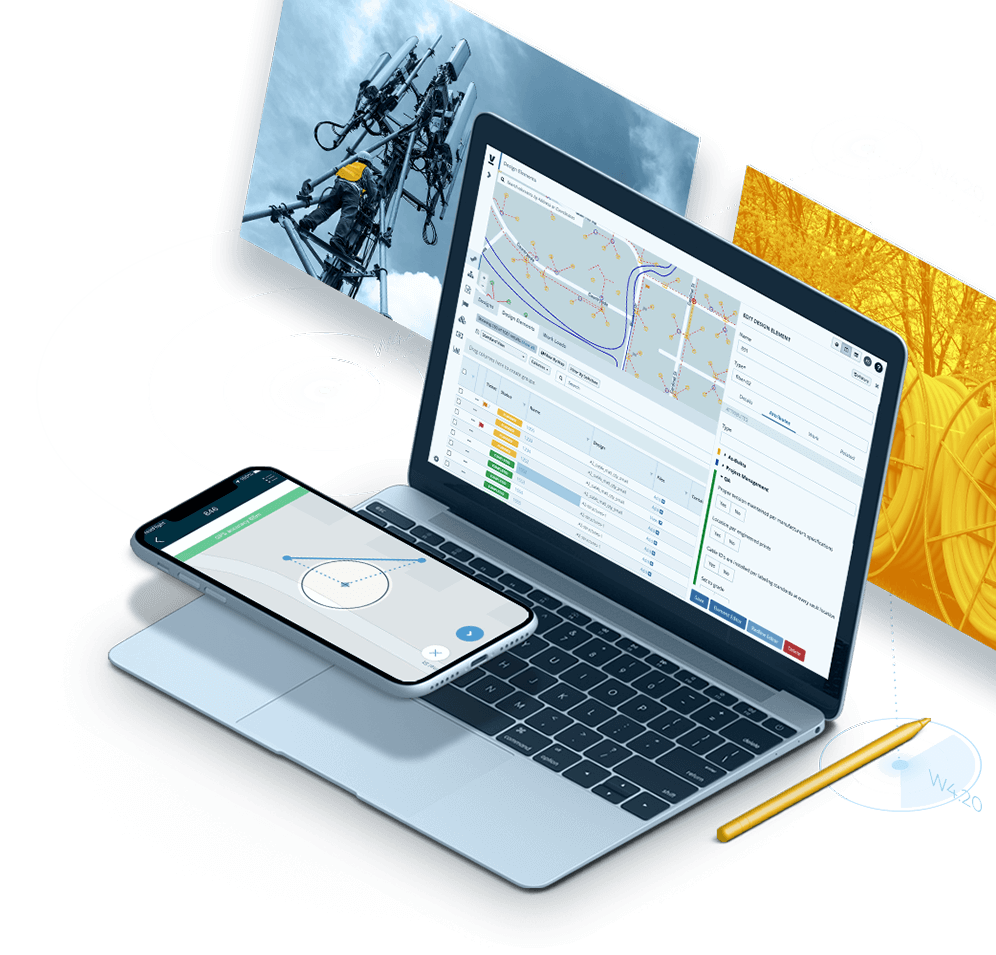
Vitruvi automatically alerts you whenever expenses start teetering towards or over your set financial limits so you can nip potential issues in the bud, keeping projects on schedule and budget.
Moreover, it prevents duplicate or unauthorized payments by automatically scanning payment requests and transactions for redundancies or discrepancies. This way, the software saves time on auditing and troubleshooting + protects your organization from financial leakage, ensuring your funds are used exactly as intended.
Worth flagging upfront: Vitruvi is built specifically for linear and infrastructure construction – fiber, utilities, water, oil and gas – not general building construction. If your projects are commercial or residential builds, several other tools on this list will fit more naturally.
Key construction budgeting challenges Vitruvi helps to solve:
#1: Overly rigid approach to construction budget management.
#2: Poor control over the use of resources.
#3: Costly errors due to manual calculations and data processing.
Best for: Linear and infrastructure construction programs – fiber, utilities, water, oil and gas – rather than general commercial or residential building.
Pricing: Not published – Launch, Business, and Enterprise tiers are all custom-quoted, scaling by minimum user count.
Free trial: None offered.
Rating: G2 4.3 (23 reviews) – Vitruvi’s Capterra listing shows 5.0 but from a single, seven-year-old review, not a meaningful sample.
Pros:
- Built specifically for linear/infrastructure work, where general construction budget tools often don’t fit cleanly
- Ties budgeting to verified field production data, not just self-reported progress
Cons:
- Not a fit for general building construction – this is a specialist tool for linear/infrastructure projects specifically
- No public pricing, and named accounting integrations aren’t confirmed on Vitruvi’s own site
| actiTIME | Knowify | Linarc | Planyard | JobTread | |
| Time budgets | |||||
| Budget variance analysis | |||||
| Mobile app | |||||
| Free version |
FAQ
What’s the difference between construction budget tracking software and construction accounting software?
Accounting software (QuickBooks, Sage) handles the company-wide books – invoicing, payroll, tax filings, the general ledger. Construction budget tracking software works at the project level, breaking costs down by job, cost code, and phase so you can see how each project is performing against its own budget in near real time. Most of the tools in this list, including actiTIME, are built to sync with accounting software rather than replace it – the two do different jobs and work best together.
Does construction budget tracking software integrate with accounting tools like QuickBooks or Sage?
Most of it does, though the depth varies. Some tools here – actiTIME, Knowify, and LiveCosts among them – offer a native, two-way sync with QuickBooks and similar platforms, so cost data doesn’t need to be re-entered by hand. Others rely on a generic connector or don’t publish integration details at all – worth confirming directly before you commit, since it’s one of the biggest time-savers this kind of software can offer.
Can small contractors benefit from construction budget tracking software, or is it only worth it for large companies?
Small contractors often benefit the most, since they typically don’t have a dedicated accountant reviewing project numbers every week. Several tools on this list – actiTIME, JobTread, Knowify – price by user count and offer free trials or a free-forever plan specifically so smaller teams aren’t paying enterprise rates for features they don’t need. The tools built for large or infrastructure projects, like BuildEnd and Vitruvi, are quote-only and priced for teams that size.
How does construction budget tracking software help prevent cost overruns?
Mainly by closing the gap between when money is committed and when someone notices. Real-time budget-vs-actual tracking flags overspending while there’s still time to adjust scope or staffing, instead of at the end of a billing cycle when it’s too late to change course. Change order management and job costing add to this by keeping approved scope changes and true costs – labor, materials, subcontractors – tied to the budget as they happen, rather than surfacing as a surprise variance months later.
Can construction budget tracking software replace a construction accountant or estimator?
No – it supports their work rather than replacing it. Estimators still build the initial budget and forecasts based on judgment, and accountants still handle taxes, payroll compliance, and financial statements. What the software does is give both of them, and everyone else on the project, a shared, real-time view of where the money actually stands, so decisions aren’t based on stale spreadsheets or guesswork.
Conclusion
The above 10 solutions are often overlooked behind more popular software options. However, they will open the door to more effective and optimized budgeting processes.
Each of these construction budget tracking software tools offers unique features, from automated project tracking and real-time notifications or to comprehensive visual reports and integrations with other project management modules.
One solution on the list stands out among the rest – actiTIME!
Thanks to its versatile time tracking features and visual budget management functionality, it can simplify your construction project management processes and keep your costs in check.
So, if you’re ready to take your construction budgeting to the next level, make sure to give it a whirl.