
Construction crews track time in a lot of different ways, from paper timecards to dedicated GPS-based clock apps, and the right setup depends on your team size, how you run payroll, and how closely you need to tie hours back to job costs. If you’re already juggling multiple job sites, subcontractors, or a mix of billable and non-billable work, actiTIME is built for the piece that dedicated construction time clock apps usually skip: connecting the hours your crew logs to project budgets, invoicing, and profitability.
This guide walks through what actiTIME actually does for a construction business today: how crews log time from the field, how that time turns into task budgets and job costs, and how it flows into payroll, billing, and reporting.
- What does actiTIME do for construction crews?
- Time tracking and mobile access on the job site
- Task management and project budgets
- Job costing, billing, and invoicing
- Payroll, overtime, and leave management
- Reports built for construction management
- actiTIME pricing for construction teams
- Security and deployment options
- FAQ
What does actiTIME do for construction crews?
actiTIME is project time tracking software that connects the hours your crew logs to project budgets, billing, and payroll, rather than stopping at a simple timesheet. Work is organized in three levels – customer, project, and task (the labels are fully customizable, so a construction team could rename them to something like Client, Job, and Task to match its own terminology) – and every hour logged rolls up through that structure into cost, billing, and time budgets you can track in real time.
actiTIME has been on the market for over 20 years, is used in more than 130 countries, and ships as one product with no feature tiers to upgrade between: every account gets the same feature set, priced by user count.
Time tracking and mobile access on the job site
Crews can log time from the actiTIME mobile app (iOS and Android), which works offline and syncs automatically once a connection is back – a real requirement on sites with poor signal. The app supports both an automatic timer and manual entry, lets workers add comments and notes to a task, and also handles leave submission, so a crew member can log a sick day or vacation request from the same app they use to clock in.
Back in the browser, the same data feeds two entry views: a weekly timesheet for logging total hours per task, and a calendar view for crews that need to record exact start and stop times per task, with drag-and-drop editing. A manager can require timesheet approval before hours count toward reports, and lock submitted entries so they can’t be edited after payroll or invoicing runs.
Task management and project budgets
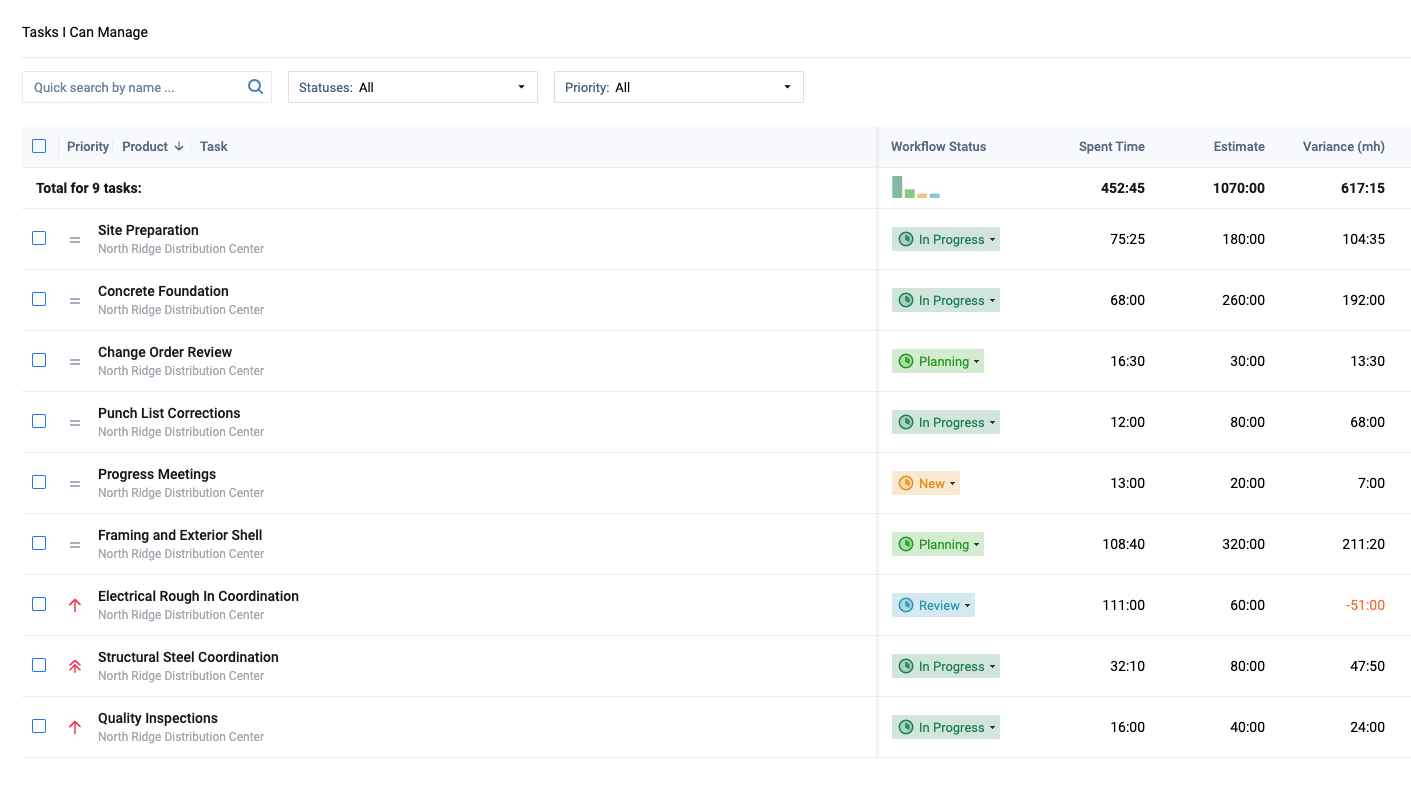
Beyond logging hours, actiTIME tracks the work itself: tasks carry estimates, deadlines, priority levels, and custom workflow statuses, and progress is visible in either a list view or a Kanban board. The Estimated vs. Actual Time Report shows exactly where a task is running over its original estimate while there’s still time to act on it.
Budgets are where construction teams get the most direct value. Effective construction time tracking software connects crew hours with project progress and budgets to identify overruns early.actiTIME tracks three independent budget types – time (hours logged vs. allocated), cost (spending based on employee pay rates), and billing (billable amounts based on billing rates) – and any of them can be set at the customer, project, or task level. Each budget shows a visual progress bar that turns red once it’s exceeded, so a project running over budget is visible before the invoice goes out, not after.
Job costing, billing, and invoicing
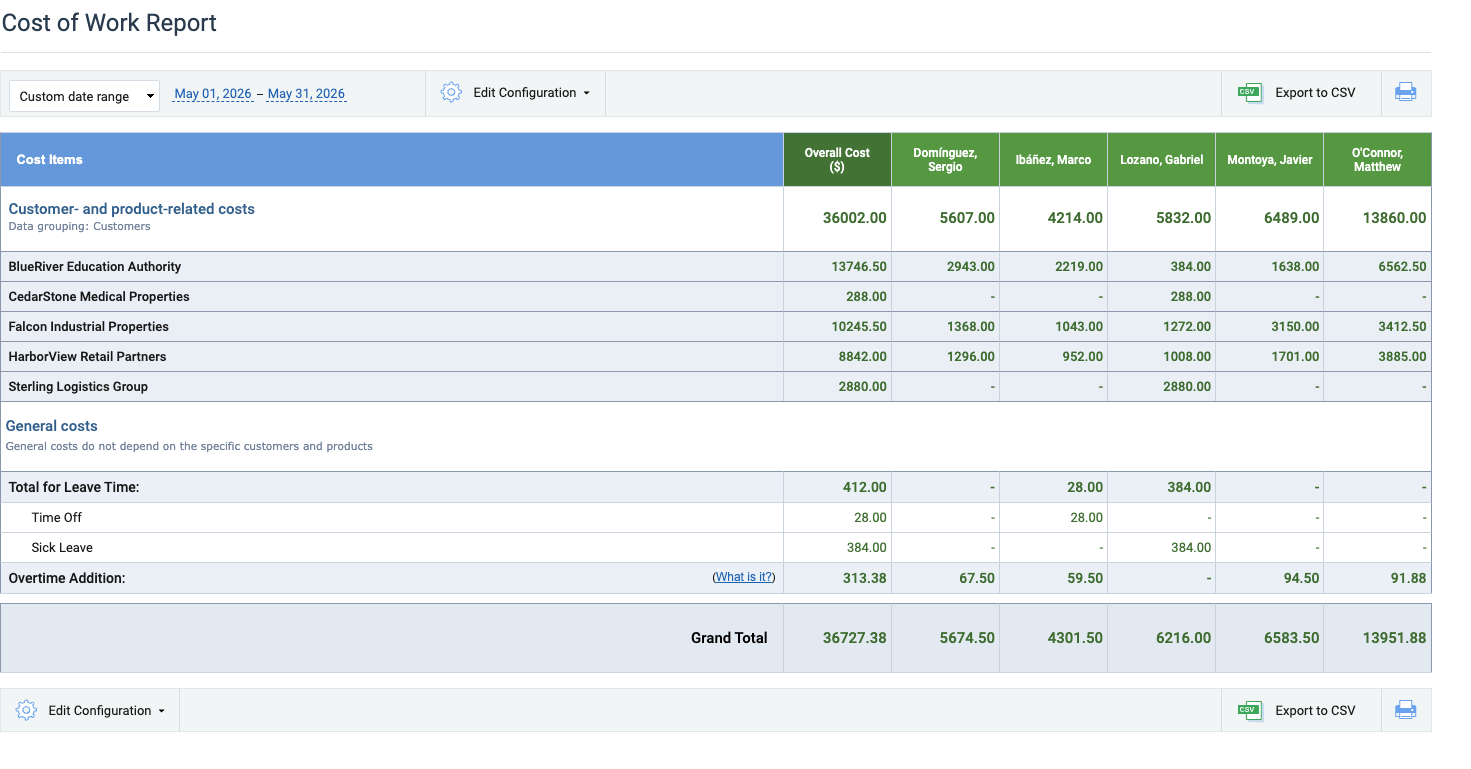
Job costing runs off the same tracked hours: set a cost of work rate per employee (covering regular, overtime, and leave hours) and a billing rate per type of work, and actiTIME calculates labor costs and billable amounts automatically as the crew logs time. The Cost of Work Report breaks down staff costs per user, the Billing Summary Report totals billable amounts by period, and the Profit/Loss Report compares the two by customer, project, or task.
Invoices generate directly from tracked billable time and rates as PDFs, without a separate invoicing tool. For teams already using QuickBooks Online, actiTIME’s integration imports timesheet data directly for payroll and invoicing, so time doesn’t need to be re-entered in a second system.
Payroll, overtime, and leave management
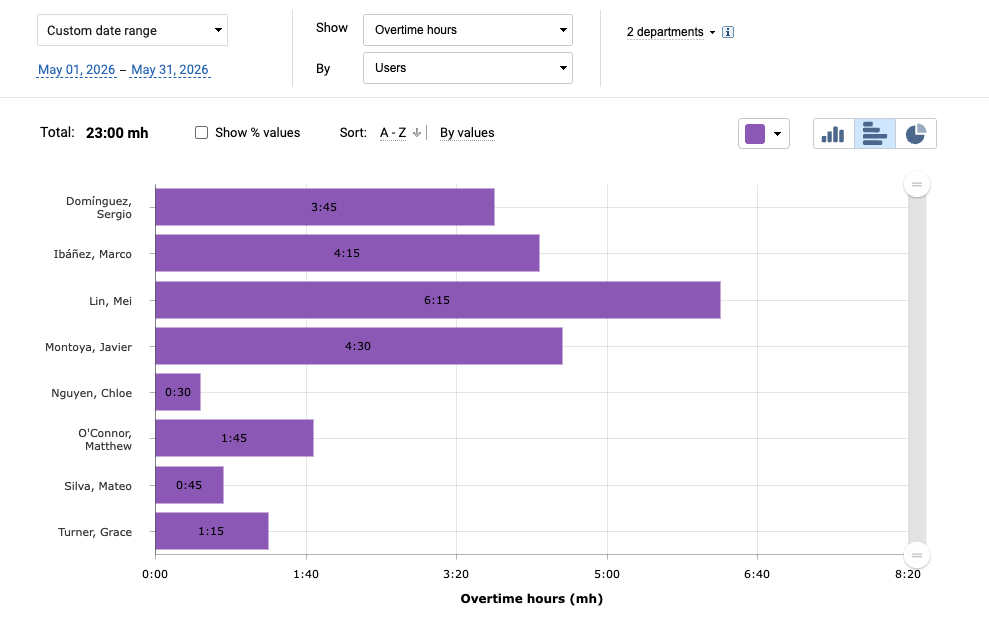
Overtime is one of the more construction-specific requirements actiTIME handles: each user’s overtime calculation can be set to automatic (visible or hidden from the user) or manual entry, following the applicable state or company rules, and overtime is paid at its own rate, separate from regular hours. Overtime costs flow straight into the Cost of Work Report and the Time Balance and Overtime Report.
Leave works the same way. Crews log leave against customizable leave types, each tied to a PTO or sick day balance if needed, and accrual rules can run weekly, biweekly, monthly, or yearly, with caps and blackout days to control when leave can be taken. Leave carries its own hourly rate too, so vacation and sick time show up as a real cost in the Cost of Work Report rather than disappearing from the budget entirely.
Reports built for construction management
Beyond the cost and billing reports above, the Locations Report is the one built specifically for teams working across more than one job site: it breaks down time spent per location with a bar chart, so a manager running several active jobs can see where labor hours are actually concentrated without pulling a separate report per site. The Staff Performance Report gives the same breakdown per employee, and custom fields let a team track anything specific to their own workflow (permit numbers, equipment used, weather delays) and report on it later.
Most reports export as HTML or CSV; invoices, charts, and a handful of others (Time Balance and Overtime, Leave Time and Balances, Estimated vs. Actual Time) also export as PDF.
actiTIME pricing for construction teams
actiTIME is one product with no feature tiers, so every construction team gets the same feature set regardless of which option they pick – only the price and hosting change. The free version works permanently for up to 3 users, with a limited feature set and no credit card required, which covers a very small crew but not much more. The Online option runs $6 per user per month for teams of 1–40 users, dropping to $5 per user for 41–200 users, billed annually, and unlocks the full feature set covered above, including overtime tracking, task estimates, budgets, and the QuickBooks integration.
For contractors who’d rather own their infrastructure than pay monthly, the self-hosted version costs $120 per user as a one-time payment instead of a subscription. Current numbers are always worth confirming on actiTIME’s pricing page directly. A 30-day free trial gives full access to every feature before committing to either option, and human support plus onboarding is included regardless of which one a team picks.
Security and deployment options
For contractors handling government or prevailing-wage work where data control matters, the self-hosted version above gives full infrastructure control instead of running in the cloud. Both versions support two-factor authentication, and the cloud version includes daily data backups plus configurable password and account-lockout policies.

We reduced payroll processing to 45 minutes per week
actiTIME is very robust, integrated well into your business process, and most important, helps you focus on your business instead of monkeying around with technology. actiTIME has reduced our payroll processing from 4-6 hours per week to 45 minutes per week.
FAQ
Does actiTIME integrate with tools besides QuickBooks?
Yes. actiTIME connects to over 2,000 apps through Zapier, and an open API is available for teams that want to build custom connections or pull data into their own systems.
Does actiTIME track GPS location like other construction time clock apps?
No. actiTIME doesn’t do GPS geofencing or photo verification at clock-in. It’s built for the step after that: turning logged hours into task budgets, billing, and payroll. Teams that need site-verified clock-ins often pair actiTIME with a dedicated GPS time clock app and use actiTIME for the cost and billing side.
What does actiTIME offer for crews working across multiple job sites?
The Locations Report breaks down time spent per site with a bar chart, and the mobile app works offline so crews without reliable signal can still log hours that sync once reconnected.