Construction sites often look like chaos: workers are buzzing around, managers are screaming loudly to be heard, materials and equipment are constantly moving all over the place. In such a context, organization is key, which means not only developing a safe and well-regulated work environment but also applying proper management practices and tools.
In this regard, construction time tracking can serve businesses well as it puts team performance in order and increases employee accountability. Time tracking produces many other benefits for construction professionals as well. This article covers what it actually takes, the trade-offs involved, a practical implementation strategy, common mistakes to avoid, and the tools that support it.
What is construction time management?
A construction schedule is the plan: the dates, durations, and task order laid out before anyone picks up a tool. Construction time management is what keeps that plan honest once work actually starts: coordinating crews and resources day to day, recording what really happened against what was planned, clearing whatever’s blocking the next task, and adjusting the plan itself when site conditions change. A polished schedule doesn’t control a project by itself. It only works if someone is actively managing the gap between what was planned and what’s actually happening on site.
That’s the piece construction time tracking software supports directly: it doesn’t replace the schedule, but it gives you the actual labor and progress data you need to tell whether the schedule still holds.
Pros and cons
Benefits
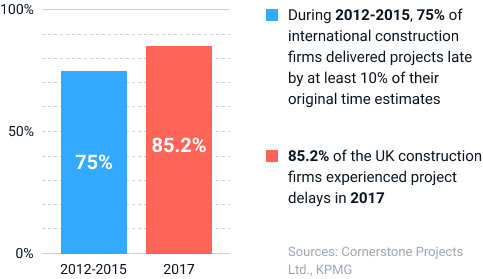
Project delays in construction are widespread, and they lead to many adverse effects, from minor budget overruns to the total abandonment of work.
A study by Cornerstone Projects Ltd. revealed that, among 61 UK construction industry respondents surveyed in 2017, over 91% had experienced delayed projects, with poor original planning and unrealistic scheduling cited as the leading cause. But the United Kingdom is not the only one to suffer the consequences of unmet deadlines. The 2015 study by KPMG showed that just 25% of projects came within 10% of their original deadlines over the three years prior to the survey.
So, why do construction firms continually struggle to deliver projects on time? Of course, some of the major contributing factors, such as adverse weather and price escalations, are impossible to control. But many other reasons for failure stem from inadequate management:
- Poor scope definition,
- Mistakes in the initial project design,
- Ineffective client communication, etc.
Unrealistic scheduling and workforce challenges are also among the leading causes of project delays in the construction industry, and time tracking can help you address both of them:
- It lets you see whether your workers show progress or fail to achieve performance targets as planned.
- Digital time tracking tools store data on team productivity in one place, allowing you to detect behavior inefficiencies quickly and analyze your workload distribution decisions in-depth.
- Time tracking data submitted throughout a completed project may be used to develop accurate time estimates for new similar projects.
Besides, many construction time tracking instruments available in the market today can readily support you in:
- Labor cost monitoring,
- Compliance with deadlines,
- Billable time calculation,
- Competitive bidding (with the backlog data),
- Task management, and more.
Those numbers only tell part of the story. A closer look at where a typical week actually goes, per an analysis by construction management platform Projul, makes the case even clearer: on many crews, direct project work eats up roughly 15–20 hours out of a 40-hour week, while communication takes another 8–12 hours, scheduling 5–8 hours, paperwork 3–5 hours, and rework 2–4 hours. That leaves less than half the week for the work that actually moves a project forward. Every time a worker gets pulled off one task to answer a call or track down a document, it costs roughly 23 minutes of lost focus before they’re back up to speed, and rework alone can eat up about 5% of total project cost on a job that otherwise looks like it’s running fine.
Accountability is the other side of the same coin. When hours are logged against a specific task instead of disappearing into a single daily total, it’s immediately visible who did what and when, so a slipping task gets caught while there’s still time to fix it, and credit goes where it’s due. That visibility is also what makes the reward-based approach in the strategy below actually work: you can’t recognize your most diligent trackers if the data doesn’t clearly show who they are.
Drawbacks
Time management is also genuinely harder to do well in construction than in a typical office. Crews are spread across multiple job sites instead of one building, most of the workforce is rarely at a desk, subcontractors and temporary labor often sit outside your normal reporting structure entirely (a subcontractor documentation tracker helps close that gap), connectivity on some sites is unreliable, and many teams have years of paper timesheets and verbal updates to unlearn. None of this means the effort isn’t worth it. It means the rollout has to account for these specifics rather than copying a plan built for an office team. That’s what the next section covers.
How to build a time management strategy for construction crews
Here’s the full routine at a glance, before the detailed breakdown below:
| Step | What it covers |
|---|---|
| 1. Start with accurate time estimates | Set realistic deadlines before tracking begins |
| 2. Plan from milestones and protect your critical path | Know which delays actually move the finish date |
| 3. Build buffer time into your schedule | Absorb the disruptions every job faces |
| 4. Adopt a time tracking tool early | Make tracking easy enough that people actually do it |
| 5. Delegate clearly and cross-train your team | Give every task a named owner and a backup |
| 6. Structure communication instead of leaving it to chance | Give updates a fixed rhythm instead of ad hoc calls |
| 7. Educate team members on how to use the tracker | Make sure adoption doesn’t stall on unfamiliarity |
| 8. Encourage employees to track time regularly | Keep the habit going once the novelty wears off |
| 9. Analyze performance data with real metrics | Prove the routine is actually working |
1. Start with accurate time estimates
Accurate time estimates are an underlying part of project management – without them, you won’t be able to establish realistic deadlines and will bear an elevated risk of project delays. Therefore, prior to proceeding with time tracking itself, dedicate enough resources and attention to obtain as accurate task and project estimates as possible.
When estimating a construction project, especially a complex one, you need to take into account plenty of variables. Break the estimate down into realistic construction time frames per phase and per task, not just one overall deadline for the whole job – a single end date tells you nothing about whether week three is actually on pace, while a set of phase-level time frames gives you an early warning the moment one of them slips. We won’t be able to discuss them all within the scope of this article, but many useful materials on this subject are already published in actiTIME Blog:
- Which types of information do you need for estimating tasks correctly?
- What time estimation techniques suit your case best?
- What are the benefits of collaborative time estimation?
Feel free to check out the above articles in order to set more realistic deadlines and then track work hours as a means to adhere to them.
2. Plan from milestones and protect your critical path
Break the project into milestones: inspections, material deliveries, phase completions. Work backward from each one to find the latest safe start date for the tasks that lead up to it. Then identify your critical path: the specific chain of dependent tasks where a delay pushes back the whole project, as opposed to a task that feels urgent locally but has slack elsewhere in the schedule. For more on this, see our own guide to scheduling and time management in construction. Not every fire drill is a critical-path problem, and knowing the difference is what tells you where extra crew, overtime, or a faster decision actually buys back time, and where it doesn’t.
Mapping which tasks depend on which also surfaces hidden waiting before it costs you a day: list what each activity needs before it can start (a completed handoff, an inspection, a material delivery, an approval) and name who’s responsible for clearing it.
3. Build buffer time into your schedule
A schedule with zero slack turns every minor disruption (a late delivery, a day of rain, an equipment breakdown) into a missed deadline. Add reserve time around key milestones rather than scheduling tasks back to back, so the plan can absorb the kind of problem that shows up on almost every job without cascading into the next phase. This isn’t about padding every task equally; concentrate the buffer where the real uncertainty actually is: weather-exposed phases, deliveries with long lead times, work that depends on a third party. Don’t spread it evenly across a schedule that doesn’t need it everywhere. Building in this kind of margin is what keeps a schedule realistic rather than optimistic.
4. Adopt a time tracking tool early
Time tracking with a high-quality digital tool is always much easier than with traditional methods (e.g., Excel spreadsheets). Smart pieces of software, such as actiTIME:
- Increase time tracking accuracy,
- Make the process effortless,
- Provide comprehensive performance reports,
- And, in addition, streamline many essential tasks (e.g., billing and payroll) that would otherwise take hours to complete.
But regardless of the apparent benefits of modern time trackers, your team members can be reluctant to adopt them if accustomed to applying other methods. Thus, the earlier you integrate a construction time tracking tool into your workflow, the better. And if you’re worried that your workers won’t be very enthusiastic about the innovation, undertake some precautionary measures:
- Try out several apps to choose the best one for your team,
- Test it for some time to make sure it’s convenient to implement and won’t cause any troubles to your employees,
Also, aim to detect as many benefits of using a digital time tracker in your company as possible and communicate these benefits to your team members. This will allow you to boost their motivation better.

5. Delegate clearly and cross-train your team
Assign each task to the person whose skills actually match it, and make ownership explicit – a task with two people loosely responsible for it is, in practice, a task nobody owns. Our guide to resource and cost management covers matching people to work in more depth. Clear delegation also frees you up for the decisions that actually need a manager’s attention instead of chasing the status of work someone else should already be handling.
Cross-train where you can, so a single absence doesn’t stall a task that only one person knows how to do. It also makes tracked time more useful: when more than one team member can competently do a given job, you get a real range for how long that type of task should take, instead of a single data point tied to one person’s pace.
6. Structure communication instead of leaving it to chance
A lot of the time lost on a job site isn’t lost to bad work. It’s lost to the same question getting asked and answered three times, or a schedule change that reaches half the crew and not the other half. Give communication a fixed rhythm instead of letting it happen ad hoc: a short daily check-in for immediate blockers (a daily report template keeps this consistent across crews), a weekly review of the schedule against actual progress, and a standard weekly update sent to clients (progress summary, photos, what’s next) so they’re not calling to ask for one.
Put decisions and schedule changes in writing somewhere the whole crew can reach, rather than relying on whoever happened to be on the call. It costs a few minutes upfront and saves the much larger cost of two people working from two different versions of the plan.
7. Educate team members on how to use the tracker
Although contemporary people are generally tech-savvy, and the majority of time trackers are fairly simple to use, some of your workers may still need assistance with learning how to integrate a new piece of software into their daily routines.
Think about the ways to provide such help to them: Will you arrange a short-term group course or a training session? Will you pair up your least tech-savvy team members with those who get along with the technology well? Will you simply collect some valuable resources from the Internet and share them with your workers? Options are many. So, evaluate your team needs thoroughly to select the most appropriate one.
8. Encourage employees to track time regularly
Construction time tracking works best when practiced regularly. A failure to keep a record of hours spent on even the most trivial job activities and ensure that employees are productive enough can cost your business a ton of money. Thus, you need to motivate your team to use the time tracker throughout the day and fill in timesheets once a task is completed.
A great way to do so is by rewarding the best time tracker users. You can offer some small cash bonuses, treats or extra time off to the most diligent in construction time tracking. By showing your employees that you appreciate their efforts, you’ll speed up the process of tool adoption and maximize the advantages of time tracking.
9. Analyze performance data with real metrics
Another great way to dispel doubts in the value of construction time tracking is by providing your employees with evidence on its effectiveness.
Did your business experience some massive productivity problems before? Did you fail to meet deadlines ever so often? Or did your projects incur too many labor costs? Compare previous performance data to that collected with a newly adopted time tracker to see whether your work process has accelerated, become less cost-consuming, and started to produce the desired outputs faster. Summarize the results and show the findings to your employees to make them understand why time tracking is good for everyone in the team.
Give the comparison some real numbers to work with instead of a general impression. Track schedule variance (planned finish date vs. actual), the percentage of tasks completed on time, and planned hours vs. actual hours logged per task. That last one gets at construction productivity tracking directly, since it measures how much work those hours actually produced rather than just how many got logged. If tracked hours are climbing while completed work isn’t, that’s a production problem worth investigating before it shows up as a missed deadline. If a specific task type consistently runs over its estimate, that’s a signal to fix the estimate, not just the execution.
Time data is also one of the more reliable inputs for construction progress tracking more broadly: alongside photos, inspections, and percent-complete estimates, hours logged against a task tell you whether the work is actually moving at the rate the schedule assumes.
Time tracking mistakes that undo good planning
A few patterns show up often enough to call out on their own:
| Mistake | Why it hurts | Better approach |
|---|---|---|
| Treating the schedule as fixed once it’s set | Hides how far current progress has drifted from the original plan | Compare actual vs. planned regularly and revise openly |
| Starting a task before its prerequisites are confirmed | Creates a stall the moment a missing approval or delivery surfaces | Check dependencies before a crew reaches the workface |
| Calling every delay “critical” | Spends limited attention and overtime budget on tasks that had slack anyway | Check the critical path before reacting |
| Logging hours without linking them to a specific task | Makes it impossible to tell where the time actually went | Track time by job and task, not just by day |
| Skipping buffer time entirely | No margin left for the disruptions every job runs into | Build in reserve time at key milestones |
| Keeping the schedule and time records in separate systems | Nobody can see whether logged hours match actual progress | Connect scheduling and time tracking data |
Useful construction time tracking tools and features
Construction time tracking tools generally fall into a few types, and most crews end up combining more than one rather than relying on a single all-in-one product:
- Field time clock apps – mobile clock-in/clock-out built for workers who are rarely at a desk, often with offline support for sites with unreliable signal.
- Task- and budget-based time tracking – ties logged hours to specific tasks, projects, and cost estimates, so time data feeds directly into budget tracking and billing instead of sitting as a separate attendance record.
- Payroll and certified payroll tools – built around wage calculation and, for government or prevailing-wage work, the specific compliance reporting that general time tracking tools don’t handle.
- Equipment and asset hour tracking – tracks machine and vehicle hours rather than labor hours, feeding maintenance schedules instead of payroll.
Which combination makes sense depends on what you’re actually trying to solve. A small crew mainly needs accurate hours tied to jobs, while a larger contractor juggling government contracts or a mixed equipment fleet usually needs two or three of these working together. For a broader look at general-purpose options, see our roundup of construction time tracking tools; if budget tracking is the main driver, our guide to construction budget tracking software covers that ground in more depth.
How actiTIME helps you manage time on the job
actiTIME falls into the task- and budget-based category above: time logged against a task rolls up directly into time, cost, and billing budgets tracked at the task, project, and customer level, so you can see where a job is running over its estimate while there’s still time to act on it. The estimated-vs-actual time report gives you exactly the kind of concrete comparison the metrics tip above calls for, without building it manually in a spreadsheet.
For crews working across several job sites, the locations report shows where time is actually being spent, and the mobile app records time on the go and keeps working offline, which matters on sites where signal isn’t reliable. Leave tracking and a QuickBooks Online integration cover the payroll and time-off side without a separate tool.


FAQ
What’s the difference between a construction schedule and time management?
A schedule is the plan: dates, durations, and task order laid out before work starts. Time management is the ongoing discipline of keeping that plan honest: tracking actual hours and progress against it, clearing blockers, and adjusting when site conditions change. You can have a perfect schedule and still fall behind if nobody is actively managing the gap between it and what’s really happening on site.
How do you track time across multiple job sites at once?
The core requirement is a mobile time tracking tool that works reliably offline, since connectivity on job sites is inconsistent, plus a locations or site report that rolls hours up by site rather than just by employee. That combination lets you see, at a glance, whether labor hours per site line up with each site’s own schedule and budget, not just a company-wide total.
How often should you compare your schedule against actual progress?
Weekly, at minimum, for the full schedule, with a quick daily check on anything currently on the critical path. High-change phases (early mobilization, a phase with a lot of subcontractor handoffs) warrant a tighter cycle; stable, routine phases can run on the weekly rhythm alone.
Ready to introduce construction time tracking?
Managing a construction business is a challenging job. However, construction time tracking software can make the life of a construction manager much easier by fostering effective progress monitoring and an in-depth analysis of employees’ time use behaviors.
Are you ready to advance the time tracking system in your company? Sign up for a free actiTIME trial to boost team productivity and attain superior project outcomes.