
Most businesses start tracking employee time for one reason, usually payroll or client billing, and then find the data answers questions they had been guessing at: which projects lose money, who is overloaded, why quotes keep coming in low. Those answers are where most of the benefits of employee time tracking come from, and you only get them if hours are logged against the actual work instead of as one daily total.
So why track employee time at all? This guide covers nine benefits, with the arithmetic behind the biggest one, the ways time tracking backfires, and how to introduce it without damaging trust.
What is employee time tracking?
Employee time tracking is recording the hours people work, and ideally what they worked on, so the business can pay, bill, and plan from accurate data. It ranges from a clock in and clock out for shift staff to timesheets where every hour is logged against a client, project, and task. The second kind produces far more of the benefits below, because it connects hours to the work they were spent on. For the basics, see our guide to what time tracking is.
9 benefits of employee time tracking
1. Accurate pay and legal compliance
Paying people correctly for every hour, overtime included, is the first reason most businesses track time. In many places it is also the law.
In the US, the Fair Labor Standards Act requires employers to keep records for nonexempt employees that include hours worked each day and total hours each workweek, and to keep the time cards that wage calculations are based on for two years, according to the Department of Labor’s recordkeeping fact sheet. In the European Union, the Court of Justice ruled in 2019, in case C‑55/18 (CCOO v Deutsche Bank) that member states must require employers to set up an objective, reliable, and accessible system for measuring each worker’s daily working time. How countries implement that ruling varies, so check the rules where your team works.
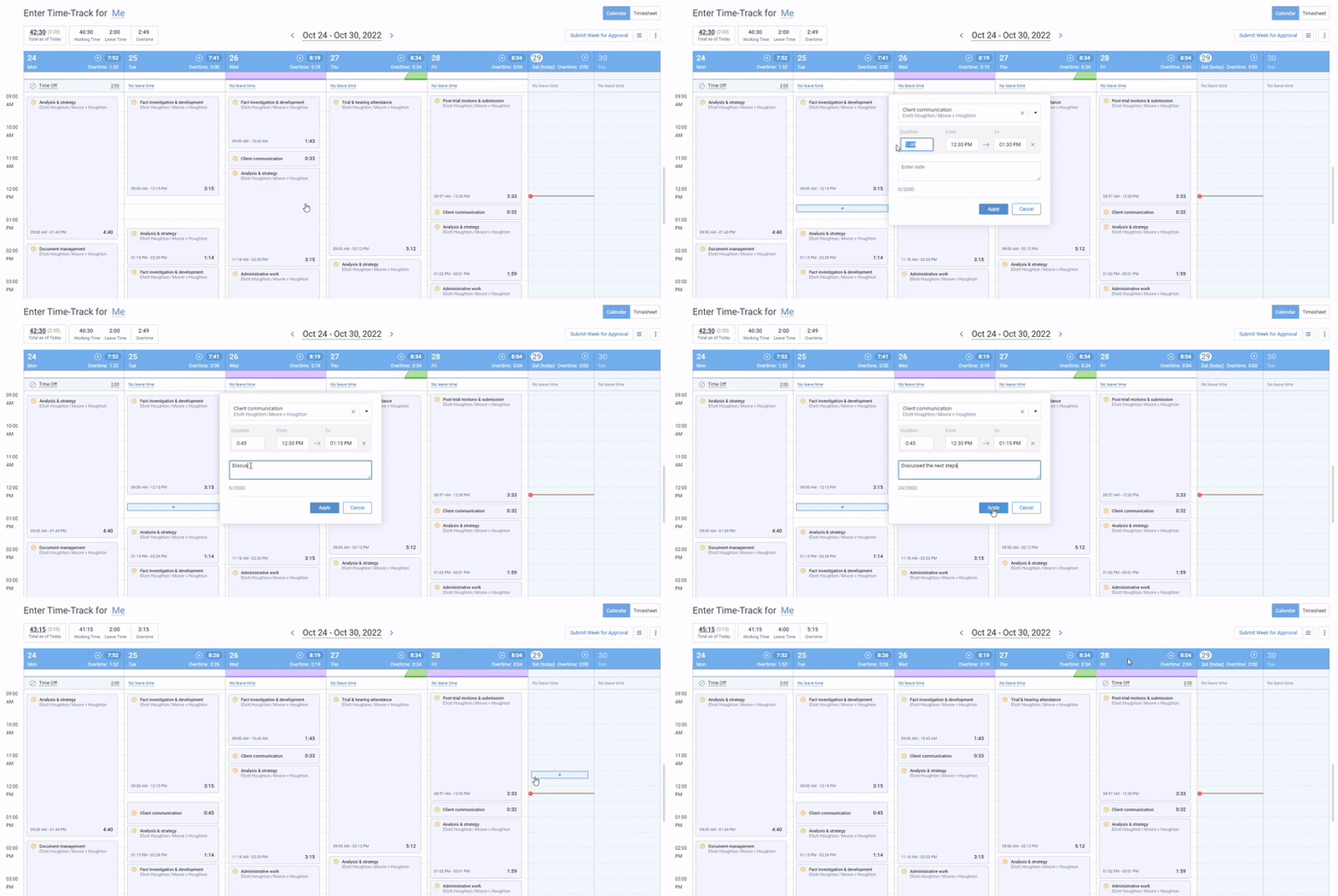
In actiTIME, employees can log exact start and end times per task in the Calendar View, overtime is calculated automatically or entered manually depending on your settings, and each person has a separate overtime rate so overtime costs show up correctly in reports. For the overtime arithmetic itself, see our guide to overtime calculation.
2. Billing every hour you work
For any business that bills by the hour, untracked time is unbilled time. The leak is rarely big blocks of work; it is the short calls, quick fixes, and review rounds that nobody writes down. Here is an illustrative calculation for a small agency.
At 30 minutes a day the figure doubles to $103,500. The inputs are made up, but the pattern is common: a few unlogged minutes a day cost more than any tracking tool. Accurate records also make invoices easier to defend, because you can show a client exactly which tasks the hours went to.
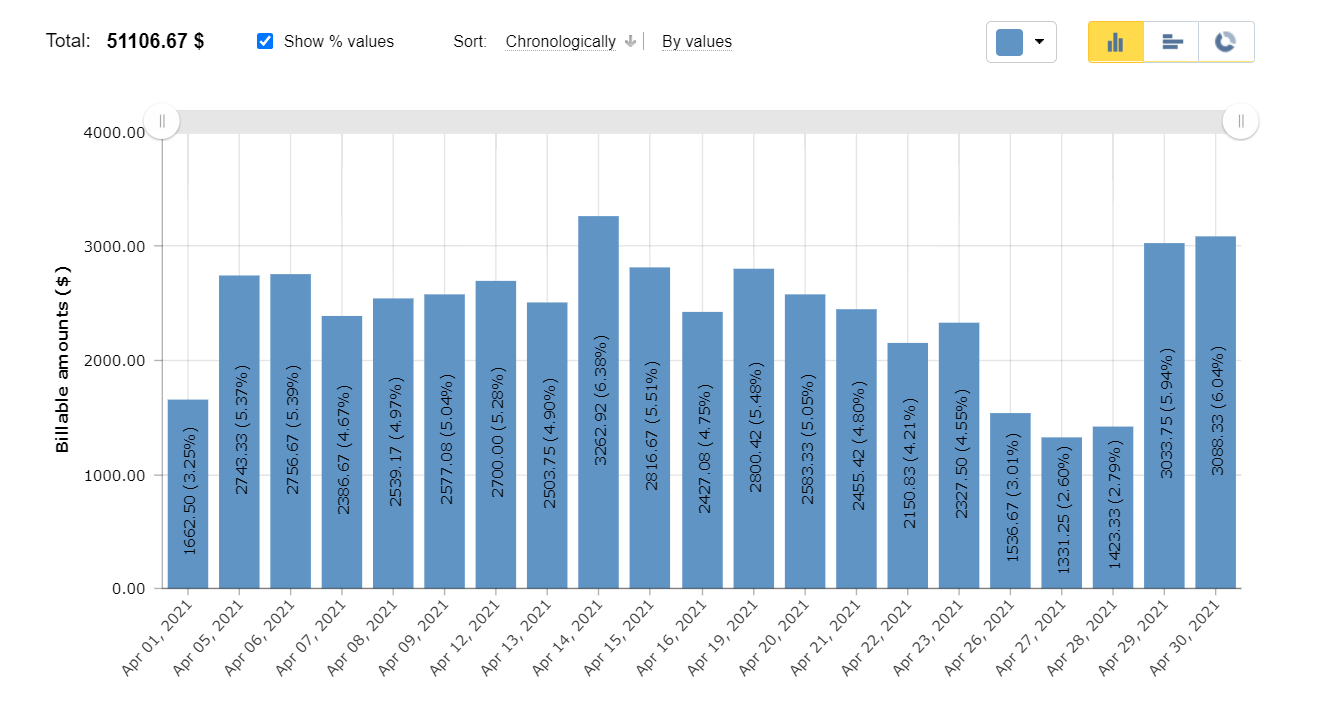
In actiTIME, billing rates are set on types of work and applied to tasks, billable amounts build up as people log time, and invoices are generated from that billable time. Our guide to project cost and client billing shows the setup.
3. Better estimates and quotes
Estimates go wrong when they are based on memory. Time tracking replaces memory with a record: if the last three website builds took 140, 165, and 150 hours, quoting the next one at 100 is a choice you make knowingly. Over time you also learn your team’s typical estimation error and can correct for it.
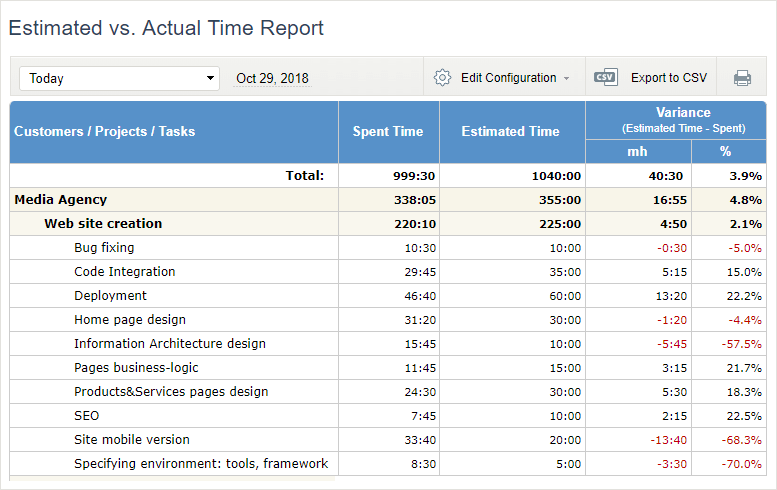
It also helps to compare estimates with actual hours while the work is still in progress. In actiTIME you set estimated hours on tasks, and the Estimated vs. Actual Time Report shows which tasks are running over while there is still time to react.

Now we can better predict future project requirements
Our company needed a simple way of tracking time used on multiple projects – and actiTIME fit the need. Its interface is simple and easy to maintain. We use the application for time management, task estimation and also to communicate deadline information to our team members. Now having actiTIME we can better predict future project requirements!
4. Projects that stay on budget
On most service projects labor is the biggest cost, so tracking hours is most of what budget tracking means. When each hour carries a cost, you can see a project burning through its budget in week three instead of finding out at the final invoice.
actiTIME sets a cost rate for each person (regular, overtime, and leave), turns tracked hours into staff costs in the Cost of Work Report, and lets you set cost budgets on customers, projects, or tasks with a progress bar that turns red once the budget is exceeded.
5. Knowing which work pays
Revenue per client is easy to see in accounting software. Profit per client is not, because accounting rarely knows how many hours each client took. Once hours are tracked against clients and projects, you can compare what each one paid with what it cost to deliver, and some of your busiest clients may turn out to be your least profitable.
In actiTIME, the Profit/Loss Report compares billable amounts with costs by customer, project, or task, which is the view most owners want when they decide which work to take on, reprice, or drop.
6. Fairer workloads and less burnout
Overload is hard to spot from the outside, because overloaded people often look the same as busy ones. Time data shows it directly: who logs regular overtime, whose leave balance keeps growing because they never take it, and whose hours sit well below capacity. That lets you rebalance work before someone burns out or quits. Our article on how to prevent employee burnout covers the people side.
actiTIME tracks leave in the same timesheet as work, against leave types tied to PTO balances, and the Time Balance and Overtime Report shows work time against scheduled hours for each person.
7. Fixing workflows with real data
When hours are logged against tasks, patterns appear that nobody would notice otherwise: a review step that takes longer than the work it reviews, meetings eating a third of a team’s week, a routine report that one person spends a full day assembling. Each is a specific, fixable problem once you can see it in the numbers.
Look at the data by task and type of work as well as by person. A person logging long hours on a task is information about the task as often as it is about the person.
8. Accountability without surveillance
Time tracking makes expectations concrete. If a task was estimated at eight hours and has taken twenty, that is a conversation worth having, and the tracked hours make it about the task rather than about impressions.
This is different from monitoring. Screenshots and activity scores show that a laptop was busy; hours logged on tasks against estimates and deadlines show whether the work moved forward. Task records build accountability without treating people as suspects. It also deals with the most common form of timesheet fraud, padded hours, because padding shows up as tasks running consistently over estimate.
9. Proof of hours for employees
Time tracking benefits employees too. An accurate record is proof of the overtime someone worked, the leave they have left, and the extra hours a project really took. It also gives people a data based way to push back on workload: “the last three reports took 12 hours each, so I can’t take on a fourth this week” lands better than “I’m too busy”.
Individuals also get better at estimating their own work, which makes deadlines more realistic and evenings more predictable.
When time tracking backfires
Time tracking has real downsides, and they explain most failed rollouts.
- It feels like surveillance. Screenshot capture, keystroke counts, and activity scores tend to damage trust and measure the wrong thing. Track time on tasks, explain why, and leave monitoring out unless there is a specific, stated reason.
- It adds admin. If logging time takes more than a few minutes a day, people stop doing it accurately. Choose a tool with fast entry (a timer, a weekly grid, a phone app) and reasonable defaults.
- It gets gamed. If tracked hours drive bonuses or rankings, people log to the target. Use the data to fix estimates and workloads, not to rank people.
- Nobody uses the data. The fastest way to kill time tracking is to collect it and never act on it. Share what you learned and what changed because of it.
For a closer look at automatic tracking specifically, see our article on the pros and cons of automated time tracking.
How to introduce employee time tracking
-
Say why, specifically.
“We are underquoting fixed price projects” is a reason people accept. “We want to see what you do all day” is not.
-
Track against work, not just hours.
Set up clients, projects, and tasks first, so every hour lands somewhere useful.
-
Make entry fast.
Pick one main method (timer, weekly timesheet, or mobile app) and a clear deadline, such as Friday afternoon.
-
Approve and correct weekly.
A weekly approval step catches gaps while people still remember what they did.
-
Show results within a month.
Share one thing the data changed, such as a better quote or a rebalanced workload, so tracking feels worth the effort.
If you are comparing tools, see our roundup of employee time tracking software.
FAQ
Does time tracking actually work?
It works when the data is used. Tracking alone changes little; the benefits come from acting on it, such as requoting work that runs over, rebalancing overloaded people, and billing hours that were slipping through. Teams that track time against tasks and review it weekly see results; teams that only collect daily totals for payroll mostly get accurate payroll.
Is time tracking worth it for employees?
Usually, yes, as long as it tracks work rather than monitoring activity. Employees get a record of overtime and leave, evidence when workload is too high, and better estimates of their own work. The cost is a few minutes a day, which a good tool keeps low.
Should salaried employees track time?
Often, yes, though for different reasons than hourly staff. Salaried time data shows project costs, capacity, and burnout risk, and in some jurisdictions working time must be recorded regardless of pay type. Our guide to timesheets for salaried employees covers the details.
Conclusion
The case for tracking employee time rests on two things: accurate pay and billing, which every business needs, and the decisions the data makes possible, which is where most of the value is. Track hours against real work, keep entry quick, stay away from surveillance, and act on what the numbers show.
To see these benefits with your own team’s data, start a free trial of actiTIME.