
Quick AnswerProject cost tracking software is a tool that monitors, records, and controls all project-related expenses in real time, capturing labor costs from tracked time, logging direct expenses, and comparing actual spending against the original budget at the task, project, and client level. It gives teams the financial visibility to finish projects on budget and understand whether each project is profitable.
According to global project management research, only 43% of companies worldwide complete their projects within budget. The other 57% face overruns driven by manual tracking and a lack of real-time visibility into where money is actually going. Spreadsheets fall apart once a project has more than a few moving parts, and by the time a manager spots a problem, the budget has already slipped.
Project cost tracking software solves this by giving teams a single place to monitor expenses, calculate labor costs, and compare actual spending to the original budget in real time. The right tool can mean the difference between a project that finishes profitably and one that quietly loses money until the final invoice.
This guide compares the best project cost tracking software tools available in 2026, covering features, pricing, and which teams each tool fits best. Whether you are running a small consultancy or managing a large project portfolio, there is a tool in this list for you.
What Is Project Cost Tracking Software?
Project cost tracking software is a tool that monitors, records, and controls all project-related expenses throughout the project lifecycle. It converts tracked time, logged expenses, and predefined hourly rates into a clear financial picture, showing teams exactly how much each project has cost and whether spending is on track against the original budget.
Unlike generic accounting software, project cost tracking tools are built around the project structure, tracking costs at the task, project, and client level rather than recording transactions in isolation.
The five cost types most tools track:
- Direct costs: Expenses directly tied to a specific project, such as employee hours, freelancer fees, and purchased materials.
- Indirect costs: Overhead expenses shared across multiple projects, including office rent, utilities, and administrative salaries.
- Fixed costs: Costs that stay constant regardless of project scope or duration, such as software licenses or flat-fee contractor arrangements.
- Variable costs: Costs that change as the project progresses, such as hourly labor or materials purchased on demand.
- Contingency costs: A reserved budget buffer that covers unexpected expenses and scope changes.
How project cost tracking works in four steps:
- Set the budget. Before the project begins, define expected costs across categories and set spending limits for each.
- Monitor spending. As work progresses, log hours, expenses, and other costs against the project budget using specialized project management software in real time.
- Adjust when needed. If actual costs diverge from the budget, reallocate funds, adjust scope, or escalate early.
- Review after completion. Compare final costs to the original budget and apply what you learn to future project estimates.
What Features Should You Look for in Project Cost Tracking Software?
Not all cost tracking tools are built the same. Here are the features that matter most when evaluating your options.
Time tracking integration
Labor is typically the largest cost on any project. A tool that connects time tracking directly to cost calculations means you never need to manually convert hours into dollars; the software does it automatically using predefined rates.
Real-time budget monitoring and alerts
The most valuable cost data is current cost data. Look for tools that show budget versus actual spending as it happens, with configurable alerts that notify you before a project goes over budget rather than after.
Labor cost automation
The tool should calculate labor costs automatically based on tracked hours and the hourly rates set for each work type. This removes manual calculations and reduces the risk of errors that are common with spreadsheet-based tracking.
Expense and receipt management
Beyond labor, projects incur travel costs, materials, and other direct expenses. A good tool lets team members log these expenses, including via mobile receipt capture, and associates them with the correct project or task.
Project-level and task-level tracking
You need cost visibility at every layer of the project, not just a single total number. Task-level tracking helps you identify which parts of a project are consuming the most budget, so you can act before overruns compound.
Reporting and dashboards
Look for customizable reports that show time spent, costs incurred, and billing amounts side by side. Profit and loss reporting is especially valuable for teams doing client-facing work.
Accounting integrations
Your cost tracking tool should connect to your accounting software, QuickBooks, Xero, or FreshBooks, so financial data flows without manual re-entry between systems.
Scalability for team growth
A tool that works well for a team of five should still work well at fifty. Check whether the pricing model and feature set hold up as your organization grows.
Best Free Project Cost Tracking Software
1. actiTIME — Best Overall for Teams Managing Multiple Projects
Key features:
- Mobile app
- Calendar view
- Automatic time tracking
- Client billing
- Budget notifications
- Time off management
- Integrations
actiTIME is project time tracking software built on a clear premise: tracking hours should tell you something about money, not just minutes. Unlike most time trackers that stop at recording hours, actiTIME connects logged time directly to project finances, calculating labor costs automatically, monitoring budgets in real time, and generating profit and loss reports that show actual revenue versus cost per project.
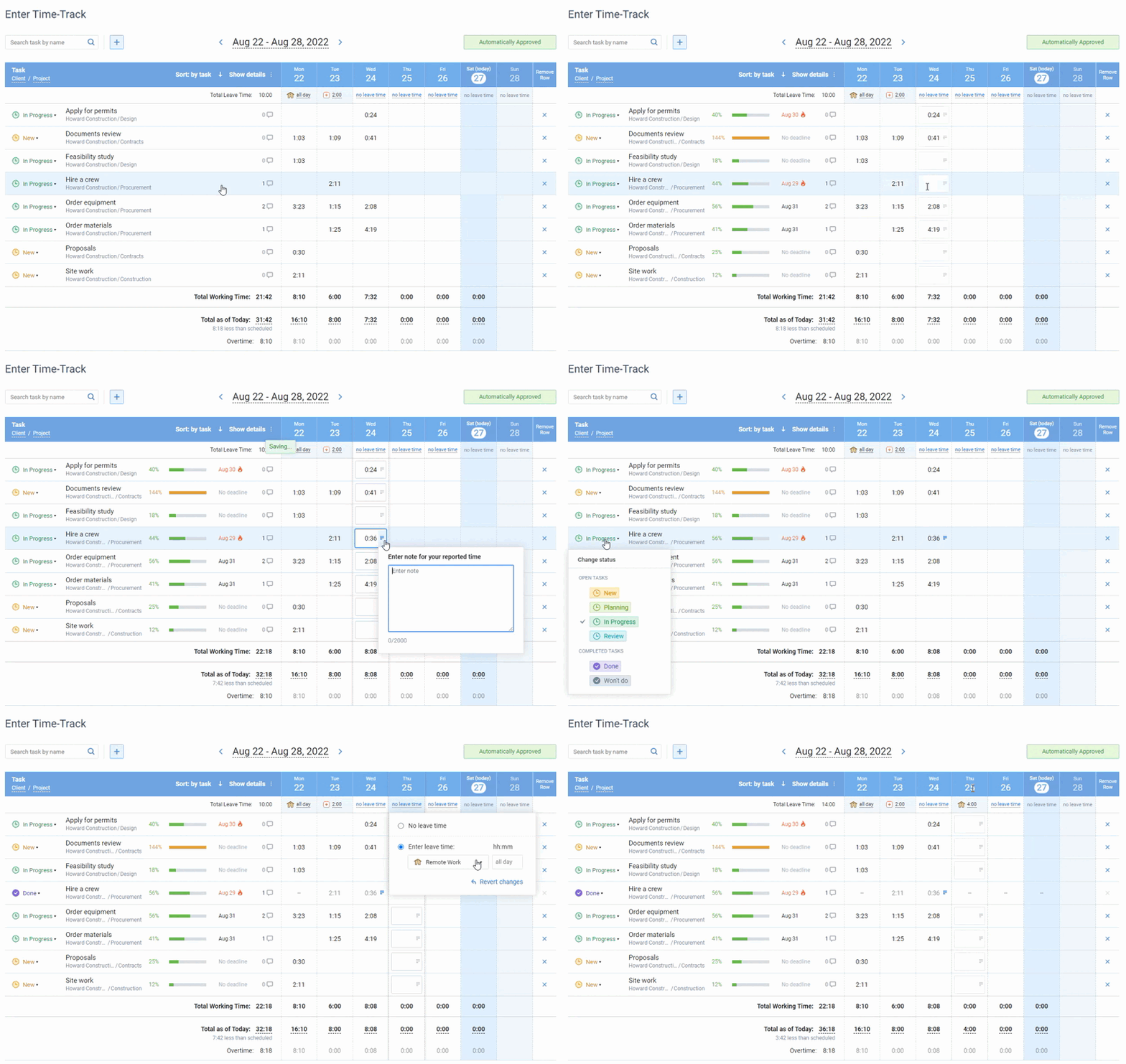
Teams use actiTIME to set budgets at multiple levels (customer, project, and task), assign those budgets to work, and track spending as it accumulates. Budget notifications alert managers before a project approaches its limits, giving them time to respond rather than react after the fact. The Profit/Loss Report pulls together billed amounts, labor costs, and tracked hours into one view, making it clear whether a project is financially healthy without exporting data to a spreadsheet first.
- Project Budgeting: With actiTIME managers can set cost, time and billing budgets for individual projects, defining their limits. They then monitor spending against these predefined thresholds to ensure projects remain financially viable throughout their lifecycle.
- Cost Calculation: actiTIME automatically calculates labor costs based on tracked hours and predefined hourly rates, eliminating the need for manual calculations and providing real-time insights into project expenditures.
- Detailed Reporting: You can access a range of customizable reports covering time spent, costs incurred, and billing amounts accumulated.
- Integrations: actiTIME integrates with various accounting tools, ensuring that data flows smoothly between systems.
How to Track Project Costs with actiTIME
- Create projects and tasks in the app and set up the preferred hourly rates.
- Assign those tasks to your team members and ask them to record hours spent on the assignments in their digital timesheets.
- Establish budgets at multiple levels — customers, projects, and tasks — to gain detailed insight into how every dollar is allocated across your projects.
- Run the Profit / Loss Report to calculate project revenues based on predetermined hourly rates and work time reported by employees.
Users value the customizable reporting features in actiTIME, which have simplified their expense reporting processes and offered flexibility in report configuration. The option to export raw data to Excel is especially beneficial for creating pivot tables and performing in-depth analysis.
Setup is measured in hours rather than days. The interface is intuitive, and every option includes free onboarding support from a real team rather than just documentation. actiTIME also integrates with accounting tools via a QuickBooks integrator and Zapier, and the mobile app lets field teams and remote workers log time from anywhere.
Best for:
Professional services firms, consulting teams, agencies, engineering and architecture teams, and any organization that needs to connect tracked time to project profitability.
Pricing:
- Free 30-day trial — no credit card required.
- Free version for up to 3 users (budgets and several advanced features not included).
- Online: from $5/user/month, or $1,500/month for unlimited users.
- Self-hosted: $120/user, one-time payment.
2. Avaza
Key features:
- Project collaboration
- Invoicing
- Mobile app
- Time tracking
Avaza combines project cost management, time tracking, and invoicing in one platform, which works well for teams that bill clients for their work. Expenses can be added manually, via mobile receipt capture, or as recurring entries, then attached directly to client invoices. Real-time reports give managers visibility into project costs against budget, and bulk expense approval speeds up the process for larger teams.
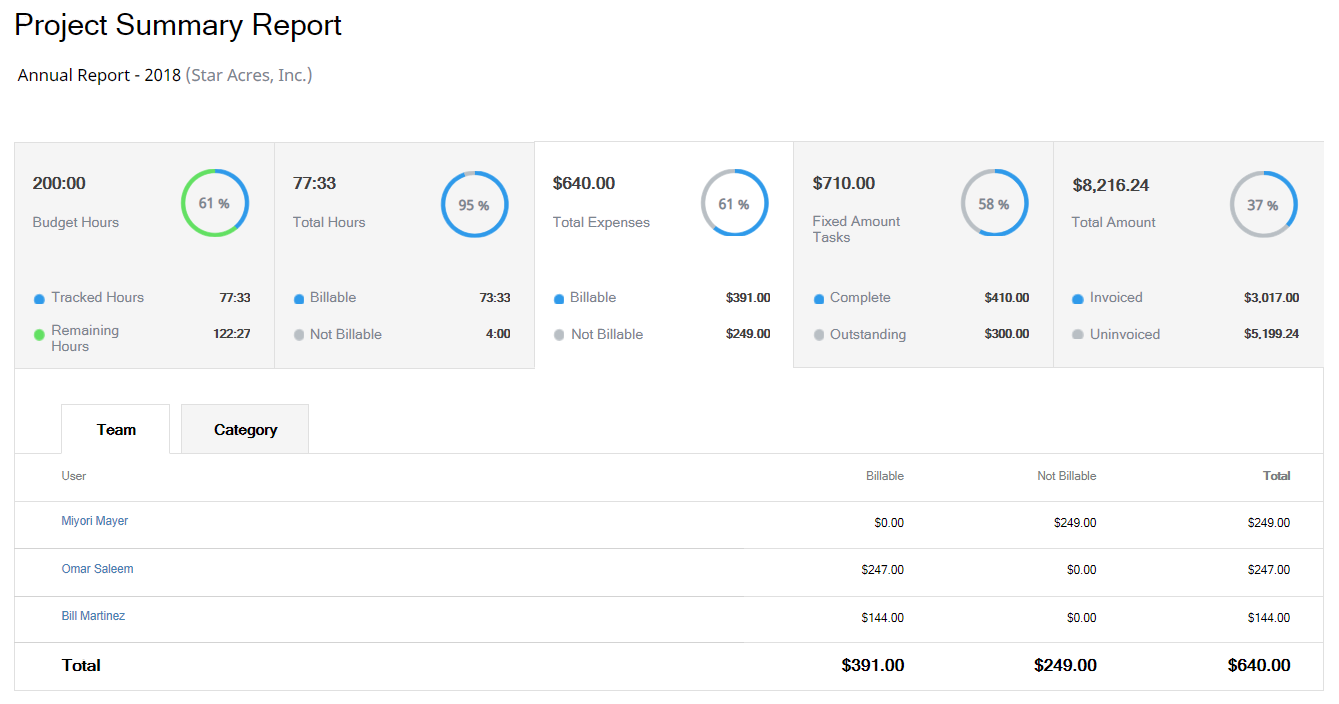
Reviewers praise Avaza for its invoicing management features, especially the simplicity of creating and customizing invoices. They appreciate the convenience of linking client work directly to invoices and the ability to accept payments directly from them. Some users find the interface takes time to learn, but the end-to-end billing workflow is one of the most complete available at this price.
Best for:
Collaborative project management environments.
Pricing:
- Free version with limited functionality.
- Paid plans start at $11.95 per month.
3. Harvest
Key features:
- Time tracking
- Invoicing
- Online payments
- Accounting integrations
- Reports
Harvest combines time tracking with expense management and invoicing in a clean, minimal interface. Team members log hours against specific projects and tasks, and managers pull reports showing labor costs alongside billable amounts to see whether a project is tracking to budget.
Harvest integrates natively with QuickBooks and Xero, and its invoice generation pulls directly from tracked time to reduce the admin work involved in billing clients. Along with labor costs, Harvest allows for the tracking of other types of business expenses with the receipt scanning feature — just take a photo of a receipt with your mobile app and it will be uploaded to your account immediately.
Reviewers appreciate Harvest’s invoicing capabilities, especially for creating polished invoices from tracked time and expenses. They highlight the software’s integration with tools like QuickBooks and Stripe, which simplifies invoicing and online payment acceptance.
Best for:
Streamlined invoicing in project teams.
Pricing:
- Free 30-day trial.
- Free version for 1 user and 2 projects.
- Paid plans start at $10.80 per user/month.
4. Expensify
Key features:
- Budget management
- Virtual cards
- Billing
- Global reimbursements
Expensify is focused on expense management and reimbursement workflows. Its SmartScan feature uses optical character recognition to capture receipt data from photos, automatically populating expense fields. Policy enforcement rules flag out-of-policy submissions before they enter the approval queue, and the workflow moves expense reports from submission to reimbursement without manual follow-up.
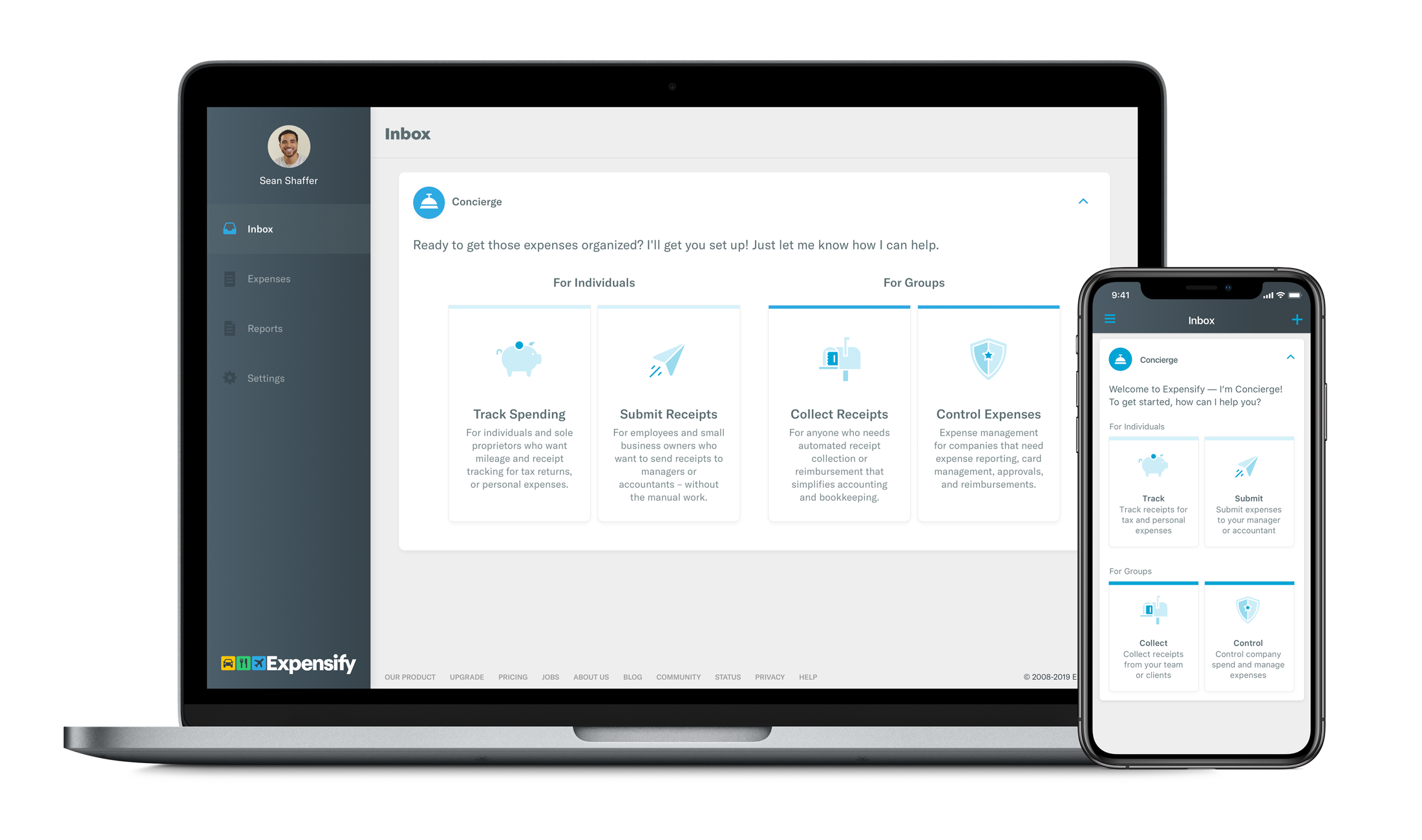
Another key feature, Concierge DoubleCheck, supports automatic detection of duplicate receipts and incompliance with organizational policies, helping prevent unplanned expenses and fraud while eliminating the risk of human error in the pre-accounting process.
Users have mixed feelings about Expensify’s report-generation features. Many value the capability to produce detailed reports that aid in managing business finances, but some find the report creation process non-intuitive and reporting options limited.
Best for:
Personal use and small teams.
Pricing:
- Free version with limited functionality for personal use.
- Paid plans start at $5 per user/month.
Free and Freemium Tools: At a Glance

Best Paid Project Cost Tracking Software
1. Rydoo
Key features:
- Receipt scanning
- Mileage tracking
- Daily allowances
- Accounting integrations
- Flexible approval workflows
Rydoo is built for organizations with frequent travel and complex expense workflows. Its AI-powered receipt scanning captures expense data automatically, and the platform handles multi-currency expenses and per-diem calculations for international travel. Compliance controls let you define expense policies by team, project, or geography, with the system flagging violations automatically. Integration with ERP systems and accounting tools suits mid-market and enterprise teams that need expense data to flow reliably into their financial systems.

Users regard Rydoo’s expense management system as highly efficient and user-friendly, making the management of business travel and expenses much simpler. They value the straightforward process for entering information, obtaining reimbursements, and generating detailed expense reports, which saves time and minimizes the risk of errors.
Best for:
Companies with high travel volumes and regulatory compliance requirements.
Pricing:
Plans start at $9 per user/month.
2. Birdview
Key features:
- Time tracking
- Financial targets
- Flexible billing
- Business intelligence
- Resource management
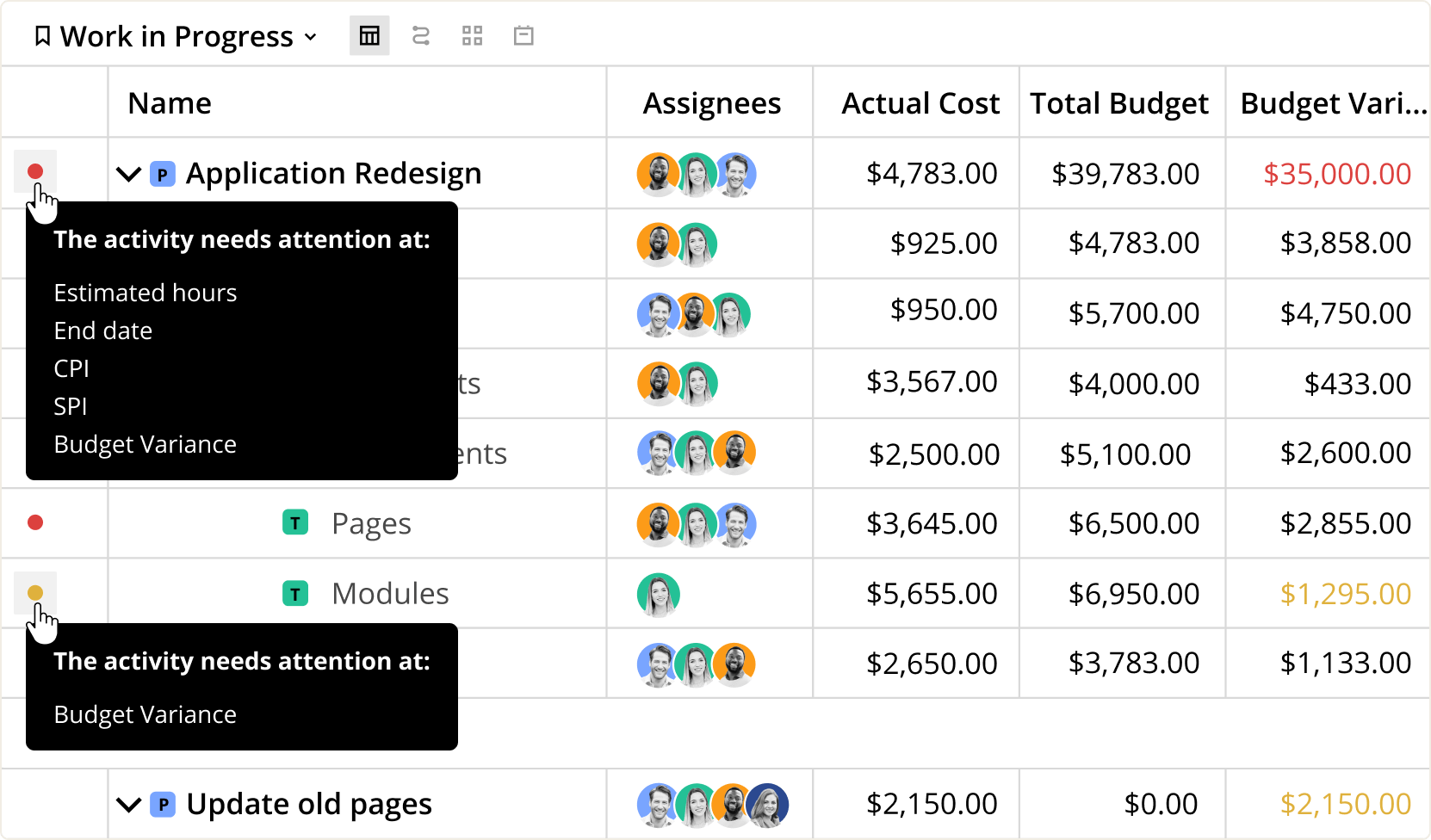
Birdview is a project management and resource planning platform with financial tracking built in. Its financial dashboards give portfolio managers a cross-project view of costs, budgets, and resource utilization, making it easier to see which projects are on track and which are consuming more than their share of the budget. Resource capacity planning lets managers allocate work before costs get out of hand, and the reporting suite covers project profitability alongside standard progress metrics.
Best for:
Portfolio managers and teams running multiple concurrent projects.
Pricing:
- Free 14-day trial.
- Plans start at $9 per user/month.
3. Twproject
Key features:
- Gantt charts
- Resource management
- Kanban
- Cost reports
Twproject centers on Gantt-based project management with cost tracking built directly into the scheduling layer. Project managers assign costs at the task level, link them to resource plans, and watch budget consumption update as the timeline shifts. This tight connection between schedule and cost makes Twproject particularly useful for complex, multi-phase projects where a delay in one task carries direct financial implications for the rest of the plan.
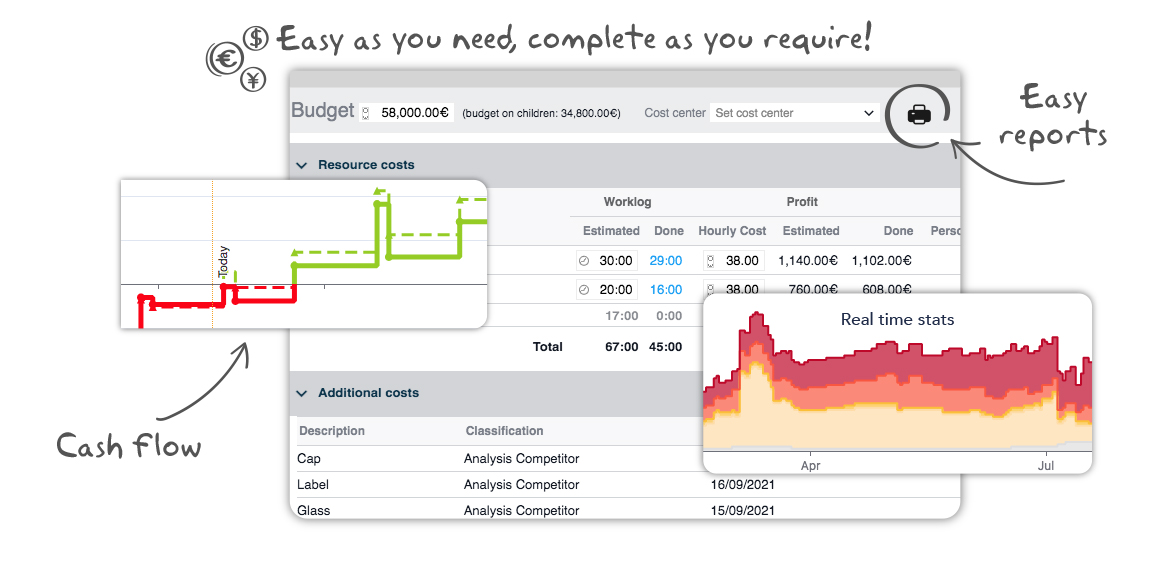
With Twproject you can set up project budgets and compare actual costs with estimated ones, oversee labor costs based on employees’ hourly rates and time logs, upload data on other types of project expenses by taking photos of invoices and receipts, and analyze cost data by different periods, groups of users, and expense categories.
Best for:
Project managers who need to tie schedule changes directly to cost impact.
Pricing:
- Free trial.
- Plans start at $5.29 per user/month.
4. TriNet Expense
Key features:
- Tax management
- Time tracking
- Receipt management
- Expense reports
TriNet Expense is an enterprise-grade expense management platform designed for large organizations with HR and payroll integration requirements. It handles multi-level approval workflows, policy enforcement, and compliance reporting across large employee populations. Its integration with HR systems means expense data flows directly into payroll and benefits calculations, reducing the manual reconciliation work that typically falls to finance teams in organizations of this size.
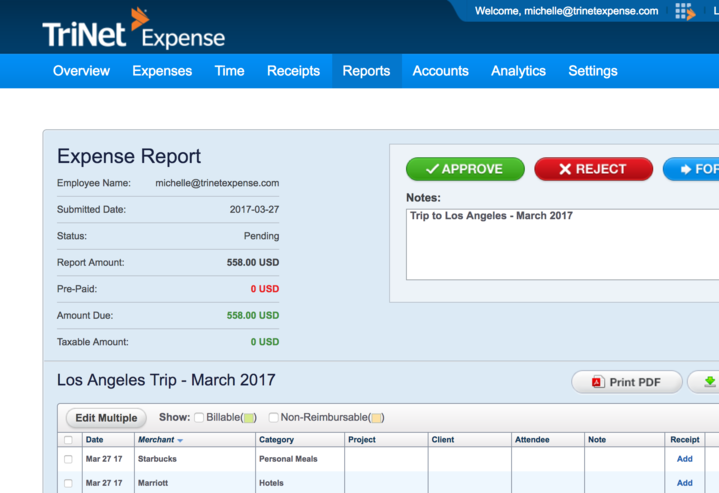
With TriNet Expense you can submit expenses one by one or import them in bulk from credit cards or CSV files, track mileage with automatic reimbursement calculation, create custom expense categories, set up expense policies to prevent excessive spending, receive notifications on expense reports requiring approval, and analyze historical and real-time data.
What users say: This was one of the easiest apps to train people on. Even those staunch pencil pushers really liked how easy it was to scan receipts from the mobile app, and it would automatically sync with the desktop app. It had cut the expense processing time by at least 2/3.
Best for:
Enterprise teams with complex expense policies and HR system integration needs.
Pricing:
- Free 30-day trial.
- Contact for pricing.
Paid Tools: At a Glance

How to Choose the Right Project Cost Tracking Software
With this many options available, the right choice depends on how your team works, what your budget allows, and which integrations you cannot do without.
Team size and structure
Solo freelancers and very small teams can get real value from free tools, but once a team grows past five people, the limits of free tiers tend to become a source of friction rather than a cost saving. Teams larger than that typically benefit from paid options that include multi-user permissions, budget controls, and approval workflows.
Industry needs
Professional services firms and agencies primarily need labor cost tracking and client billing. Construction teams and field-based organizations need materials tracking, subcontractor management, and mobile expense capture. SaaS companies and internal project teams often care more about resource allocation and sprint-level cost visibility. Pick a tool that fits your workflows rather than one that requires you to adapt around its structure.
Free versus paid threshold
The free options on this list are genuinely useful, but most of them restrict the features that matter most for cost tracking, specifically budgets and detailed financial reporting. As a rough guide, if you have more than five users or you bill clients for project work, the cost of a paid tool is almost always recovered in the admin time it saves.
Required integrations
If your team already uses QuickBooks, Xero, or a specific project management platform, confirm that your cost tracking software connects to it natively. Re-entering data between systems compounds errors and reduces the likelihood that records stay accurate over time.
Ease of adoption
A tool that nobody uses consistently produces data that cannot be trusted. If your team needs to log time daily, the interface has to be simple enough that recording takes under two minutes. Test the onboarding experience before committing, and look for tools that offer live support rather than just a help center.
Support quality
For anything that touches project finances, responsive support matters. Look for tools that offer access to a real support team, especially if your organization is not deeply technical.
Scalability
Your team will grow and your reporting needs will get more complex over time. Choosing a tool that can grow with you rather than one you will outgrow in eighteen months saves a painful migration later.
Why Project Managers Choose actiTIME
Most time tracking tools answer one question: how many hours did your team spend? actiTIME answers a different one: what did those hours cost, and did the project make money?
That distinction matters for teams that bill clients or need to demonstrate the financial return on their work. actiTIME sits between your team’s daily activity and your financial reporting, converting tracked hours into cost data automatically so managers spend less time reconciling spreadsheets and more time running projects.
Simplicity
actiTIME is designed to be usable by teams without dedicated IT support or formal training. The timesheet interface is clean, the project structure maps onto how most teams already organize their work, and the initial setup takes hours rather than days. Every option includes free onboarding assistance, which means someone from the actiTIME team will help you get configured correctly from the start.
For team members who log time daily, the interface experience matters more than almost any other factor. actiTIME’s minimal interface makes recording time feel like a quick habit rather than an administrative burden, which results in far more consistent compliance than tools that require navigating multiple screens to submit a timesheet.
Real-Time Financial Visibility
Once your team starts logging time, actiTIME calculates labor costs automatically based on the hourly rates set for each work type. You can set budgets at three levels, customer, project, and task, and the system monitors actual spending against those budgets continuously. Budget notifications alert managers when spending approaches or exceeds a defined threshold, so cost overruns surface before they become unrecoverable.
The Profit/Loss Report is what sets actiTIME apart from most trackers. It brings billed amounts and tracked costs together in a single report, showing the financial result of each project without requiring any manual export or calculation. For client-facing teams, this turns a monthly reconciliation exercise into a routine daily check.
How it works, step by step:
- Create your customers, projects, and tasks in actiTIME and define the hourly rates for each work type.
- Assign tasks to team members and ask them to record their hours in digital timesheets.
- Set budgets at the customer, project, or task level to define spending limits.
- The system calculates labor costs automatically as hours are logged throughout the day.
- Run the Profit / Loss Report to see revenue versus cost per project, with all figures already calculated.
Flexibility and Affordability
actiTIME is available as an online tool starting at $5 per user per month, or as a self-hosted installation for teams that need to keep data on their own infrastructure. The self-hosted option carries a one-time fee of $120 per user with no recurring subscription. Both options include access to the full feature set and human support.
For teams that want to test before committing, the 30-day trial includes every feature, including budgets and advanced reporting. After the trial, teams with up to three users can continue on the free version permanently, though budgets and several advanced features are not available in that version.
With more than 20 years on the market, over 1,000 verified reviews, and users in more than 130 countries, actiTIME has a track record that newer tools simply do not have.


Best Practices for Project Cost Tracking
The right software only works if the habits around it are consistent. These practices make the difference between a system that produces reliable financial data and one that quietly drifts out of accuracy.
- Set budgets at three levels. Define limits at the project level, the task level, and the resource level. A project-level budget tells you when the whole initiative is at risk, while task-level budgets show you exactly which area is causing the overrun before it spreads to the rest of the project.
- Log costs as work happens, not at the end of the week. Time logged on the same day it is worked is significantly more accurate than time reconstructed three days later. Even a short daily habit of two to three minutes at the end of each work session produces far more reliable data than weekly catch-up entries.
- Review budget versus actuals every week. A weekly comparison of actual spending against the plan catches problems early enough to course-correct. Monthly reviews typically surface problems too late for any meaningful response.
- Categorize expenses consistently. The value of cost data depends on it being comparable across projects. If one project codes travel under direct costs and another codes it under overhead, cross-project analysis becomes unreliable. Define categories once and apply them uniformly.
- Integrate with your accounting software. Keeping cost tracking data and accounting data in separate systems that do not connect creates reconciliation work at the end of every period. A direct integration keeps both systems current and reduces the risk of discrepancies accumulating over time.
- Explain to your team why the data matters. People track time more accurately when they understand how the data is used. A clear explanation of how tracked hours feed into project budgets and profitability reporting tends to improve logging compliance noticeably, and consistent data is what everything else depends on.
Frequently Asked Questions
What is project cost tracking software?
Project cost tracking software is a tool that monitors, records, and controls all financial costs associated with a project in real time, capturing labor costs through time tracking, logging direct and indirect expenses, and comparing actual spending to the original budget throughout the project lifecycle. It gives project managers the financial visibility to catch overruns early and understand whether each project is profitable.
What is the difference between project cost tracking and expense management?
Project cost tracking is broader than expense management: it connects all project costs, including labor from tracked time, to specific projects and tasks to show total project profitability, while expense management focuses only on capturing and approving individual spending items like receipts and reimbursements. Expense management handles the transaction-level workflow; project cost tracking answers the bigger question of whether the project made money. Most project-focused teams benefit from having both capabilities in one place.
How does time tracking reduce project costs?
Accurate time tracking reduces project costs by giving managers real-time visibility into which tasks are consuming the most budget, making it possible to catch scope creep and inefficiencies before they exhaust the project’s resources. Without tracked time, cost overruns frequently go unnoticed until the project is nearly complete, at which point very little can be done to address them.
How often should I review project budgets against actual costs?
Weekly is the minimum for any active project. High-risk or high-spend projects benefit from daily checks, especially when the team is moving quickly or the budget margin is thin. Setting up automated budget alerts removes the need to remember to check manually, but the weekly review should still happen to identify spending trends rather than just responding to individual threshold breaches.
What is the best free project cost tracking software?
actiTIME is the most complete free option for small teams, offering permanent free access for up to three users with time tracking, task management, and basic reporting included. Teams that need budgets and the Profit/Loss Report will need the paid version or the 30-day trial. Harvest also offers a free option for a single user, and Avaza provides a limited free tier for small project teams.
What should I look for in project cost tracking software for remote teams?
For remote teams, the most important features are a mobile app that works in low-connectivity environments, transparent timesheet approval workflows, and timezone handling for distributed team members. Multi-currency support matters for international teams, and integrations with the collaboration tools your team already uses, such as Slack or project management platforms, reduce friction in daily logging.
How do I calculate labor costs for a project?
Labor cost equals hours worked multiplied by the hourly rate for the relevant work type. For example, if a developer spends 40 hours on a project at an effective cost rate of $50 per hour, the labor cost for that contribution is $2,000. Project cost tracking software automates this calculation by applying predefined rates to logged hours, so the cost figure updates in real time as the team records their work rather than being calculated manually at period end.
What is the cost of not tracking project expenses?
The most immediate impact is financial: projects without active tracking tend to run over budget without anyone noticing until very little can be done about it. Beyond direct overruns, poor cost tracking produces inaccurate future estimates because there is no reliable historical data to learn from, creates unprofitable client relationships when billing is disconnected from actual costs, and generates significant admin overhead from manually reconciling accounts at period end.
Conclusion
Good project cost tracking software does four things well: it captures labor costs from tracked time, monitors spending against budgets in real time, alerts managers when something is going wrong, and produces clear reports showing the financial result of each project. Tools that do all four make it significantly easier to finish projects on budget and bill clients with confidence.
The tools in this guide cover a wide range of use cases, from solo freelancers who need a free time tracker to enterprise teams with complex expense policies and compliance requirements. The right choice depends on your team size, your industry, and the integrations your workflow depends on.
If you are starting out or switching away from spreadsheets, actiTIME is worth starting with. It covers the full cycle from time tracking to profit reporting, the setup is fast, and the 30-day free trial includes every feature so you can test it against your real work before making any commitment.