
Almost every time tracker advertises a free plan, but the word covers very different deals. One app gives three people nearly the whole product, another lets your entire company in and keeps reports or billing behind a paywall, and a third is free only if you run it on your own server.
We compared 14 free time tracking app options for teams and freelancers on the parts of a free plan that decide whether it works: how many people it covers, what it caps, which devices it runs on and where the free part ends. Every limit and price below was checked on the vendor’s own site in October 2026.
Key takeaways:
- Free plans come in four kinds: capped by team size (actiTIME, Toggl and Traqq at 3 users, Clockify and Trackabi at 5, Connecteam at 10), unlimited users with features held back (TimeCamp, TrackingTime, Jibble, OfficeTimer, Odoo Timesheets), one person only (Paymo, todo.vu), or open source you host yourself (Kimai).
- Free plans have tightened: Toggl (formerly Toggl Track) now covers 3 users instead of 5, and Clockify’s free reports cover only 31 days at a time.
- Billing is where most free plans stop. Clockify, Toggl, TimeCamp and TrackingTime charge for billable rates, while actiTIME, Paymo, todo.vu, Trackabi and self-hosted Kimai include invoicing at no cost.
- Quick picks by situation: up to 3 people who bill clients, actiTIME; up to 10 hourly workers clocking in on phones, Connecteam; a whole company on one free account, Jibble or TimeCamp; data that never leaves your server, Kimai.
- 4 kinds of free plans
- Recent changes to free plans
- How we picked these apps
- Free plans compared
- Free plans reviewed one by one
- Which apps stay free as your team grows
- What free plans usually leave out
- Your data on a free plan
- When a free time tracker app is enough
- How to test a free app in 7 days
- Moving off a free plan
- FAQ
Prefer to watch? This five-minute video walks through popular free time trackers and how to choose between them.
4 kinds of free plans
A free plan lets you use a time tracking application at $0 with no end date, and the vendor decides which part of the product to give away. In practice that comes down to four models, each with its own catch.
| Kind of free plan | Apps in this list | The catch |
|---|---|---|
| Capped by team size | actiTIME, Toggl and Traqq (3 users), Clockify and Trackabi (5), Connecteam (10) | Features vary, and one more hire moves the whole team to a paid plan |
| Unlimited users, limited features | TimeCamp, TrackingTime, Jibble, OfficeTimer, Odoo Timesheets | Everyone fits, but reports, exports, billable rates or approvals are often held back |
| One person only | Paymo, todo.vu | Works for a freelancer; the first teammate means paying for every seat |
| Open source, self-hosted | Kimai | No license fee and no user cap, but you install, update and back up the server |
A free trial is a different thing. A trial unlocks the paid product for a fixed period and then ends or downgrades: Clockify’s lasts 7 days, Paymo’s 15, and actiTIME’s and Toggl’s 30. TrackingTime moves the account to its free plan when the trial ends, and actiTIME lets you switch to its free version, so nothing logged during the trial is lost.
Recent changes to free plans
Five of these free plans changed recently, and most of them got smaller. Some roundups still describe the older, more generous versions, so here is where things stand in October 2026:
- Toggl Track is now sold as Toggl, which adds simple project planning; existing Toggl Track accounts keep working, and the free plan covers up to 3 users, down from 5.
- Clockify limits each free report to a 31-day date range, exports reports to PDF only, and doesn’t include billable rates or the kiosk on its free plan.
- Paymo limits its free plan to 1 user, 1 client and 2 projects, while some older articles, including posts on Paymo’s own blog, still describe unlimited users.
- Jibble now markets the whole product as 100% free for unlimited users and lists no paid tiers; its pricing page redirects to the homepage, and only an Enterprise option is offered on request.
- Connecteam now offers two free options: the Small Business plan with almost every feature for up to 10 users, and a thinner Limited plan for up to 30.
How we picked these apps
To build this list of the best free time tracking software for business use, we started from the apps in our earlier version of this list, added newer tools with genuine free plans, and kept an app only if it met all of these conditions:
- A real free plan. It keeps working at $0 with no end date.
- Built for work. It tracks working hours for teams or freelancers, so personal habit and screen-time trackers didn’t make the cut.
- Checked at the source. Limits, prices and platforms come from pricing pages, help centers and app store listings.
- Still developed and sold. Apps with unclear status or no current free-plan details were dropped.
- Rated by users. Each app has reviews on Capterra, G2 or both, and the quotes in each card come from them; Odoo Timesheets is rated as part of the Odoo suite.
A mobile app counted in an app’s favor without being required, and 12 of the 14 picks run on iOS and Android. If the mobile experience decides it, our roundup of the best iPhone time tracking app options goes deeper. Traqq and Kimai have no phone app but made the list on the strength of privacy and self-hosting, and their cards say so plainly. Our overview of time tracking use cases shows where tracked hours usually end up.
Free plans compared
The table sums up each free plan in one row. The cards below go into what each plan includes, how you track time and what happens to your data.
| App | Free for | Main limits on free | Paid plan needed for | Mobile app | Monitoring on free |
|---|---|---|---|---|---|
| actiTIME | Up to 3 users | No approvals, integrations or browser extension | More than 3 users or timesheet approvals | + | None |
| Clockify | Up to 5 users | 31-day report range, PDF report exports, no billable rates | Billable rates or CSV reports | + | Desktop auto tracker on the user’s device |
| Connecteam | Up to 10 users (30 on Limited) | No payroll integration | More than 10 users | + | GPS while clocked in |
| Jibble | Unlimited users | No published limits | Enterprise needs such as SSO | + | Optional GPS, selfies, face recognition |
| Toggl | Up to 3 users | PDF only, no billable rates or team reports | More than 3 users or billable rates | + | Desktop activity as suggestions |
| Paymo | 1 user | 1 client, 2 projects | More than 1 client or 2 projects | + | Optional desktop activity |
| TimeCamp | Unlimited users | No billable time or invoices, PDF only | Invoices, billable time or rates | + | GPS, keyword-based auto tracking |
| Trackabi | Up to 5 users | 30 projects, 10 clients | More than 5 users | + | Applications used, on desktop |
| Traqq | Up to 3 users | 1 project | More than 1 project or 3 users | – | None |
| todo.vu | 1 user | 1 GB of storage | A second user | + | None |
| TrackingTime | Unlimited users | Most reports, billable time, CSV export | Project or client reports | + | None |
| OfficeTimer | Unlimited users | No approvals or billing rates, 1 leave type | Approvals or rates | + | None |
| Odoo Timesheets | Unlimited users | Timesheets is the only free app | A second app, such as Invoicing | + | Optional activity assistant |
| Kimai | Unlimited users, self-hosted | You run the server | Hosting in the vendor’s cloud | – | None |
Free plans reviewed one by one
actiTIME comes first as our own product; the rest follow in order of how many Capterra reviews they have, except Odoo Timesheets, which is placed near the end because its reviews cover the whole Odoo suite, not the Timesheets app. Every card uses the same fields, so you can compare free plans line by line.
1. actiTIME
actiTIME caps its free version by team size and keeps most of the product in it, which makes it a natural free time tracking app for freelancers and small teams that bill. Up to three people get timesheets, project reports, leave tracking and invoicing, and a growing team keeps the same account and history when it upgrades.
Best for: freelancers and teams of two or three who bill clients by the hour and want invoices and project reports from the same hours.
Not ideal for: teams of four or more, or anyone who needs timesheet approvals or integrations from day one.
Free version:
- Free for: up to 3 users
- Limits: no cap on customers, projects or tasks; approvals, overtime, task estimates, custom task fields, the API, Zapier, the QuickBooks integrator and the Chrome extension are part of the paid version
- Paid version from: $6/user/month billed annually, $7 billed monthly
- Trial: 30 days of the full product, no credit card; afterwards you can switch the account to the free version
Where free ends: at the fourth user, or the first time a manager needs to approve timesheets before they go into invoices or payroll. Either one means a paid subscription for the whole team.
How you track time: weekly timesheet, a calendar view with start and end times, and a timer in the mobile app; leave and time off sit next to work hours.
Apps in the free version: web, iOS and Android. The mobile apps need a connection, since they have no offline mode.
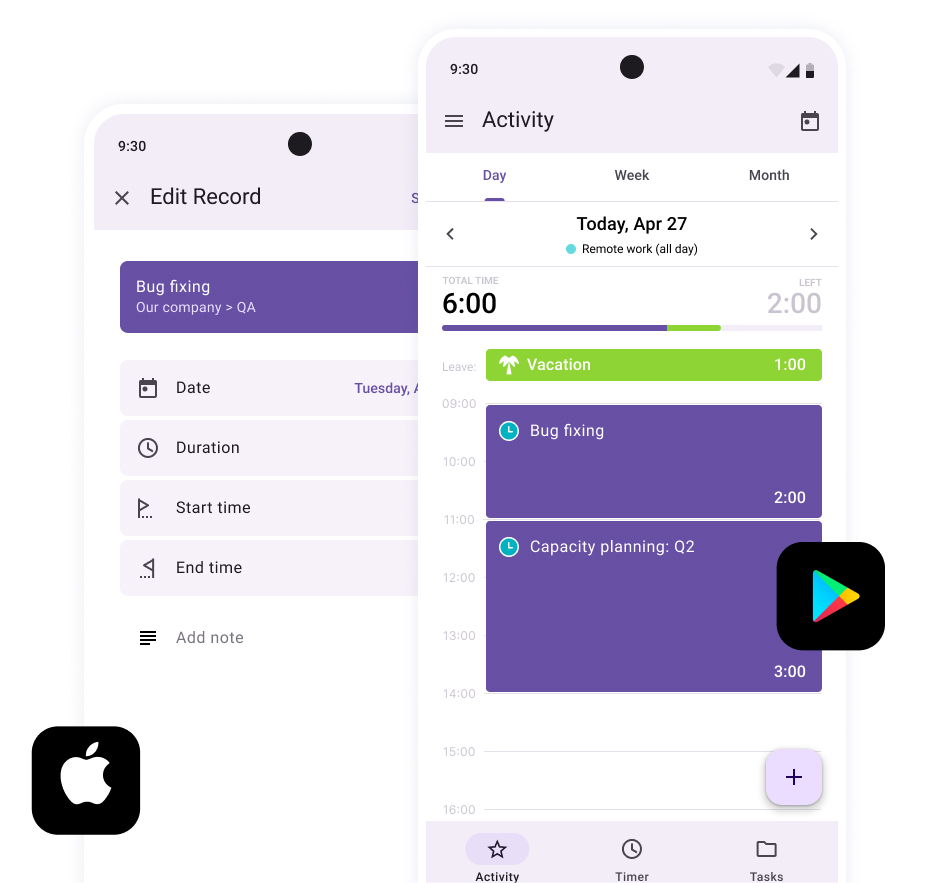
What the free version includes:
- Users: up to 3
- Projects and clients: unlimited
- Report history: full history
- Export: CSV reports
- Billable rates: yes
- Invoicing: yes
- Timesheet approvals: no
- Offline mobile tracking: no
- Automatic tracking: no
- Integrations: no; the API, Zapier and QuickBooks integrator are paid
Your data: cloud-hosted, with no screenshots or activity tracking. A paid self-hosted version exists for teams that need data on their own servers.
Ratings: Capterra 4.6 (111 reviews), G2 4.6 (50 reviews).
Pros:
- Invoicing, leave tracking and project reports are part of the free version.
- No caps on clients, projects or tasks, so a small team can run all its work in one place.
- Upgrading keeps the same account and history, with nothing to migrate.
- iOS and Android apps are included.
Cons:
- The free version stops at three users.
- No timesheet approvals or integrations until you pay.
- The mobile apps have no offline mode.
What users like
“Offers quite a bit of functionality for free. Time tracking and the ability to carry that information over into invoices are critical features we need to complement the other SaaS products that we use (wave, clickup, etc).”
What users would improve
“Some of the reports can be tricky to work through. To determine user activity, I have had to export a report and then carry out some basic Excel formulas to calculate the exact metrics needed.”
2. Clockify
Clockify gives up to five people a free work time tracker with a timer and timesheet on every platform, plus an automatic tracker in the desktop app. Its 2026 free plan narrowed reports and dropped billable rates, so it now suits tracking more than billing.
Best for: teams of up to five who want to see where hours go across public projects, on desktop, web and phone, without paying.
Not ideal for: anyone who bills by the hour, compares hours across quarters in one report, or wants spreadsheet report exports without paying.
Free plan:
- Free for: up to 5 users
- Limits: public projects only; each report covers up to 31 days at a time; report exports are PDF only; no billable rates, invoicing, approvals or kiosk
- Paid plans from: $3.99/user/month billed annually, $4.99 billed monthly
- Trial: 7 days of Pro features
Where free ends: as soon as you need billable rates, a CSV or Excel report, or a report that spans more than 31 days. All of these need a paid plan, priced per seat across the workspace; our Clockify pricing breakdown covers each tier.
How you track time: timer, manual timesheet, calendar view, and an auto tracker in the desktop app that records the apps and sites you use so you can turn them into entries; idle detection and reminders are included.
Apps on the free plan: web, Windows, macOS, Linux, iOS, Android and browser extensions. Time can be tracked offline on mobile and desktop and syncs later.
What the free plan includes:
- Users: up to 5
- Projects and clients: unlimited public projects
- Report history: full history, viewed 31 days at a time
- Export: PDF for reports; CSV or Excel for project data
- Billable rates: no
- Invoicing: no
- Timesheet approvals: no
- Offline mobile tracking: yes
- Automatic tracking: yes, in the desktop app
- Integrations: yes, plus API access capped at 30 requests per hour
Your data: cloud-hosted; screenshots and GPS start on higher paid plans, so the free plan records only what people log or what the desktop auto tracker sees on their own device.
Ratings: Capterra 4.8 (9,271 reviews), G2 4.5 (204 reviews).
Pros:
- Five free users, with desktop, web and mobile apps.
- Offline tracking and a desktop auto tracker come with the free plan.
- Paid plans start low if you outgrow the free one.
Cons:
- Each report is limited to a 31-day range, and report exports are PDF only.
- Billable rates and invoicing need a paid plan.
- Private projects are paid, so every project is visible to the whole workspace.
What users like
“Clockify is such an easy program to use for keeping track of your time. For being a free program, I love using it!”
What users would improve
“Some of the more advanced features like detailed billing and automation are locked behind paid plans, so as a free/individual user I don’t get access to everything. The mobile app can also feel a bit sluggish at times compared to the web version”
3. Connecteam
Connecteam is an all-in-one app for deskless teams with a time clock, scheduling, chat and forms. Businesses with up to 10 people get almost all of it free on the Small Business plan, and teams of up to 30 can stay on a reduced free Limited plan.
Best for: field, retail and service businesses with up to 10 hourly workers who need a free employee time tracking app with schedules built in.
Not ideal for: office or project teams that track time against client budgets, since there are no billable rates or invoicing.
Free plan:
- Free for: up to 10 users on the Small Business plan; up to 30 on the Limited plan after the 14-day trial
- Limits: Small Business has no payroll integration; Limited drops GPS stamps and timesheet export, shows only the last 30 days of timesheets and allows 5 jobs
- Paid plans from: Operations Basic at $29/month billed annually or $35 billed monthly, for the first 30 users; $0.80 to $1 per extra user
- Trial: 14 days of the Expert plan, which every new account starts with
Where free ends: at the 11th employee. From there the free Limited plan loses export, GPS and older timesheets, so most growing teams move to a paid Operations plan, which our Connecteam pricing guide breaks down, or look at Connecteam alternatives before then.
How you track time: a mobile hours tracker app with GPS stamps, plus a shared kiosk on a tablet, NFC clock-in, and geofences that can clock people out automatically.
Apps on the free plan: iOS and Android apps for employees, plus a web dashboard and mobile admin tools for managers; our Android time clock app roundup compares more options.
What the free plan includes:
- Users: up to 10 (Small Business); up to 30 with fewer features (Limited)
- Projects and clients: unlimited jobs on Small Business; 5 on Limited
- Report history: full on Small Business; last 30 days on Limited
- Export: timesheet export on Small Business; none on Limited
- Billable rates: no
- Invoicing: no
- Timesheet approvals: yes, on Small Business
- Offline mobile tracking: not documented
- Automatic tracking: auto clock-out by geofence on Small Business
- Integrations: Zapier on Small Business; no payroll integration on either free plan
Your data: cloud-hosted. GPS stamps and live location tracking are part of the product, and Connecteam says location is recorded only while people are on the clock.
Ratings: Capterra 4.6 (5,318 reviews), G2 4.6 (3,506 reviews).
Pros:
- Up to 10 people get nearly the full product free, including scheduling and chat.
- Kiosk, NFC and geofence clock-in for teams without desks.
- Paid plans are priced flat for the first 30 users.
Cons:
- No billable rates, invoicing or project budgets.
- The free plan for teams of 11 to 30 is much thinner than the one for 10 or fewer.
- Payroll integration is paid.
What users like
“The app is free for small businesses! Such an amazing service for small a small office! We love the ease of use and that we can use our phones to clock in and out.”
What users would improve
“That I can’t track projects or budget I would prefer to be able to see my budget and every project that I’ve worked on with ability to add photos, but still be stored in a project”
4. Jibble
Jibble now markets its whole product as 100% free for unlimited users. It no longer lists paid tiers, and the only extra it mentions is an Enterprise option with SSO, 2FA and dedicated onboarding. The site doesn’t publish a feature-by-feature list of what’s free, but the features it markets include timesheets, approvals, kiosk, face recognition, geofencing, time off and offline clock-in.
Best for: teams of any size, including shift and field staff, who want a free time keeping app with clock-in, approvals and time off and no per-seat bill.
Not ideal for: anyone who needs a written list of which features are free before committing.
Free plan:
- Free for: unlimited users
- Limits: none published; a 2026 reviewer still mentions a Pro plan and finds marking vacation days clunkier on the free version
- Paid plans from: no paid tiers listed; Enterprise on request
- Trial: not needed for the free version
Where free ends: by Jibble’s own account, only at Enterprise needs such as SSO. Since there’s no published feature list, confirm advanced time off rules or custom permissions in the app before you rely on them; our Jibble review covers both.
How you track time: mobile and web clock-in, a timer, a shared kiosk on a tablet, face recognition, NFC and PIN, geofencing and GPS stamps, plus a desktop app and Chrome extension.
Apps on the free plan: iOS, Android, web, desktop, Chrome extension, kiosk mode for tablets, Slack and Microsoft Teams. Clock-ins work offline and sync later.
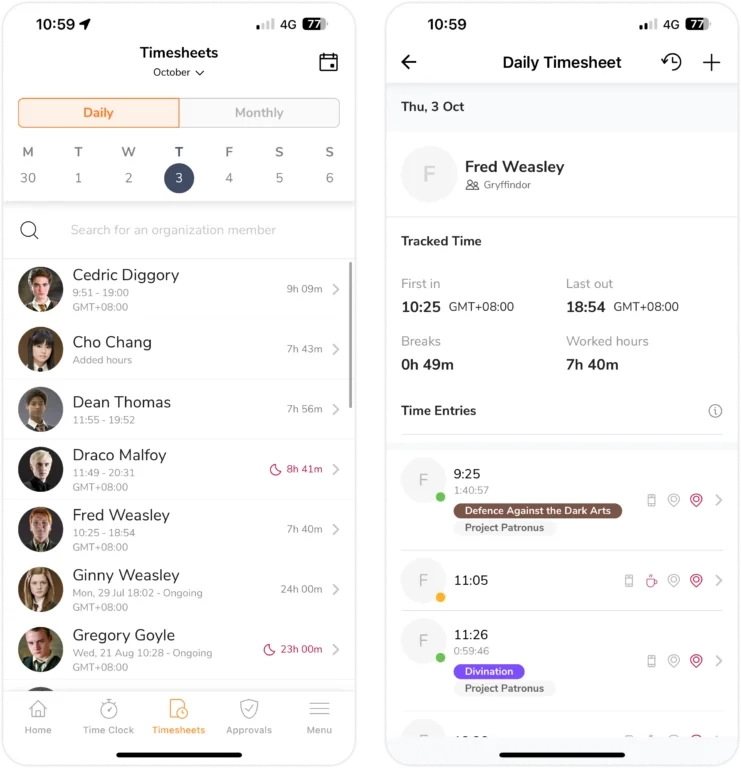
What the free plan includes:
- Users: unlimited
- Projects and clients: projects included
- Report history: no time limit stated
- Export: XLS and CSV
- Billable rates: yes, per member or per project
- Invoicing: yes, invoices built from tracked time
- Timesheet approvals: yes
- Offline mobile tracking: yes
- Automatic tracking: not documented
- Integrations: Slack, Microsoft Teams and QuickBooks
Your data: cloud-hosted; face recognition, selfies and GPS stamps are optional controls the admin turns on.
Ratings: Capterra 4.8 (3,117 reviews), G2 4.7 (682 reviews).
Pros:
- Marketed as fully free for unlimited users, including approvals, kiosk and offline clock-in.
- Works for office, remote and shift workers in one account.
- Slack and Teams apps let people clock in where they already chat.
Cons:
- There’s no written list of what’s free, so feature availability is hard to confirm in advance.
- Time off handling on the free version is basic.
- There’s no Firefox extension, only Chrome.
What users like
“The sheer depth of functionality provided – even at the free tier – is truly remarkable, allowing businesses to streamline operations effectively without the burden of heavy initial costs.”
What users would improve
“If I had to point out a downside, it’s that the free version makes it rather clunky to mark days off for vacation, whereas it appears to be simple with the Pro plan.”
5. Toggl
Toggl, formerly Toggl Track, now combines time tracking with simple project planning, and new accounts sign up for the merged product. Its free plan includes the full set of automated tracking tools plus tasks, boards and estimates, but it covers up to three users, down from five.
Best for: freelancers and teams of two or three who want a timer with automatic tracking on desktop and in the browser, plus light task planning.
Not ideal for: teams of four or more, or anyone who needs billable rates, team reports or spreadsheet exports without paying.
Free plan:
- Free for: up to 3 users
- Limits: PDF exports only; no billable rates, team-level reports, teams, approvals or team reminders
- Paid plans from: Starter at $9/user/month billed annually, $12 billed monthly
- Trial: 30 days
Where free ends: at the fourth user, or when you need billable rates, a CSV or Excel export, or reports across the team. All of these start on Starter, and our Toggl pricing review walks through the paid tiers.
How you track time: real-time timer, manual entries, a calendar view, Pomodoro focus mode, and automated tracking: desktop activity, calendar events, selected browser pages, keyword rules and idle detection.
Apps on the free plan: web, Windows, macOS, iOS, Android, and Chrome and Firefox extensions. The mobile time tracking app records entries offline and syncs when the device reconnects.
What the free plan includes:
- Users: up to 3
- Projects and clients: unlimited projects
- Report history: no time limit stated
- Export: PDF only
- Billable rates: no
- Invoicing: no
- Timesheet approvals: no
- Offline mobile tracking: yes, syncs when back online
- Automatic tracking: yes, on desktop, calendar and browser
- Integrations: Google and Outlook calendars, CSV import, API
Your data: cloud-hosted; desktop activity is recorded on the user’s own device as suggestions, and the user decides what becomes a time entry.
Ratings: Capterra 4.7 (2,591 reviews), G2 4.6 (1,656 reviews).
Pros:
- Automated tracking from desktop, calendar and browser, free for up to three people.
- Desktop, web and mobile apps, with offline capture.
- A simple interface that needs little setup.
Cons:
- Free for three users only.
- Billable rates and spreadsheet exports need Starter.
- Starter costs $9 per seat billed annually, more than twice Clockify’s $3.99.
What users like
“The free version was sufficient for me to use. Easy to use and did what I wanted to allow me to see where I was spending my time and which tasks I could stop doing or delegate out.”
What users would improve
“The lack of a plan just like the free version but with more seats, the jump to get more users is a bit pricey and includes many features that maybe are not that required on some cases. It would be great to just be able to pay for extra seats on the free plan.”
6. Paymo
Paymo is project management with time tracking and invoicing built in. Its free plan is for one person: unlimited time entries and invoices, but only one client and two projects at a time.
Best for: freelancers with one main client who want time tracking and invoices in the same free app.
Not ideal for: anyone working with several clients at once, who will find more room in other tools for freelancers, or a team of two or more.
Free plan:
- Free for: 1 user
- Limits: 1 client, 2 projects, 1 GB of storage; estimates, expenses and Kanban or calendar task views are paid
- Paid plans from: Solo at $5.90/month billed annually, $9.90 billed monthly (1 user, 3 clients, 5 projects)
- Trial: 15 days
Where free ends: at the second client or the third project. Solo raises the caps for one person; adding a teammate means Plus, priced per user.
How you track time: web timer, timesheets, mobile timer, and the Paymo Track desktop app, which records the apps and sites you use so you can turn them into entries.
Apps on the free plan: web, iOS, Android, and Paymo Track for Windows, macOS and Linux.
What the free plan includes:
- Users: 1
- Projects and clients: 2 projects, 1 client
- Report history: no time limit stated
- Export: not documented; timesheet reports start on Plus
- Billable rates: yes
- Invoicing: yes, unlimited invoices
- Timesheet approvals: no; single-user plan
- Offline mobile tracking: not documented
- Automatic tracking: yes, through Paymo Track
- Integrations: no; integrations and API access start on Plus
Your data: cloud-hosted; automatic tracking runs on your own computer and you choose which records become time entries.
Ratings: Capterra 4.7 (687 reviews), G2 4.6 (594 reviews).
Pros:
- Unlimited invoices on the free plan.
- Tasks, time and invoices sit in one app, so there’s nothing to connect.
- Desktop automatic tracking on top of the web and mobile timers.
Cons:
- Free for one user only.
- One client and two projects is tight for most freelancers.
- Expenses and estimates are paid.
What users like
“I like that Paymo has everything included without the need to purchase another bit of software.”
What users would improve
“We only use time tracking, invoicing and basic clients and projects. We don’t need canban boards or options like that.”
7. TimeCamp
TimeCamp gives unlimited users and projects on its free plan, with keyword-based automatic tracking and GPS location. Billing is paid, and spread over three tiers: invoices on Starter, billable time on Premium and billable rates on Ultimate.
Best for: teams of any size that want automatic tracking and basic reports without per-seat costs.
Not ideal for: agencies and freelancers who bill by the hour from their time tracker; our TimeCamp review covers the paid plans that add billing.
Free plan:
- Free for: unlimited users
- Limits: PDF export only; billable time, invoicing, budgets, attendance, time off, app and website tracking, screenshots and approvals are paid
- Paid plans from: Starter at $3.99/user/month billed annually, $5.49 billed monthly
- Trial: not stated on the pricing page
Where free ends: when you need invoices (Starter), billable time (Premium), billable rates or approvals (Ultimate), or Excel exports. Each paid plan is charged for every user in the account.
How you track time: timer, manual entries, a desktop app with keyword-based automatic tracking, GPS location tracking in the mobile app, and a browser plugin that adds timers to 80+ web tools.
Apps on the free plan: web, desktop, iOS, Android, and a browser plugin.
What the free plan includes:
- Users: unlimited
- Projects and clients: unlimited projects
- Report history: no time limit stated; 10+ report types
- Export: PDF only
- Billable rates: no
- Invoicing: no
- Timesheet approvals: no
- Offline mobile tracking: not documented
- Automatic tracking: yes, keyword-based
- Integrations: browser plugin for 80+ tools, API, Trello Power-Up
Your data: cloud-hosted; screenshots and app and website tracking are paid, while GPS location tracking is free.
Ratings: Capterra 4.7 (600 reviews), G2 4.7 (392 reviews).
Pros:
- Unlimited users and projects.
- Keyword-based automatic tracking and GPS location without paying.
- Invoicing starts on the low-priced Starter plan.
Cons:
- Billable time and invoicing cost extra.
- Free reports export only to PDF.
- Approvals sit on the top Ultimate plan.
What users like
“Timecamp is the cheapest time tracking software that i have worked with so far. It covered most of my needs with the free version itself.”
What users would improve
“unable to capture details in some specific aplications ( for ex chat contact information in Rambox, which I use for comunication with my customers, aggregating Whatsapp, Telegram, Skype and Teams )”
8. Trackabi
Trackabi includes a long feature list in its free Starter plan for up to five people: an automatic desktop timer, a mobile app with GPS, billable and pay rates, invoices and leave planning. The trade-off is that the desktop app logs which applications people use.
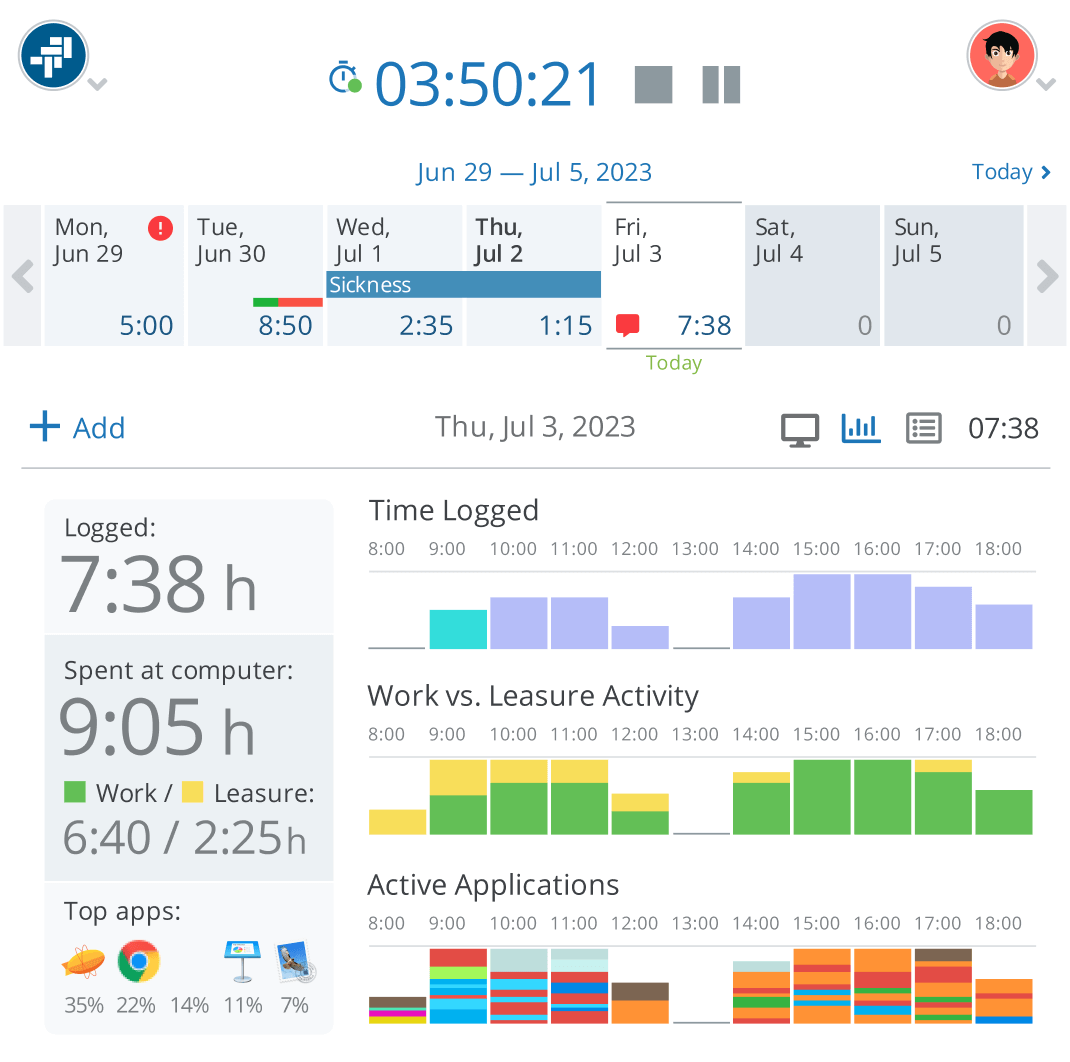
Best for: teams of five or fewer looking for a GPS time tracking app for free, with billable rates, invoices and leave planning included.
Not ideal for: anyone who prefers a tracker that records nothing but hours, since the desktop app logs applications used.
Free plan:
- Free for: up to 5 users
- Limits: 30 active projects, 10 active clients, 3 user roles; no screenshots, live monitoring, payroll or API
- Paid plans from: Growth at $3.20/user/month billed annually ($192 a year for 5 users)
- Trial: 30 days of Growth or Scale, no credit card
Where free ends: at the sixth user, the 31st active project or the 11th active client. Growth raises the caps to 50 users, 200 projects and 50 clients.
How you track time: automated desktop timer with idle detection, a web timer, and a mobile timer with GPS locations; timesheets can carry custom fields.
Apps on the free plan: web, Windows, macOS, Linux, iOS and Android.
What the free plan includes:
- Users: up to 5
- Projects and clients: 30 active projects, 10 active clients
- Report history: no time limit stated
- Export: CSV timesheets; Excel and PDF time reports
- Billable rates: yes, billable and pay rates
- Invoicing: yes, with payment tracking
- Timesheet approvals: not documented; leave requests can be approved
- Offline mobile tracking: not documented
- Automatic tracking: yes, in the desktop app
- Integrations: imports from Toggl and Harvest, Bitbucket, GitHub, GitLab; no API on free
Your data: cloud-hosted. The free plan includes an activity timeline with applications used and productive versus unproductive time; screenshots and website logs start on paid plans.
Ratings: Capterra 4.7 (217 reviews).
Pros:
- Billable rates, invoices and leave planning at $0.
- Desktop apps for Windows, Mac and Linux plus mobile apps with GPS.
- Low paid price if you outgrow the caps.
Cons:
- The desktop app records which applications people use, even on the free plan.
- Active projects and clients are capped at 30 and 10.
- No API until you pay.
What users like
“Trackabi is really good tool for tracking work hours, managing timesheets and monitoring team productivity from one platform. I really like the automated time tracking, leave management features and detailed reporting dashboards that help understand how time is spent across projects.”
What users would improve
“Sometimes the interface feels a bit crowded, and a more streamlined layout would make navigating between tasks even smoother.”
9. Traqq
Traqq built its free plan around privacy: no screenshots, no keystroke counts, no activity scores and no app or website tracking. Up to three people get a free hours tracker with timers, timesheets, billable rates and reports for one project, on computers only, since there’s no mobile app.
Best for: freelancers and small teams on computers who want a simple time tracking app that collects nothing beyond the hours.
Not ideal for: anyone who logs time on a phone, or works on more than one project at a time.
Free plan:
- Free for: up to 3 users
- Limits: 1 project; invoicing, client management and break tracking are paid
- Paid plans from: Plus at $4/user/month for up to 10 users, with 10% off quarterly and 15% off annual billing
- Trial: 14 days on any paid plan, no payment details
Where free ends: at the second project or the fourth user. Plus adds unlimited projects and client management; invoices start on Business.
How you track time: start and stop timers on the web, desktop and browser, with manual entries; time recorded offline syncs later.
Apps on the free plan: Windows, macOS, web and a browser extension. There’s no mobile app.
What the free plan includes:
- Users: up to 3
- Projects and clients: 1 project
- Report history: no time limit stated
- Export: not documented
- Billable rates: yes, billable and cost rates
- Invoicing: no
- Timesheet approvals: no
- Offline mobile tracking: no mobile app; offline tracking on desktop
- Automatic tracking: no
- Integrations: 20+ via the browser extension
Your data: cloud-hosted, with no monitoring of any kind on the free plan: no screenshots, keystrokes, activity levels, idle tracking or app and website logs.
Ratings: Capterra 4.9 (111 reviews), G2 4.8 (123 reviews).
Pros:
- The free plan collects only hours, with no monitoring at all.
- Billable and cost rates with project financials for free.
- Offline tracking on desktop.
Cons:
- There’s no mobile app, so time is tracked on computers only.
- The free plan covers a single project.
- Invoicing sits on the Business plan.
What users like
“I use Traqq for free as a freelancer, and it provides everything I need in the free plan.”
What users would improve
“It doesn’t have a mobile app, which can be limiting when you’re on the go or want to work away from a computer.”
10. todo.vu
todo.vu combines a simple CRM, tasks, time tracking and billing for freelancers and consultants. The free Solo plan covers one staff user, and its pricing lists no cap on clients or projects.
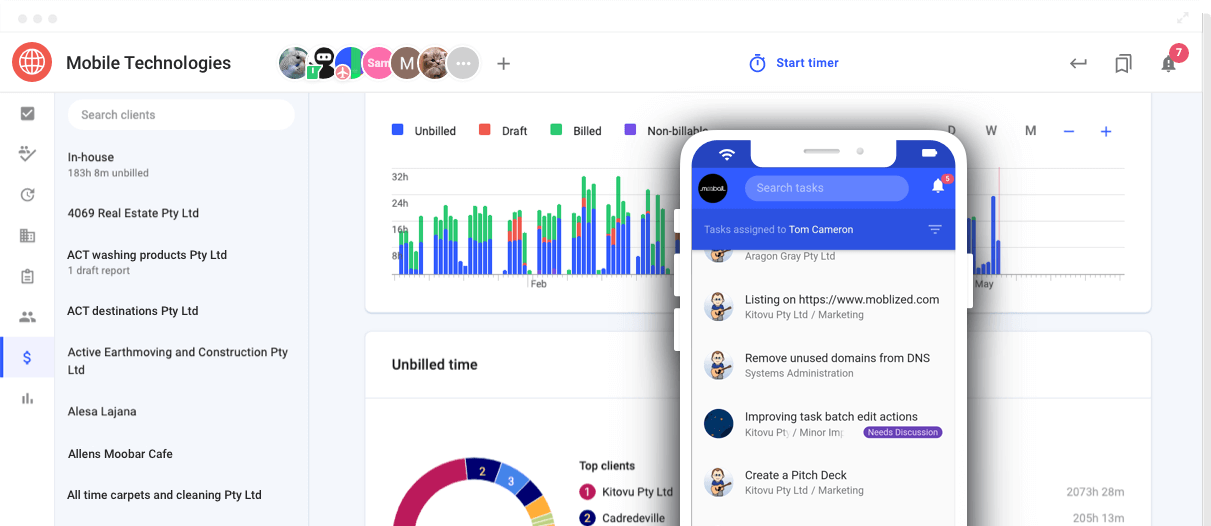
Best for: freelancers and consultants who juggle several clients and want a free billable hours tracker with tasks in one place.
Not ideal for: teams; a second staff user means the paid Business plan for everyone.
Free plan:
- Free for: 1 staff user
- Limits: 1 GB of storage; priority support is paid
- Paid plans from: Business Time at $9/user/month
- Trial: 14 days with all features for every new workspace
Where free ends: the day you add a teammate. Business Time removes the one-user limit and adds 2 GB of storage per user.
How you track time: a timer and manual time logging on tasks, in the web app and the mobile apps.
Apps on the free plan: web, iOS and Android.
What the free plan includes:
- Users: 1 staff user
- Projects and clients: no cap stated
- Report history: no time limit stated
- Export: billing reports
- Billable rates: yes
- Invoicing: yes, billing included
- Timesheet approvals: no; single-user plan
- Offline mobile tracking: not documented
- Automatic tracking: no
- Integrations: Zapier and an Add-Task API; free-plan availability not stated
Your data: cloud-hosted, no monitoring.
Ratings: Capterra 4.4 (49 reviews).
Pros:
- Clients, tasks, time and billing in one free workspace.
- No client or project cap listed for the solo user.
- Native iOS and Android apps.
Cons:
- Free for one user only.
- Customization is limited without a paid plan.
- Editing time inside tasks can feel fiddly.
What users like
“Helps me as a solo architect to track my tasks and time effort in different projects. The tool helps me to keep an overview and to analyse where my work lacks efficiency. Billing works quite easily.”
What users would improve
“Customization isn’t included in the free plan- and no low cost tier to support/use cosmetic upgrade.”
11. TrackingTime
TrackingTime is a free project time tracker for unlimited users, projects and clients, with web, desktop and mobile apps and Microsoft Teams and Slack integrations. Reports are what you pay for: billable time, spreadsheet exports and most reports sit on paid plans.
Best for: teams that want everyone logging time in one place, including inside Teams or Slack, before they decide what to pay for.
Not ideal for: anyone who needs project or client reports, billable rates or a CSV export without paying.
Free plan:
- Free for: unlimited users
- Limits: PDF export only; billable time, AutoTrack, calendar sync, dashboards, project and client reports, CSV and Excel export, and approvals are paid
- Paid plans from: Starter at $4.50/user/month billed annually, $6 billed monthly
- Trial: 14 days, then the account moves to the free plan
Where free ends: when someone asks for a report by project or client, a CSV export, or billable hours. Those start on paid plans.
How you track time: real-time timer, manual entries, batch edits, time notes, automatic reminders, and day and week views; admins can add or edit time for others.
Apps on the free plan: web, usable as a free online time tracker in any browser, plus desktop, iOS, Android, a Chrome extension for 50+ apps, Microsoft Teams and Slack.
What the free plan includes:
- Users: unlimited
- Projects and clients: unlimited
- Report history: no time limit stated; project and client reports are paid
- Export: PDF only
- Billable rates: no
- Invoicing: no
- Timesheet approvals: no
- Offline mobile tracking: not documented
- Automatic tracking: no; AutoTrack is paid
- Integrations: Chrome extension for 50+ apps, Microsoft Teams, Slack
Your data: cloud-hosted, no monitoring on the free plan.
Ratings: Capterra 4.7 (45 reviews), G2 4.4 (227 reviews).
Pros:
- Unlimited users, projects and clients.
- Teams and Slack integrations included free.
- The trial drops back to free instead of locking the account.
Cons:
- Most reports are paid.
- Billable time is a paid feature.
- Free exports are PDF only, so data can’t go straight into a spreadsheet.
What users like
“The ease of use of the application and the fact that multiple projects can be added and integrated. A very cool feature that I like is that you can integrate calendars so the time will be easier to be tracked amongst meetings / other activities.”
What users would improve
“The only downside is because I am using the free version, I can’t run all of the reports, and there are many, including to track overall hours on a project, user reports, etc.! But the free version has everything I need.”
12. OfficeTimer
OfficeTimer splits its product into modules, and each one has a free version for unlimited users: timesheets and projects, attendance, time off with one leave type, and expenses. Billing rates, approvals and locking are paid per module.
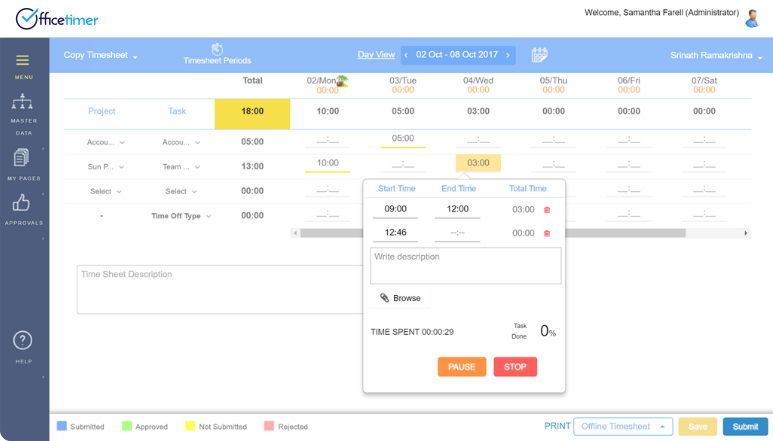
Best for: small offices that want a free time and expense tracking app plus a basic leave tracker for everyone.
Not ideal for: teams that need billing rates or manager approvals without paying.
Free plan:
- Free for: unlimited users, on every module
- Limits: one leave type; user permissions, timesheet locking, approval hierarchies and employee, role and task rates are paid
- Paid plans from: Timesheet Premium at $1.99/user/month billed annually (20% more monthly); all modules at $3.99
- Trial: not needed for the free modules
Where free ends: when you need approvals, locking or billing rates on timesheets, or more than one leave type. Each module is upgraded separately.
How you track time: weekly timesheet with a built-in timer, plus web and mobile check-in and check-out in the attendance module.
Apps on the free plan: web, iOS and Android.
What the free plan includes:
- Users: unlimited
- Projects and clients: unlimited projects
- Report history: unlimited reports
- Export: not documented
- Billable rates: no
- Invoicing: no
- Timesheet approvals: no; approval hierarchies are Premium
- Offline mobile tracking: not documented
- Automatic tracking: no
- Integrations: not documented for free modules
Your data: cloud-hosted; geo-tagging and automatic check-ins are Premium attendance features.
Ratings: Capterra 4.5 (22 reviews).
Pros:
- Unlimited users on every free module.
- Timesheets, expenses and leave in one product.
- Cheap upgrades, bought one module at a time.
Cons:
- Approvals and billing rates are Premium features.
- Only one leave type for free.
- Its Capterra reviews all predate 2022, so recent user feedback is thin.
What users like
“They have all the features that one needs to timesheet management, leave management and expense management. Highly customizable and easy to use. Worth trying.”
What users would improve
“I have noticed some errors, especially when your connection drops for a moment – when it is back you can lose your progress.”
13. Odoo Timesheets
Odoo Timesheets is a time tracking application inside the Odoo business suite, and Odoo’s One App Free plan makes any single app free for unlimited users. Timesheets qualifies, with a timer, manager validation and billable time; turning those hours into invoices needs a second, paid app.
Best for: teams of any size that want validated timesheets for free and may later run sales or invoicing in the same suite.
Not ideal for: anyone who wants to invoice from the same free plan, since a second Odoo app switches the account to paid.
Free plan:
- Free for: unlimited users, on Odoo Online
- Limits: one app plus the apps it depends on, such as Project for Timesheets; adding Invoicing, Sales or any other app makes the plan paid
- Paid plans from: Standard at $31.10/user/month billed annually, $38.90 billed monthly, for all apps (list prices; Odoo shows a first-year discount)
- Trial: not needed for One App Free
Where free ends: the moment you install a second app, such as Invoicing to bill the hours. Standard pricing then applies to every user.
How you track time: timer that starts with one click anywhere in Odoo, manual timesheets, and a timesheet assistant that Odoo says builds entries from desktop and browser activity.
Apps on the free plan: web and the Odoo mobile app for iOS and Android; Odoo lists offline use for Timesheets.
What the free plan includes:
- Users: unlimited
- Projects and clients: projects and tasks, since the Project app comes with Timesheets
- Report history: no time limit stated
- Export: spreadsheet export from list and report views
- Billable rates: yes, billable time by billing type
- Invoicing: no; needs the paid Invoicing app
- Timesheet approvals: yes, one-click validation
- Offline mobile tracking: listed by Odoo
- Automatic tracking: timesheet assistant
- Integrations: other Odoo apps, all paid
Your data: hosted on Odoo Online; the timesheet assistant reads desktop and browser activity on the user’s own device to suggest entries.
Ratings: Odoo overall: Capterra 4.2 (1,335 reviews).
Pros:
- Unlimited users with manager validation.
- Billable time tracking included.
- Room to grow into a full business suite later.
Cons:
- Invoicing the hours needs a second, paid app.
- Paid pricing is for the whole suite, so it’s high for time tracking alone.
- Timesheets are simpler than in specialized tools.
What users like
“What I like most about Odoo is that it allows you to do a lot of things for a very reasonable price. I have tried several modules in Odoo, and I have enjoyed them all very much.”
What users would improve
“As it allows you to do many things, it also has the disadvantage of being less advanced than software whose development is focused on a single feature. For example, Calendly allows you to do more things than Odoo’s meeting module. Similarly, the timesheet is not as developed as a timesheet offered by a company that specializes in this field.”
14. Kimai
Kimai is open-source time tracking you install on your own server. Self-hosted, it’s free for unlimited users, with rates, invoices and exports. The hosted cloud version is paid after a 30-day trial, and there’s no official mobile app.
Best for: teams with someone technical who want unlimited users, invoices and full control of their data at no license cost.
Not ideal for: teams without a server or admin, or anyone who needs a native mobile app.
Free plan:
- Free for: unlimited users, self-hosted under the AGPL-3.0 license
- Limits: you host, update and back it up yourself; some plugins in the marketplace are paid; the cloud version isn’t free
- Paid plans from: cloud at €2.99/user/month billed annually, €3.99 billed monthly
- Trial: 30 days of the cloud version
Where free ends: when you’d rather not run a server. Then the cloud version is paid per user, or you pay for hosting and admin time yourself.
How you track time: timer and manual entries in a responsive time tracking web application that works in mobile browsers, and a punch-in, punch-out time-clock mode.
Apps on the free plan: web only; there’s no official native app for iOS or Android.
What the free plan includes:
- Users: unlimited
- Projects and clients: unlimited customers, projects and activities
- Report history: full history on your server
- Export: XLSX, PDF, CSV and HTML
- Billable rates: yes
- Invoicing: yes, PDF and DOCX templates
- Timesheet approvals: not part of the core features
- Offline mobile tracking: no
- Automatic tracking: no
- Integrations: JSON API and a plugin marketplace
Your data: stored on your own server, so nothing leaves your infrastructure, which is the main case for self-hosted time tracking; no monitoring.
Ratings: G2 4.8 (6 reviews), Capterra 3.6 (7 reviews).
Pros:
- Unlimited users, rates and invoices for free when self-hosted.
- Your data stays on your own server.
- Exports in four formats and a full API.
Cons:
- Needs a server and someone to maintain it.
- There’s no native mobile app, only the mobile browser.
- The cloud version isn’t free.
What users like
“It is free to use open-source software so anyone can use it without any subscription fees.”
What users would improve
“Automated exports would be great, having to get data out of the system every month needs a few clicks.”
Which apps stay free as your team grows
Seat caps decide when a free plan stops working. Find your headcount in the top row to see which free plans still cover everyone, which matters most for small business timekeeping, where one hire can push a free time tracking app over its cap.
| App | 1 person | 2–3 | 4–5 | 6–10 | 11+ |
|---|---|---|---|---|---|
| actiTIME | + | + | – | – | – |
| Toggl | + | + | – | – | – |
| Traqq | + | + | – | – | – |
| Clockify | + | + | + | – | – |
| Trackabi | + | + | + | – | – |
| Connecteam | + | + | + | + | + up to 30, Limited plan |
| TimeCamp | + | + | + | + | + |
| TrackingTime | + | + | + | + | + |
| Jibble | + | + | + | + | + |
| OfficeTimer | + | + | + | + | + |
| Odoo Timesheets | + | + | + | + | + one app only |
| Kimai | + | + | + | + | + self-hosted only |
| Paymo | + | – | – | – | – |
| todo.vu | + | – | – | – | – |
Unlimited users rarely means unlimited features. The apps that stay free at any headcount usually hold back something else, such as billable rates, spreadsheet exports or most reports, so check the next section before treating a long row of pluses as the best deal.
What free plans usually leave out
Six features account for most upgrades from a free plan. Each item below says who needs the feature and which apps include it at $0.
- Billable rates and invoices. You need them if you invoice clients for hours, since rates turn time into amounts. Included free in actiTIME, Paymo, todo.vu, Trackabi, self-hosted Kimai and, by Jibble’s own account, Jibble; Traqq and Odoo Timesheets include rates without invoices; Clockify, Toggl, TimeCamp and TrackingTime charge for both.
- Timesheet approvals. They matter once hours drive payroll or a client bill and a manager has to approve timesheets first, and it’s the point where most free timesheet software asks you to upgrade. Free in Connecteam (Small Business plan) and Odoo Timesheets and listed among Jibble’s features; paid in most other apps here, including actiTIME, Toggl, TimeCamp and TrackingTime. For tools built around approvals, see our review of employee timesheet software options.
- Spreadsheet exports. A CSV or Excel file is what payroll, accounting software and another time tracker can import, while a PDF can only be read. actiTIME, Jibble, Trackabi, Kimai, Odoo Timesheets and Connecteam’s Small Business plan export to spreadsheets for free; Toggl, TimeCamp and TrackingTime export reports only as PDF, and Clockify allows CSV for project data but PDF for reports.
- Report history and team reports. Quarter or year comparisons need reports that span long periods. Clockify’s free reports cover up to 31 days at a time, Connecteam’s Limited plan shows 30 days of timesheets, and TrackingTime and Toggl keep project, client or team-level reports for paying customers.
- Integrations and API access. They save double entry when time has to reach other tools. Toggl, TimeCamp, TrackingTime, Jibble, Trackabi, Kimai and Connecteam’s Small Business plan (through Zapier) include integrations for free, and Clockify caps its free API at 30 requests per hour; actiTIME keeps the API and integrations in its paid version, and Trackabi charges for its API.
- GPS, kiosk and geofencing. Field and shift teams use them to confirm where and when people clock in. Connecteam’s Small Business plan and Jibble include all three free, TimeCamp and Trackabi include GPS, and Clockify keeps its kiosk on paid plans. Our roundup of free time clock software covers tools built around clock-in.
Your data on a free plan
Thirteen of the 14 apps keep your data in the vendor’s cloud, and most free plans store only the hours people enter. The details below matter before a team starts logging time.
- Where it lives. Kimai is the exception and runs on your own server, and actiTIME sells a separate self-hosted edition for teams that need data in-house.
- What gets recorded. On most free plans, a time recording app stores only what people enter. The desktop time trackers in Clockify, Toggl, TimeCamp and Paymo, and Odoo’s timesheet assistant, read activity on the user’s own computer to suggest entries; Trackabi’s free plan logs applications used; Connecteam, Jibble, TimeCamp and Trackabi can record GPS location. Traqq is the only vendor that spells out on its pricing page that its free plan records no screenshots, keystrokes or activity levels; actiTIME, todo.vu, TrackingTime, OfficeTimer and Kimai don’t monitor on their free plans either. If you need the opposite, compare dedicated employee monitoring tools instead.
- Getting it out. Export formats decide how hard it is to leave later; the section on moving off a free plan below covers what to save first.
When a free time tracker app is enough, and when it is not
A free time tracker app is a sensible starting point for a freelancer or a small team that just needs to record hours. Most free plans cover the basics well: timers, manual entries and daily or weekly totals. When the goal is simply to see where the hours go, that’s often all you need, and there’s no reason to pay.
The limits show up once the time data has a job to do. The moment hours feed payroll, a client invoice or a project budget, the missing pieces start to cost you more than a subscription would.
A useful test: if you only need to know how time was spent, a free app is usually enough. If you need to prove it, bill for it or control a budget against it, you’ve outgrown the free tier.
How to test a free app in 7 days
A week of real work tells you more about a free plan than any feature list, whichever of the ways to track time your team prefers. Run the test before the team commits to an hour tracking app:
-
Set up your own structure on day one
Add your current clients and projects and invite two or three teammates.
-
Log a full week on the devices people use
Everyone tracks time where they work, on a phone in the field or a desktop at the office, so you see whether people keep up with it.
-
Try it offline once
Switch a phone to airplane mode, track 15 minutes, reconnect and check that the entry synced.
-
Pull the report you’ll need every month
Group the week by client, project or person and export it in the format your accountant or payroll provider uses.
-
Find where free ends for you
Note every step that needed a paid feature, such as billable rates, an approval, a spreadsheet export or one more user, and price the plan that removes it at your team size.
If the free plan runs out in the first week, it’s better to pick the app whose paid plan you’d accept now than to switch once months of history are stored in it.
Moving off a free plan without losing history
Upgrading inside the same app keeps your history; switching apps or downgrading is where data gets lost. Before either, a few steps protect the record:
- Export everything first. Pull time entries, projects, clients and rates as CSV or Excel while you still have access.
- Check what the new tool imports. Trackabi imports data from Toggl and Harvest, Toggl accepts CSV imports, and actiTIME imports projects and users from CSV so the structure doesn’t have to be rebuilt by hand.
- Know what a downgrade removes. Traqq’s free plan drops access to higher-plan features as soon as you switch, and Connecteam’s Limited plan only shows the last 30 days of timesheets.
- Back up a self-hosted install. With Kimai, the data is your database, so back it up before every upgrade or move.
Conclusion
No single best free time tracking app suits every small business team: the right free plan is the one that still fits after your next hire and your next invoice. Count the people who will track time, decide whether those hours need to become bills, payroll or reports, and then pick the plan whose limits sit furthest from where you are.
If you’re a team of up to three that bills clients, actiTIME’s free version covers timesheets, reports, leave and invoicing, and the mobile app comes with it. When the team grows, the same account moves to a paid subscription with its history intact.
FAQ
Can a free time tracker keep the records labor law requires?
It can, as long as it keeps the full history and lets you export it. In the US, the Fair Labor Standards Act requires employers to keep payroll records for at least three years and the time cards behind them for two, according to the Department of Labor. Before relying on a free plan for this, check how far back it shows data: Connecteam’s Limited plan, for example, displays only the last 30 days of timesheets. actiTIME’s free version keeps the complete history and exports reports to CSV, so records can also be archived outside the app.
Do I have to pay for the whole team when one person needs a paid feature?
Usually, yes. Once you upgrade, most of these apps charge per seat for every user in the account, not just the one who needs the feature: that’s how actiTIME, Clockify, TimeCamp and Odoo price their paid plans. Connecteam is the main exception, with a flat price for the first 30 users, and OfficeTimer lets you upgrade one module at a time. Before upgrading, multiply the per-user price by your full headcount.
Is company data safe in a free time tracking tool?
Before signing up, check three things: where the data is stored, what the free plan records about people, and whether you can export it. Most apps here are cloud-hosted and store only what people enter, while some free plans add GPS or application logs. For data that has to stay in-house, Kimai runs on your own server and actiTIME offers a paid self-hosted edition.


Start with a free 30-day trial, no credit card required, and continue with the permanent free version for up to 3 users anytime.