
Consultants lose money in a very specific, very avoidable way: hours that were worked but never logged, never billed, and never counted toward the next project estimate. A Reddit thread from a consultant put it bluntly – end-of-day timesheets turn into guesswork, and a few unaccounted hours here and there add up to a chronic sense of being short-changed for a full week’s work.
The fix isn’t more willpower at 6 PM on a Friday. It’s dedicated time tracking and billing software for consultants – something that captures hours as you work and turns them into an invoice without a second data-entry pass. In this guide, we compare the tools that do this well – free and paid, simple trackers and full billing suites – so you can pick the one that matches how your consulting business actually runs.
- The hidden cost of not tracking billable hours
- Must-have features for time tracking software for consultants
- How to choose the right time tracking and billing tool for your consulting business
- Time tracking and billing tools for consultants at a glance
- Best free time tracking tools for consultants
- Paid time tracking and billing options for consultants
- How to roll out time tracking and billing tools on your team
- FAQ
The hidden cost of not tracking billable hours
Most consultants can tell you their hourly or project rate off the top of their head. Far fewer can tell you, with any confidence, how many billable hours they actually logged last month versus how many they meant to log.
That gap is where money quietly disappears. A quick call that runs 20 minutes over goes unrecorded because it felt too small to log. A research rabbit hole eats an afternoon that never makes it onto an invoice because there was no clear “task” to file it under. None of this looks like a problem in the moment – it looks like a problem three months later, when a project that felt busy turns out to have been barely profitable once you account for all the hours that went into it but never got billed.
Manual tracking (or no tracking at all) makes this gap worse in three specific ways: it relies on memory, which is unreliable by end of day; it makes non-billable creep invisible, so administrative work quietly eats into billable capacity without anyone noticing; and it turns invoicing into a monthly reconstruction project instead of a five-minute export. A dedicated time tracking and billing tool closes all three gaps at once – which is exactly why it’s worth being deliberate about which one you pick. (If you want the process itself – steps, rollout, day-to-day habits – rather than a tool comparison, our full guide to consultant time tracking covers that in depth.)
Must-have features for time tracking software for consultants
So what features do time tracking solutions need to deliver these benefits for consultancies and independent consultants?
- Time-track notes: Sometimes a task takes longer than expected because of an unforeseen complication. A good time tracker should let you add a short note explaining why, so both you and your client have context for the hours later.
- Billable vs. non-billable tracking: Distinguishing between billable hours, non-billable activities, and personal tasks keeps your invoices accurate. A good time tracker should have clear flags or categories so hours land in the right bucket without extra manual sorting – if this is your main concern, our roundup of billable hours trackers narrows in on that angle specifically.
- Project-coded entries: When you’re juggling multiple clients, submitting time can get messy. Look for software that lets you code entries by project so your hours land on the right client and phase automatically.
- Integrations: Client interruptions are a constant in consulting. A tool that integrates with your calendar or messaging app helps you stay on top of your hours even on days full of context-switching.
- A lean interface: If your timesheet tool is clunky, you’ll put off using it. Look for one-click copying from previous entries, keyboard shortcuts, and mobile capture to keep friction low.
Whether invoicing and billing automation belongs on this list depends entirely on your setup. If you already invoice clients through QuickBooks, FreshBooks, or an accountant, a time tracker that only exports clean hourly reports may be all you need. If you’re billing clients directly and want one tool to handle both the hours and the invoice, built-in billing – rate-based invoice generation, payment tracking, recurring retainers – turns into a real time-saver rather than a nice-to-have. Neither answer is wrong; it’s a question of what’s already in your stack.
If that stack still needs an accounting tool, see our list of bookkeeping programs for small businesses.
To help you navigate this time tracking maze, here’s a quick comparison of some popular software options.
How to choose the right time tracking and billing tool for your consulting business
Once you know which features matter to you, the next decision is really about fit – what works for a solo consultant billing three clients a month looks nothing like what a 40-person consultancy needs.
- Standalone tracker or full PSA? A standalone time tracker does one job well: capture hours and, in many cases, turn them into a simple invoice. A professional services automation (PSA) platform bundles time tracking with project accounting, resource planning, and sometimes CRM – useful once your firm has multiple consultants, overlapping projects, and a finance team that wants one system of record instead of three tools feeding into a spreadsheet. Most solo consultants and small teams are better served by a standalone tracker; PSA earns its complexity (and its price tag) at larger team sizes. If your practice is specifically an engineering consultancy, our roundup of software for engineering consultants covers PSA platforms built around that industry’s own billing structure. For the wider picture beyond billing, see our guide to engineering project management.
- Match the tool to your team size. A tool priced and designed for 50-person teams will have approval chains and admin overhead that a solo consultant doesn’t need. Conversely, a tool built for freelancers may cap out on clients or projects before a growing consultancy is ready to switch.
- Budget and scalability. Per-user pricing adds up fast once a team grows – check what the tool costs at your team size in a year, not just what the marketing page shows for a single seat.
- Customization and flexibility. Every consulting practice bills a little differently – hourly, retainer, fixed-fee, or some mix. Make sure the tool’s billing rates, project structures, and reports can actually reflect how you bill, not just how the software assumes you bill.
- Take the free trial seriously. Log a real week of work in it before committing – a tool that looks clean in a demo can still be the wrong fit once you’re doing it every day.
Time tracking and billing tools for consultants at a glance
The table below summarizes the tools featured in this guide and whether each one handles billing and invoicing on its own, or expects you to pair it with separate accounting software.
| Tool | Free plan | Free trial | Starting price | Billing built in? | Best for |
|---|---|---|---|---|---|
| actiTIME | Yes – up to 3 users | 30 days | $5/user/month | Yes – PDF invoices from tracked hours | Consultancies of any size that want time, cost, and billing in one place |
| Hubstaff | No | 14 days | $4.99/user/month | Yes – from the Grow tier up | Remote and distributed consulting teams |
| TMetric | Yes – up to 2 users | 14 days, extendable by 7 more | Paid tiers from the Professional plan (price on request) | Yes – from the Professional tier up | Small teams that want budgets and invoicing without screenshot monitoring |
| DeskTime | No | 14 days, no payment required | €5.50/user/month | No – time and productivity reports only | Consultants who want productivity insights alongside time data |
| DueFocus | Yes – up to 5 users | Extended trial on request | $9/user/month | Yes – limited on Starter, unlimited on Premium | Freelance consultants who want a focus timer alongside tracking |
| Elorus | Yes – 1 user, 5 active clients | Paid tiers can be tried before committing | $9/month | Yes – core product is invoicing | Freelance consultants who want invoicing and expenses in one tool |
| Bill4Time | No | 14 days | $39/user/month, billed annually | Yes – core product is time billing | Consulting firms that bill clients like a law firm bills matters |
| Timely | No | 14 days, full feature access | $9/month (up to 5 users) | No – automatic time capture and project budgets, no native invoicing | Consultants who forget to start timers and want tracking to happen automatically |
| Time Analytics | No | 14 days | $4.99/user/month, billed annually | Yes – on the Optimum tier | Consultants who want time and cost reporting without a big learning curve |
| BigTime | No | – demo-based, contact sales | $20/user/month | Yes – deep billing, multi-currency invoicing on higher tiers | Consulting firms that want a full time-and-billing system with QuickBooks sync |
Best free time tracking tools for consultants
1. actiTIME
Key features:
- Online timesheet
- Browser extension
- Task management
- Billing & invoicing
- Productivity reports
- Mobile apps
Why it works: actiTIME tracks billable and non-billable time by client and project, then turns tracked hours and billing rates directly into a PDF invoice – no separate invoicing software needed. You can add notes to time entries for client-facing context, and compare billable hours against costs to see project profitability, not just hours logged.
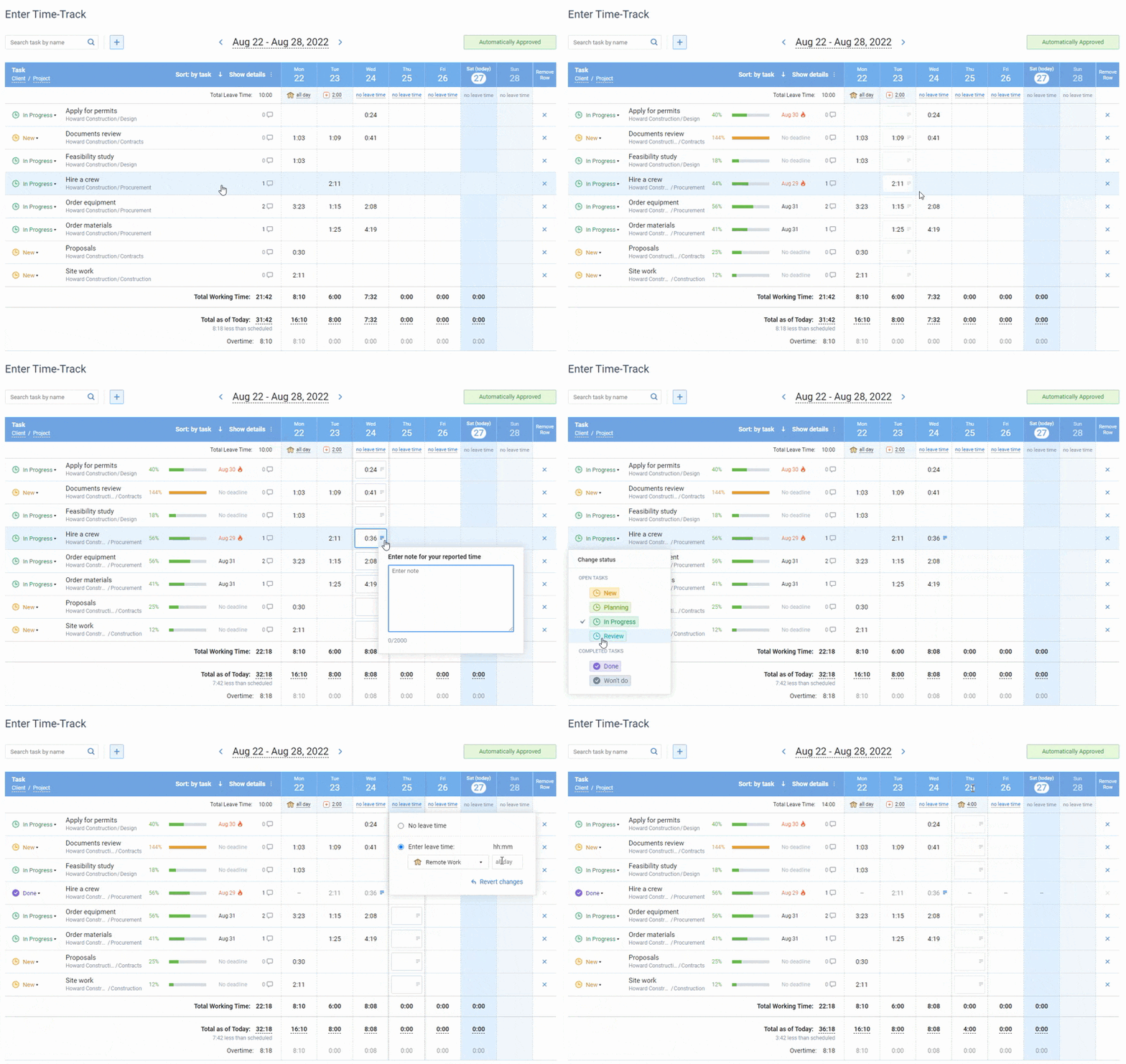
Online timesheet interface in actiTIME, where each user selects the task parameters they want to see in their timesheet
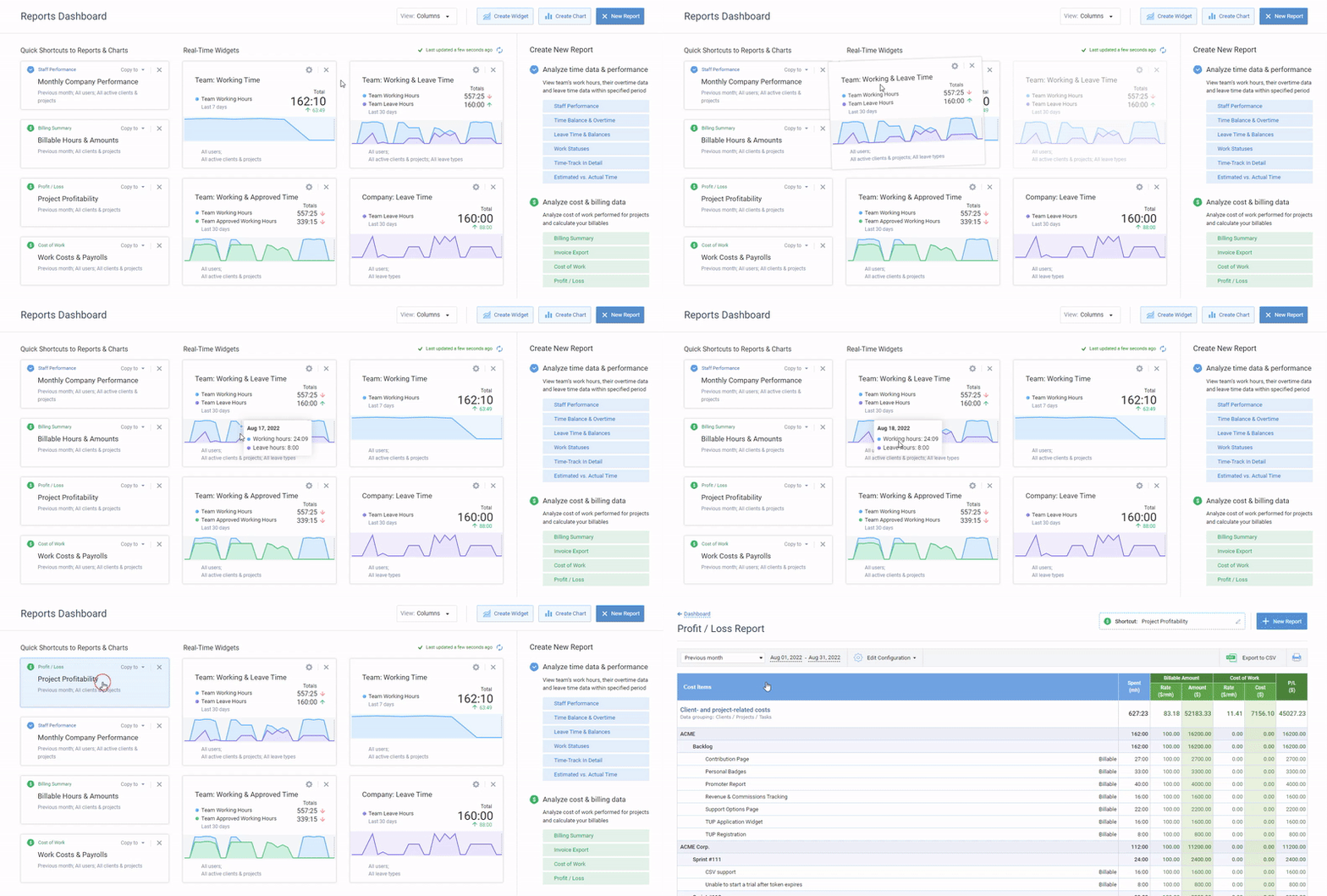
Reports dashboard in actiTIME – set up real-time data widgets and shortcuts to your most-used reports
Best for: Consulting businesses of any size that want time, cost, and billing data living in one system instead of three.
Pricing: Free for up to 3 users; $6/user/month for 1–40 users, $5/user/month for 41–200 users (billed annually); self-hosted from $120/user as a one-time purchase.
Free trial: 30 days, no credit card required.
Rating: Capterra 4.6 (111 reviews).
Pros:
- The free version has no expiration date for small consultancies, unlike a typical time-limited trial
- Invoices generate directly from tracked billable time – no re-entering hours into separate billing software
- Available as both cloud and self-hosted, useful if client data can’t leave your own infrastructure
Cons:
- Invoicing covers generating a PDF from tracked hours and rates – it doesn’t handle online payment collection or recurring retainer billing the way a dedicated billing suite does

actiTIME more than meets the needs of my company
It’s an amazing product, it is extremely well-polished and a good deal better than other apps which have higher license fees. At this point, actiTIME more than meets the needs of my company. Thanks for developing such a wonderful app!
2. Hubstaff
Key features:
- Online timesheets
- Geofencing
- Analytics
- Invoicing (Grow tier and up)
- Cost management
Why it works: Hubstaff logs time spent in apps and on websites automatically, which suits remote consulting work where you’re not always at a desk to hit a manual timer. Consultants can set project budgets, export reports for clients, and – on the Grow plan and above – generate invoices and accept payments straight from tracked hours.
Best for: Remote and distributed consulting teams that want automatic tracking without a separate app for invoicing.
Pricing: Starter $4.99/user/month; Grow $7.50/user/month (adds time-off, invoices, and payments); Team $10/user/month; Enterprise from $25/user/month (custom) – all billed annually.
Free trial: 14 days, no credit card required.
Pros:
- Automatic tracking means less manual timer discipline required day to day
- Invoicing and payments are available at a relatively low tier ($7.50/user/month), not locked behind an enterprise plan
Cons:
- Screenshot and activity-monitoring features can raise privacy concerns with team members if rolled out without a clear policy. For a lighter-touch automatic tracker, compare TimeCamp vs Hubstaff.
- No permanent free plan – only a 14-day trial
3. TMetric
Key features:
- Billing and invoicing (Professional tier and up)
- Time off management
- Activity tracking
- Project budgets with alerts
Why it works: TMetric’s free plan already covers unlimited time tracking, clients, and projects for up to 2 seats. Once you need billable rates per client, budget alerts, and client invoicing, the Professional tier adds them without switching tools.
Best for: Small consulting teams that want budgets and invoicing without paying for the screenshot-monitoring features bundled into the Business tier.
Pricing: Free for up to 2 users; Professional and Business tiers add billing, budgets, and monitoring (per-seat pricing shown at checkout); Enterprise is custom.
Free trial: 14 days, extendable by 7 more.
Pros:
- Free tier has no user-count-driven feature cuts on core time tracking, just a 2-seat cap
- Invoicing and budgeting sit in the mid-tier Professional plan, not gated behind the top tier
Cons:
- Free plan is capped at 2 users, tighter than some competitors’ free tiers
- Exact Professional/Business pricing isn’t published – you see it at checkout
4. DeskTime
Key features:
- Automatic and manual time tracking
- Productivity calculation
- Shift scheduling
- Calendar integrations
Why it works: DeskTime automatically records work hours, flags unproductive patterns, and generates reports you can hand to a client as evidence of time spent – useful if what you need is transparent activity data more than an invoicing engine.
Best for: Consultants who want productivity insights – app and URL usage, idle time – alongside their time data, and already invoice through separate accounting software.
Pricing: Pro €5.50/user/month; Premium €8.25/user/month; Enterprise custom (200+ users) – billed annually.
Free trial: 14 days, no payment required to start.
Pros:
- Automatic tracking and productivity breakdowns need no manual setup to start showing useful data
- Annual billing includes a free extra month
Cons:
- No permanent free plan anymore – only the 14-day trial
- No built-in invoicing – you’ll need a separate tool for billing clients
5. DueFocus
Key features:
- One-click timers
- Real-time monitoring
- Invoicing (limited on Starter, unlimited on Premium)
- Client reporting
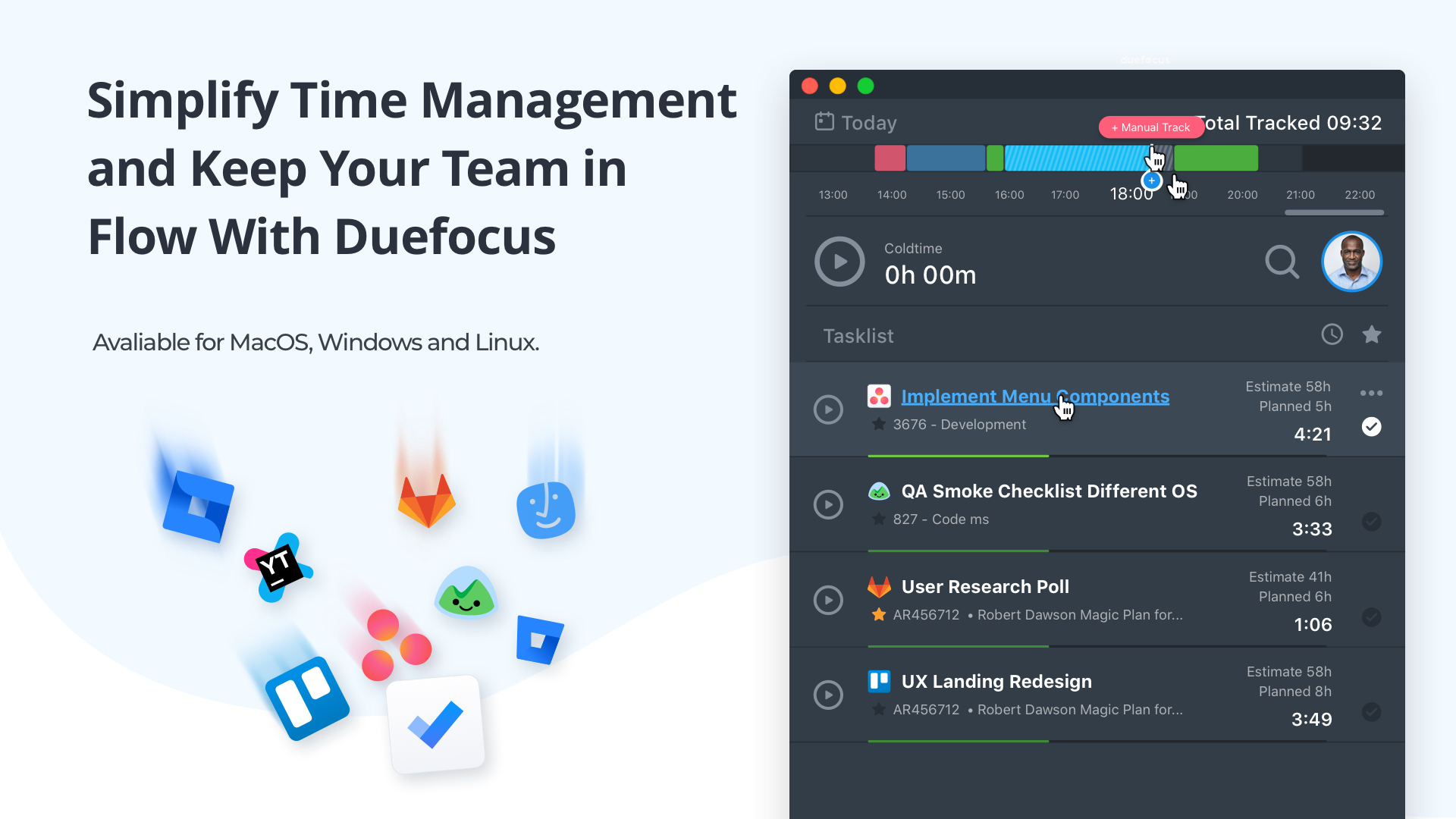
Why it works: DueFocus is built around focused work sessions – a Pomodoro-style timer alongside automatic activity capture and offline tracking. Invoices can be generated from tracked or manually entered time, though the free plan caps how many you can send per month.
Best for: Freelance consultants who want a focus timer built into their tracker, not just a stopwatch.
Pricing: Free for up to 5 users with 1 integration; Starter $9/user/month (limited invoices); Premium $12/user/month (unlimited invoices, client reporting); Enterprise custom.
Free trial: Extended trial of the full feature set available on request.
Pros:
- Free plan supports up to 5 users, generous compared to most competitors’ free tiers
- Built-in Pomodoro timer is a genuine differentiator for solo consultants prone to context-switching
Cons:
- Invoicing is capped on the free and Starter tiers – you need Premium for unlimited invoices
- Fewer integrations than larger competitors
Paid time tracking and billing options for consultants
1. Elorus
Key features:
- Invoicing and online payments
- Expense tracking
- Time tracking by client and project
- Client portal
Why it works: Elorus is built around invoicing first and time tracking second – it tracks billable time, expenses, and project costs, then turns all of it into professional invoices with online payment collection built in. For a freelance consultant, that means one tool for both logging hours and getting paid for them.
Best for: Freelance consultants and small service businesses who want invoicing, expenses, and time tracking in a single freelancer-priced tool.
Pricing (Elorus Freelance plans): Free for 1 user and up to 5 active clients; Essential $9/month for up to 2 users and 100 active clients; Growth $14/month for up to 10 users and unlimited clients.
Free trial: Free plan available permanently; paid tiers can be tried before committing.
Rating: Capterra 4.9.
Pros:
- Online payment collection is built in, not just invoice generation – clients can pay directly from the invoice
- Free plan is a real permanent tier, not a time-limited trial
Cons:
- Time tracking is secondary to the invoicing/accounting side – fewer advanced tracking methods than dedicated time trackers
2. Bill4Time
Key features:
- Invoice templates
- Expense tracking
- Online payments
- Client and matter management
Why it works: Bill4Time is built for professionals who bill by the hour and need the paper trail to match – detailed time entries, customizable invoice templates, and reports broken down by client, matter, or biller. It’s the same category of tool law firms use, applied to consulting engagements.
Best for: Consulting firms that want law-firm-grade billing rigor – detailed invoices, client organization, audit-ready reports.
Pricing: Time & Billing from $39/user/month, billed annually ($49/month billed monthly); higher tiers add more reporting and customization.
Free trial: 14 days, no credit card required.
Pros:
- Invoice customization and client/matter organization are deep enough for firms with strict billing standards
- Mobile apps let you log time and check billing status away from your desk
Cons:
- Meaningfully pricier than most of this list – a real cost jump for a solo consultant or small team
- No permanent free plan
3. Timely
Key features:
- Automatic time tracking
- Project health analysis
- Budget management
- Overtime tracking
Why it works: Timely records time in the background using AI rather than requiring you to remember to start a timer, then lets you tag and assign the captured time to the right project after the fact. It’s a strong fit if the problem you’re solving is forgetting to track, not billing automation – Timely doesn’t generate invoices itself.
Best for: Consultants who consistently forget to start a timer and want tracking to happen automatically in the background.
Pricing: Starter from $9/month (up to 5 users, 20 projects), billed annually; Premium and Unlimited tiers scale up in users and features.
Free trial: 14 days, full feature access.
Rating: G2 4.8 (486 reviews).
Pros:
- Fully automatic capture means no lost hours from forgetting to hit a timer
- Strong G2 rating from a large review base
Cons:
- No native invoicing – you’ll need to export tracked time into separate billing software
- Trial length has shortened to 14 days from the 30 days it used to offer
4. Time Analytics
Key features:
- Time and cost reporting
- Invoicing (Optimum tier)
- Utilization and overtime tracking
- Automatic cost allocation
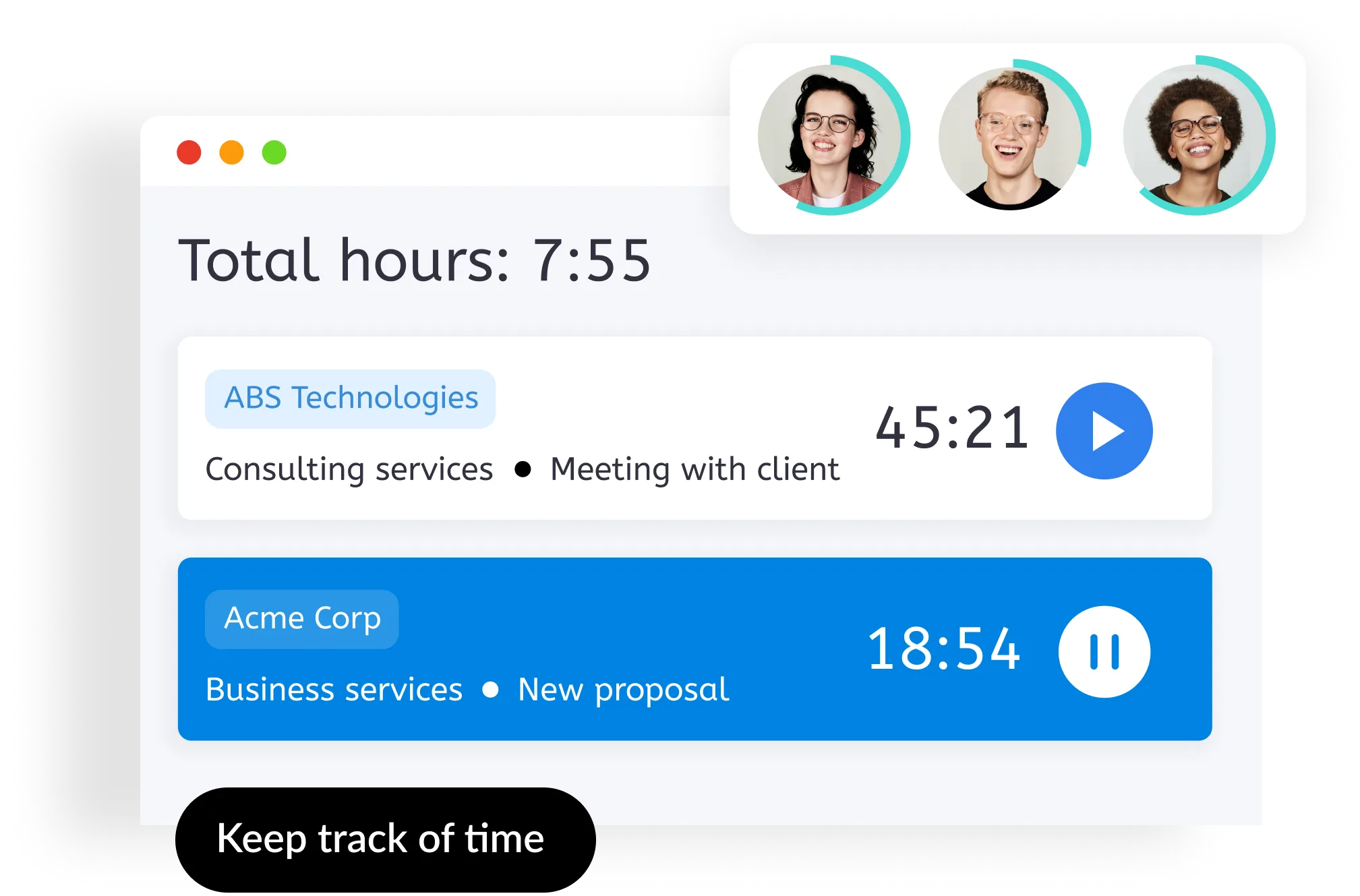
Why it works: Time Analytics lets you choose between manual entries, timers, or desktop activity tracking, then rolls everything into time and cost reports organized by client and project. The Optimum tier adds invoicing directly from billable time, plus revenue and profit reporting.
Best for: Consultants who want time and cost reporting without a steep learning curve, and are willing to step up a tier for invoicing.
Pricing: Starter $4.99/user/month (billed annually, $5.99 billed monthly); Optimum $6.99/user/month (billed annually, $8.45 billed monthly) – adds invoicing and revenue reporting.
Free trial: 14 days, no credit card required.
Pros:
- Multiple time-entry methods (manual, timer, activity tracking) instead of forcing one workflow
- Invoicing tier is inexpensive relative to dedicated billing suites
Cons:
- Invoicing isn’t available on the entry-level Starter plan
- Fewer third-party integrations than larger competitors
5. BigTime
Key features:
- Time and expense management
- Billing and invoicing
- QuickBooks integration
- Project portfolio management
Why it works: BigTime is built for professional services firms that want billing depth, not just a timer – automatic invoice reconciliation, QuickBooks sync, and (on higher tiers) multi-currency invoicing and multi-level approvals. It’s the closest thing on this list to a full PSA platform rather than a standalone tracker.
Best for: Consulting firms past the solo stage that want time tracking, project accounting, and billing approvals in one connected system.
Pricing: Essentials from $20/user/month; Advanced and Premier tiers add multi-currency invoicing, custom rate management, and approval workflows; Enterprise is custom.
Free trial: Demo-based – contact sales to see the product before committing.
Pros:
- Billing depth (multi-currency invoicing, multi-level approvals) goes further than any other tool on this list
- Native QuickBooks integration keeps billing data in sync with your books automatically
Cons:
- Highest starting price on this list – overkill for a solo consultant or very small team
- No published free trial length or self-serve free plan – you go through a sales demo first
How to roll out time tracking and billing tools on your team
Picking the right tool from the list above is only half the job. Whether it actually sticks – and whether the billing data coming out of it is trustworthy – comes down to how you roll it out and use it day to day.
- Get buy-in before you roll it out. Frame the tool around what it does for the person logging time – accurate billing that protects their own hours, an invoice that takes five minutes instead of an afternoon – not just what it gives management visibility into. A tool introduced as surveillance gets resented and gamed.
- Standardize what counts as billable before day one. Decide upfront how client calls, internal admin, and research time get categorized, and write it down somewhere the whole team can check. Ambiguity here is what causes inconsistent, hard-to-bill entries later.
- Train on the actual tool, not just the policy. A short walkthrough of the real interface prevents the most common failure: people forgetting to log time simply because they haven’t built the habit yet.
- Roll out in phases if you’re a team. Starting with one project or a small group surfaces friction – confusing categories, missing task types – before it becomes everyone’s problem at once.
- Track daily, not weekly. By Friday, most people can’t accurately reconstruct where Monday’s hours went. Logging time right after finishing a task, even roughly, produces far more accurate data than reconstructing a week from memory.
- Use the data to improve, not to police. Time tracking data is most useful for spotting where estimates were off or where a project quietly went over budget – treating it as a tool for catching people out just teaches them to game the numbers.
- Feed tracked time back into your estimates. If a task keeps taking longer than quoted, that’s information for the next proposal, not just a billing footnote. Reviewing actual-vs-estimated time regularly is what makes future quotes more accurate.
- Review the data early, not just at billing time. Checking entries in the first few weeks catches formatting problems and miscategorized time before they turn into a pattern across a whole invoicing cycle.
Time tracking and billing software pays off fast for consultants
The tools on this list solve the same underlying problem in different ways: turning hours worked into hours billed, without a manual reconciliation step at the end of the month. Some, like actiTIME and Elorus, do that for free at small team sizes. Others, like Bill4Time and BigTime, trade a higher price for deeper billing and reporting once your consultancy outgrows a simple tracker.
Whichever you pick, the real payoff isn’t the software itself – it’s the billable hours that stop slipping through the cracks once you’re tracking them properly.
FAQ
Which time tracking and billing tool is best for consultants overall?
It depends mainly on team size and how much billing automation you need. actiTIME covers the most ground for consultancies of any size – free for small teams, with billing and invoicing built in as you grow. Solo consultants who want invoicing and online payments specifically should look at Elorus; firms that need law-firm-grade billing rigor or a full PSA platform are better served by Bill4Time or BigTime.
Which of these tools are free forever, not just a free trial?
actiTIME (up to 3 users), TMetric (up to 2 users), DueFocus (up to 5 users), and Elorus (1 user, up to 5 active clients) all have permanent free tiers. Hubstaff, DeskTime, Bill4Time, Timely, Time Analytics, and BigTime only offer time-limited free trials before you need to subscribe.
Which tools handle invoicing without needing separate billing software?
actiTIME, Elorus, Bill4Time, and BigTime all generate invoices directly from tracked billable time. Hubstaff, TMetric, DueFocus, and Time Analytics add invoicing from a mid-tier plan up rather than on their entry-level tier. DeskTime and Timely are time and productivity trackers first – neither generates invoices, so you’d pair either one with separate accounting software.
Is a standalone time tracker enough, or do I need a full PSA platform?
For a solo consultant or small team, a standalone tracker with basic invoicing (like actiTIME or Elorus) usually covers everything you need. A full professional services automation platform like BigTime earns its extra cost and complexity once you have multiple consultants, overlapping projects, and a finance team that wants project accounting and billing approvals in one system rather than several tools feeding a spreadsheet.