
Are you feeling like your time runs away from you as soon as you get down to work? If the answer is yes, then it’s safe to say that your consultant business needs a better system for tracking time. After all, how can you maximize your profits and optimize workflow if there’s no way for you to measure productivity (or lack thereof)?
Fortunately, there are ways of handling consultant time tracking like a pro, no matter whether you’re running a full-scale agency or are simply flying solo – and if you’re specifically weighing the best time tracking software for consultants, we cover that separately too.
In this blog post, we’ll show aspiring experts and entrepreneurs exactly how they can approach tracking their time with effective tips and tools.
It’s time to take control of those fleeting hours – read on for more!
Common time tracking problems consultants face
- Inaccurate billing: How do you ensure that you’re billing your clients accurately – down to the minute? Time tracking can help you do just that. You can keep a precise record of billable hours and provide accurate invoices to your clients. This ensures that you get paid what you’re worth, without any disputes over billing.
- Unproductive time: Consultants often work on multiple projects at once, and it can be challenging to keep track of the time invested in each one. Yet with time tracking, you can clearly determine where you’re spending your resources, identify areas where time might be wasted in vain, and then take corrective measures to boost productivity.
- Overworking: With tight deadlines, changing client demands, and the constant pressure to exceed expectations, it’s easy for consultants to lose track of how much time they work every day and end up overworking themselves. But thanks to time tracking, you can set limits on the workday duration, ensuring that you or your team members are not burning out.
- Poor project management: Accurate time tracking enables managers to monitor productivity, identify bottlenecks, and make course corrections before projects spiral out of control. You can use time tracking data to identify areas where you need to allocate more resources and adjust your project plans accordingly.
- Time theft: In the consulting business, time is money (quite literally). Losing even a few minutes here and there to time theft can cause a significant dent in profits. Luckily, you don’t need to resort to fingerprint scanners or surveillance cameras. Instead, time tracking software can help your consulting business to accurately monitor the time spent on projects, avoid any pocketing of time, and prevent clients or colleagues from taking credit for work that isn’t theirs.

5 steps to track your time effectively as a consultant
So, how do consultants track their time in practice? It usually comes down to five habits, whether you’re flying solo or running a team.
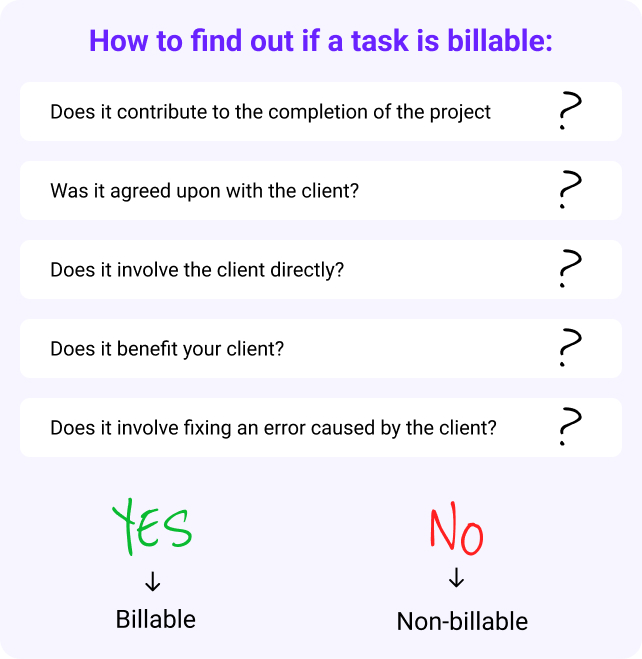
1. Define billable vs. non-billable tasks
Every hour you spend on a project is an hour that could be billed. That’s why it’s absolutely vital to distinguish between billable and non-billable tasks.
Billable tasks are those that directly contribute to the project at hand. They’re the tasks that your client is paying you for, and as such, they’re the ones that you should be prioritizing –every minute spent on a billable task is a minute well spent.
On the flip side, non-billable tasks are those that don’t directly contribute to the project at hand. These might include administrative tasks, training sessions, or even just answering emails. While essential to the day-to-day running of your business, they do not produce revenues and can be a drain on your time and resources.
By clearly distinguishing between billable and non-billable tasks, you can prioritize your time accordingly and ensure that your work is generating income for your business. This can also help you to delegate tasks effectively, outsource non-billable tasks to free up your time for more profitable work, and avoid overworking yourself without achieving any financial gain.
2. Set task estimates and deadlines
How can you accurately track time if you’re not sure how long a task should take in the first place? By setting estimates and deadlines, you can compare the actual time spent to the expected time spent and adjust accordingly in the future.
In addition, setting estimates and deadlines helps with accountability. When a clear deadline is set, it’s easier to hold oneself (or team members) accountable for completing the task in a timely manner. Plus, it’s easier to report progress to stakeholders when there is a concrete deadline in place.
So, here are a few tips on how to estimate your tasks effectively:
- Consider all possible variables: A task may seem simple at first glance, but such factors as team availability, potential roadblocks, and unforeseen challenges must be taken into account. Don’t underestimate the power of Murphy’s Law – anything that can go wrong will go wrong.
- Be realistic: Don’t be overly optimistic, but don’t be a Debbie Downer either. Base your estimate on past experiences, similar projects, and your team’s capabilities. Remember, no one likes to be told they have less time than they realistically need, but no one likes to miss a deadline either.
- Set deadlines intentionally: Don’t just randomly choose a date out of thin air. Take into account the importance of the task, the impact on other projects, and the potential consequences of missing the deadline. Deadlines are a powerful motivator, but only if they are set with purpose.
- Communicate your estimates and deadlines transparently: Provide context for why certain timelines were chosen and encourage open dialogue with your team and clients. When everyone is on the same page, everyone can work towards the same goal together.
3. Choose a convenient time tracking method
Modern software has expanded the range of options for tracking time beyond the classic punch card. Here is the full list of methods available:
- Weekly timesheets: A classic choice that requires employees to enter their hours worked for each day of the week. It’s simple, it’s effective, and it’s been around since… well, since people started getting paid for their time.
- Calendars: If you’re one of those professionals who lives and dies by their calendar, look for a consultant time tracker with the Calendar View. It lets you schedule blocks of time for specific tasks, and then track how long you actually spend on each one.
- Time clock: Remember those old-fashioned punch clocks that people used to implement to clock in and out of work? Well, they still exist, but now they’re digital. With a modern time clock program, employees can punch in and out with just a few clicks (or using GPS tracking and facial recognition features), while managers can easily keep track of their attendance, whereabouts, and actual work hours.
- Fully automated activity tracking: Want to make time tracking as simple and accurate as can be? Try a solution that automatically tracks what you’re working on your computer, without requiring any input from you. Such a tool is especially helpful for remote workers with flexible work hours and without a clear daily structure that an office environment gives.
- One-click timers: If you need to track your time on specific tasks but don’t want to mess around with fully automated software, try using apps with one-click timers. With just one button, you can start and stop the timer whenever you switch tasks, and then get a report of how long you spent on each one.
- Offline time tracking: If you’re working in an area with spotty internet access, you’ll need a consultant time tracker that works offline. Look for software that stores data locally on your computer or device, and then syncs up with the cloud when you’re back online.
- Mobile apps: Finally, if you’re constantly on the go, you’ll need a consultant time tracking app that works on your phone or tablet. Use a solution that allows you to enter your hours, track tasks, and run performance reports no matter where you are.
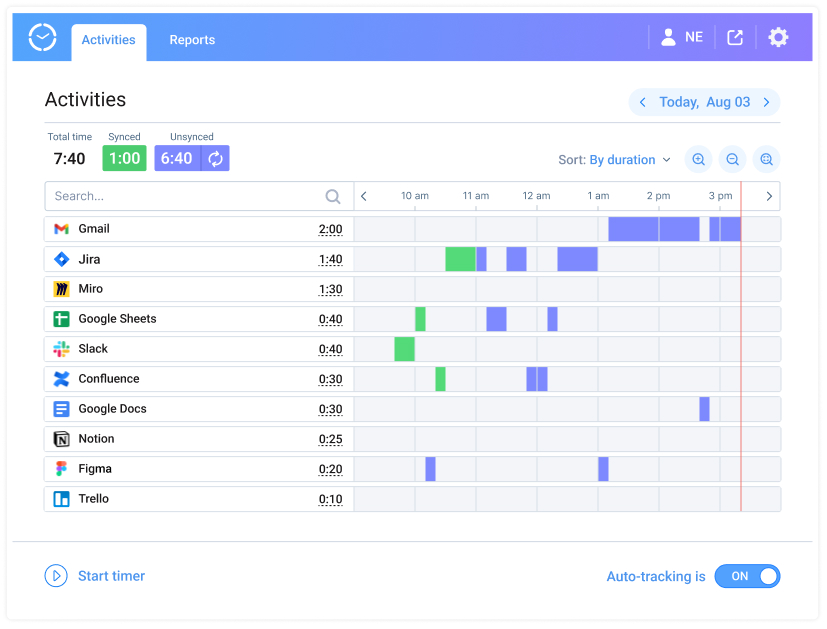
Time Management Assistant offers a hands-off approach to consultant time tracking. It uses advanced algorithms to automatically track your online activities and the time spent on them.
Check out our free project management templates for consultants and consulting agencies!
4. Approve timesheets if necessary
Do you consider it a waste of time to review and approve employee timesheets? Well, there are actually some serious benefits to this practice:
- For starters, it ensures that everyone is accurately tracking their time and not padding their hours or taking longer breaks than necessary (we’re not saying your employees are dishonest, but mistakes happen).
- Approving timesheets also helps you better manage your project budgets. By reviewing the time spent on each task or project, you can make more informed decisions about how to allocate resources moving forward.
- But perhaps most importantly, approving timesheets shows your employees that you value their time and are committed to ensuring they are compensated fairly for their hard work. Ultimately, timesheet approval fosters a culture of transparency and accountability, which boosts morale and leads to greater job satisfaction and retention.
So go ahead, take a closer look at those timesheets once they’re filled – our guide to timecard approval goes deeper into building that review step. And a high-quality consultant time tracker will help you make this entire process a breeze.
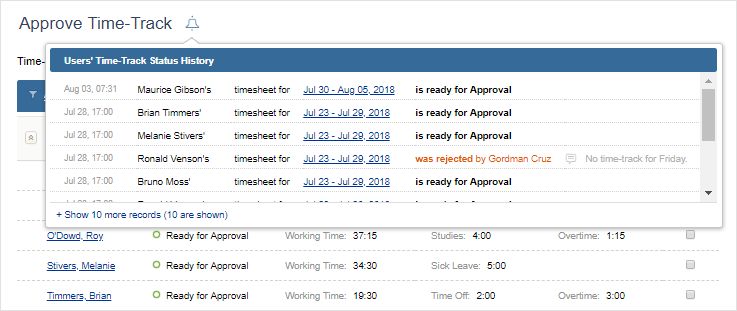
With actiTIME, you can approve employees’ weekly timesheets either one by one or in bulk. An intuitive interface design simplifies the review process and makes it more enjoyable.
5. Analyze the collected data
By analyzing the time tracking data, you can identify patterns and trends in your team’s working habits. Are they spending too much time on certain tasks? Are they efficient with their time management? These are all questions that can be answered by examining the data.
Furthermore, time tracking data can also help you in decision-making. For example, if you notice that a particular client project is taking up more time than anticipated, you can make informed decisions about whether to continue working on the project or allocate your resources elsewhere.
Here are a few prompts on how to make data analysis more beneficial:
- Identify your key performance indicators (KPIs): They must be meaningful to your consulting business and might include metrics like billable hours per employee, project profitability, or utilization rate.
- Sort and group the data: Start by organizing the collected data into meaningful categories (e.g., by client, employee, project, or task). This will help you see patterns and trends more clearly.
- Figure out outliers: Look for any data points that seem particularly high or low, and investigate further – they may be a sign of a problem that needs to be addressed.
- Compare actual vs. estimated time: See how employees’ actual time spent compares to the estimated time for a given task or project. This can provide insights into where adjustments need to be made.
- Analyze time spent on different tasks: By examining how much time is spent on different types of tasks, you can find areas where more training or resources may be needed or prioritize projects and clients that bring your business more money.
- Look at productivity over time: Keep track of how productivity changes over time to see if performance is improving or declining and if further changes are needed.
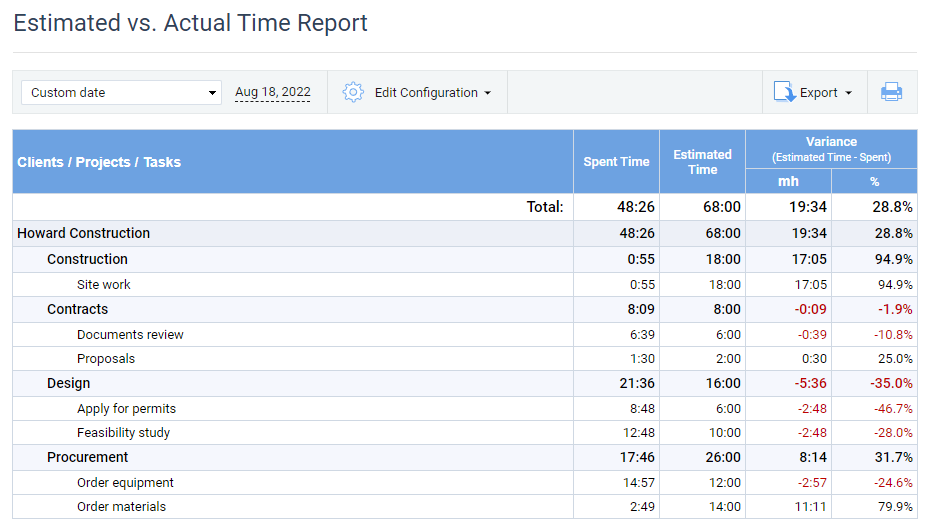
actiTIME reports provide invaluable insight into your team’s productivity and show how efficiently your business performs. You can sort report data in a convenient way and even categorize it using custom fields.
How to choose the best time tracking app for consultants?
Good time tracking for consultants comes down to a handful of practical criteria, not a long feature checklist:
- Look for a variety of time tracking methods: Whether you prefer manual time entry or automatic time tracking based on activity levels, the app should accommodate your preferences.
- Billable time tracking is a must: It’s an essential aspect of any consulting work. So, your time tracker should help to streamline the billing process while saving you time and effort.
- Check if the app has flexible settings: What works well for one consulting agency may not work for another. Thus, the app should let you customize settings to meet your unique requirements to get the most out of it.
- Make sure the app has advanced and diverse reports: They should be easy to understand and analyze so you can keep track of your progress, identify potential problems, and make data-driven decisions without a hitch.
- Complex doesn’t always mean good: A simple app with basic functionalities can be just as effective as a feature-packed one. It all depends on your needs and preferences.
- Focus on cost-efficiency: The app should offer value for money and should not drain your wallet. Balancing features and costs is a delicate dance, but with some research, you can find a solution that meets your needs and your budget.
- Make use of a free trial: Most reliable application providers offer free trials for their products, and you should use this opportunity to test drive the solution. This will help you get a taste of the app and determine whether it suits your needs before committing to a purchase.
How to roll out time tracking successfully
Choosing the right tool is only half the job – getting your team (or yourself, if you’re flying solo) to actually use it consistently is the part that determines whether time tracking sticks or quietly dies out after a few weeks. A few things make the difference:
- Get buy-in before you roll it out. Explain what’s in it for the people doing the logging – accurate billing that protects their own hours, fewer end-of-month scrambles – rather than framing it purely around what management gets out of it. A tool introduced as a monitoring measure gets resented and gamed; one introduced as a way to get paid correctly gets used.
- Set clear rules for what counts as billable. Ambiguity is what causes inconsistent logging across a team – decide upfront how client calls, internal meetings, and research time get categorized, and write it down somewhere everyone can check. Our guide to timesheet management covers building that kind of process from scratch.
- Train people on the actual tool, beyond the written policy. A short walkthrough of the real interface prevents the most common early failure: people forgetting to log time simply because they haven’t built the habit yet, regardless of how well they understand the rules.
- Roll out in phases if you’re a team. Starting with one project or one small group lets you catch friction points – confusing categories, missing task types – before they become everyone’s problem at once.
- Review the data early and often. Checking timesheets in the first few weeks, rather than waiting until billing time, catches formatting problems and miscategorized time before they turn into a pattern across a whole cycle.
Top 5 time tracking software for consultants
| actiTIME | HiveDesk | FunctionFox | todo.vu | Wobbly | |
| Billing & invoicing | |||||
| Automated time tracking | |||||
| Task estimates | |||||
| Free version |
1. actiTIME
- Client billing
- Branded invoices
- Powerful reporting
- Mobile app
- Automated time tracking
- Flexible setup
- Cost tracking
- Estimates
actiTIME is intuitive time tracking software that allows you to monitor and manage the time spent on various tasks and projects. It’s ideal for consultants who need to stay on top of billable hours, as well as for project managers who want to keep tabs on team productivity.
actiTIME offers manual time tracking for those of us who like to do things the old-fashioned way. But for those who are about that automated life, actiTIME offers a browser extension that tracks your time as you work. That’s right, no more manual inputting of hours at the end of the day – the extension does the work for you!
Moreover, actiTIME offers offline time tracking in their handy mobile app. So even if you’re on the go and not connected to the internet, you can still track your precious time with ease.
With actiTIME, you can see exactly how much billable and non-billable time you’re putting into each project, so you can make informed decisions about how to prioritize your effort and resources. You can also generate reports that show your clients exactly what you’re working on and how many hours you’ve dedicated to them – talk about transparency!
With its ease of use, customizability, and advanced features, actiTIME is the perfect tool for any consultant who wants to spend more time doing what they do best – helping their clients succeed.
Pricing: Free for 1–3 users; Online from $6 per user per month for 1–40 users, $5 per user per month for 41–200 users, billed annually; Self-Hosted $120 per user, one-time payment.
Best for: Consulting businesses of any size.
2. HiveDesk
- Time clock
- Automated time tracking
- Cost tracking
- Overtime management
This virtual workspace offers a comprehensive suite of tools and resources that make it easy to manage projects, monitor team attendance, and track progress on tasks. With HiveDesk, you can say goodbye to confusing spreadsheets and the headaches that usually come with trying to collaborate with team members who are scattered around the globe.
One of the coolest things about HiveDesk is that it allows you to monitor your team’s activity in real time. This means that you can see who’s working on what, and when they’re working on it. Plus, the tool makes it easy to track billable hours, assign tasks, and set deadlines, which is sure to help your team to stay organized, efficient, and productive.
Best for: Remote and international teams.
Pricing: $5 per user per month, one plan with all features; 14-day free trial, no permanent free version.
3. FunctionFox
- Stopwatch timer
- Estimates
- Budget tracking
- Billable tasks
- Mobile app
FunctionFox is a cloud-based project management tool with robust time tracking features. It helps to streamline your workflow, boost your productivity, and achieve your project goals with ease.
With FunctionFox, you can stay on top of your projects with real-time tracking and reporting, so you always know exactly where your time and resources are going. Besides, the solution offers such useful functionality as project templates, budget tracking, client invoicing, and even time off management. And with its cross-platform compatibility and mobile app, you can access your project information anywhere, anytime.
Best for: Creative teams and freelancers.
Pricing: Classic plan from $10.50 per user per month, billed annually; no permanent free version.
4. todo.vu
- CRM
- Calendar integration
- Checklists
- Task management
- Billing
todo.vu is a cloud-based productivity platform that helps you manage your tasks, team, and clients all in one place. From task tracking and time management to team collaboration and client invoicing, todo.vu has got you covered.
When it comes to task management, todo.vu goes above and beyond your average to-do list app. You can create tasks, set deadlines, assign them to team members, and track time spent on each task. With its built-in timer, you can accurately bill your clients for every second of work done and create professional-looking invoices.
Best for: Freelancers and small teams.
Pricing: Starting from $9 per user a month; free version available.
5. Wobbly
- Billable time tracking
- Resource planning
- Reports
- Invoicing
- One-click timer
Wobbly is cloud-based software that helps you keep track of your working hours. With its simple and intuitive interface, Wobbly promises to reduce your performance costs and maximize productivity in your team.
Wobbly includes a one-click timer that automates the time tracking process, ensuring accuracy and efficiency every step of the way. It also features insightful reports that provide valuable data about your team’s productivity and time utilization. Armed with these reports, you can make informed decisions and optimize your team’s workflow for maximum efficiency.
And if that’s not enough to get you excited, Wobbly also offers integration with popular team collaboration platforms like Slack and Trello. This means that your team can easily track their time, collaborate on tasks, and stay in sync – all from one intuitive platform.
Best for: Freelancers, medium-sized or large teams.
Pricing: Free forever plan available; Starter from €4 per user per month, Business from €7 per user per month; team plans from €39 per month.
FAQ
How do consultants typically bill for their time?
Hourly billing is the most common starting point, but many consultants move toward fixed project fees or monthly retainers as they gain experience – both give clients cost predictability and give the consultant steadier income than pure hourly work. Whichever model you use, accurate time tracking still matters: even on a fixed-fee project, knowing where the hours actually went is what tells you whether that project was profitable. If billable hours specifically are your main concern, our roundup of billable hours trackers covers that angle in more depth.
Do I need separate software for time tracking and invoicing?
Not necessarily. Most consultant time tracking tools, including the ones covered in this guide, generate invoices directly from tracked hours, which avoids re-entering the same data twice. A separate invoicing tool only really makes sense if your billing needs are more complex than your time tracker supports – multi-currency clients or unusual payment terms, for example.
How much detail should a consultant’s time entries include?
Enough that you and the client could both reconstruct what was done from the entry alone – “strategy call with Acme Corp, Q3 roadmap” tells you far more six months later than “meeting.” Overly granular entries (logging every five minutes) usually aren’t worth the extra effort; the useful middle ground is one entry per task or per meeting, with a short, specific description.
How long does it take for a team to adjust to a new time tracking process?
Most teams need a few weeks of consistent use before it becomes habit rather than a chore, and the adjustment goes faster when the tool is genuinely simple to use day to day. Reviewing entries closely during that first stretch, rather than waiting until the first billing cycle to check, is what catches bad habits early instead of letting them set in.
Accurate time tracking pays for itself as a consultant
Time is a precious commodity for any consultant – tracking it efficiently helps you win better opportunities and makes sure clients are paying you fairly for the work you actually did.
Consultant time tracking can feel like a hassle at first, but a reliable tool like actiTIME takes the stress out of it: easier task management, more accurate billing, and invoicing that no longer eats up an afternoon every month.
The efficiency gains from proper work management let you do more with less time and get more profitable outcomes for yourself or your clients. Take control of your productivity now – sign up for a free actiTIME trial today.