
Tracking employee hours is a fundamental task that is indispensable for accurate billing and payroll. Time cards have long been a popular method of recording work time. However, the accompanying approval process can easily become a bottleneck.
If you frequently find yourself exhausted or frustrated when dealing with time cards, it may be time to reevaluate your current approach.
Read on to learn how to analyze your time card approval workflow and detect and eliminate the inefficiencies that lead to significant productivity losses, affecting not only your finances but also employee morale and operational effectiveness.
What Is Time Card Approval?
Time card approval is the process of verifying and authorising the hours an employee has worked before payroll runs. A supervisor checks the submitted card, confirms the regular hours, overtime and leave are right, and either approves it or sends it back.
It is the same control as timesheet approval, applied where hours are recorded as time cards. The vocabulary differs by workplace: time cards are more common in shift and hourly settings, where clock in and clock out times and unpaid break deductions matter more than task allocation.
| Stage | What happens | Where it goes wrong |
|---|---|---|
| 1. Entry and submission | The employee records hours, overtime and leave on the card and submits it | Entry left to the end of the week, so short tasks and breaks are guessed |
| 2. Review and approval | A supervisor checks the card for accuracy and approves it | Nobody is clearly the reviewer, so the card sits untouched |
| 3. Payroll processing | Approved cards go to payroll and become pay | Approved hours conflict with policy and the card has to be reopened |
Time Card Approval Issues and Ways to Tackle Them
Despite the simplicity of the process, mistakes can occur at any stage. The most vulnerable steps of the flow above are the time entry and review.
| Issue | Root cause | Fix |
|---|---|---|
| Late entry | Cards filled in from memory at the end of the period | Automated reminders and a short entry window |
| Manual entry only | One input method that does not suit how people work | Offer a timer, a browser extension and a mobile app |
| Overtime confusion | Rules exist but were never explained to the people applying them | Write the overtime rule down and enforce it in the tool |
| No standard format | Everyone reports at a different level of detail | One template and one set of task codes |
| Undefined reviewers | Several people could approve, so nobody does | One named approver, one named backup, visible card status |
| Unknown leave rules | Accrual and carryover rules live outside the tool | Block requests the policy does not allow at entry |
The same six apply whether you approve time cards weekly or biweekly. If you approve time cards for several teams, the pattern is worth checking against your own queue before changing anything.
Five of the six are structural. Only the overtime and leave items are genuinely about people not knowing something, and even those are better solved by the system refusing an invalid entry than by another training session.
Issue 1: Delayed Time Entry and Time Card Submission
One of the primary mistakes occurs when employees are allowed to submit their timesheets less frequently than daily. When time entries are postponed, especially until the end of the week or later, people simply forget small tasks they completed, which leads to incomplete submissions, resulting in lost hours.
Some may even attempt to fill in these gaps with wrong estimates or tasks that haven’t been accomplished yet, creating discrepancies in their reported hours.
For instance, consider a very busy project manager at a marketing firm who usually waits until Friday afternoon to submit their timesheet for the week. By that time, they can’t remember exactly what they were doing on Monday and Tuesday. Attending a client meeting or maybe conducting a brief training session for the team…
Consequences:
- Inaccurate payroll leading to employee dissatisfaction and potential financial strain.
- Increased administrative workload for payroll departments to rectify errors.
- Erosion of trust between employees and management due to perceived negligence in handling pay.
Solution: Implement strict timecard submission deadlines and send regular reminders to encourage timely submissions.
Try our free Time Card Calculator that allows you to enter time for all your work activities, calculates overtime, automatically deducts meal breaks, and generates a downloadable time card for quick and easy approval!
Issue 2: Full Reliance on Manual Entries
Manual entry is flexible and error-prone in the same breath. Our perception of time can be subjective; what feels like 20 minutes might actually be half an hour.
Such subjectivity leads to inaccuracies in recorded hours. Next, employees who were inaccurate may find themselves redoing their timesheets several times.
Consequences:
- Increased likelihood of payroll errors, resulting in underpayment or overpayment.
- Employee frustration due to repeated corrections.
- Potential compliance issues if records are not accurate or reliable.
Solution: Offer multiple methods for entering time, such as a browser extension, stopwatch, and mobile app and let your employees choose the way that fits them most.

Issue 3: Misunderstanding of Company Overtime Policies
Another common issue arises from a lack of clarity surrounding overtime tracking rules. Employees may not fully understand the policies that apply to them and make unintentional mistakes in how they report their hours.
Some may believe that overtime always kicks in after working 40 hours in a week or forget to deduct meal breaks from their time entries; others would misunderstand the difference between exempt and non-exempt status, etc.
Consequences:
- Financial losses for employees due to incorrect overtime calculations.
- Strain on management resources to resolve disputes regarding pay.
- Increased risk of legal issues related to labor laws and compliance.
Solution: Set clear limits for entering time and overtime, and provide training sessions for employees of all levels.
Issue 4: No Unified Time Card Format
Even if your employees are instructed to submit their time cards in a specific format, such as an Excel spreadsheet, the lack of detail can create chaos. If the format is not standardised, reviewers end up sifting through data at six different levels of detail.
Imagine a scenario where multiple team members submit their time cards with varying levels of detail; some include specific tasks, while others do not.
For instance, Mark submits a detailed report with all tasks, subtasks, comments, and descriptions, while Lisa submits a bare-bones version that only lists hours worked without any context. When the manager reviews these submissions, they struggle to make sense of the discrepancies.
Consequences:
- Delays in payroll processing due to confusion and errors in timesheet submissions.
- Increased frustration among employees waiting for their payments.
- Potential misallocation of budget resources due to inaccurate data.
Solution: Establish a unified time card format that all employees must use.
Try one of our free downloadable timesheet templates!
Issue 5: Multiple Reviewers with No Defined Scope of Responsibility
Storing timecards in a shared folder accessible by multiple reviewers can also become a source of confusion. Without clearly defined responsibilities and workflow, reviewers may forget to update the status of a time card or move it to the Approved or Rejected folder. Consequently, one time card gets checked by several managers or leads who may disagree about whether it is correct.
Or there’s another scenario. One day, someone (let’s call her Amy) submits her timesheet for approval, but because there are no defined roles, none of the managers realize they are responsible for reviewing it.
Days pass without any updates on her submission. Amy grows increasingly frustrated as payday approaches and she has no idea if her hours will be approved in time.
Consequences:
- Increased anxiety among employees regarding paychecks due to overlooked submissions.
- Inefficiencies in the payroll process, leading to delays and increased costs.
- Potential for conflicts among managers over responsibilities, affecting team dynamics.
Solution: Assign specific roles and permissions for timesheet review and make the timecard status visible to all relevant parties immediately.
Issue 6: Unawareness of Company Policies Beyond Overtime
Finally, it’s not just overtime policies that employees may be unaware of; other important company rules, such as vacation accrual rules or sick day limits, can also be overlooked.
Take someone who has accumulated several sick days but mistakenly believes they roll over into the next year. Then, they track their PTO inaccurately by assuming they have more days than they actually do and end up taking paid leave they are not entitled to.
Consequences:
- Financial losses for employees who unknowingly violate policies.
- Budgeting challenges for the company if employee hours are not tracked correctly.
- Decreased employee satisfaction and engagement due to a lack of transparency in policies.
Solution: Incorporate a time tracking policy into the time card submission and approval process.
Frequently Asked Questions
How do I approve a timecard?
Open the cards waiting on you, check the recorded hours against what you know of the period, confirm that overtime and leave are recorded separately from regular hours and that unpaid breaks have been deducted, then approve the card or return it with a reason. If your system supports it, approve in bulk after dealing with the entries that look unusual rather than reading every line.
What happens if a timecard is approved late?
It depends on where the delay lands relative to the payroll cut-off. Inside the cut-off, nothing happens beyond the administrative cost. Past it, the hours usually roll into the next pay run, which means an employee is paid late for work already done. That is the reason a backup approver matters more than a faster approver: most late approvals are one person being unavailable, not a review that took a long time.
How do you handle time card approvals at scale?
By reviewing exceptions rather than everything. Sort the pending cards by what looks unusual, such as a week of identical eight hour days, overtime that was never discussed, or a card submitted for a period the person was on leave. Handle those individually and bulk approve the rest. Reviewing every card equally does not scale past a handful of people, and in practice turns into approving everything without looking.
What is timecard review, and is it the same as approval?
Review is the checking; approval is the decision that follows it. They are usually treated as one step, but separating them is useful when several people are involved: a team lead can review the detail while a manager holds the authority to approve. Where that split exists, write down who does which, because an undefined boundary is the most common reason a time card review sits untouched.
Time card or timesheet: does the difference matter?
For the approval process, barely. A time card traditionally records clock in and clock out times for a pay period, while a timesheet records hours against tasks and projects. Both need the same control: someone other than the person who logged the hours confirms them, and the period locks once approved. Our guide to timesheet approval covers the task and project side in more detail.
Future-Proofing Your Timecard Approval Process with actiTIME
actiTIME handles the six problems above directly rather than leaving them to policy.
Here’s how actiTIME can help you eliminate time card approval mistakes:
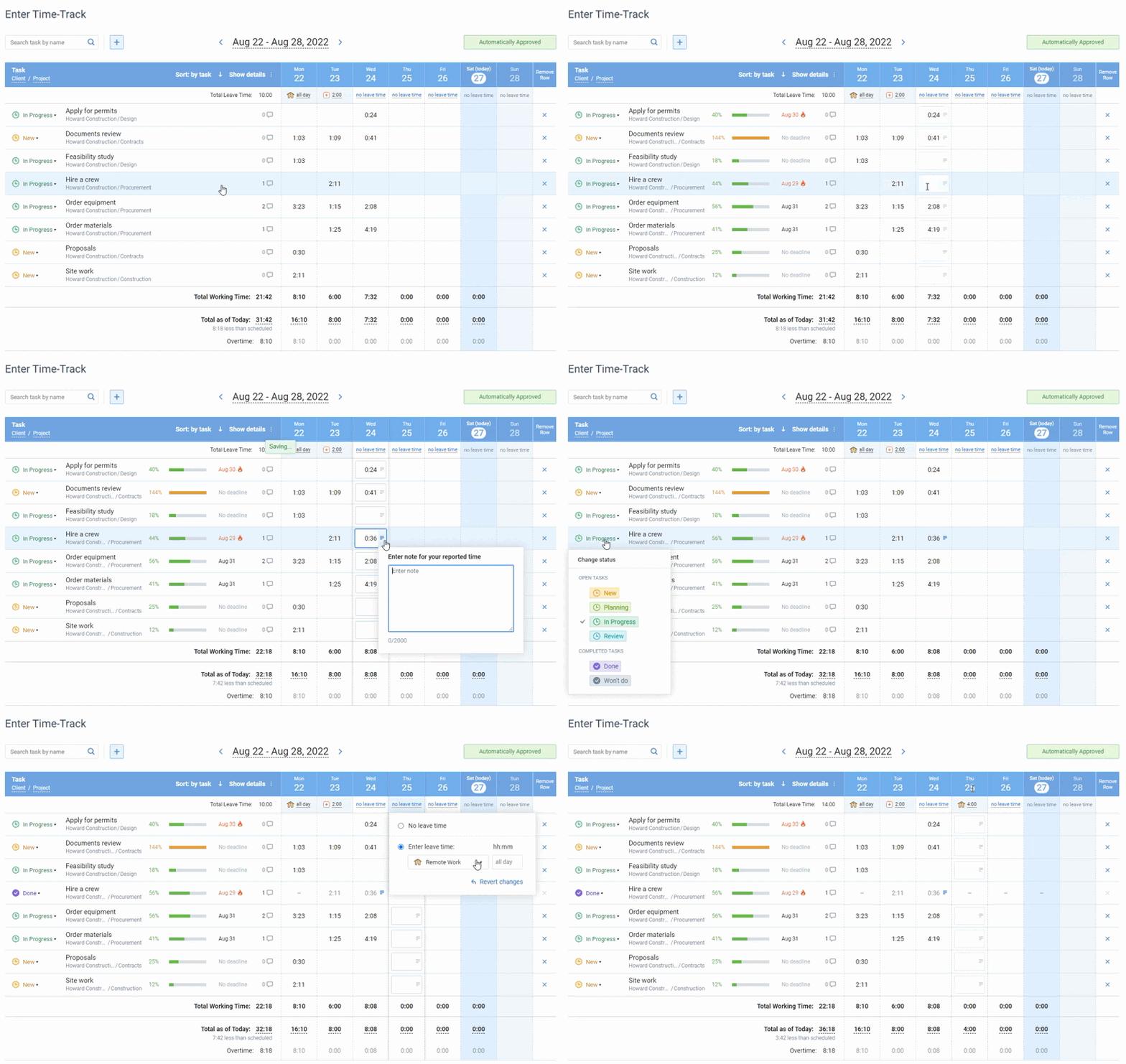
- A flexible approach to time tracking, allowing employees to log their hours in various ways: a web version, a convenient browser extension, and a user-friendly mobile app, and so hours get captured while the work is fresh rather than reconstructed on Friday.
- A uniform timesheet format for all employees, making it easier for managers to review and approve time tracks. Approved data exports to payroll and invoicing without being retyped.
- Automated reminders for timecard submission deadlines, requesting employees to fill in their time cards in a polite and convenient manner.
- Custom settings that prevent employees from submitting overtime or leave requests if the applicable policies do not allow that.
- Automated time card status updates and dedicated notifications for managers and employees.
Pricing starts at $5 per user per month, and you can test the approval workflow on a real week of data during a free 30 day trial.